
UiPath UiPath-TAEPv1 Practice Exams
Last updated on Oct 22,2026- Exam Code: UiPath-TAEPv1
- Exam Name: UiPath Test Automation Engineer Professional v1.0 Exam
- Certification Provider: UiPath
- Latest update: Oct 22,2026
Question #111
How does the licensing model work for Testing runtimes in UiPath?
- A . It counts the total number of licenses available and divides them amongst the Testing robots.
- B . It counts the maximum number of Testing robots that are able to execute tests simultaneously, given by the total number of runtimes allocated to all the online machines.
- C . It counts the individual testing robots on a machine and assigns each of them an equal number of licenses.
- D . It works by allocating a fixed number of licenses per testing robot, regardless of the maximum number that can execute tests simultaneously.
Correct Answer: B
B
Explanation:
The licensing model for Testing runtimes in UiPath is based on the maximum number of Testing robots that can execute tests simultaneously, which is determined by the total number of runtimes allocated to all online machines. This ensures efficient utilization of available resources.
B
Explanation:
The licensing model for Testing runtimes in UiPath is based on the maximum number of Testing robots that can execute tests simultaneously, which is determined by the total number of runtimes allocated to all online machines. This ensures efficient utilization of available resources.
Question #112
What does the Timezone configuration in the Add Test Schedule section do?
- A . It adjusts the test execution time according to the tenant’s timezone.
- B . It allows to specify the timezone according to which the schedule is launched.
- C . It allows to set up a default timezone for all test schedules.
- D . It determines the timezone of your Orchestrator instance.
Correct Answer: B
B
Explanation:
The Timezone configuration in the Add Test Schedule section allows you to specify the timezone according to which the test schedule is launched. This ensures that the test execution aligns with the correct time zone, especially when working with teams across different geographical locations.
B
Explanation:
The Timezone configuration in the Add Test Schedule section allows you to specify the timezone according to which the test schedule is launched. This ensures that the test execution aligns with the correct time zone, especially when working with teams across different geographical locations.
Question #113
Which are the supported object types when creating a new custom field in UiPath Test Manager?
- A . Test case and test result.
- B . Test set and defect
- C . Requirement and test set.
- D . Defect and requirement.
Correct Answer: C
C
Explanation:
In UiPath Test Manager, when creating a new custom field, the supported object types are Requirement and Test Set. This allows teams to define additional metadata specific to project needs for better organization and tracking.
C
Explanation:
In UiPath Test Manager, when creating a new custom field, the supported object types are Requirement and Test Set. This allows teams to define additional metadata specific to project needs for better organization and tracking.
Question #114
Which are the sub-tasks available under test task in UiPath CLI?
- A . Convert: converts test results written as CSV to another format.
Run: tests a given package, or runs an existing Test Set on Orchestrator. - B . Convert: converts test results written in JSON or CSV to another format.
Run: tests a given package, or runs an existing Test Set on Orchestrator. - C . Convert: converts test results written in JSON to another format.
Run: tests a given package, or runs an existing Test Set on Orchestrator. - D . Convert: converts test results written in JSON to another format.
Test: tests a given package.
Run: runs an existing Test Set on Orchestrator.
Correct Answer: B
B
Explanation:
In the UiPath CLI, the test task includes the following sub-tasks:
– Convert: Converts test results written in JSON or CSV to another format (e.g., JUnit or NUnit).
– Run: Executes tests from a given package or runs an existing Test Set on Orchestrator.
These enable integration of test execution and reporting into CI/CD pipelines.
B
Explanation:
In the UiPath CLI, the test task includes the following sub-tasks:
– Convert: Converts test results written in JSON or CSV to another format (e.g., JUnit or NUnit).
– Run: Executes tests from a given package or runs an existing Test Set on Orchestrator.
These enable integration of test execution and reporting into CI/CD pipelines.
Question #114
Which are the sub-tasks available under test task in UiPath CLI?
- A . Convert: converts test results written as CSV to another format.
Run: tests a given package, or runs an existing Test Set on Orchestrator. - B . Convert: converts test results written in JSON or CSV to another format.
Run: tests a given package, or runs an existing Test Set on Orchestrator. - C . Convert: converts test results written in JSON to another format.
Run: tests a given package, or runs an existing Test Set on Orchestrator. - D . Convert: converts test results written in JSON to another format.
Test: tests a given package.
Run: runs an existing Test Set on Orchestrator.
Correct Answer: B
B
Explanation:
In the UiPath CLI, the test task includes the following sub-tasks:
– Convert: Converts test results written in JSON or CSV to another format (e.g., JUnit or NUnit).
– Run: Executes tests from a given package or runs an existing Test Set on Orchestrator.
These enable integration of test execution and reporting into CI/CD pipelines.
B
Explanation:
In the UiPath CLI, the test task includes the following sub-tasks:
– Convert: Converts test results written in JSON or CSV to another format (e.g., JUnit or NUnit).
– Run: Executes tests from a given package or runs an existing Test Set on Orchestrator.
These enable integration of test execution and reporting into CI/CD pipelines.
Question #116
What is the output format of the UiPath.Testing.Activites.TestData.Address activity?
- A . Dictionary (String, String) with the fields: Country, PostalCode, StreetNumber, State
- B . Dictionary (String, Object) with the fields: Country, PostalCode, StreetNumber, StreetName, City, State
- C . Dictionary (String, String) with the fields: Country PostalCode, StreetNumber, StreetName, City, State
- D . Dictionary (String, Object) with the fields: Country, PostalCode, StreetNumber, State
Correct Answer: C
C
Explanation:
The output format of the UiPath.Testing.Activities.TestData.Address activity is a Dictionary<String, String> containing the fields: Country, PostalCode, StreetNumber, StreetName, City, and State. This structured data is useful for generating realistic test addresses.
C
Explanation:
The output format of the UiPath.Testing.Activities.TestData.Address activity is a Dictionary<String, String> containing the fields: Country, PostalCode, StreetNumber, StreetName, City, and State. This structured data is useful for generating realistic test addresses.
Question #117
What type of data can be added to the Tester Comment field?
- A . Text and Screenshot
- B . Text and documents
- C . Text and Video recording
- D . Only text
Correct Answer: D
D
Explanation:
The Tester Comment field in UiPath Test Manager supports only text input. It is used to provide notes, observations, or explanations related to a test case execution.
D
Explanation:
The Tester Comment field in UiPath Test Manager supports only text input. It is used to provide notes, observations, or explanations related to a test case execution.
Question #118
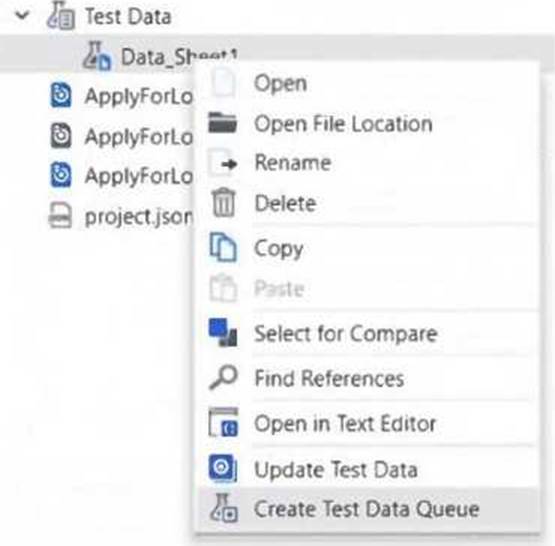
What needs to be provided in order to create a Test Data Queue from static Test Data in UiPath Studio?
- A . No additional information is necessary.
- B . Only the Test Data Queue name.
- C . Test Data Queue name and JSON schema.
- D . Only the JSON schema.
Correct Answer: C
C
Explanation:
To create a Test Data Queue from static test data in UiPath Studio, you need to provide both the Test Data Queue name and the corresponding JSON schema. The schema ensures the structure of the data is defined correctly for the queue items.
C
Explanation:
To create a Test Data Queue from static test data in UiPath Studio, you need to provide both the Test Data Queue name and the corresponding JSON schema. The schema ensures the structure of the data is defined correctly for the queue items.
Question #119
What are the steps to delete a test schedule in UiPath Orchestrator?
- A . Open your folder, move to Testing > Test Schedules, open a test schedule, and click on Delete, click OK to confirm.
- B . Open your project, navigate to Testing > Test Schedules, select a test schedule, click on More Options > Remove, click Confirm for deletion.
- C . Open your folder, navigate to Testing > Test Schedules, select a test schedule, and go to More Actions > Edit, click Delete click OK to confirm.
- D . Open your folder, navigate to Testing > Test Schedules, select a test schedule, and go to More Actions > Delete, click OK to confirm.
Correct Answer: D
D
Explanation:
To delete a test schedule in UiPath Orchestrator, navigate to your folder, then go to Testing > Test Schedules, select the test schedule, choose More Actions > Delete, and confirm the deletion by clicking OK.
D
Explanation:
To delete a test schedule in UiPath Orchestrator, navigate to your folder, then go to Testing > Test Schedules, select the test schedule, choose More Actions > Delete, and confirm the deletion by clicking OK.
Question #119
What are the steps to delete a test schedule in UiPath Orchestrator?
- A . Open your folder, move to Testing > Test Schedules, open a test schedule, and click on Delete, click OK to confirm.
- B . Open your project, navigate to Testing > Test Schedules, select a test schedule, click on More Options > Remove, click Confirm for deletion.
- C . Open your folder, navigate to Testing > Test Schedules, select a test schedule, and go to More Actions > Edit, click Delete click OK to confirm.
- D . Open your folder, navigate to Testing > Test Schedules, select a test schedule, and go to More Actions > Delete, click OK to confirm.
Correct Answer: D
D
Explanation:
To delete a test schedule in UiPath Orchestrator, navigate to your folder, then go to Testing > Test Schedules, select the test schedule, choose More Actions > Delete, and confirm the deletion by clicking OK.
D
Explanation:
To delete a test schedule in UiPath Orchestrator, navigate to your folder, then go to Testing > Test Schedules, select the test schedule, choose More Actions > Delete, and confirm the deletion by clicking OK.