
UiPath UiPath-TAEPv1 Practice Exams
Last updated on Oct 23,2026- Exam Code: UiPath-TAEPv1
- Exam Name: UiPath Test Automation Engineer Professional v1.0 Exam
- Certification Provider: UiPath
- Latest update: Oct 23,2026
Question #119
What are the steps to delete a test schedule in UiPath Orchestrator?
- A . Open your folder, move to Testing > Test Schedules, open a test schedule, and click on Delete, click OK to confirm.
- B . Open your project, navigate to Testing > Test Schedules, select a test schedule, click on More Options > Remove, click Confirm for deletion.
- C . Open your folder, navigate to Testing > Test Schedules, select a test schedule, and go to More Actions > Edit, click Delete click OK to confirm.
- D . Open your folder, navigate to Testing > Test Schedules, select a test schedule, and go to More Actions > Delete, click OK to confirm.
Correct Answer: D
D
Explanation:
To delete a test schedule in UiPath Orchestrator, navigate to your folder, then go to Testing > Test Schedules, select the test schedule, choose More Actions > Delete, and confirm the deletion by clicking OK.
D
Explanation:
To delete a test schedule in UiPath Orchestrator, navigate to your folder, then go to Testing > Test Schedules, select the test schedule, choose More Actions > Delete, and confirm the deletion by clicking OK.
Question #122
How can a Serverless Robot be added to an Orchestrator tenant?
- A . Go to Tenant > Machines. Click Add Machine and select Cloud Robot – Serverless. Fill in the Name and optionally the Description. Add tags if necessary, but don’t configure other settings. Finally, click Save.
- B . Go to Tenant > Robots. Click Add Robot and select Serverless. Fill in the Name and optionally the Description. Add tags if necessary and configure other settings. Finally, click Provision.
- C . Go to Tenant > Robots. Click Add Robot and select Serverless Robot. Fill in the Name and optionally the Description. Add tags if necessary and configure other settings. Finally, click Add Robot.
- D . Go to Tenant > Machines. Click Add Machine and select Cloud Robot – Serverless. Fill in the Name and optionally the Description. Add tags if necessary and configure other settings. Finally, click Provision.
Correct Answer: A
A
Explanation:
To add a Serverless Robot in Orchestrator, navigate to Tenant > Machines, click Add Machine, and select Cloud Robot C Serverless. Then, fill in the Name (and optionally Description), add any necessary tags, and click Save. No additional configuration is required.
A
Explanation:
To add a Serverless Robot in Orchestrator, navigate to Tenant > Machines, click Add Machine, and select Cloud Robot C Serverless. Then, fill in the Name (and optionally Description), add any necessary tags, and click Save. No additional configuration is required.
Question #123
What is the purpose of the RunTest block in the Test Automation Framework?
- A . RunTest block is where the Test Case is executed. The Placeholder activity changes at runtime into an Invoke Workflow File activity.
- B . RunTest block is where the Test Case should be created. The RunTest should contain the actions specific to the Test Case.
- C . RunTest block is where workflows specific to the Test Case should be invoked. If an Application Exception occurs, the current transaction is being retried. If a Business Rule Exception occurs, the block will skip the transaction.
- D . RunTest block is where the Test Case should be invoked. The RunTest should be replaced at design time with an Invoke Workflow activity referencing the Test Case at the execution time. At the execution time, the Test Case will run instead of the RunTest block.
Correct Answer: A
A
Explanation:
The RunTest block in the Test Automation Framework is where the Test Case is executed. At runtime, the Placeholder activity within the block dynamically changes into an Invoke Workflow File activity that points to the actual test case implementation. This allows for a flexible and modular test execution design.
A
Explanation:
The RunTest block in the Test Automation Framework is where the Test Case is executed. At runtime, the Placeholder activity within the block dynamically changes into an Invoke Workflow File activity that points to the actual test case implementation. This allows for a flexible and modular test execution design.
Question #124
In which of the following cases is the Self-Hosted agent needed when creating a pipeline using the UiPath Integration for Azure DevOps?
- A . In cases where UiPath Orchestrator is not available.
- B . In cases where an External Application cannot be created in order to connect to UiPath Orchestrator.
- C . In cases where Cross-Platform projects are built and deployed.
- D . In cases where the Orchestrator is not accessible from the public internet.
Correct Answer: D
D
Explanation:
A Self-Hosted agent is required when creating a pipeline using the UiPath Integration for Azure DevOps in cases where Orchestrator is not accessible from the public internet. This agent acts as an intermediary to facilitate communication between the DevOps pipeline and Orchestrator when direct internet access is not available.
D
Explanation:
A Self-Hosted agent is required when creating a pipeline using the UiPath Integration for Azure DevOps in cases where Orchestrator is not accessible from the public internet. This agent acts as an intermediary to facilitate communication between the DevOps pipeline and Orchestrator when direct internet access is not available.
Question #124
In which of the following cases is the Self-Hosted agent needed when creating a pipeline using the UiPath Integration for Azure DevOps?
- A . In cases where UiPath Orchestrator is not available.
- B . In cases where an External Application cannot be created in order to connect to UiPath Orchestrator.
- C . In cases where Cross-Platform projects are built and deployed.
- D . In cases where the Orchestrator is not accessible from the public internet.
Correct Answer: D
D
Explanation:
A Self-Hosted agent is required when creating a pipeline using the UiPath Integration for Azure DevOps in cases where Orchestrator is not accessible from the public internet. This agent acts as an intermediary to facilitate communication between the DevOps pipeline and Orchestrator when direct internet access is not available.
D
Explanation:
A Self-Hosted agent is required when creating a pipeline using the UiPath Integration for Azure DevOps in cases where Orchestrator is not accessible from the public internet. This agent acts as an intermediary to facilitate communication between the DevOps pipeline and Orchestrator when direct internet access is not available.
Question #126
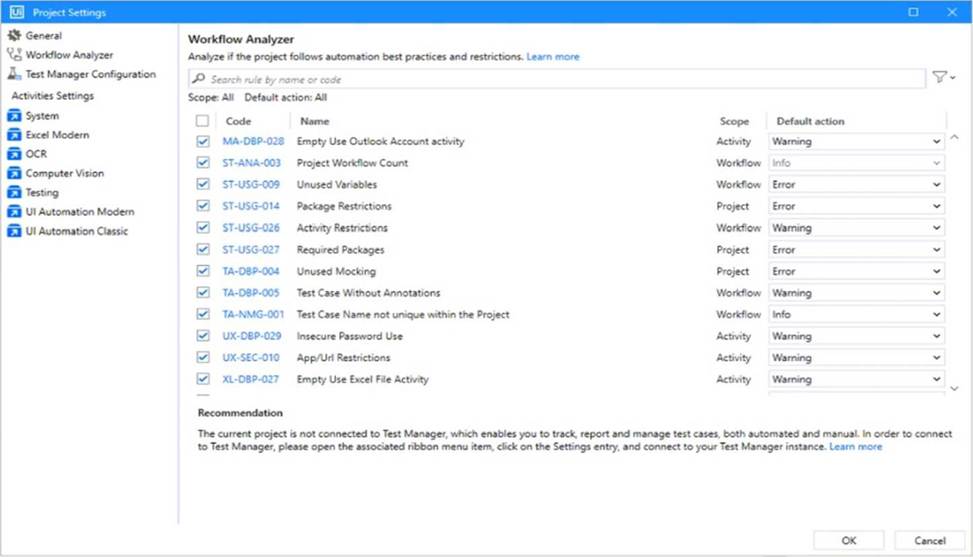
Considering the provided configuration for Workflow Analyzer Settings, how many testing rules applied will be classified as an "Error"?
- A . 0
- B . 1
- C . 3
- D . 4
Correct Answer: D
D
Explanation:
Based on the image, there are 4 Workflow Analyzer rules with the "Error" default action set:
ST-USG-009 C Unused Variables
ST-USG-014 C Package Restrictions
ST-USG-027 C Required Packages
TA-DBP-004 C Unused Mocking
These are all marked with "Error" in the Default action column.
D
Explanation:
Based on the image, there are 4 Workflow Analyzer rules with the "Error" default action set:
ST-USG-009 C Unused Variables
ST-USG-014 C Package Restrictions
ST-USG-027 C Required Packages
TA-DBP-004 C Unused Mocking
These are all marked with "Error" in the Default action column.