
UiPath UiPath-TAEPv1 Practice Exams
Last updated on Oct 22,2026- Exam Code: UiPath-TAEPv1
- Exam Name: UiPath Test Automation Engineer Professional v1.0 Exam
- Certification Provider: UiPath
- Latest update: Oct 22,2026
Given the following SumWorkflow:
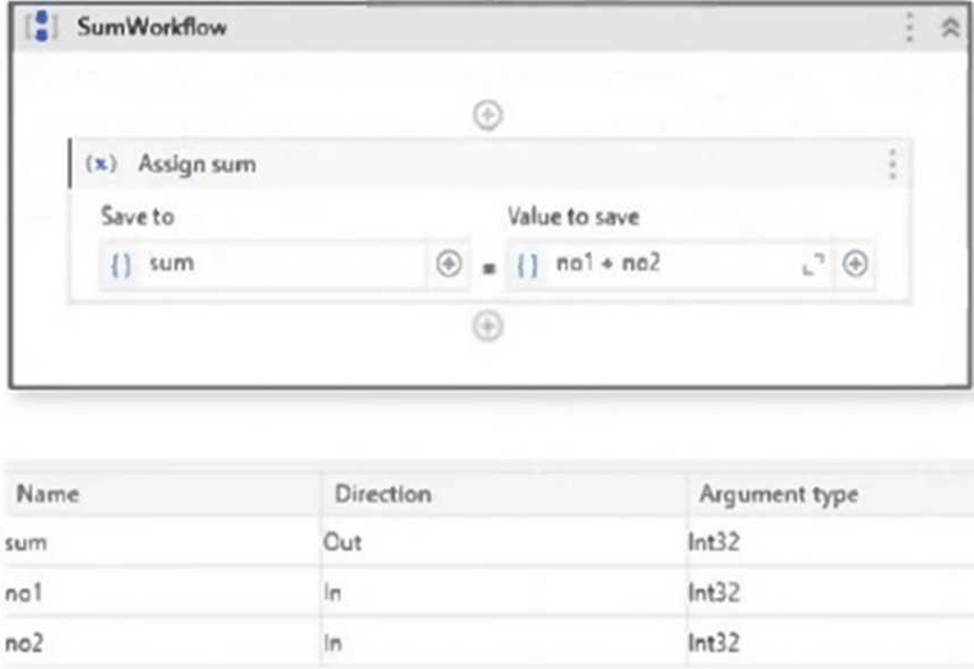
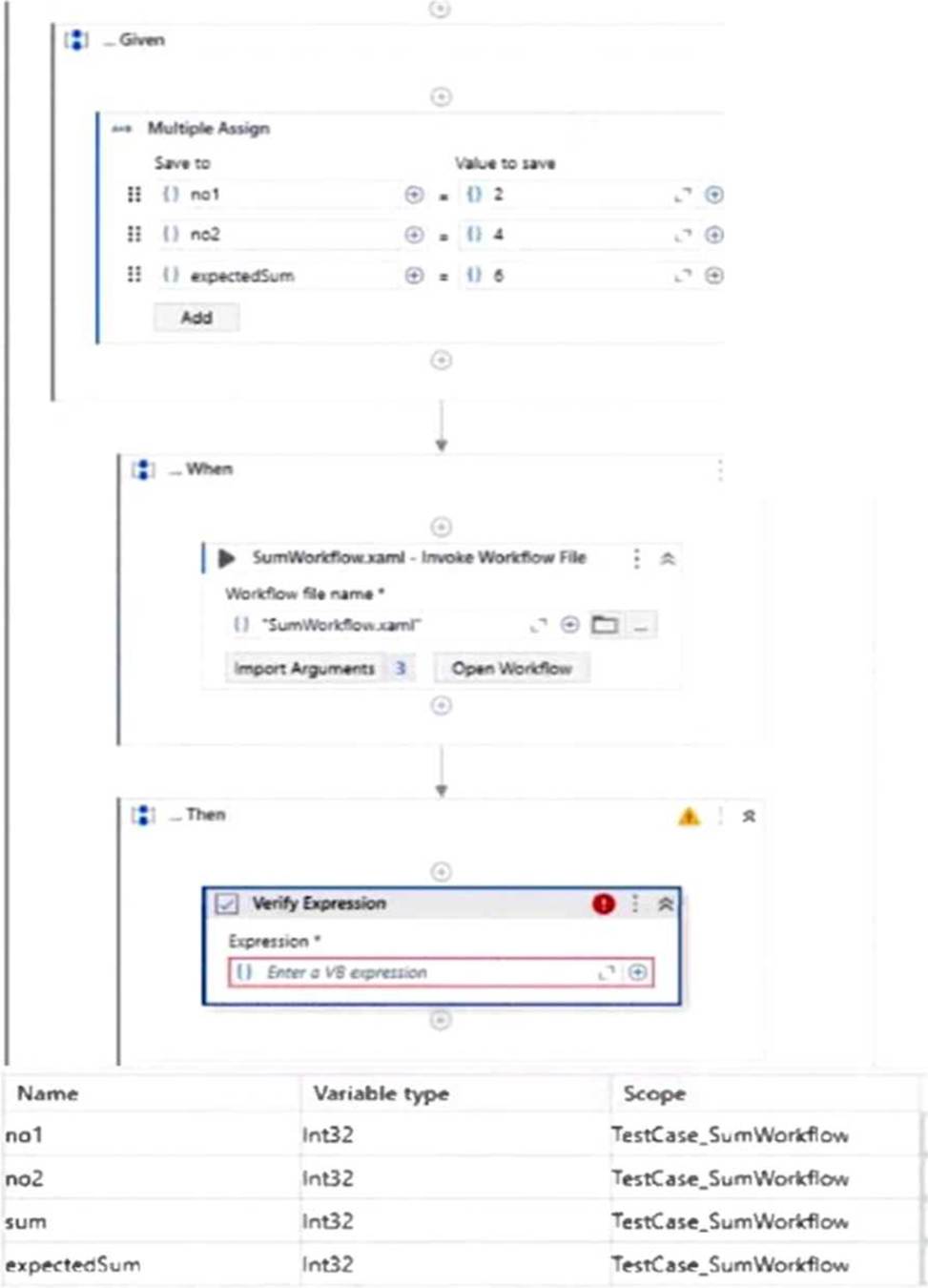
What is the appropriate verification required for testing that the SumWorkflow works as expected?
- A . "sum = expectedSum"
- B . sum
- C . no1 + no2 = expectedSum
- D . sum.Equals(expectedSum)
A
Explanation:
The correct VB expression to verify that the SumWorkflow executed correctly is sum = expectedSum. This compares the actual output (sum) with the expected value (expectedSum) set earlier in the test case. If they match, the workflow performs as intended.
Which component of the UiPath Test Suite communicates directly with CI/CD pipelines?
- A . UiPath Studio
- B . UiPath Action Center
- C . UiPath Orchestrator
- D . UiPath Test Manager
C
Explanation:
UiPath Orchestrator is the component that communicates directly with CI/CD pipelines. It manages the execution of test cases and workflows triggered from CI/CD tools, enabling automated and continuous testing as part of the deployment process.
What color code in the status tab represents a test without a definitive results or that have not been executed yet but is a part of a test set that is currently being executed?
- A . Red
- B . Black
- C . Grey
- D . Green
C
Explanation:
In UiPath Test Manager, the Grey color code in the status tab represents a test case that has not yet been executed or does not have a definitive result, but is part of a test set that is currently being executed.
What color code in the status tab represents a test without a definitive results or that have not been executed yet but is a part of a test set that is currently being executed?
- A . Red
- B . Black
- C . Grey
- D . Green
C
Explanation:
In UiPath Test Manager, the Grey color code in the status tab represents a test case that has not yet been executed or does not have a definitive result, but is part of a test set that is currently being executed.
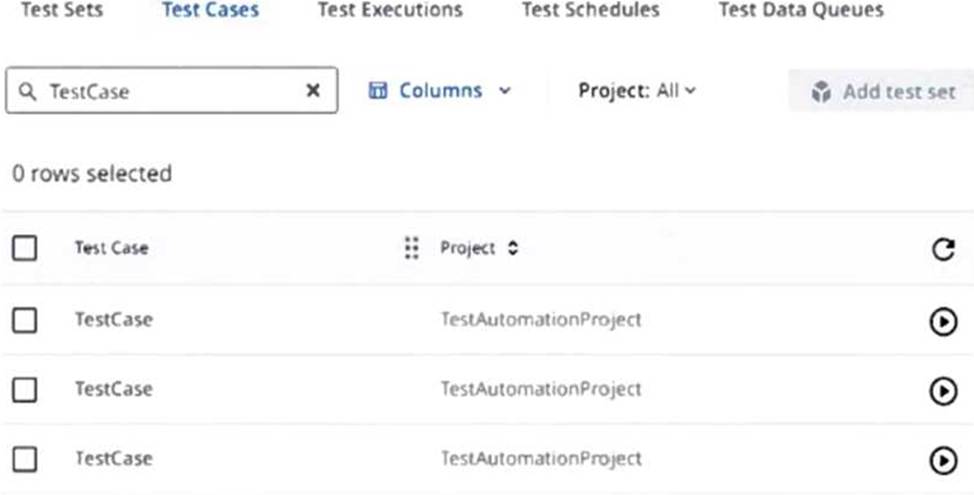
Why are test cases duplicated in orchestrator for the scenario below?
- A . Different project versions were used while publishing the test automation project.
- B . Different test automation project machine hosts were used while publishing.
- C . The Test Case is linked to multiple Test Manager projects.
- D . The Test Case is used in multiple Test Sets.
A
Explanation:
Test cases are duplicated in Orchestrator when different project versions are used while publishing the test automation project. Each published version of the project includes its own instance of the test case, resulting in multiple entries appearing in Orchestrator.
What happens with the attachment if an Attach Document activity in a workflow is run, as part of an automation job?
- A . The attachments are available only if the workflow is run as part of a job.
- B . The attachment is unavailable.
- C . The attachment is available.
- D . Attachments support only the following type of files: JSON, TXT, XML, PNG and JPEG formats.
B
Explanation:
When an Attach Document activity is run as part of an automation job, the attachment is unavailable. This activity is intended for test case execution contexts where attachments are linked to test results, not regular automation jobs.
Who can edit or delete projects in Test Manager?
- A . Project Owners and Administrators
- B . Any user role
- C . Only the Project Owners
- D . Only the Administrators
A
Explanation:
In UiPath Test Manager, only Project Owners and Administrators have the necessary permissions to edit or delete projects. This ensures proper access control and prevents unauthorized modifications.
What is the difference between RPA testing and application testing?
- A . RPA testing and application testing are the same thing, the term used simply depends on the specific software involved.
- B . RPA testing involves checking the quality of robotic processes, whereas application testing checks the functionality of software applications.
- C . RPA testing checks the functionality of a software application, but application testing evaluates the performance of robots.
- D . RPA testing evaluates human interactions with software, while application testing checks robotic processes.
B
Explanation:
The key difference is that RPA testing focuses on verifying the quality and correctness of robotic processes (automations), while application testing verifies the functionality of the underlying software applications being automated.
What happens to the arguments when creating a test case from a workflow?
- A . Arguments from the workflow need to be manually imported into the test case.
- B . Arguments from the workflow are transformed into variables in the test case.
- C . Arguments from the workflow are automatically imported into the test case.
- D . Arguments from the workflow are deleted and must be redefined.
C
Explanation:
When creating a test case from a workflow in UiPath Studio, the arguments from the workflow are automatically imported into the test case. This allows the test case to simulate the input/output behavior of the original workflow without needing to redefine the arguments.
Where can robot authentication settings be seen and configured?
- A . Tenant > Preferences, on the Robot security tab.
- B . Tenant > Settings, on the Robot connection tab.
- C . Tenant > Preferences, on the Robot connection tab.
- D . Tenant > Settings, on the Robot security tab.
D
Explanation:
Robot authentication settings can be seen and configured in UiPath Orchestrator by navigating to Tenant > Settings, under the Robot security tab. This is where you manage how robots authenticate with Orchestrator.