
UiPath UiPath-TAEPv1 Practice Exams
Last updated on Oct 22,2026- Exam Code: UiPath-TAEPv1
- Exam Name: UiPath Test Automation Engineer Professional v1.0 Exam
- Certification Provider: UiPath
- Latest update: Oct 22,2026
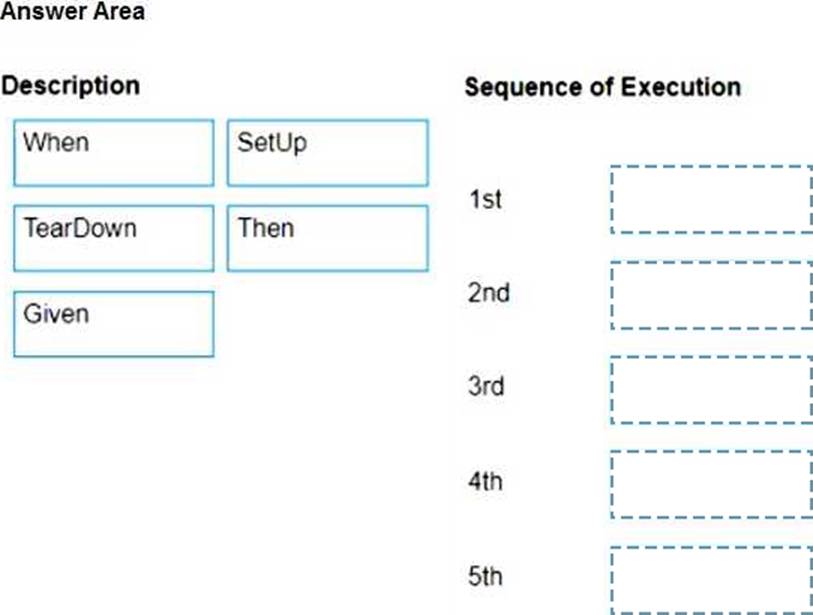
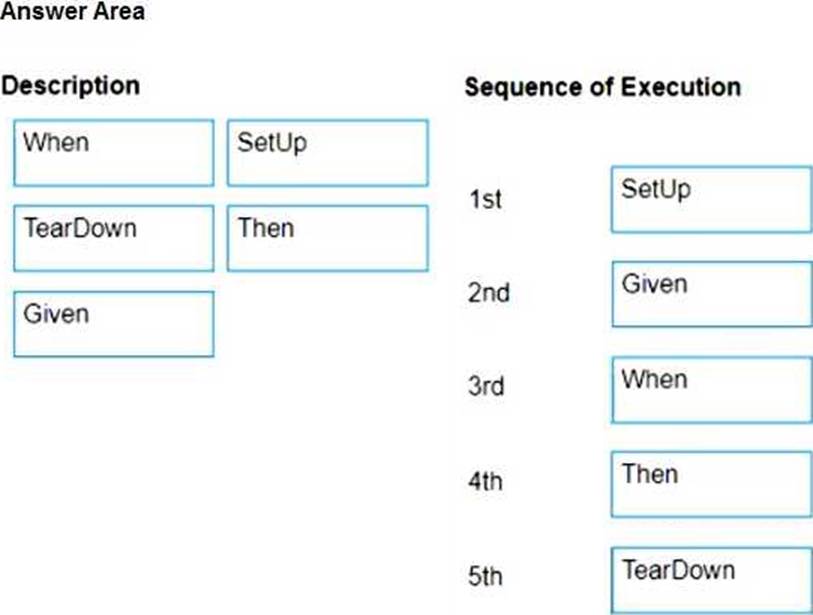
DRAG DROP
What is the sequence of execution of the main blocks of a Test Case that has Test Automation Framework attached?
Instructions: Drag the Description found on the left and drop on the correct Sequence of Execution found on the right.
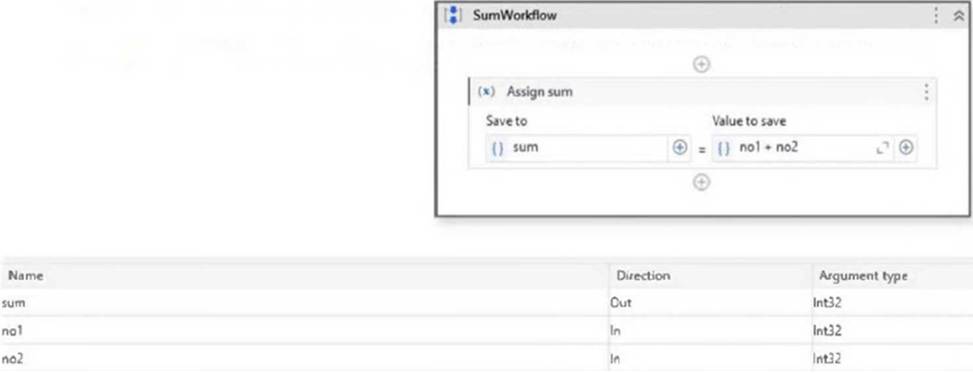
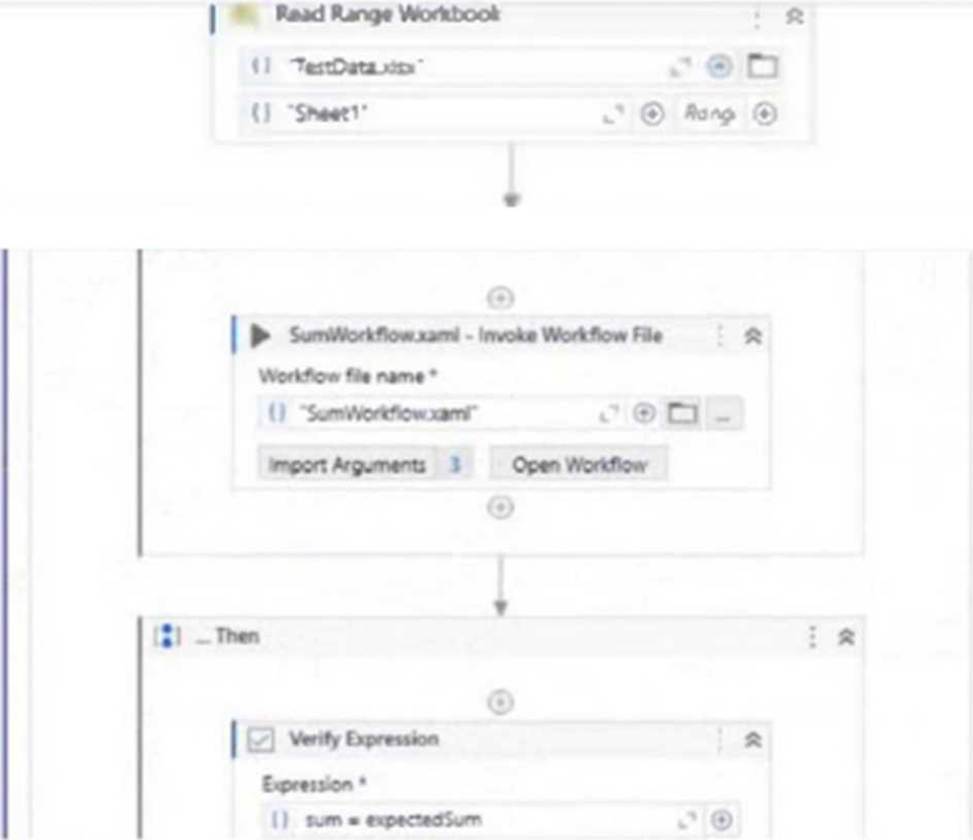
A developer, who has just discovered Test Suite, built a test case that checks if the SumWorkflow correctly performs the sum of 2 integers, using different input values from an Excel file.
The test case was published to Orchestrator.
How many Test Runs will be generated when the test case is executed?
SumWorkflow:
TestCase:
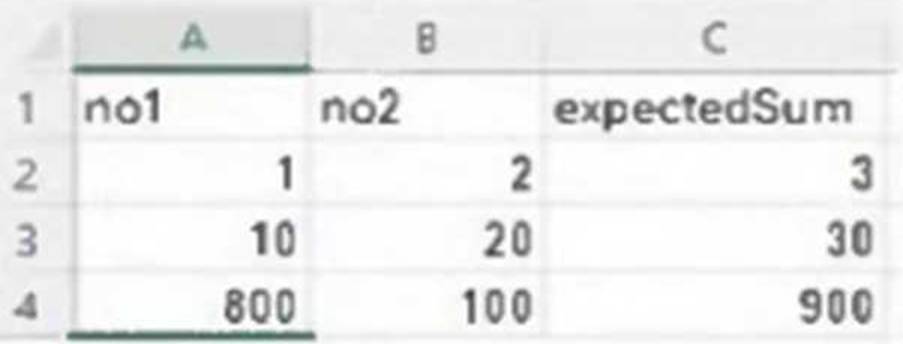
TestData.xlsx:
- A . 0
- B . 1
- C . 3
- D . 4
C
Explanation:
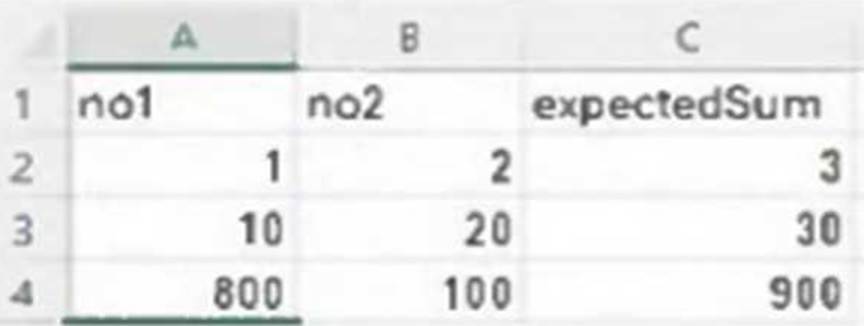
The Excel file (TestData.xlsx) contains 3 rows of input data (excluding the header row). Since the test case uses this Excel file for data-driven testing, one Test Run will be generated for each data variation (row). Therefore, 3 test runs will be generated when the test case is executed.
Where are Postman collection endpoint activities found after being imported into a Studio library?
- A . In the Projects tab, under the namespace of the imported Postman collection.
- B . In the Activities tab, under the namespace that you have set.
- C . In the Debug tab, within the testing activities pack.
- D . In the Activities tab, under the Postman imported libraries list.
B
Explanation:
After importing a Postman collection into a Studio library, the endpoint activities appear in the Activities tab, under the namespace that you have set during the import process. This makes them reusable across workflows.
Where are Postman collection endpoint activities found after being imported into a Studio library?
- A . In the Projects tab, under the namespace of the imported Postman collection.
- B . In the Activities tab, under the namespace that you have set.
- C . In the Debug tab, within the testing activities pack.
- D . In the Activities tab, under the Postman imported libraries list.
B
Explanation:
After importing a Postman collection into a Studio library, the endpoint activities appear in the Activities tab, under the namespace that you have set during the import process. This makes them reusable across workflows.
Having the test case described in the image below:
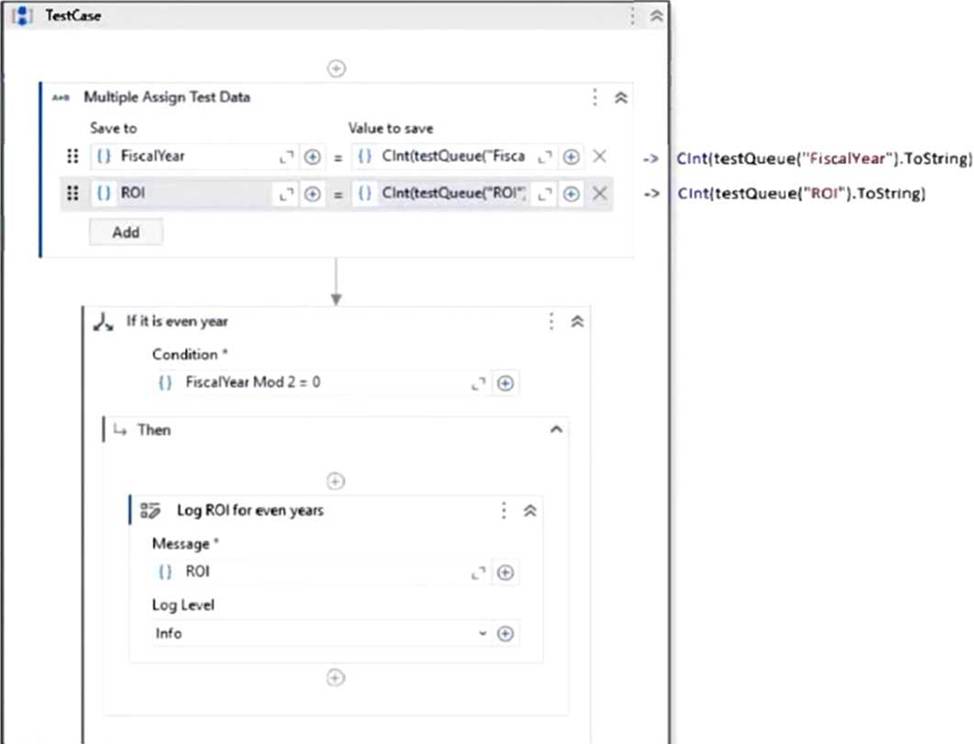
The test data queue was imported in Studio workflow through a variable called testQueue.
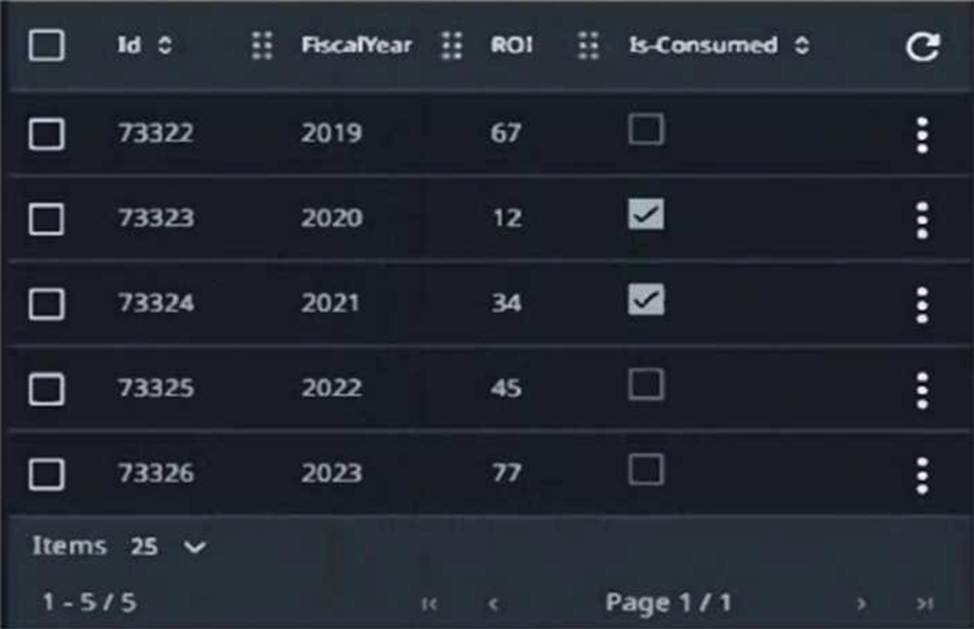
The structure of the Test Data Queue can be seen below:
What ROI will be printed in the Output panel when the test case from the Text Explorer panel is run?
- A . 67,77
- B . 12.45
- C . 45
- D . 67,34,77
C
Explanation:
The logic in the test case checks whether FiscalYear Mod 2 = 0 (i.e., even years). If true, it logs the corresponding ROI. Only FiscalYear 2022 is even and not marked as consumed, so it will be used.
– 2020 is even but already consumed.
– 2022 is even and not consumed → ROI 45 is logged.
What programming language can be used in Coded Workflows?
- A . VB.Net
- B . C#
- C . C# and VB.Net
- D . VBScript
C
Explanation:
In Coded Workflows within UiPath, both C# and VB.Net can be used as programming languages. These languages provide flexibility for developers to write complex logic that cannot be achieved with the standard UiPath activities.
Where can the variations that have passed or failed for a data-driven test case in UiPath Studio be viewed?
- A . On the parent test cases in the Test Results panel.
- B . On the individual test case data variations in the Test Results panel.
- C . In the Test Manager configuration.
- D . In the Assertions tab of the corresponding test case result.
B
Explanation:
In UiPath Studio, the Test Results panel displays the outcome of individual data variations for a data-driven test case. This allows users to see exactly which data inputs passed or failed during execution.
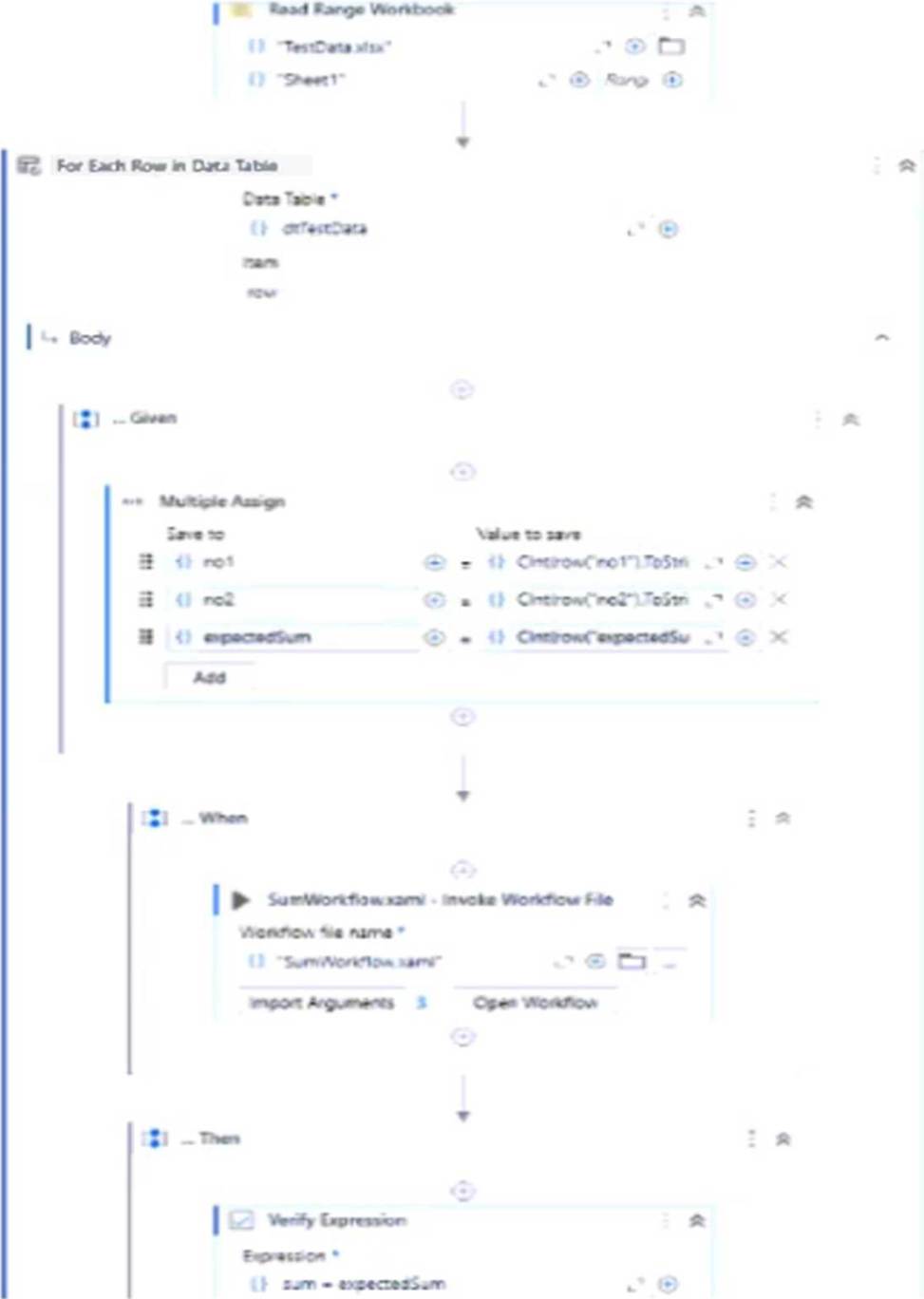
A developer, who has just discovered Test Suite, built a test case that checks if the SumWorkflow correctly performs the sum of 2 integers, using different input values from an Excel file.
What could be considered an improvement in the way the test was developed?
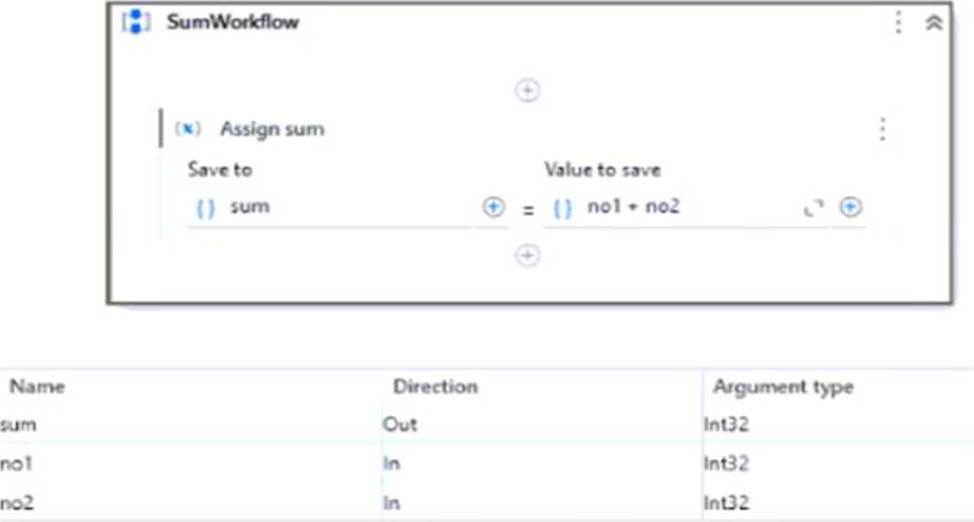
SumWorkflow:
TestCase:
TestData.xlsx:
- A . Use the Excel file as a Data Variation Source, instead of iterating through it inside the test case.
- B . Replace the Verify Expression activity with Verify Expression with Operator to benefit from built-in operators.
- C . Surround the SumWorkfiow in a Retry Scope to improve error handling.
- D . Replace the Given-When-Then structure with a custom-built framework.
A
Explanation:
The current test case manually iterates through the Excel file using a For Each Row loop. A better practice is to use the Excel file as a Data Variation Source by configuring it as a data-driven test case. This allows Test Suite to automatically generate separate test runs for each row in the file, improving maintainability, visibility of test results, and alignment with Test Suite best practices.
What happens when a test set is deleted in UiPath Orchestrator?
- A . The test cases within the test set are deleted but the test set remains.
- B . The test set is moved to a recycle bin from where it can be recovered later.
- C . The test set is permanently saved for future reference.
- D . The test sets and any associated test schedules are deleted.
D
Explanation:
When a test set is deleted in UiPath Orchestrator, both the test set and any associated test schedules are deleted. This is a permanent action and should be done with caution, as it removes all configurations tied to that test set.
According to best practices, how should the renaming, moving, or deleting of test cases in the project be handled?
- A . Test cases should be renamed or moved outside of Studio and then re-imported.
- B . Do not rename move or delete the test cases outside of Studio.
- C . The renaming, moving or deleting of test cases can be handled either inside or outside Studio, there is no preferred way.
- D . Test cases can be renamed, moved or deleted outside of Studio.
B
Explanation:
According to best practices, test cases should not be renamed, moved, or deleted outside of UiPath Studio. Making such changes externally can lead to discrepancies in the project structure and potentially break links or references within the testing framework. Performing these actions within Studio ensures that all changes are properly tracked and synchronized across the test suite.