UiPath UiPath-TAEPv1 Practice Exams
Last updated on Oct 22,2026- Exam Code: UiPath-TAEPv1
- Exam Name: UiPath Test Automation Engineer Professional v1.0 Exam
- Certification Provider: UiPath
- Latest update: Oct 22,2026
Stat capture the test steps based on the test case description
Explanation:
To document a test case using Task Capture, you need to:
Open the project in Test Manager
Open the specific test case to be documented
Navigate to the Manual Steps tab
Click Document with Task Capture
Start capturing the test steps based on the test case description
This process ensures that manual test steps are accurately captured and linked to the test case for better traceability and clarity.
What can the Clipboard data field be used for in the manual steps of a test case?
- A . Storing the login credentials for the application under test.
- B . Capturing the state of the application under test at the time of test case execution.
- C . Saving the output of the test case for future use.
- D . Defining a Clipboard value to avoid manually typing into the input fields.
D
Explanation:
The Clipboard data field in the manual steps of a test case is used for defining a value that can be copied to the clipboard during manual test execution. This helps testers quickly input data into fields without manually typing, improving efficiency and reducing input errors.
Consider the following snippet:
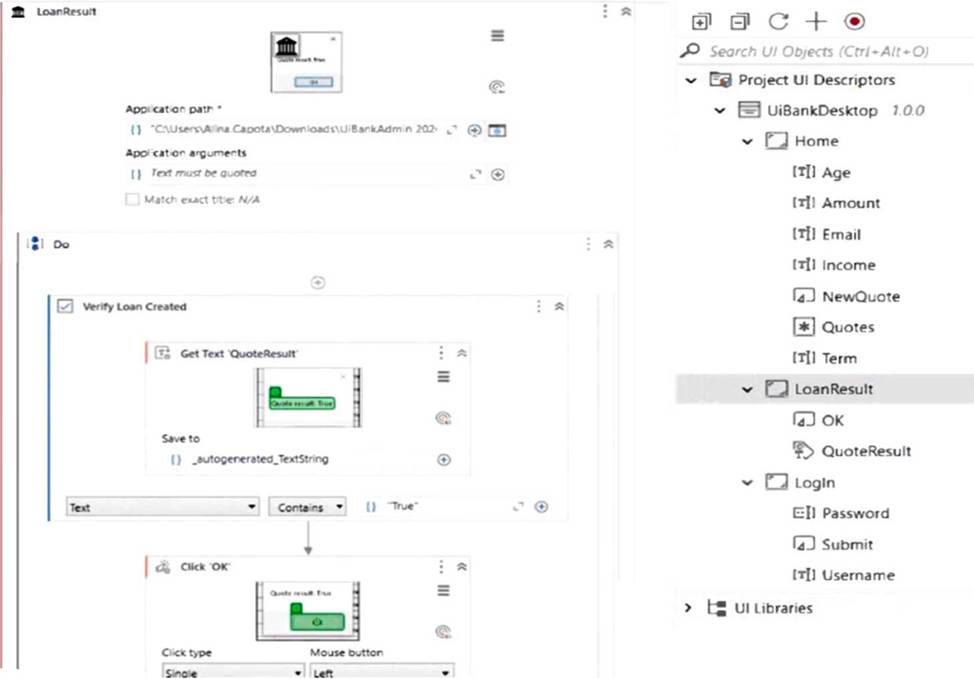
What should be improved to ensure the Test Case will not fail with exception?
- A . In the Verification point ‘_autogenerated_TextString’ should be removed.
- B . The ObjectRepository should be changed so all the elements fall into Home screen.
- C . The ApplicationPath should be provided dynamically.
- D . Click ‘OK’ should be removed.
C
Explanation:
The ApplicationPath in the "Launch Application" activity is hardcoded, which can lead to failures if the file path changes or differs across environments. To avoid exceptions and improve flexibility, the ApplicationPath should be provided dynamically (e.g., through a project argument or configuration file).
What is a primary distinction between manual and automated test execution in UiPath Test Manager?
- A . Automated test executions can be performed only in UiPath Orchestrator, while manual executions can only be performed in UiPath Test Manager.
- B . Manual and automated test executions do not have specific distinctions and can be executed interchangeably.
- C . Manual executions require user interaction for each test step, while automated executions are self-running without any manual intervention.
- D . Manual executions are done for test sets created in UiPath Test Manager or linked from Orchestrator with manual steps, while automated executions are invoked through Orchestrator for test cases linked from Studio.
C
Explanation:
The primary distinction is that manual executions require user interaction for each test step, making them suitable for scenarios like exploratory testing or steps requiring human validation. In contrast, automated executions are fully self-running, executed via Orchestrator without manual involvement.
According to best practices how can reusability be increased between individual test projects?
- A . Code reusability should not be a consideration when creating test projects.
- B . Try to reuse workflows as much as possible between projects.
- C . Try to use libraries and object repository, whenever possible.
- D . Try to use the project code base entirely independent of others.
C
Explanation:
According to best practices, reusability between individual test projects can be increased by using libraries and the Object Repository. These allow shared components and UI descriptors to be centrally maintained and reused across multiple projects, enhancing consistency and efficiency.
According to best practices how can reusability be increased between individual test projects?
- A . Code reusability should not be a consideration when creating test projects.
- B . Try to reuse workflows as much as possible between projects.
- C . Try to use libraries and object repository, whenever possible.
- D . Try to use the project code base entirely independent of others.
C
Explanation:
According to best practices, reusability between individual test projects can be increased by using libraries and the Object Repository. These allow shared components and UI descriptors to be centrally maintained and reused across multiple projects, enhancing consistency and efficiency.
Which test cases are included in test sets linked from Orchestrator to Test Manager?
- A . Only the test cases from Orchestrator.
- B . Test cases from both Orchestrator and Test Manager.
- C . Both manual and automated test cases from multiple Studio projects.
- D . Test cases that have been updated by your user, by specific labels, or the source.
A
Explanation:
When test sets are linked from Orchestrator to Test Manager, they include only the test cases from Orchestrator. These are typically automated test cases published from Studio and managed through Orchestrator.
What is the appropriate scenario to use the "Synchronize mock" action?
- A . To sync the mock files with the source workflow files.
- B . To sync the workflows into newly mock files for mock testing.
- C . To copy the workflows into mock files for mock testing.
- D . To sync the mock files into newly created workflow files.
A
Explanation:
The "Synchronize mock" action is used to sync the mock files with the source workflow files. This ensures that any changes made to the original workflows are reflected in the associated mock files, maintaining consistency during mock testing.
What is the appropriate scenario to use the "Synchronize mock" action?
- A . To sync the mock files with the source workflow files.
- B . To sync the workflows into newly mock files for mock testing.
- C . To copy the workflows into mock files for mock testing.
- D . To sync the mock files into newly created workflow files.
A
Explanation:
The "Synchronize mock" action is used to sync the mock files with the source workflow files. This ensures that any changes made to the original workflows are reflected in the associated mock files, maintaining consistency during mock testing.
DRAG DROP
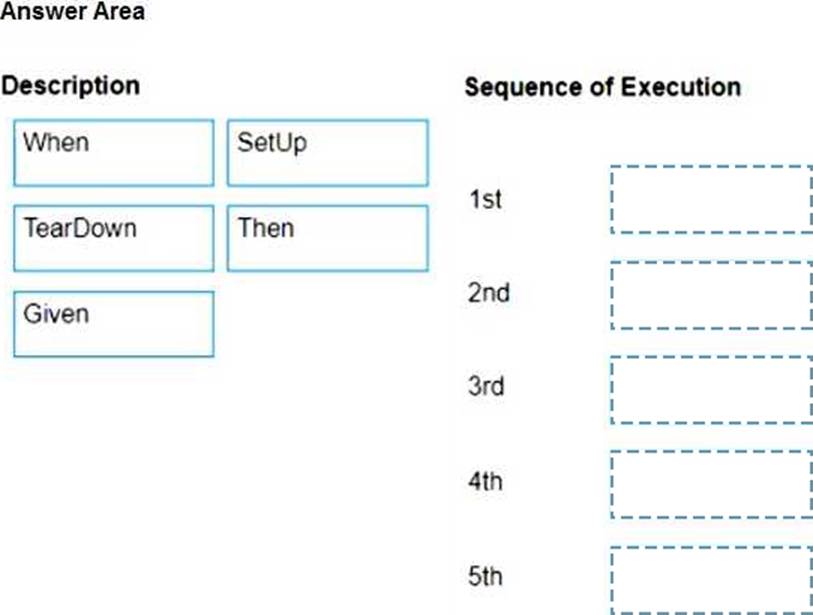
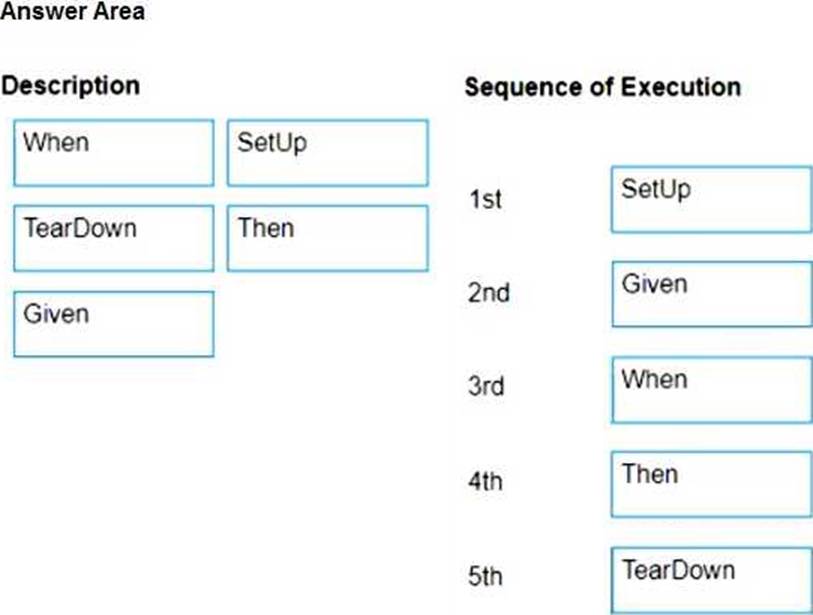
What is the sequence of execution of the main blocks of a Test Case that has Test Automation Framework attached?
Instructions: Drag the Description found on the left and drop on the correct Sequence of Execution found on the right.