
UiPath UiPath-STEPv1 Practice Exams
Last updated on Oct 21,2026- Exam Code: UiPath-STEPv1
- Exam Name: UiPath Software Testing Engineer Professional Exam
- Certification Provider: UiPath
- Latest update: Oct 21,2026
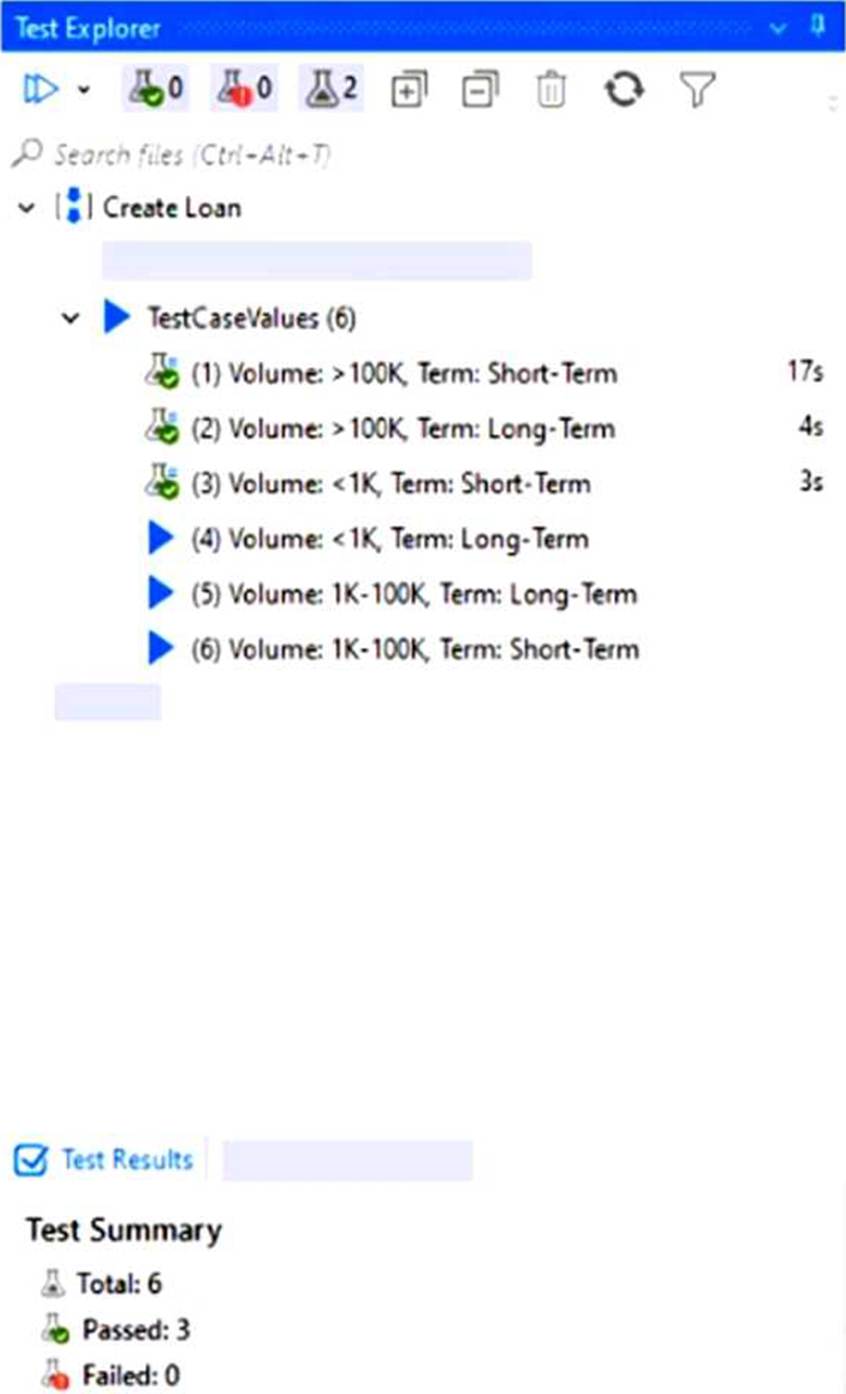
What conclusions can be drawn from the exhibit?
- A . It’s a data-driven test case with 2 variations, 2 variations were run and 2 not yet run.
- B . It’s a data-driven test case with 3 variations, 3 variations were run and 3 not yet run.
- C . It’s a data-driven test case with 6 variations, 3 variations were run and 3 not yet run.
- D . It’s an automated test case with 8 variations.
C
Explanation:
The Test Explorer shows a data-driven test case named "Create Loan" with 6 variations under TestCaseValues. Out of these, 3 have green flask icons (indicating they were run and passed), while 3 have blue play icons (indicating they have not yet been executed).
What conclusions can be drawn from the exhibit?
- A . It’s a data-driven test case with 2 variations, 2 variations were run and 2 not yet run.
- B . It’s a data-driven test case with 3 variations, 3 variations were run and 3 not yet run.
- C . It’s a data-driven test case with 6 variations, 3 variations were run and 3 not yet run.
- D . It’s an automated test case with 8 variations.
C
Explanation:
The Test Explorer shows a data-driven test case named "Create Loan" with 6 variations under TestCaseValues. Out of these, 3 have green flask icons (indicating they were run and passed), while 3 have blue play icons (indicating they have not yet been executed).
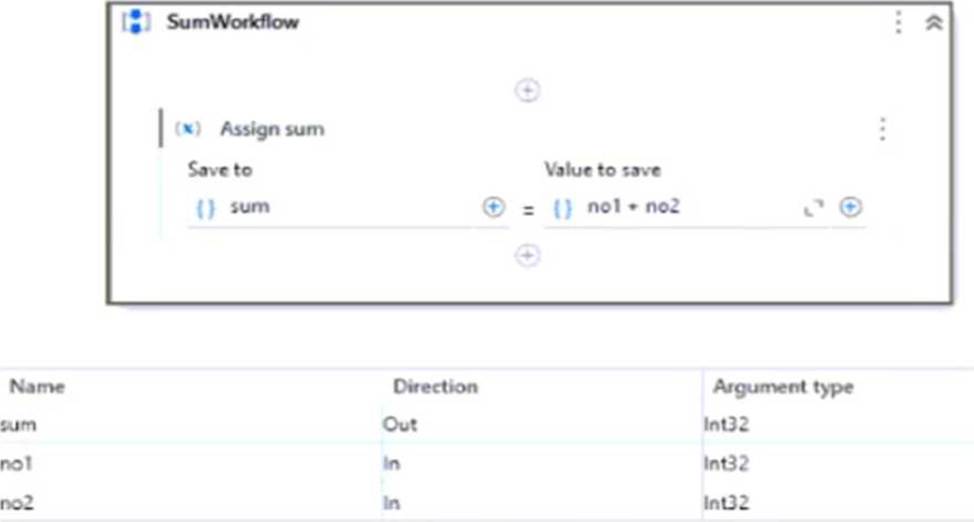
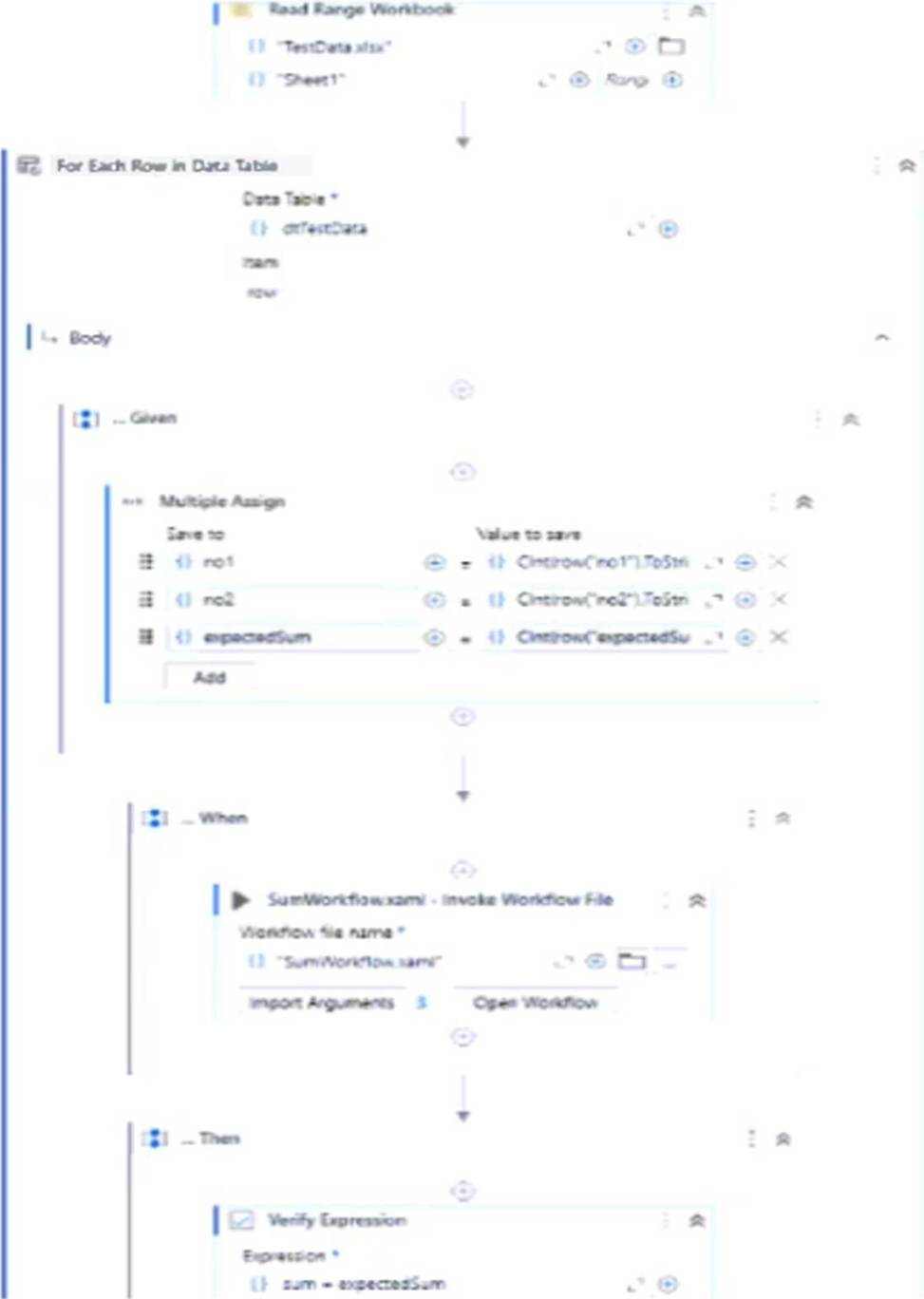
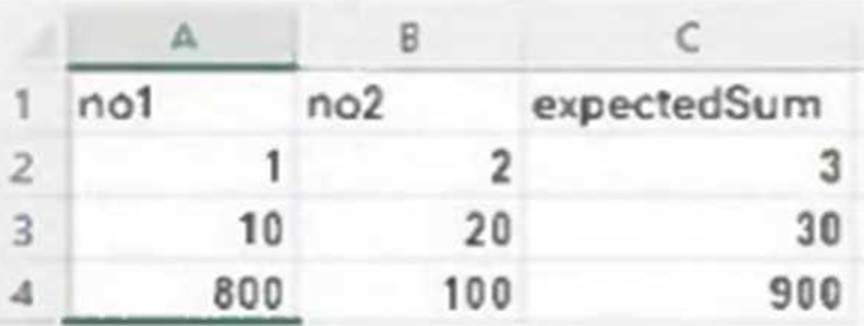
A developer, who has just discovered Test Suite, built a test case that checks if the SumWorkflow correctly performs the sum of 2 integers, using different input values from an Excel file.
What could be considered an improvement in the way the test was developed?
SumWorkflow:
TestCase:
TestData.xlsx:
- A . Use the Excel file as a Data Variation Source, instead of iterating through it inside the test case.
- B . Replace the Verify Expression activity with Verify Expression with Operator to benefit from built-in operators.
- C . Surround the SumWorkfiow in a Retry Scope to improve error handling.
- D . Replace the Given-When-Then structure with a custom-built framework.
A
Explanation:
The current test case manually iterates through the Excel file using a For Each Row loop. A better practice is to use the Excel file as a Data Variation Source by configuring it as a data-driven test case. This allows Test Suite to automatically generate separate test runs for each row in the file, improving maintainability, visibility of test results, and alignment with Test Suite best practices.
What kind of changes can be made to test sets linked from Orchestrator in Test Manager?
- A . The description can not be edited, but the name and version can be edited in Test Manager.
- B . The name description, or version can not be edited. Any changes need to be made in Orchestrator.
- C . The name can not be edited, but the version and description can be edited in Test Manager.
- D . The version can not be edited, but the name and description can be edited in Test Manager.
D
Explanation:
When test sets are linked from Orchestrator in Test Manager, the version cannot be edited in Test Manager. However, the name and description of the test set can be modified within Test Manager to support better project documentation or categorization.
Where can robot authentication settings be seen and configured?
- A . Tenant > Preferences, on the Robot security tab.
- B . Tenant > Settings, on the Robot connection tab.
- C . Tenant > Preferences, on the Robot connection tab.
- D . Tenant > Settings, on the Robot security tab.
D
Explanation:
Robot authentication settings can be seen and configured in UiPath Orchestrator by navigating to Tenant > Settings, under the Robot security tab. This is where you manage how robots authenticate with Orchestrator.
In software testing what does the term "test case” refer to?
- A . It’s a set of conditions under which a tester determines if a system under test satisfies requirements and functions correctly.
- B . It’s the maximum load that the system can tolerate without crashing.
- C . It’s the process of executing the system to reveal bugs.
- D . It’s a written document outlining the detailed process of software development.
A
Explanation:
A test case is a set of conditions, inputs, and expected results used to determine whether a system under test behaves correctly and meets its specified requirements. It helps validate functionality and detect defects.
What type(s) of license should be used in order to be able to connect Studio to Test Manager?
- A . Just Task Capture license
- B . Just Test Manager license.
- C . Studio license and Test Manager license.
- D . Studio license and Orchestrator license.
C
Explanation:
To connect UiPath Studio to Test Manager, both a Studio license and a Test Manager license are required. This ensures that Studio can interact with Test Manager for managing and executing test cases.
How can activity coverage scenarios for different automation needs be created in UiPath?
- A . Create one comprehensive test case that covers all scenarios in one execution.
- B . Alter the workflow to ensure a single test case covers all scenarios.
- C . Create separate test cases to cover each scenario during the execution.
- D . Use the same test case, but execute it in different workflows.
C
Explanation:
To ensure thorough activity coverage in UiPath, it’s best to create separate test cases for each automation scenario. This allows targeted validation, improves clarity in test results, and ensures that all logic branches are adequately tested.
Given a Verify activity that has the ContinueOnFailure property set to False, what will the outcome be if the verification performed fails?
- A . Test case execution is stopped and any subsequent verification is failed.
- B . Test case execution is stopped and an exception is thrown.
- C . Test case execution continues and any subsequent verification is skipped.
- D . Test case execution is stopped and the applications used are closed gracefully.
B
Explanation:
If a Verify activity has ContinueOnFailure set to False and the verification fails, the test case execution stops immediately and an exception is thrown. This ensures that failures are treated as critical and halt further execution.
What are the steps to re-execute a test case from UiPath Orchestrator?
- A . Navigate to Testing > Test Cases, select a test run, go to More actions > Details, select a test case, and go to More actions > Re-execute.
- B . Navigate to Testing > Test Executions, select a test run, go to More actions > Details, select a test case, and go to Details > Re-execute.
- C . Navigate to Testing > Test Executions, select a test run. go to More actions > Details, select a test case, and go to View Assertions > Re-execute.
- D . Navigate to Testing > Test Executions, select a test run, go to More actions > Details, select a test case, and go to More actions > Re-execute.
D
Explanation:
To re-execute a test case from UiPath Orchestrator, go to Testing > Test Executions, select the relevant test run, click More actions > Details, then select the test case, and finally choose More actions > Re-execute. This allows for isolated re-execution of failed or specific test cases.