
UiPath UiPath-STEPv1 Practice Exams
Last updated on Oct 21,2026- Exam Code: UiPath-STEPv1
- Exam Name: UiPath Software Testing Engineer Professional Exam
- Certification Provider: UiPath
- Latest update: Oct 21,2026
What are the tasks that can be executed from the UiPath command-line interface (CLI) while creating a CI/CD pipeline?
- A . Job, Run, Deploy, Delete, Analyze.
- B . Asset Job, Package, Test, Help, Version.
- C . Analyze, Delete, Deploy, Pack.
- D . Run, Test, Deploy, Pack, Help, Version.
D
Explanation:
The UiPath CLI supports several tasks useful for building CI/CD pipelines, including:
– Run C to execute workflows
– Test C to run test cases
– Deploy C to publish packages
– Pack C to create NuGet packages
– Help and Version C for CLI assistance and version info
These tasks help integrate UiPath automation into automated build and deployment workflows.
What are the mock testing conditions in UiPath?
- A . • There can be only one mock file for a workflow
• Nested mocks are available
• Mock.json file does not contain configuration settings for mock files
• Changes made in the source workflow file are not applied to the mock file when the project is saved - B . • There can be multiple mock files for a workflow
• Nested mocks are not available
• Mock.json file contains configuration settings for mock files
• Changes made in the source workflow file are applied to the mock file when the project is saved - C . • There can be multiple mock files for a workflow
• Nested mocks are available
• Mock.json file contains configuration settings for mock files
• Changes made in the source workflow file are not applied to the mock file when the project is saved - D . • There can be only one mock file for a workflow
• Nested mocks are not available
• Mock.json file contains configuration settings for mock files
• Changes made in the source workflow file are applied to the mock file when the project is saved
C
Explanation:
In UiPath, mock testing conditions include:
– Multiple mock files can exist for a workflow
– Nested mocks are supported
– The mock.json file stores configuration settings for mock files
– Changes in the source workflow are not applied to the mock file when the project is saved, ensuring mock behavior remains isolated
What are the mock testing conditions in UiPath?
- A . • There can be only one mock file for a workflow
• Nested mocks are available
• Mock.json file does not contain configuration settings for mock files
• Changes made in the source workflow file are not applied to the mock file when the project is saved - B . • There can be multiple mock files for a workflow
• Nested mocks are not available
• Mock.json file contains configuration settings for mock files
• Changes made in the source workflow file are applied to the mock file when the project is saved - C . • There can be multiple mock files for a workflow
• Nested mocks are available
• Mock.json file contains configuration settings for mock files
• Changes made in the source workflow file are not applied to the mock file when the project is saved - D . • There can be only one mock file for a workflow
• Nested mocks are not available
• Mock.json file contains configuration settings for mock files
• Changes made in the source workflow file are applied to the mock file when the project is saved
C
Explanation:
In UiPath, mock testing conditions include:
– Multiple mock files can exist for a workflow
– Nested mocks are supported
– The mock.json file stores configuration settings for mock files
– Changes in the source workflow are not applied to the mock file when the project is saved, ensuring mock behavior remains isolated
Who can edit or delete projects in Test Manager?
- A . Project Owners and Administrators
- B . Any user role
- C . Only the Project Owners
- D . Only the Administrators
A
Explanation:
In UiPath Test Manager, only Project Owners and Administrators have the necessary permissions to edit or delete projects. This ensures proper access control and prevents unauthorized modifications.
What does the UiPath CLI allow to do?
- A . Run on both Windows and Linux devices without any restrictions.
- B . Execute certain pre-defined tasks for RPA package management and testing.
- C . Run only Windows – Legacy projects.
- D . Build Studio projects that are not compatible with Orchestrator.
B
Explanation:
The UiPath CLI allows users to execute predefined tasks related to RPA package management and testing, such as packing projects, running tests, deploying packages, and converting test results― making it a key tool for CI/CD integration.
According to best practices, what is an acceptable way of validating an application’s state before proceeding with certain steps in a process during testing?
- A . Consider applying validation measures which include using extra activities that wait for the desired application state before other interactions.
- B . Use as many hardcoded delays as needed to ensure the application has reached the desired state before proceeding with other interactions.
- C . Validate an application’s state by implementing hardcoded delays before proceeding with other interactions.
- D . Avoid waiting for the desired application state and directly proceed with other interactions.
A
Explanation:
According to best practices, it is important to apply validation measures such as using activities that wait for the desired application state to be reached before proceeding with other interactions. This ensures stability and reduces the risk of errors, as waiting for a specific condition or state before continuing ensures that the application is ready for the next action.
What actions can be done for test cases that contain data variation?
- A . Update test data, Remove test data, and Modify test data JSON file.
- B . Create test data, Remove test data, and Modify test data JSON file.
- C . Create test data, Update test data, and Remove test data.
- D . Create test data, Update test data, and Modify test data JSON file.
C
Explanation:
For test cases that contain data variation, you can Create, Update, and Remove test data. These actions allow you to manage different input scenarios effectively for data-driven testing without needing to manually edit the JSON file.
What are the specific benefits of using coded automations in UiPath?
- A . Coded automations are primarily used to create structured code with no enhanced productivity, performance improvement, or increased readability.
- B . Coded automations allow to work with low-code automations only, manage basic automation scenarios and developers find it challenging to maintain the code.
- C . Coded automations are used only in complex automation scenarios and they have no role in productivity, performance, hybrid automation or code readability.
- D . Coding can increase productivity, manage complex automation scenarios, work seamlessly with low-code automations, enhance performance, and improve code readability.
D
Explanation:
Coded automations in UiPath bring several benefits, including increased productivity, the ability to manage complex automation scenarios, seamless integration with low-code automations, improved performance, and better code readability. This enables developers to write more efficient and maintainable code, especially in scenarios where complex logic or custom functions are required.
According to best practices how can reusability be increased between individual test projects?
- A . Code reusability should not be a consideration when creating test projects.
- B . Try to reuse workflows as much as possible between projects.
- C . Try to use libraries and object repository, whenever possible.
- D . Try to use the project code base entirely independent of others.
C
Explanation:
According to best practices, reusability between individual test projects can be increased by using libraries and the Object Repository. These allow shared components and UI descriptors to be centrally maintained and reused across multiple projects, enhancing consistency and efficiency.
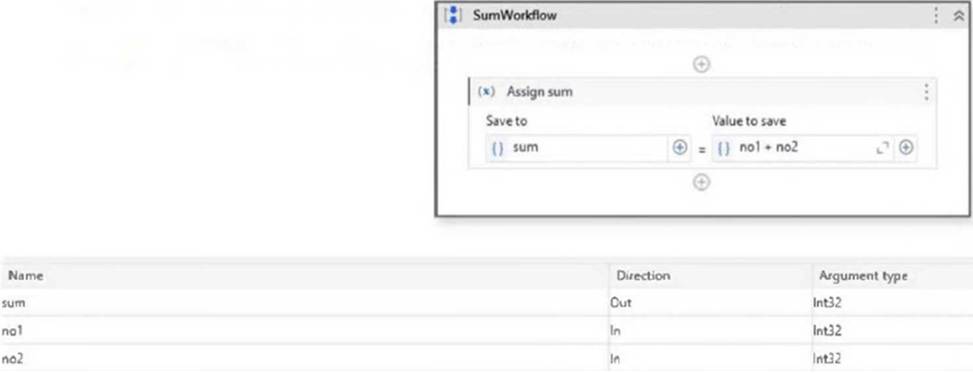
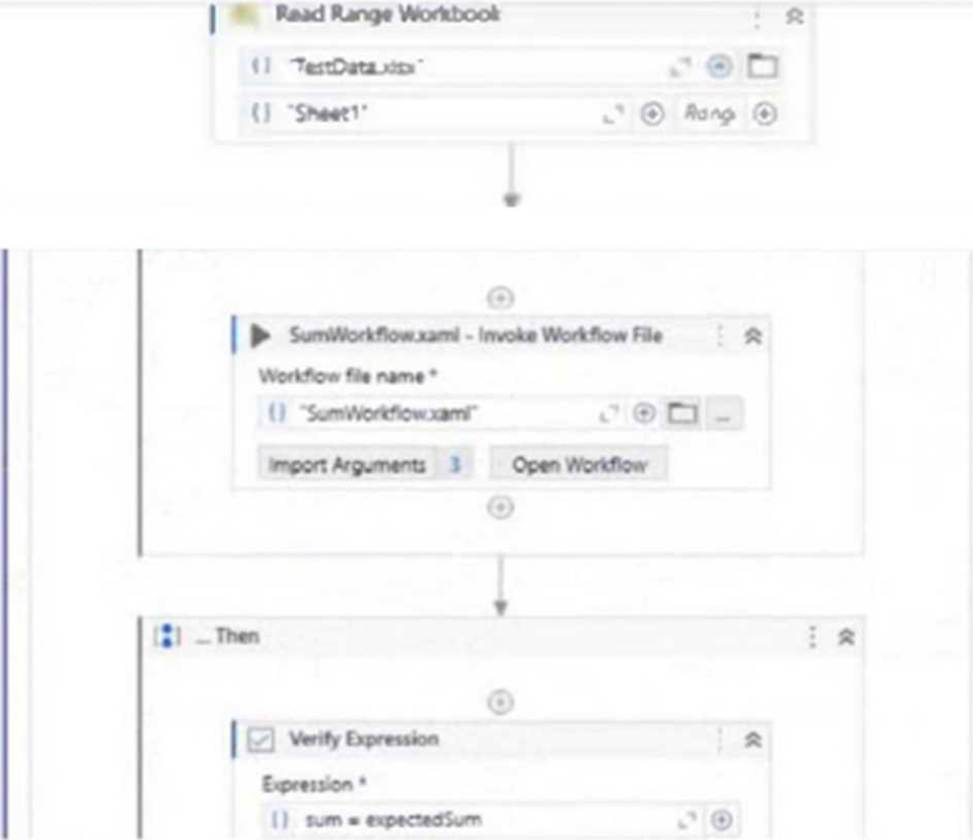
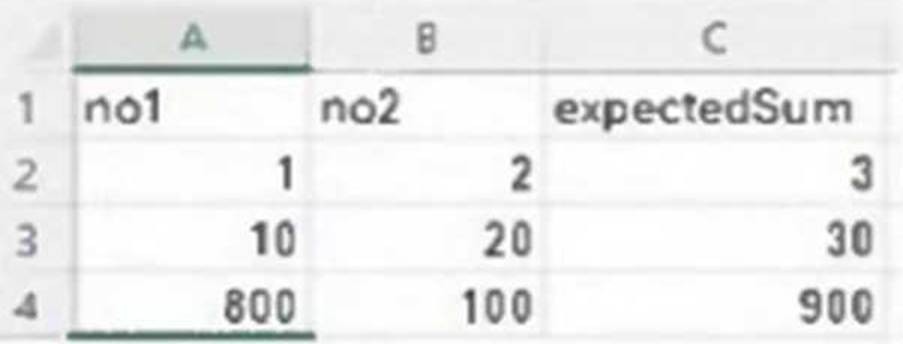
A developer, who has just discovered Test Suite, built a test case that checks if the SumWorkflow correctly performs the sum of 2 integers, using different input values from an Excel file.
The test case was published to Orchestrator.
How many Test Runs will be generated when the test case is executed?
SumWorkflow:
TestCase:
TestData.xlsx:
- A . 0
- B . 1
- C . 3
- D . 4
C
Explanation:
The Excel file (TestData.xlsx) contains 3 rows of input data (excluding the header row). Since the test case uses this Excel file for data-driven testing, one Test Run will be generated for each data variation (row). Therefore, 3 test runs will be generated when the test case is executed.