
UiPath UiPath-STEPv1 Practice Exams
Last updated on Oct 22,2026- Exam Code: UiPath-STEPv1
- Exam Name: UiPath Software Testing Engineer Professional Exam
- Certification Provider: UiPath
- Latest update: Oct 22,2026
Having the test case described in the image below:
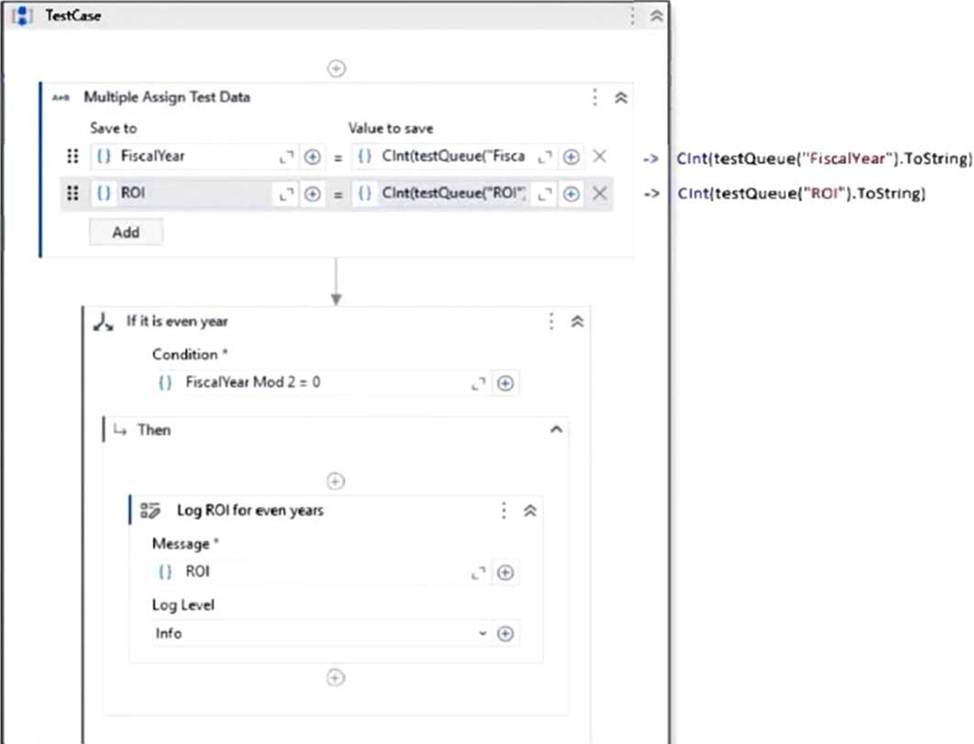
The test data queue was imported in Studio workflow through a variable called testQueue.
The structure of the Test Data Queue can be seen below:
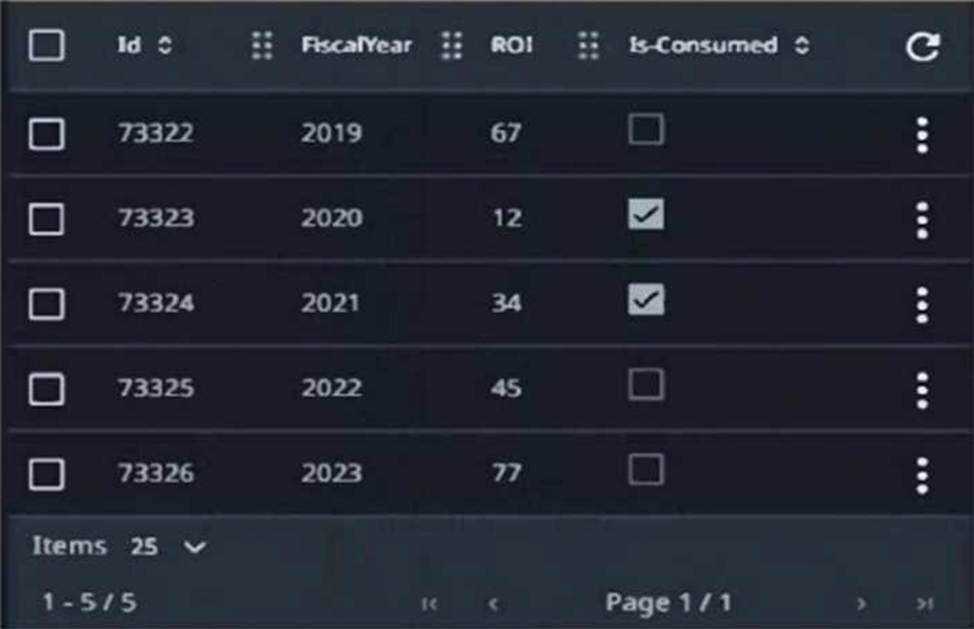
What ROI will be printed in the Output panel when the test case from the Text Explorer panel is run?
- A . 67,77
- B . 12.45
- C . 45
- D . 67,34,77
C
Explanation:
The logic in the test case checks whether FiscalYear Mod 2 = 0 (i.e., even years). If true, it logs the corresponding ROI. Only FiscalYear 2022 is even and not marked as consumed, so it will be used.
– 2020 is even but already consumed.
– 2022 is even and not consumed → ROI 45 is logged.
What is the BDD test case template used for in UiPath?
- A . To handle Global Exception Handlers in behaviour driven development approach.
- B . To create test cases based on If-Then-Else containers.
- C . To structure the test around If-Then-Else statements.
- D . To structure the test around Given-When-Then containers.
D
Explanation:
The BDD (Behavior-Driven Development) test case template in UiPath is used to structure tests using the Given-When-Then format, which clearly separates setup, action, and expected outcome. This makes test cases more readable and aligned with business scenarios.
What is the output format of the UiPath.Testing.Activites.TestData.Address activity?
- A . Dictionary (String, String) with the fields: Country, PostalCode, StreetNumber, State
- B . Dictionary (String, Object) with the fields: Country, PostalCode, StreetNumber, StreetName, City, State
- C . Dictionary (String, String) with the fields: Country PostalCode, StreetNumber, StreetName, City, State
- D . Dictionary (String, Object) with the fields: Country, PostalCode, StreetNumber, State
C
Explanation:
The output format of the UiPath.Testing.Activities.TestData.Address activity is a Dictionary<String, String> containing the fields: Country, PostalCode, StreetNumber, StreetName, City, and State. This structured data is useful for generating realistic test addresses.
What is the output format of the UiPath.Testing.Activites.TestData.Address activity?
- A . Dictionary (String, String) with the fields: Country, PostalCode, StreetNumber, State
- B . Dictionary (String, Object) with the fields: Country, PostalCode, StreetNumber, StreetName, City, State
- C . Dictionary (String, String) with the fields: Country PostalCode, StreetNumber, StreetName, City, State
- D . Dictionary (String, Object) with the fields: Country, PostalCode, StreetNumber, State
C
Explanation:
The output format of the UiPath.Testing.Activities.TestData.Address activity is a Dictionary<String, String> containing the fields: Country, PostalCode, StreetNumber, StreetName, City, and State. This structured data is useful for generating realistic test addresses.
What is the output format of the UiPath.Testing.Activites.TestData.Address activity?
- A . Dictionary (String, String) with the fields: Country, PostalCode, StreetNumber, State
- B . Dictionary (String, Object) with the fields: Country, PostalCode, StreetNumber, StreetName, City, State
- C . Dictionary (String, String) with the fields: Country PostalCode, StreetNumber, StreetName, City, State
- D . Dictionary (String, Object) with the fields: Country, PostalCode, StreetNumber, State
C
Explanation:
The output format of the UiPath.Testing.Activities.TestData.Address activity is a Dictionary<String, String> containing the fields: Country, PostalCode, StreetNumber, StreetName, City, and State. This structured data is useful for generating realistic test addresses.
What is the output format of the UiPath.Testing.Activites.TestData.Address activity?
- A . Dictionary (String, String) with the fields: Country, PostalCode, StreetNumber, State
- B . Dictionary (String, Object) with the fields: Country, PostalCode, StreetNumber, StreetName, City, State
- C . Dictionary (String, String) with the fields: Country PostalCode, StreetNumber, StreetName, City, State
- D . Dictionary (String, Object) with the fields: Country, PostalCode, StreetNumber, State
C
Explanation:
The output format of the UiPath.Testing.Activities.TestData.Address activity is a Dictionary<String, String> containing the fields: Country, PostalCode, StreetNumber, StreetName, City, and State. This structured data is useful for generating realistic test addresses.
What color code in the status tab represents a test without a definitive results or that have not been executed yet but is a part of a test set that is currently being executed?
- A . Red
- B . Black
- C . Grey
- D . Green
C
Explanation:
In UiPath Test Manager, the Grey color code in the status tab represents a test case that has not yet been executed or does not have a definitive result, but is part of a test set that is currently being executed.
Where should be navigated in UiPath Test Manager in order to configure a new Jira connection?
- A . Navigate to the External Connections tab within Admin Settings.
- B . Navigate to the Integrations tab within Admin Settings.
- C . Navigate to the Connection tab within Project Settings.
- D . Navigate to the Integration tab within Project Settings.
B
Explanation:
To configure a new Jira connection in UiPath Test Manager, you need to navigate to the Integrations tab within Admin Settings. This is where external ALM tools like Jira can be connected and managed centrally.
What are the key features of UiPath Test Manager and its integration with ALM solutions, facilitated by UiPath Test Manager Connect?
- A . UiPath Test Manager Connect offers a one-way synchronization of objects and supports a limited number of ALM tools.
- B . UiPath Test Manager is only compatible with ALM solutions for defect management, and the integration is facilitated by an external provider.
- C . UiPath Test Manager is compatible with leading ALM solutions, and the UiPath Test Manager Connect, provided by Planview, ensures bidirectional synchronization for seamless data exchange.
- D . UiPath Test Manager excludes agile planning and requirement management, and the integration is facilitated by UiPath itself.
C
Explanation:
UiPath Test Manager integrates with leading ALM solutions, and the UiPath Test Manager Connect (provided by Planview) enables bidirectional synchronization for requirements, defects, test cases, and results―ensuring seamless and real-time data exchange between UiPath and ALM platforms.
What is the appropriate scenario to use the "Synchronize mock" action?
- A . To sync the mock files with the source workflow files.
- B . To sync the workflows into newly mock files for mock testing.
- C . To copy the workflows into mock files for mock testing.
- D . To sync the mock files into newly created workflow files.
A
Explanation:
The "Synchronize mock" action is used to sync the mock files with the source workflow files. This ensures that any changes made to the original workflows are reflected in the associated mock files, maintaining consistency during mock testing.