
UiPath UiPath-STEPv1 Practice Exams
Last updated on Oct 22,2026- Exam Code: UiPath-STEPv1
- Exam Name: UiPath Software Testing Engineer Professional Exam
- Certification Provider: UiPath
- Latest update: Oct 22,2026
What programming language can be used in Coded Workflows?
- A . VB.Net
- B . C#
- C . C# and VB.Net
- D . VBScript
C
Explanation:
In Coded Workflows within UiPath, both C# and VB.Net can be used as programming languages. These languages provide flexibility for developers to write complex logic that cannot be achieved with the standard UiPath activities.
What type of data sources can be used for a data-driven test that will be developed using UiPath Test Suite on Premises version?
- A . File (Excel and CSV)
Auto Generate
Data Service
Existing data already Stored in the Test Data folder of the project - B . File (Excel and CSV)
Data Service
Existing data already Stored in the Test Data folder of the project
Test Data Queue - C . File (Excel and CSV)
Auto Generate
Existing data already Stored in the Test Data folder of the project
Test Data Queue - D . File (Excel and CSV)
Auto Generate
Data Service
Test Data Queue
C
Explanation:
In UiPath Test Suite On-Premises, supported data sources for data-driven tests include:
File (Excel and CSV)
Auto Generate
Existing data stored in the Test Data folder of the project
Test Data Queue
These options allow flexible management and variation of test inputs for automated testing.
Given the following SumWorkflow:
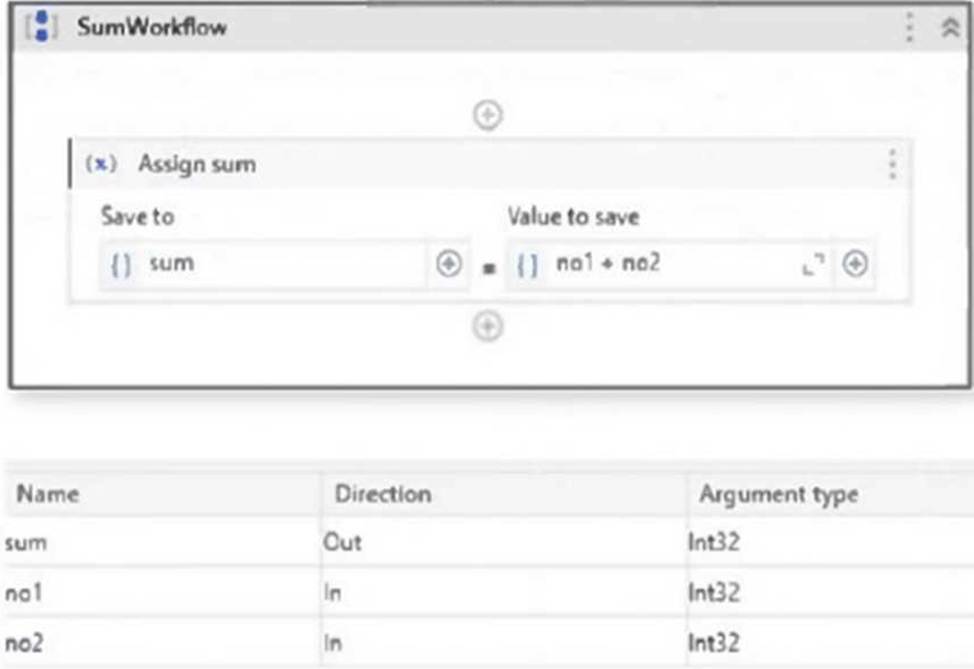
What is the appropriate verification required for testing that the SumWorkflow works as expected?
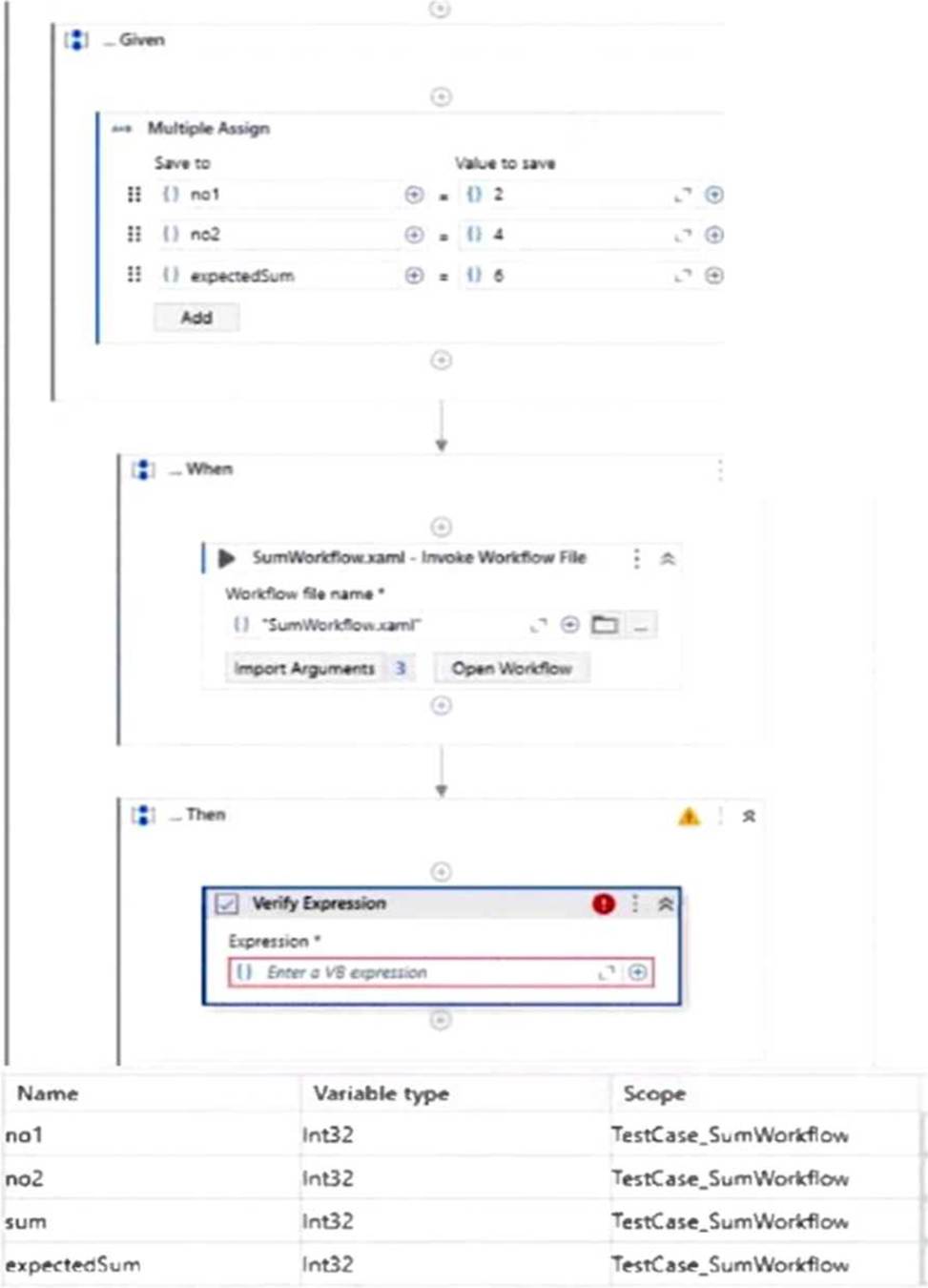
- A . "sum = expectedSum"
- B . sum
- C . no1 + no2 = expectedSum
- D . sum.Equals(expectedSum)
A
Explanation:
The correct VB expression to verify that the SumWorkflow executed correctly is sum = expectedSum. This compares the actual output (sum) with the expected value (expectedSum) set earlier in the test case. If they match, the workflow performs as intended.
When should a Test Data File in data-driven testing be used?
- A . A Test Data File is useful when application testing requires working with large data sets to verify workflow execution and cover edge cases.
- B . A Test Data File should only be used when there is a need to perform tests using multiple argument types for a decision tree.
- C . A Test Data File is used only when there is a need to perform runtime data fetching from the first entry in the entity in UiPath Data Service.
- D . A Test Data File is only used when there is a need to execute test cases containing data variations from UiPath Data Service in Orchestrator.
A
Explanation:
A Test Data File is best used in data-driven testing when the test cases need to handle large data sets
to validate workflow behavior under different conditions and cover edge cases. It allows structured input variation without relying on external sources.
One requirement of the organization’s testing strategy is to attach a screenshot to a test case execution whenever it fails.
How can this be achieved?
- A . Use the Attach Document activity and set its AttachmentType property to Screenshot.
- B . Surround the Verity activity in a Try Catch and use a Take Screenshot activity in the Catch block.
- C . Use a Take Screenshot activity and set its AttachToExecution property to True.
- D . Use one of the Verify activities and set its TakeScreenshotlfFailed property to True.
D
Explanation:
To automatically attach a screenshot upon test failure, use one of the Verify activities and set the TakeScreenshotIfFailed property to True. This ensures that a screenshot is captured and attached only when the verification fails.
One requirement of the organization’s testing strategy is to attach a screenshot to a test case execution whenever it fails.
How can this be achieved?
- A . Use the Attach Document activity and set its AttachmentType property to Screenshot.
- B . Surround the Verity activity in a Try Catch and use a Take Screenshot activity in the Catch block.
- C . Use a Take Screenshot activity and set its AttachToExecution property to True.
- D . Use one of the Verify activities and set its TakeScreenshotlfFailed property to True.
D
Explanation:
To automatically attach a screenshot upon test failure, use one of the Verify activities and set the TakeScreenshotIfFailed property to True. This ensures that a screenshot is captured and attached only when the verification fails.
Which of the custom field actions can be used in order to change the default value of a custom field within an object in UiPath Test Manager?
- A . Rename
- B . Change Default Value
- C . Edit
- D . Delete and Create
B
Explanation:
In UiPath Test Manager, the action "Change Default Value" is specifically used to modify the default value of a custom field within an object, such as a requirement, test case, or defect. This helps maintain consistent metadata across projects.
Objects of which data source for the data variation can be found inside Studio in the Project tab, under Entities?
- A . Test Data Queue
- B . Data Service
- C . File
- D . Auto Generate
B
Explanation:
In UiPath Studio, Data Service objects for data variations can be found inside the Project tab, under Entities. This allows you to define and manage structured data within the project for data-driven testing.
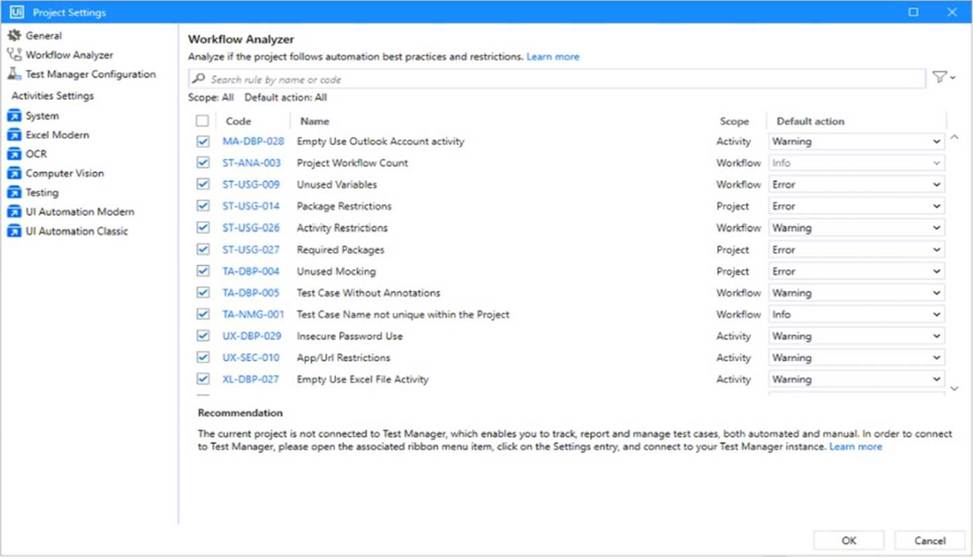
Considering the provided configuration for Workflow Analyzer Settings, how many testing rules applied will be classified as an "Error"?
- A . 0
- B . 1
- C . 3
- D . 4
D
Explanation:
Based on the image, there are 4 Workflow Analyzer rules with the "Error" default action set:
ST-USG-009 C Unused Variables
ST-USG-014 C Package Restrictions
ST-USG-027 C Required Packages
TA-DBP-004 C Unused Mocking
These are all marked with "Error" in the Default action column.
What happens to the arguments when creating a test case from a workflow?
- A . Arguments from the workflow need to be manually imported into the test case.
- B . Arguments from the workflow are transformed into variables in the test case.
- C . Arguments from the workflow are automatically imported into the test case.
- D . Arguments from the workflow are deleted and must be redefined.
C
Explanation:
When creating a test case from a workflow in UiPath Studio, the arguments from the workflow are automatically imported into the test case. This allows the test case to simulate the input/output behavior of the original workflow without needing to redefine the arguments.