
UiPath UiPath-ADAv1 Practice Exams
Last updated on Oct 22,2026- Exam Code: UiPath-ADAv1
- Exam Name: UiPath Automation Developer Associate v1 Exam
- Certification Provider: UiPath
- Latest update: Oct 22,2026
What differentiates a List type from an Array type?
- A . List items can be accessed through an index but array items cannot.
- B . An array has a fixed, predefined number of elements while a list has a dynamic number of elements.
- C . A list can hold items of multiple data types at the same time while arrays cannot.
- D . Lists provide the option of looping through data while arrays do not.
B
Explanation:
Both list and arrays are a collection type of variables that can store multiple values of the same data type. The main difference between them is if their size is fixed or not. Array has a fixed size, meaning that if you create an array containing 3 elements, you can’t add more than 3 or reduce its size. List has a dynamic size, meaning that you can add or remove elements as you need. List also provides some methods that can be invoked to perform operations on the elements, such as sorting, reversing, finding, etc. Array does not have such methods, but it is more optimized for arithmetic computations.
References: Differences between a list and an array – UiPath Community Forum Array manipulation with UiPath (List, Dictionary, Array) – F-PenIT blog List Collection ArrayList – Activities – UiPath Community Forum
A developer needs to create a repetitive process in the REFramework. Following the best practices, which action(s) should be performed to defend against potential robot crashes such as "out of memory"?
- A . Build a script that compares current CPU usage values to a threshold and clears data as needed.
- B . After every transaction, clear the transaction data, close the applications, and re-open the applications.
- C . All "Invoke Workflow File" activities from the Main.xaml file should be marked with the Isolated option.
- D . Add a "Clear Collection" activity at the beginning of the Process.xaml workflow.
B
Explanation:
The REFramework is a template that helps developers create robust and reliable automation processes. It follows the best practices of error handling, logging, and retry mechanisms. One of the best practices is to clear the transaction data, close the applications, and re-open the applications after every transaction. This helps to avoid potential robot crashes such as “out of memory” by freeing up the memory and resources used by the applications. It also ensures that the applications are in a consistent state for the next transaction.
Reference: REFramework documentation, REFramework best practices
A developer stored a UiPath Studio project remotely in GIT.
Which feature allows the developer to view the project on their local machine?
- A . Clone Repository
- B . Copy to GIT
- C . Disconnect
- D . GIT Init
A
Explanation:
The Clone Repository feature allows the developer to copy a remote GIT repository to a local working directory. This way, the developer can view and edit the project on their local machine. The Copy to GIT feature allows the developer to copy the current project to an existing GIT repository. The Disconnect feature allows the developer to disconnect the current project from the GIT repository. The GIT Init feature allows the developer to add the current project to a local GIT repository.
References: Managing Projects with GIT
What is the purpose of the Interval filter in the Orchestrator’s Monitoring page?
- A . It allows you to control the granularity of the displayed data and check the health of your system in either the last day or the last hour.
- B . It allows you to allocate licenses per machine for the displayed data.
- C . It allows you to choose between background and foreground processes for the displayed data.
- D . It enables you to sort the displayed data based on job priorities.
A
Explanation:
The Interval filter in the Orchestrator’s Monitoring page lets you select the time range for the data that is displayed on the dashboard1. You can choose between Last Day and Last Hour options to view the performance and health indicators of your system at different levels of detail2.
Reference: Monitoring documentation, Interval Filter section
UiPath Orchestrator Monitoring video, 2:10 – 2:30
A developer used a dictionary to store employee ID numbers as the key with associated employee surnames as the value.
What is the benefit of using a dictionary?
- A . Dictionaries can have repeated keys
- B . Dictionaries must have unique values
- C . Dictionaries can be searched by keys or values
- D . Dictionary keys and values can be of different data types
D
Explanation:
The benefit of using a dictionary is that dictionary keys and values can be of different data types. A dictionary is a collection of key-value pairs, where each key is associated with a value. The key and the value can be of any data type, such as String, Integer, Boolean, Object, etc. This allows for more flexibility and versatility in storing and retrieving data3. For example, a dictionary can store employee ID numbers as the key with associated employee surnames as the value, where the key is of type Integer and the value is of type String. To access the value of a specific key, the syntax dictionaryName(key) can be used4.
References: Dictionaries and How to use dictionary? from UiPath documentation and forum.
A developer sets a breakpoint on one of the activities in the workflow. When deploying the code to production, the developer published the package and created a process in UiPath Orchestrator.
At the time the process is executed in unattended mode from a UiPath Robot, what is the expected behavior?
- A . Robot will crash and execution will stop because of the breakpoint.
- B . When encountering the breakpoint the execution will pause until it is resumed manually.
- C . Execution will proceed without taking into consideration the breakpoint.
- D . Execution will throw an exception because of the breakpoint.
C
Explanation:
When a UiPath process is executed in unattended mode from a UiPath Robot, breakpoints set during the development phase do not affect the execution. The Robot ignores any breakpoints that have been left in the workflow, and execution proceeds as if the breakpoints were not there. Therefore, the correct answer is C. Breakpoints are meant for debugging purposes during development and do not cause crashes, pauses, or exceptions during unattended execution in a production environment.
Reference: UiPath Orchestrator Guide: About Processes
What is the most appropriate way to convert a designed process into a template after completing the project?
- A . Use the "Save As" option to save the project as a new file type and manually change the file extension to create a template.
- B . Use the Export as Template option from the UiPath Studio.
- C . Create a new Template and move the activities from the existing process to the new Template.
- D . There is no way the developer can do this.
B
Explanation:
In UiPath Studio, to convert a designed process into a template, you should use the "Export as Template" option. This feature packages the project in such a way that it can be reused as a starting point for other automation projects. Therefore, the correct answer is B.
Reference: UiPath Studio Guide: Project Templates
When using Invoke Workflow File, in the import arguments panel, what types of expressions can be used in the value column?
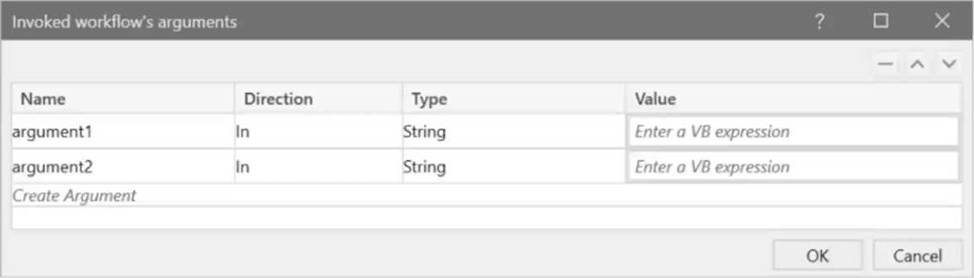
- A . In arguments can be given Hard-coded values or variables. In/out and out arguments can only be given variables.
- B . In arguments can only be given Hard-coded values. In/out and out arguments can only be given variables.
- C . In/out and out arguments can be given Hard-coded values or variables. In arguments can only be given variables.
- D . Only variables can be configured for all types of arguments.
A
Explanation:
In the Import Arguments panel of the Invoke Workflow File activity, in arguments can be given either hard-coded values or variables. In contrast, in/out and out arguments can only be given variables. This is because in/out and out arguments are designed to return data, so they need to be stored in variables to capture any changes made during the invoked workflow execution.
Reference: UiPath Studio Guide: Invoking Workflows and Managing Arguments
What is the purpose of Breakpoints when debugging a project in UiPath Studio?
- A . To purposely pause the debugging process on an activity which may trigger execution issues.
- B . To automatically restart the debugging process when an error is encountered.
- C . To measure the execution time of each activity in the workflow.
- D . To export debugging results in different formats.
A
Explanation:
Breakpoints are used in debugging to pause the execution of the project at specific activities, which may potentially cause execution issues, making option A correct. This allows developers to inspect the state of the application at that point, aiding in the identification and resolution of issues.
Options B, C, and D do not accurately describe the purpose of breakpoints in the debugging process.
Reference: UiPath Documentation: Debugging
Which option from the UiPath Studio backstage view prohibits debugging projects with Workflow Analyzer errors?
- A . Enforce Analyzer before remote execution.
- B . Enforce Analyzer before Push/Check-in.
- C . Enforce Analyzer before Publish,
- D . Enforce Analyzer before Run.
D
Explanation:
In UiPath Studio, the option that prohibits debugging projects with Workflow Analyzer errors is "Enforce Analyzer before Run." When this option is enabled in the backstage view, the Workflow Analyzer runs before the execution of the project, and if there are errors, the project will not run.
Reference: UiPath Studio Guide: Workflow Analyzer