
UiPath UiPath-ADAv1 Practice Exams
Last updated on Oct 21,2026- Exam Code: UiPath-ADAv1
- Exam Name: UiPath Automation Developer Associate v1 Exam
- Certification Provider: UiPath
- Latest update: Oct 21,2026
When installing UiPath Studio, which of the following actions require administrator privileges?
- A . Administrator privileges are not required for installing UiPath Studio.
- B . Administrator privileges are required for installing the robot in both service mode and user mode.
- C . Administrator privileges are required for installing the robot in user mode.
- D . Administrator privileges are required for installing the robot in service mode.
A developer is working on an automation using the REFramework. Each transaction item represents a piece of client information. For each customer, the automated procedure must click the "Generate Shipment Details" button. This generates a table of shipment records for each customer.
What type of exception occurs when the data is not accessible, the created table displays only the header row, and processing for that client must be halted?
- A . ApplicationException
- B . BusinessRuleException
- C . SystemException
- D . NullReferenceException
B
Explanation:
A BusinessRuleException occurs when a business rule is violated or a business requirement is not met during the execution of a process. In this case, the data is not accessible and the created table displays only the header row, which means that the expected output for the client is not generated. Therefore, processing for that client must be halted and a BusinessRuleException must be thrown. (UiPath Studio – Exception Handling – UiPath Academy)
References:
Studio – Exception Handling – UiPath Documentation Portal UiPath Studio – Exception Handling – UiPath Academy REFramework in UiPath | Robotic Enterprise Framework – SOAIS
A developer has declared a variable of type String named StrVar and assigned it the value "UIPATH STUDIO".
What is the output of the expression, StrVar.lndexOf("U")?
- A . 0
- B . 1
- C . 9
- D . 10
A
Explanation:
The IndexOf method of String values returns the index of the first occurrence of a specified character or substring in a given string. The index is zero-based, meaning that the first character has the index 0, the second character has the index 1, and so on. If the character or substring is not found, the method returns -1. In this case, the expression StrVar.IndexOf(“U”) returns the index of the first occurrence of the character “U” in the string “UIPATH STUDIO”, which is 0. Therefore, the answer is A. 0.
References: String.IndexOf Method, String Variables
A developer initialized a String array, listOfMonthsByQuarter = {"1", "2", "3"}
Which data type and value are retrieved when listOfMonthsByQuarter (2) is used at runtime?
- A . Data Type Int32
Value: 2 - B . Data Type- Int32 Value: 3
- C . Data Type: String Value. 2
- D . Data Type. String: Value 3
D
Explanation:
The listOfMonthsByQuarter variable is a String array, which means it can store multiple values of type String. Each value in the array has an index, which is a number that indicates its position in the array. The index starts from 0, so the first value has index 0, the second value has index 1, and so on. To access a specific value in the array, we can use the syntax arrayName(index).
For example, listOfMonthsByQuarter (0) will return the first value in the array, which is “1”. Similarly, listOfMonthsByQuarter (2) will return the third value in the array, which is “3”. Therefore, the data type of listOfMonthsByQuarter (2) is String, and the value is “3”.
References: Arrays and Variables from UiPath documentation.
Writes the results to a Microsoft Excel file
What is the total number of steps that require human interaction?
- A . One
- B . Two
- C . Three
- D . Four
A
Explanation:
The only step that requires human interaction is the first one, where the user is prompted for an input company name. The rest of the steps are performed by the automation process without any human intervention.
Which Scraping method should be used for the Get Text activity to capture hidden text from an application?
- A . Text attribute
- B . Default
- C . Native
- D . Full text
D
Explanation:
The Get Text activity is used to extract the text value of a specified UI element. It does not use any of the scraping methods by default, but it can be configured to use the Full Text method in the Properties panel. The Full Text method is able to capture hidden text from an application, as well as the entire visible text and editable text. The Full Text method uses an internal OCR engine that works with most applications and languages.
Reference:
Get Text activity documentation from UiPath
Screen Scraping Methods documentation from UiPath
Text scrapping forum post from UiPath Community
How to: Scrape the Whole Text, Including Hidden Elements from a Terminal Window article from UiPath Knowledge Base
Which two parts are included in an Anchor Base activity?
- A . Anchor and Action
- B . Anchor and Condition
- C . Anchor and Trigger Scope
- D . Anchor and Sequence
A
Explanation:
The two parts that are included in an Anchor Base activity are Anchor and Action. The Anchor Base activity is a container that searches for a UI element by using other UI elements as anchors. This should be used when a reliable selector is not available. The Anchor Base activity has two sections: Anchor and Action. The Anchor section contains an activity that identifies the anchor element, such as Find Element or Find Image. The Action section contains an activity that performs an action on the target element, such as Click or Type Into. The Anchor Base activity also has a property called AnchorPosition, which specifies the relative position of the target element to the anchor element, such as left, right, top, or bottom2. For example, if the Anchor Base activity is used to click on a button that is always to the right of a label, the Anchor section can use the Find Element activity to find the label, the Action section can use the Click activity to click on the button, and the AnchorPosition property can be set to Right3.
References: Anchor Base and How to properly use AnchorBase activity? from UiPath documentation and forum.
What is the output type returned when using a Get Test Data Queue Item activity?
- A . Dictionary
- B . Dictionary
- C . Object
- D . Queueltem
A
Explanation:
The Get Test Data Queue Item activity is used to retrieve a test data queue item from Orchestrator and store it in a variable. The output type of the variable is Dictionary, which means that it is a collection of key-value pairs that can be accessed by using the key name. For example, if the test data queue item contains the fields Name, Age, and Gender, then the output variable can be used to get the values of these fields by using expressions like outputVar(“Name”), outputVar(“Age”), or outputVar(“Gender”). (UiPath Studio documentation1).
References:1: Get Test Data Queue Item – UiPath Activities.
What are the distinctions between arguments and variables?
- A . Variables pass data between activities inside the same workflow. Arguments pass data between workflow files.
- B . Variables always have a direction. Arguments can be assigned to a variable value.
- C . Variables pass data between workflow files. Arguments pass data between activities inside the same workflow.
- D . Variables must be assigned to an argument value. Arguments always have a direction.
A
Explanation:
Variables and arguments are both used to store and pass data in UiPath, but they have some differences in their scope and direction. Variables are used to pass data between activities within the same workflow file. They have a default direction of In/Out, which means they can be read and written by any activity in the workflow. Arguments are used to pass data between different workflow files. They have a specific direction of In, Out, or In/Out, which means they can only be read or written by the workflow that invokes them or the workflow that is invoked. Variables and arguments can have different data types, such as String, Int32, Boolean, etc. Variables can be assigned to an argument value, but arguments cannot be assigned to a variable value.
References: Managing Arguments, Variables, Arguments, and Control Flow in Studio, Different between variables and arguments
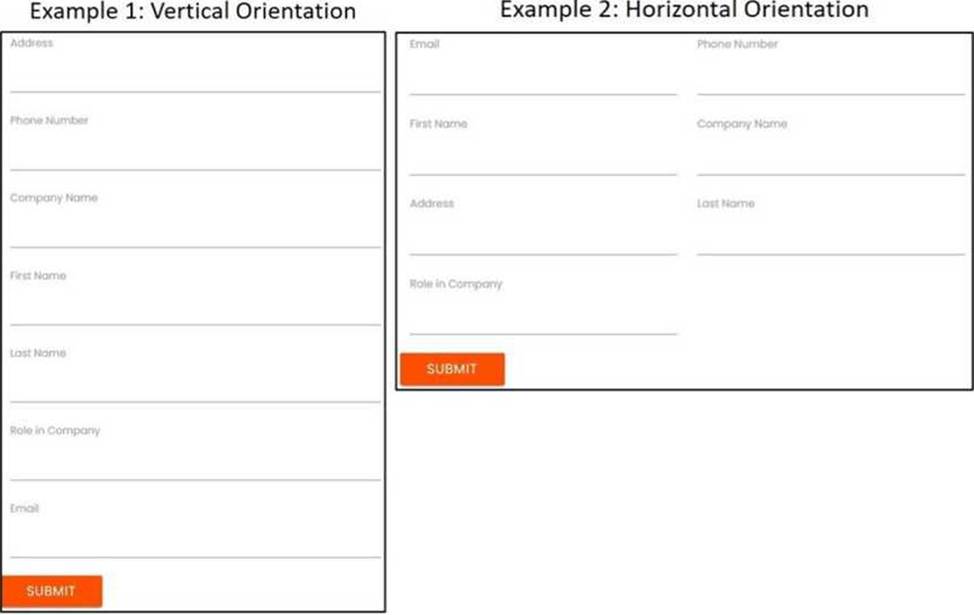
What functionality can the developer use to improve the reliability of the Type Into activity for text input fields that are impacted by changing orientations?
- A . Highlight Elements
- B . Find Element
- C . Anchor
- D . Delay Before
C
Explanation:
The developer can use the Anchor functionality to improve the reliability of the Type Into activity for text input fields that are impacted by changing orientations. This is because the Anchor functionality allows the developer to specify a particular element as a reference point for the Type Into activity.
This ensures that the activity will always be performed in the correct location, even if the orientation
of the text input fields changes.
References:
Type Into – UiPath Activities
Anchor Base – UiPath Activities
UiPath Anchor Base Tutorial & AnchorPosition Example