
UiPath UiPath-ADAv1 Practice Exams
Last updated on Oct 21,2026- Exam Code: UiPath-ADAv1
- Exam Name: UiPath Automation Developer Associate v1 Exam
- Certification Provider: UiPath
- Latest update: Oct 21,2026
Which LINQ method is used to filter data in a List or Data Table based on a condition?
- A . OrderBy
- B . Where
- C . GroupBy
- D . Select
B
Explanation:
The Where method is used to filter data in a List or Data Table based on a condition. It returns a new collection that contains only the elements that satisfy the condition12. The other methods are used for different purposes: OrderBy for sorting, GroupBy for grouping, and Select for projecting3.
Reference: Linq query to filter datatable forum post, Answer by @ppr
How to use LINQ on a DataTable in Uipath forum post, Answer by @Dave
How to use LINQ [Basic to Advanced] in UiPath event description, Introduction section
You are working on an existing project that is connected to a GIT version control system.
Which Context menu option should be used to provide local versions of files to the remote repository?
- A . Pull (rebase)
- B . Push
- C . Set As Mam
- D . Show History
B
Explanation:
The Push option is used to provide local versions of files to the remote repository in a GIT version control system. Pushing is the process of uploading local repository updates to a remote repository. By pushing changes, other users who have access to the remote repository can view and collaborate on the project1. To push changes to a remote repository, the project must be committed locally first, and then the Push option can be selected from the context menu in UiPath Studio2.
References: Pushing changes to a remote repository and Managing Projects with GIT from UiPath documentation.
You are working on an existing project that is connected to a GIT version control system.
Which Context menu option should be used to provide local versions of files to the remote repository?
- A . Pull (rebase)
- B . Push
- C . Set As Mam
- D . Show History
B
Explanation:
The Push option is used to provide local versions of files to the remote repository in a GIT version control system. Pushing is the process of uploading local repository updates to a remote repository. By pushing changes, other users who have access to the remote repository can view and collaborate on the project1. To push changes to a remote repository, the project must be committed locally first, and then the Push option can be selected from the context menu in UiPath Studio2.
References: Pushing changes to a remote repository and Managing Projects with GIT from UiPath documentation.
What variable type should the developer use to store the monetary amount read from a single cell in an Excel file, before inputting it into a field in a web application for the automation process?
- A . List
- B . Double
- C . DataRow
- D . Object
B
Explanation:
The variable type that the developer should use to store the monetary amount read from a single cell in an Excel file, before inputting it into a field in a web application for the automation process, is Double. This is because the Double variable type can store decimal numbers with high precision and a large range of values. This is suitable for storing monetary amounts that may have fractions or large digits. The Double variable type can be used with the Read Cell activity to read the value from the Excel file, and with the Type Into activity to input the value into the web application. The developer can also use the Format Value activity to format the Double variable as a currency, if needed..
References: Types of Variables – UiPath Studio
Read Cell – UiPath Activities
Type Into – UiPath Activities
Format Value – UiPath Activities
What is the main function of the UiPath Remote Runtime component?
- A . It facilitates the communication between a remote application or desktop and the dedicated UiPath extension, allowing selectors to be natively generated in UiExplorer.
- B . It enables the use of OCR and image recognition activities on remote applications or desktops, without any extensions, allowing selectors to be natively generated in UiExplorer.
- C . It introduces support for headless browser automation, so browser automation doesn’t necessarily have to rely on visual elements on screen, such as window frames.
- D . It allows automations to run on the user machine, in a different Windows session.
A
Explanation:
The UiPath Remote Runtime component is a component that enables the communication between a remote application or desktop, such as Citrix Virtual Apps, and the dedicated UiPath extension, such as the UiPath Extension for Citrix or the UiPath Extension for Windows Remote Desktop. It gathers information about the targeted UI elements of the remote applications and sends them to the corresponding extension, so that selectors can be natively generated in UIExplorer1. This way, you can create and manage tasks and exchanges between users and external applications using the authentication process of the API provider2. The UiPath Remote Runtime component is required to establish the connection between an application or desktop server and a corresponding UiPath extension installed on a client machine, without having to rely on OCR and image recognition activities3.
Reference:
Studio – About UiPath Remote Runtime – UiPath Documentation Portal.
Integration Service – Connections – UiPath Documentation Portal.
UiPath UiPath Runtime – Citrix Ready Marketplace.
Which of the following credentials stores have built in support in Orchestrator?
- A . Azure Key Vault, CyberArk CCP, HashiCorp Vault, Thycotic Secret Server, BeyondTrust, CyberArk.
- B . CyberArk CCP, Cisco, Google Credentials, CyberArk, Azure Key Vault.
- C . CyberArk CCP, Azure Key Vault, Google Credentials, Amazon Security Services.
- D . Cisco, Amazon Security Services, Google Credentials, Microsoft SCS, IBM Vault.
A
Explanation:
Credential stores are secure locations where you can store and retrieve sensitive data such as robot credentials and credential assets1. Orchestrator supports the use of multiple credential stores and has built-in integrations with the following ones2:
Azure Key Vault: A cloud-based service that provides secure storage and management of secrets, keys, and certificates3.
CyberArk CCP: A component of the CyberArk Privileged Access Security Solution that provides centralized management and distribution of credentials to applications and robots4.
HashiCorp Vault: A tool that enables secure access to secrets and encryption keys across dynamic environments5.
Thycotic Secret Server: A web-based solution that protects privileged accounts and credentials from cyberattacks and insider threats.
BeyondTrust: A platform that offers privileged access management, remote access, and vulnerability management solutions.
CyberArk: A leader in privileged access management that secures credentials, sessions, and endpoints across hybrid and cloud environments.
Therefore, option A is the correct answer, as it lists all the credential stores that have built-in support in Orchestrator. Option B is incorrect because it includes Cisco and Google Credentials, which are not credential stores supported by Orchestrator. Option C is incorrect because it includes Amazon Security Services, which is not a credential store supported by Orchestrator. Option D is incorrect because it includes Cisco, Amazon Security Services, Microsoft SCS, and IBM Vault, which are not credential stores supported by Orchestrator.
In the context of the REFramework, if the OrchestratorQueueName key is present in both the Settings and Assets sheets, but an asset with the corresponding name is not present in Orchestrator, what will be the behavior at run time?
- A . The flow will throw an exception in InitAllSettings workflow.
- B . The flow will use the value from the Settings sheets since the asset is missing.
- C . An empty string will be saved for the "OrchestratorQueueName" key in the config dictionary.
- D . The "OrchestratorQueueName" key is not added to the config dictionary and the flow will throw in Get Transaction Data workflow.
B
Explanation:
The REFramework template is a robust and scalable framework for building RPA projects1. It uses a config file to store the settings and constants that are used throughout the project2. The config file has two sheets: Settings and Assets. The Settings sheet contains the key-value pairs that are read by the InitAllSettings workflow and stored in the config dictionary. The Assets sheet contains the names of the assets that are stored in Orchestrator and need to be retrieved by the InitAllApplications workflow. The OrchestratorQueueName key is used to specify the name of the queue that is used to store the transaction items for the process. If the OrchestratorQueueName key is present in both the Settings and Assets sheets, but an asset with the corresponding name is not present in Orchestrator, the behavior at run time will be as follows:
The InitAllSettings workflow will read the value of the OrchestratorQueueName key from the Settings sheet and store it in the config dictionary.
The InitAllApplications workflow will try to retrieve the asset with the name OrchestratorQueueName from Orchestrator using the Get Asset activity. Since the asset does not exist, the activity will throw an exception.
The exception will be caught by a Try Catch block and handled by a Log Message activity with level Warning and message “Asset not found: OrchestratorQueueName”.
The flow will continue with the next asset in the Assets sheet or move to the next state if there are no more assets.
The flow will use the value of the OrchestratorQueueName key from the config dictionary whenever it needs to access or update the queue.
Therefore, option B is correct. Option A is incorrect because the exception is thrown in InitAllApplications workflow, not InitAllSettings workflow. Option C is incorrect because an empty string is not saved for the OrchestratorQueueName key in the config dictionary. Option D is incorrect because the OrchestratorQueueName key is added to the config dictionary and the flow does not throw in Get Transaction Data workflow.
Reference:
How to Use Enhanced REFramework to Implement UiPath Projects article from UiPath
Config.xlsx documentation from UiPath
[InitAllSettings.xaml] documentation from UiPath
[InitAllApplications.xaml] documentation from UiPath
[TransactionItem Variable] documentation from UiPath
In a UiPath State Machine workflow, which section of State activity is used to specify conditional/triggers logic and multiple outgoing transitions in a state machine?
- A . Triggers
- B . Entry
- C . Exit
- D . Transitions
A
Explanation:
The Triggers section of the State activity is used to specify the conditional or trigger logic and multiple outgoing transitions in a state machine. A trigger is a condition that evaluates to true or false and determines whether the state machine should move from one state to another. A transition is a link between two states that defines the direction of the state machine flow. You can add multiple triggers and transitions to a state and configure their properties, such as priority, display name, and action. (UiPath Studio documentation1).
References:1: State – UiPath Activities.
A Credential asset is created by a developer in Orchestrator as seen in the below image:
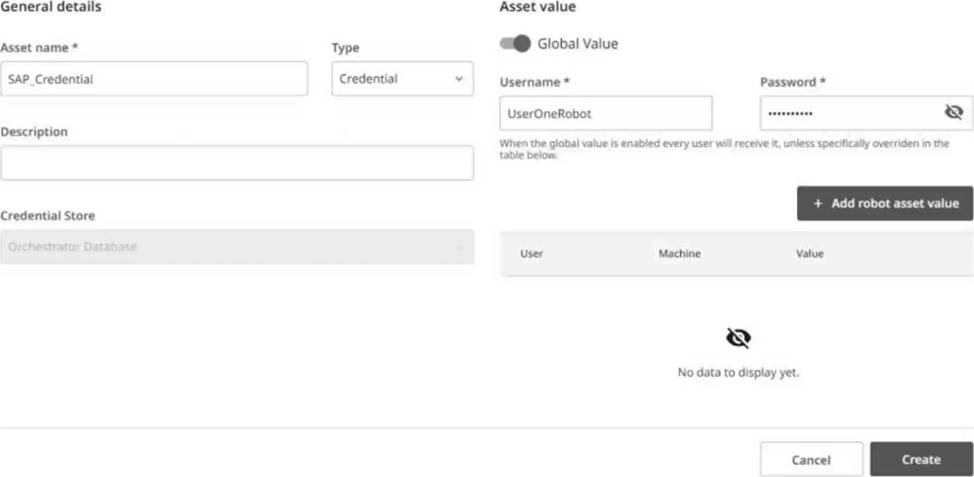
After the asset is created, if you change the Username value, what field must also be changed?
- A . Asset Name
- B . Description
- C . Type
- D . Password
D
Explanation:
In Orchestrator, when a Credential asset is created and the username value is changed, the password must also be changed to ensure that the credential set remains valid. The username and password are linked as they represent the credential pair used for authentication. Changing one without the other would result in mismatched credentials that cannot be used for logging in to the system that these credentials are associated with. Therefore, the correct answer is D.
Reference: UiPath Orchestrator Guide: Managing Assets in Orchestrator
A developer is reviewing an existing workflow in UiPath Studio Based on best practices, what should be used to view the available versions for activities used in the workflow?
- A . Workflow Analyzer
- B . Project Dependencies
- C . Project Settings
- D . Ul Explorer
B
Explanation:
To view the available versions for activities used in the workflow, the Project Dependencies option should be used. The Project Dependencies option is located in the Project panel in UiPath Studio. It shows the list of all the packages and activities that are used in the current project, along with their current versions and available updates. The Project Dependencies option also allows the developer to install, update, or remove packages and activities, as well as view their details and documentation2. By using the Project Dependencies option, the developer can ensure that the project is using the latest and compatible versions of the activities, and avoid any errors or conflicts that might arise from outdated or missing packages3.
References: Managing Dependencies and Project Dependencies Mass Update from UiPath documentation and forum.