
UiPath UiPath-ADAv1 Practice Exams
Last updated on Oct 21,2026- Exam Code: UiPath-ADAv1
- Exam Name: UiPath Automation Developer Associate v1 Exam
- Certification Provider: UiPath
- Latest update: Oct 21,2026
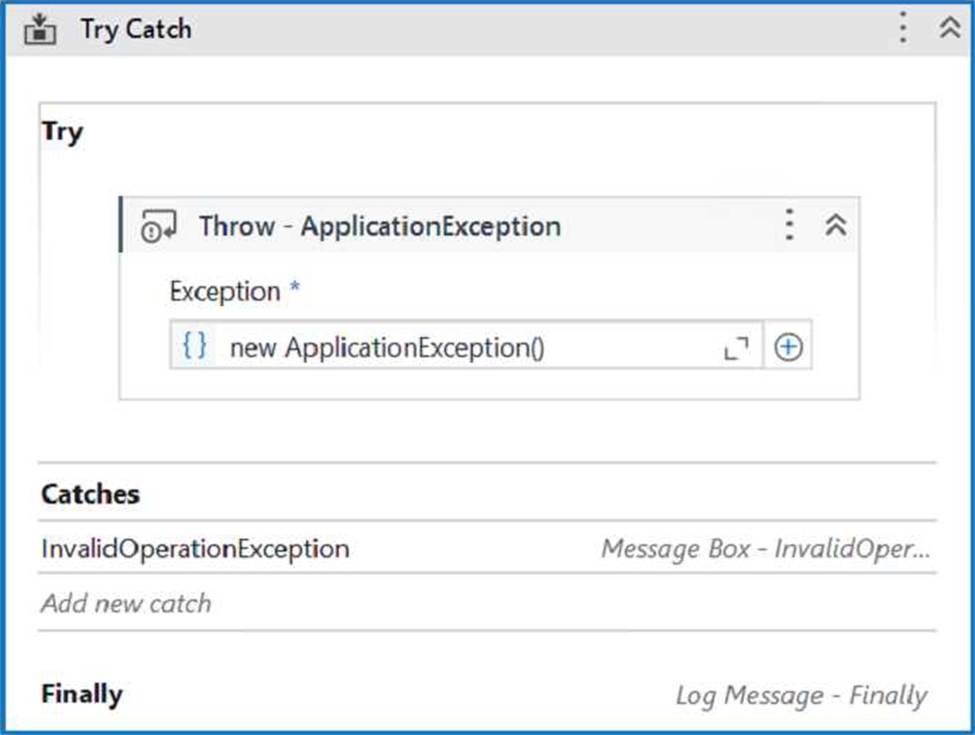
When encountering an ApplicationException, what occurs if the developer chooses InvalidOperationException as the exception handler within the Catches section of the Try Catch activity?
- A . The Finally block is executed and the Catches section catches the exception.
- B . A runtime error occurs and the Finally block is not executed.
- C . No exceptions are happening and the workflow continues to execute.
- D . No exception is thrown and the Finally block executes.
B
Explanation:
The Try Catch activity is used to handle errors and exceptions that may occur during the execution of a workflow1. It has three sections: Try, Catches, and Finally1.
The Try section contains the activities that may throw an exception or an error. If an exception or an error occurs, the execution of the Try section is stopped and the control is passed to the Catches section1.
The Catches section contains one or more exception handlers that specify what type of exception or error to catch and what actions to perform when it is caught. The exception handlers are executed in order, from top to bottom, until a matching exception or error is found. If no matching exception or error is found, the execution of the workflow is stopped and a runtime error is thrown1.
The Finally section contains the activities that are always executed at the end of the Try Catch activity, regardless of whether an exception or error occurred or not. The Finally section is used to perform cleanup actions, such as closing applications, releasing resources, or logging messages1. In your case, you have configured the properties for the Try Catch activity as follows: The Try section contains a Throw activity with an ApplicationException.
The Catches section contains an InvalidOperationException with a Message Box activity and a Log
Message activity.
The Finally section is empty.
This means that the Try Catch activity will throw an ApplicationException in the Try section and look for a matching exception handler in the Catches section. However, since you have chosen InvalidOperationException as the exception handler, which does not match the ApplicationException, the execution of the workflow will be stopped and a runtime error will occur. The Finally section will not be executed.
Therefore, option B is correct.
Reference: Try Catch – UiPath Documentation Portal.
What are the three main components of UiPath Integration Service?
- A . Connectors, API Tokens, Triggers.
- B . Connectors, Connections, Orchestrator.
- C . Connectors, Connections, Triggers.
- D . Activities, Connections, Triggers.
C
Explanation:
UiPath Integration Service is a feature that enables you to integrate UI and API automation in a unified way.
The three main components of UiPath Integration Service are:
Connectors: These are pre-built or custom components that provide access to various applications or systems through their APIs. You can use connectors to perform actions or retrieve data from different
sources, such as Salesforce, Slack, Google Sheets, etc. (UiPath Integration Service documentation1) Connections: These are configurations that store the authentication and connection details for each connector. You can create and manage connections in the UiPath Automation Cloud and share them across different folders and processes. (UiPath Integration Service documentation2)
Triggers: These are rules that define when and how to start a process in Orchestrator based on events from connectors. You can configure triggers to react to data changes, insertions, deletions, or custom events in the connected applications or systems. (UiPath Integration Service documentation3).
References:
1: Integration Service – Connectors – UiPath Documentation Portal.
2: Integration Service – Connections – UiPath Documentation Portal.
3: Integration Service – Triggers – UiPath Documentation Portal.
Which of the following demonstrates the correct syntax for using the Vb.Net "If" Operator?
- A . If(condition1, valuelfTrue, valuelfFalse)
- B . If(condition1, valuelfTrue) Elself(valuelfFalse)
- C . If condition1 Then valuelfTrue Elself valuelfFalse
- D . valuelfTrue If condition1 Else valuelfFalse
In which phase of the Implementation Methodology is the Process Definition Document (PDD) created?
- A . User Acceptance Testing
- B . Solution Design
- C . Deployment & Hypercare
- D . Process Analysis
D
Explanation:
The Process Definition Document (PDD) is a document that describes the business process to be automated in detail, including the inputs, outputs, steps, exceptions, and rules. The PDD is created in the Process Analysis phase of the Implementation Methodology, which is the first phase of the automation project lifecycle. The Process Analysis phase involves identifying and selecting the processes that are suitable for automation, documenting the current state of the processes (As-Is), and defining the expected outcomes and benefits of the automation (To-Be). The PDD is the main deliverable of this phase, and it serves as the basis for the Solution Design phase, where the technical specifications and architecture of the automation solution are defined..
References: Implementation Methodology – UiPath Documentation Portal Process Definition Document (PDD) – UiPath Documentation Portal Process Analysis – UiPath Documentation Portal
What is the purpose of the Capture All Elements feature in Object Repository?
- A . To capture the selected elements of an application from multiple screens simultaneously using the Computer Vision technology.
- B . To capture all the available elements of an application using the Computer Vision technology.
- C . To capture the selected elements of an application using the Computer Vision technology.
- D . To capture all elements of an application from multiple screens simultaneously using the Computer Vision technology.
D
Explanation:
The Capture All Elements feature is a tool that lives inside Capture Elements from Object Repository, and it extracts all the elements of an application from multiple screens simultaneously using the Computer Vision technology. It adds them to your Object Repository library, so that you can use them in your automation projects without having to manually add them one by one1. This feature is available in Studio and Studio Pro, but not in StudioX2.
Reference: UiPath Community 2021.10 Stable Release – UIAutomation.
Capture Elements for Object Repository – UiPath Community Forum.
Starting with UiPath Studio version 2022.10, what happens to dependencies that lack Windows compatibility when they are converted in a project?
- A . They are replaced with compatible alternatives.
- B . They are removed from the project.
- C . They are marked as unresolved.
- D . They are automatically resolved.
C
Explanation:
Starting with UiPath Studio version 2022.10, the default project type is Windows, which uses .NET 6 or .NET 5 with Windows support1. If a project contains dependencies that lack Windows compatibility, such as custom activities or libraries, they are marked as unresolved when the project is converted to Windows2. The developer needs to manually resolve them by finding compatible alternatives or updating the code3.
Reference: Studio – Hardware and Software Requirements documentation, Project Compatibility section Getting error: No compatible version with windows projects forum post, Question by @RajeshT Uipath New Version Features – 2022.10.3 blog post, New Default Project Compatibility = Windows section
You want to identify a selector in a Type into activity that will be used for a text input field within an application.
In order for the Type into activity to execute as expected, how many elements in an application can a selector be valid for at runtime?
- A . 1 element
- B . 2 elements
- C . 3 elements
- D . 5 elements
A
Explanation:
A selector is a string of characters (XML fragment) that identifies a UI element uniquely within the UI hierarchy. A selector must be valid for only one element in an application, otherwise the Type into activity will not be able to find the correct target for typing the text. If a selector is valid for more than one element, it is considered ambiguous and unreliable. Therefore, the answer is A. 1 element.
References: Selectors, Type Into
During the debugging process, a developer paused the execution. To alter the characteristics of the ongoing flow and change the values of variables within the existing scope.
which panel of the UiPath interface is recommended to be accessed?
- A . Variables Panel
- B . Locals Panel
- C . Information Window
- D . Execution Flow Panel
B
Explanation:
During debugging, when the execution is paused, the "Locals" panel in UiPath Studio is the place to go to alter the characteristics of the ongoing flow and change the values of variables within the existing scope. The Locals panel shows the current state of all variables and arguments in the current scope and allows their values to be changed on-the-fly.
Reference: UiPath Studio Guide: Debugging
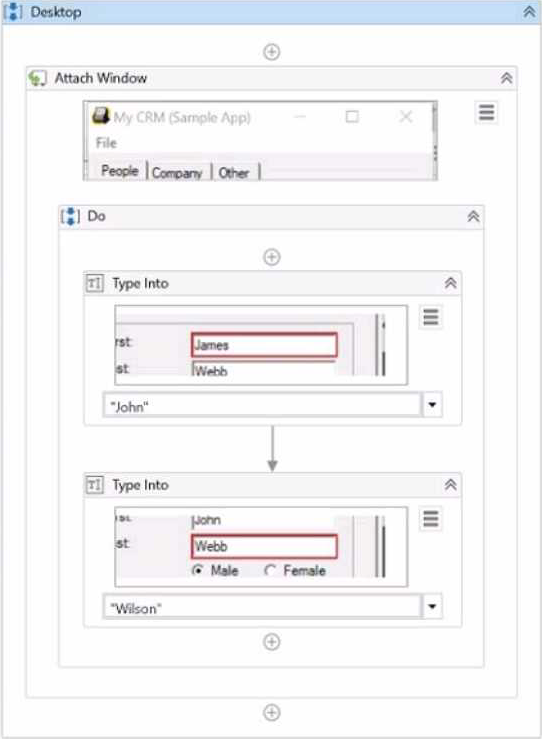
What represents a sequence that contains an activity with a partial selector?
A)
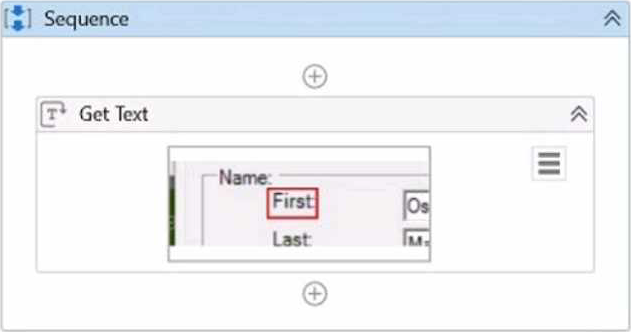
B)
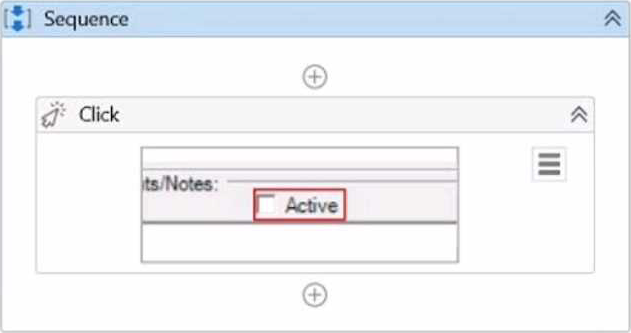
C)
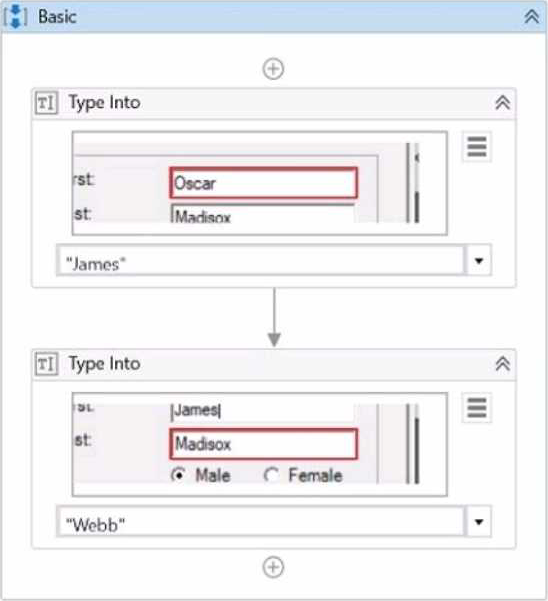
D)
- A . Option A
- B . Option B
- C . Option C
- D . Option D
B
Explanation:
A partial selector is a selector that does not contain the information about the top-level window. A partial selector is usually generated when a UI Automation activity is included in a container activity, such as Attach Browser or Attach Window, that has a full selector of the outer window. This way, the UI Automation activity can use the partial selector relative to the container, instead of the full selector from the root. A partial selector is indicated by the icon in the Properties panel of the UI Automation activity. In this question, the sequence that contains an activity with a partial selector is Option B, where the Click activity has the partial selector icon and is enclosed in an Attach Window activity. The other options have activities with full selectors, indicated by the icon. Therefore, the answer is B. Option B.
References: Full Versus Partial Selectors, Selectors
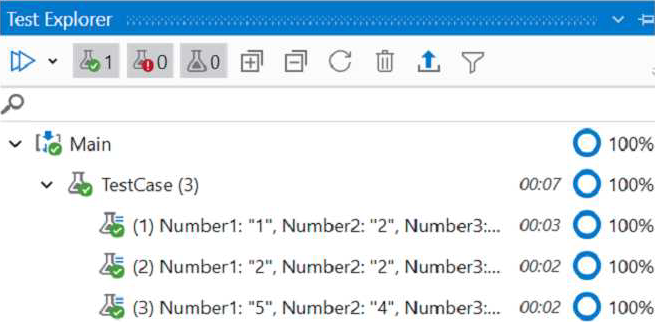
What do the percentages from the Test Explorer panel represent?
- A . Correctness of the code percent.
- B . Passing percent.
- C . Coverage percent.
- D . Percent of test data run.
C
Explanation:
The percentages from the Test Explorer panel represent the coverage of the test cases, which is the ratio of the number of activities that are executed by the test cases to the total number of activities in the project. The higher the coverage, the more thorough the testing is. The coverage percentage is calculated for each test case, test set, and the entire project. You can view the coverage details in the Coverage sub-panel of the Test Explorer1.
Reference: Test Explorer documentation from UiPath