
UiPath UiPath-ADAv1 Practice Exams
Last updated on Oct 22,2026- Exam Code: UiPath-ADAv1
- Exam Name: UiPath Automation Developer Associate v1 Exam
- Certification Provider: UiPath
- Latest update: Oct 22,2026
A developer needs to use the REFramework to automate a business process that involves processing transactions within an Excel table. Each transaction in the table should follow the same steps for processing and queues cannot be used as there is no Orchestrator in the environment.
Which variable type is best suited for Transactionltem in this scenario?
- A . System.Data.DataRow
- B . UiPath.Core.Queueltem
- C . System.Data. DataTable
- D . System.Data.DataRow[]
A
Explanation:
The REFramework template is a robust and scalable framework for building RPA projects1. It uses a state machine to handle the different stages of the automation process2. One of the states is the Process Transaction state, where the main actions are performed on each transaction item3. A transaction item can be a queue item from Orchestrator, a data row from an Excel file, or any other type of data that needs to be processed. If the transactions are stored in an Excel table, the best variable type for TransactionItem is System.Data.DataRow, as it represents a single row of data in a DataTable. A DataTable is a collection of rows and columns that can be read from or written to an Excel file using the Excel activities. Therefore, option A is correct.
Option B is incorrect because UiPath.Core.QueueItem is a variable type that represents an item from a queue in Orchestrator. If there is no Orchestrator in the environment, queues cannot be used and QueueItem is not applicable. Option C is incorrect because System.Data.DataTable is a variable type that represents a table of data with rows and columns. A single transaction item cannot be a whole table, but only a row from the table. Option D is incorrect because System.Data.DataRow[] is a variable type that represents an array of data rows. An array is a collection of items of the same type that can be accessed by an index. A single transaction item cannot be an array, but only an element from the array.
Reference:
The UiPath ReFramework documentation from UiPath
State Machines documentation from UiPath
Process.xaml documentation from UiPath
[TransactionItem Variable] documentation from UiPath
[DataRow Class] documentation from Microsoft
[Excel Activities] documentation from UiPath
[QueueItem Class] documentation from UiPath
[DataRow[] Structure] documentation from Microsoft
[Array Class] documentation from Microsoft
A developer has defined an Int32 variable called IntVar The developer has written the following expression in a Log Message activity.
Convert. ToBoolean(lntVar)
If IntVar = 0, what is displayed in the Output panel after the execution of the Log Message activity?
- A . The value True is displayed
- B . A System ArgumentNullException is displayed
- C . A System.InvalidCastException is displayed
- D . The value False is displayed
D
Explanation:
The Convert.ToBoolean method converts a specified value to a Boolean value, which can be either True or False. The method can accept different types of values, such as numbers, strings, objects, etc. However, the conversion rules depend on the type of the value. For numbers, the conversion rule is as follows1:
If the value is zero, the method returns False.
If the value is non-zero, the method returns True.
Therefore, if the IntVar variable is an Int32 variable with the value 0, the expression Convert.ToBoolean(IntVar) will return False. The Log Message activity will display the value False in the Output panel after the execution.
References: Convert.ToBoolean Method from UiPath documentation.
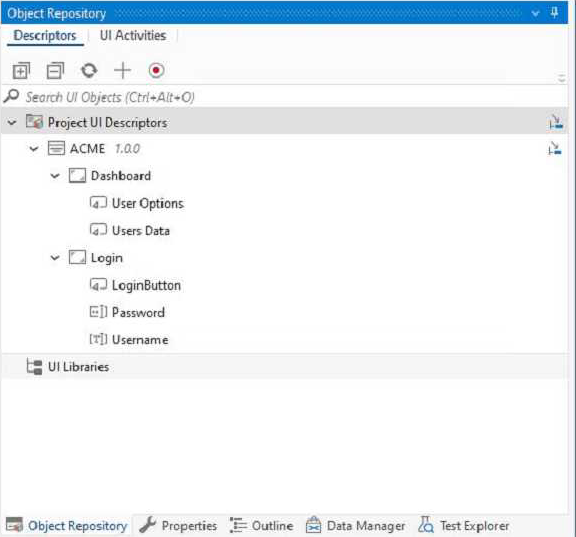
Which of the following options is correct regarding the below Object Repository tree structure?
- A . One Screen
Two Applications
Five UI Elements - B . One Application
Two UI Elements
Five Screens - C . One Library
One Application
Two Screens
Five UI Elements - D . One Application
Two Screens
Five UI Elements
D
Explanation:
The Object Repository tree structure shows one application with two screens and five UI elements. The application is the top-level node, the screens are the second-level nodes, and the UI elements are the third-level nodes. The UI elements have properties, selectors, and images that define them. https://docs.uipath.com/studio/docs/about-the-object-repository
How does UiPath Integration Service benefit automation developers?
- A . By standardizing authorization and authentication, managing API connections, and enabling faster integration into SaaS platforms.
- B . By offering a comprehensive, unified platform dedicated solely to UI automation, enabling seamless integration with third-party applications.
- C . By enabling developers to create custom UI elements for applications without using APIs.
- D . By substituting the requirement for API automation with UI automation capabilities, delivering a more manageable and user-friendly approach, allowing users to streamline their processes efficiently and effectively facilitating a more rapid integration process.
A
Explanation:
The UiPath Integration Service is a new feature that seamlessly combines world-class UI and API automation, allowing both capabilities to be centrally accessed within the same integration design environment12. This empowers developers to flexibly capture all their automation opportunities, even allowing them to deploy both types of integrations within a single automation12. The UiPath Integration Service also provides the following benefits for automation developers12:
By standardizing authorization and authentication, it simplifies the security protocols for connecting to different systems and applications, such as Salesforce, SAP, or Google G Suite2.
By managing API connections, it enables developers to create, modify, reuse, and share connections to multiple systems using pre-built connectors or custom connectors2.
By enabling faster integration into SaaS platforms, it allows developers to leverage server-side event triggers to start automations based on data updates, insertions, or deletions in external applications2.
Reference: Introducing UiPath Integration Service | UiPath.
New UiPath Integration Service | UiPath.
In which stage of the UiPath implementation model are the chosen processes analyzed in their AS-IS state?
- A . Process Analysis
- B . Development
- C . Kick-Off
- D . Solution Design
A
Explanation:
In the UiPath implementation model, the stage where the chosen processes are analyzed in their AS-IS state is during the "Process Analysis" phase. This phase involves understanding the current state of the processes to be automated, identifying their challenges, and determining the requirements for the automation solution.
Reference: UiPath Implementation Methodology Guide: Process Analysis
A developer created a datatable, dt_Users as shown in the following exhibit.
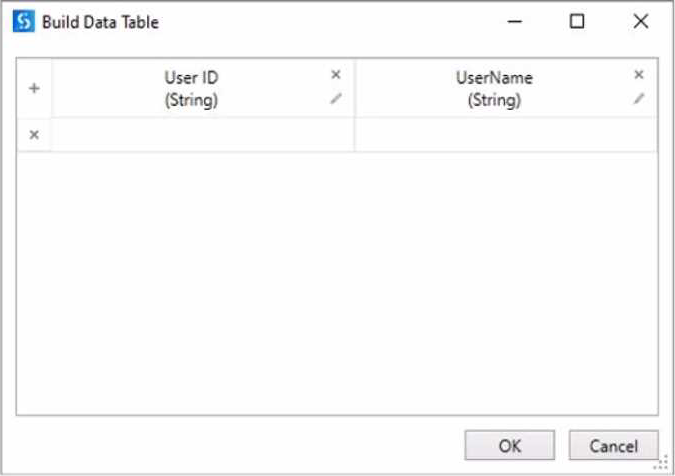
After populating the datatable variable, the developer wants to assign each User ID in dt_Users to a List<String> variable Users_List. To achieve this, the developer plans to use an Add To Collection activity inside a For Each Row activity.
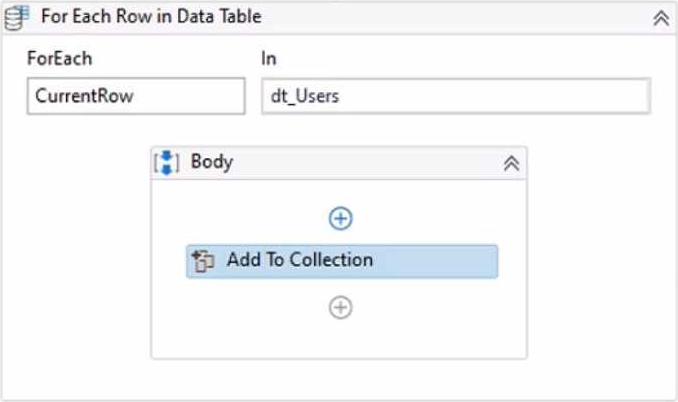
How should the Item property of the Add To Collection activity be configured?
- A . CurrentRow(0)ToStnng
- B . CurrentRow(1) ToString
- C . dtJJsers(O) ToString
- D . dt_Users(1) ToString
A
Explanation:
To assign each User ID in dt_Users to a List<String> variable Users_List, the Item property of the Add
To Collection activity should be configured as:
CurrentRow(0).ToString
This expression accesses the value of the first column (index 0) in the current row of the dt_Users datatable using the CurrentRow variable. The CurrentRow variable is a DataRow object that represents the row that is being iterated in the For Each Row activity. The expression uses the ToString method to convert the value of the User ID column to a string type. The expression returns the User ID value as a string, which is then added to the Users_List variable by the Add To Collection activity1. For example, if the dt_Users datatable has the following values:
Then the expression CurrentRow(0).ToString will return 101, 102, and 103 as the User ID values in each iteration of the For Each Row activity, and these values will be added to the Users_List variable.
References: Add To Collection and For Each Row from UiPath documentation.
When configuring the Max # of retries for the queue in Orchestrator to "1" for your process, and the queue has 5 transaction items. At runtime, the first transaction item throws a Business Rule Exception.
How does the process proceed?
- A . Transaction is not retried and the process stops.
- B . Transaction is not retried but remaining transactions continue processing.
- C . Transaction is retried only one time.
- D . Transaction is retried multiple times until processed successfully.
B
Explanation:
When a transaction item throws a Business Rule Exception, it means that the item does not meet the business requirements and cannot be processed further1. Therefore, the transaction item is marked as failed and not retried, regardless of the Max # of retries setting for the queue2. However, the process does not stop and continues with the remaining transaction items in the queue3.
Reference: Business Exception vs System Exception forum post, Answer by @loginerror
RE Framework MaxRetryNumber and Orchestrator Queue Max # Rertry, again forum post, Answer by @Arpit_Kesharwani
What is the difference between the UiPath Studio and UiPath StudioX development profiles?
- A . UiPath Studio allows the user to split the automation into smaller workflows that can be invoked, while StudioX doesn’t offer this functionality.
- B . UiPath Studio is meant for business users looking to automate tasks for themselves and their immediate teams, while StudioX is meant for Automation developers.
- C . UiPath Studio can only build unattended automations, while StudioX can only build attended automations.
- D . UiPath Studio can save values into variables for later use, while StudioX doesn’t offer this functionality.
A
Explanation:
The main difference between UiPath Studio and UiPath StudioX is their target audience and functionality. UiPath Studio is aimed at technical users and allows for complex automation development, including the ability to split automations into smaller workflows that can be invoked from within other workflows. On the other hand, StudioX is designed for non-technical business users to automate tasks without writing code, and while it does allow for simpler workflows, it does not have the same depth of functionality as Studio for modularizing workflows.
Reference: UiPath Studio Guide: Introduction to StudioX
Following UiPath best practices, which project structure is best-suited for complex processes in
UiPath Studio?
- A . State Machine
- B . Global Exception Handler
- C . Sequence
- D . Flowchart
A
Explanation:
According to the UiPath documentation and best practices, the State Machine project structure is best-suited for complex processes that involve multiple states and transitions between them12. A State Machine workflow can model the behavior of a system in terms of states, such as “Init”, “Get Transaction Data”, “Process Transaction”, and “End Process”, and transitions, such as “Success”, “Business Rule Exception”, or “System Error”. A State Machine workflow can also have entry and exit actions for each state, which are activities that execute when the system enters or exits the state, respectively1.
A State Machine project structure has several advantages over other project structures, such as
Sequence, Flowchart, or Global Exception Handler, for complex processes2:
It can handle complex logic and branching conditions more easily and clearly than a Sequence or a Flowchart, which can become cluttered and hard to maintain for large processes2.
It can handle exceptions and errors more efficiently and consistently than a Global Exception Handler, which is a separate workflow that handles all exceptions in a project. A State Machine can have dedicated states and transitions for handling different types of exceptions, such as business rule exceptions or system errors, and can also use retry mechanisms or recovery actions2.
It can improve the readability, modularity, and reusability of the workflows, by breaking down the process into smaller and coherent states that can be invoked from the main workflow. This also facilitates collaboration and testing among developers2.
Therefore, a State Machine project structure is best-suited for complex processes that involve
multiple states and transitions between them.
Reference: State Machine Workflows – Campus Management Corp..
UiPath Best Practices – Studio – UiPath Community Forum.
What is an advantage of utilizing UiPath Orchestrator queues?
- A . Capability to modify the retry count at the queue level after its creation.
- B . Capability to track the status of Queue Items.
- C . Allows several robots to handle the same Queue Item simultaneously.
- D . Guarantees each queue is exclusively processed by a single robot, by default.
B
Explanation:
One of the key advantages of using UiPath Orchestrator queues is the ability to track the status of Queue Items. This feature allows for monitoring the progress of items as they are processed by robots, including whether they are new, in progress, successful, failed, or retried, among other statuses.
Reference: UiPath Orchestrator Guide: About Queues and Transactions