
UiPath UiPath-ADAv1 Practice Exams
Last updated on Oct 22,2026- Exam Code: UiPath-ADAv1
- Exam Name: UiPath Automation Developer Associate v1 Exam
- Certification Provider: UiPath
- Latest update: Oct 22,2026
What is an advantage of utilizing UiPath Orchestrator queues?
- A . Capability to modify the retry count at the queue level after its creation.
- B . Capability to track the status of Queue Items.
- C . Allows several robots to handle the same Queue Item simultaneously.
- D . Guarantees each queue is exclusively processed by a single robot, by default.
B
Explanation:
One of the key advantages of using UiPath Orchestrator queues is the ability to track the status of Queue Items. This feature allows for monitoring the progress of items as they are processed by robots, including whether they are new, in progress, successful, failed, or retried, among other statuses.
Reference: UiPath Orchestrator Guide: About Queues and Transactions
How many Global Exception Handlers can be established per automation project, according to best practices?
- A . A single one for the entire project.
- B . There is no limit.
- C . One for each workflow in the project.
- D . One for each activity in the project.
A
Explanation:
According to best practices in UiPath, there should be a single Global Exception Handler for the entire project, making option A correct. The Global Exception Handler is designed to manage unhandled exceptions in a centralized manner, allowing for a consistent approach to error handling across the entire project.
Options B, C, and D suggest multiple handlers, which contradicts the principle of centralized exception management.
Reference: UiPath Documentation: Global Exception Handler
A developer stores value "25.11" in a String variable called "InvoiceTotal".
Which expression should be used to convert "InvoiceTotal" to a numeric format with the decimals
included?
- A . String.ToNumeric(Invoice Total)
- B . Clnt(Invoice Total)
- C . Invoice Total.IsNumeric
- D . Double.Parse(InvoiceTotal)
D
Explanation:
To convert a string variable "InvoiceTotal" to a numeric format that includes decimals, the expression Double.Parse(InvoiceTotal) should be used. This method converts the string representation of a number in a specified style and culture-specific format to its double-precision floating-point number equivalent.
Reference: Microsoft .NET Documentation: Double.Parse Method
A. At indication time, the Strict Selector has the following functionalities available:
B. Open in UiExplorer, Copy to clipboard, Show all matches.
C. Refresh, Open in UiExplorer, Copy to clipboard.
D. Accuracy, Open in UiExplorer, Copy to clipboard, Show all matches.
E. Ignore text, Copy to clipboard, Show all matches.
Explanation:
The Strict Selector option allows you to fine-tune the selector by adjusting the accuracy level and showing all the matches in the UI Explorer. The other options are not available at indication time.
Reference: Selectors in UiPath Studio course, Lesson 3: UI Explorer, Topic: Strict Selector
Uipath Associate Certification UiRPA Question Latest course, Section 2: UI Automation, Lecture:
Question 10
Upon extracting data from a website, a developer saves it in three variables: "FirstName", "LastName", and "City". The developer intends to store these three String variables in a fixed-size data structure called "UserData", to be utilized later within another workflow in the process.
Considering best practices, which data structure and assignment should be used?
- A . UserData is of type List<Object>
UserData = New List(Of Object) ({ FirstName, LastName, City }) - B . UserData is of type Object[]
UserData = {FirstName, LastName, City} - C . UserData is of type List<String>
UserData = New List(Of String) ({ FirstName, LastName, City }) - D . UserData is of type String[]
UserData = {FirstName, LastName, City}
D
Explanation:
This is the best option because it meets the requirements of storing three String variables in a fixed-size data structure. A String[] is an array of String values, which can be initialized with a fixed size and assigned with a set of values using curly braces. An array is a simple and efficient data structure that can store multiple values of the same type and access them by index. A List is another data structure that can store multiple values, but it is not fixed-size and it requires creating a new instance using the New keyword. An Object is a generic type that can store any kind of value, but it is not recommended to use it for specific types like String, as it may cause type conversion errors or performance issues.
Therefore, option D is the best choice for storing the three String variables in a fixed-size data structure called UserData.
References: Variables, Arguments, and Control Flow in Studio, Data Types in UiPath, Arrays in UiPath
A developer has published a new library from UiPath Studio to the Orchestrator feed. Another developer on the team is connected to the same Orchestrator where the library has been published.
What steps are necessary for adding this library as a dependency in a project?
- A . Open the Manage Packages Window and ensure the Orchestrator feed is enabled. In the Imports Panel in Studio, search for the package by name, and then install the package.
- B . Open the Manage Packages Window and install UiPath.System.Activities. Drag and Drop the Invoke Com Method activity and input the library name as a parameter.
- C . Open the Manage Packages Window and install UiPath.System.Activities. Drag and Drop the Invoke Method activity and input the library name as a parameter.
- D . Open the Manage Packages Window and ensure the Orchestrator feed is enabled. Search for the package by name in the Search bar and then install the package.
D
Explanation:
This is the correct way to add a library that has been published to the Orchestrator feed as a dependency in a project. The Manage Packages Window allows the developer to browse, install, update, or remove packages from various sources, such as the Orchestrator feed, the Official feed, or the Local feed. The Orchestrator feed is the default location where libraries are published from Studio, and it can be enabled or disabled by clicking on the Settings button in the Manage Packages Window. The Search bar allows the developer to find the desired package by name, version, or description. The Install button allows the developer to add the package as a dependency to the project. The other options are incorrect because they do not use the Orchestrator feed, or they do not use the correct activity to invoke the library.
References: About Libraries, Managing Dependencies, Publishing a Library, Invoking a Workflow
A developer has created a variable of type List of Strings named "UsersList", and initialized it with an empty list: "UsersList = new List(Of String)".
What is printed in the log message after the following Invoke Code is executed?
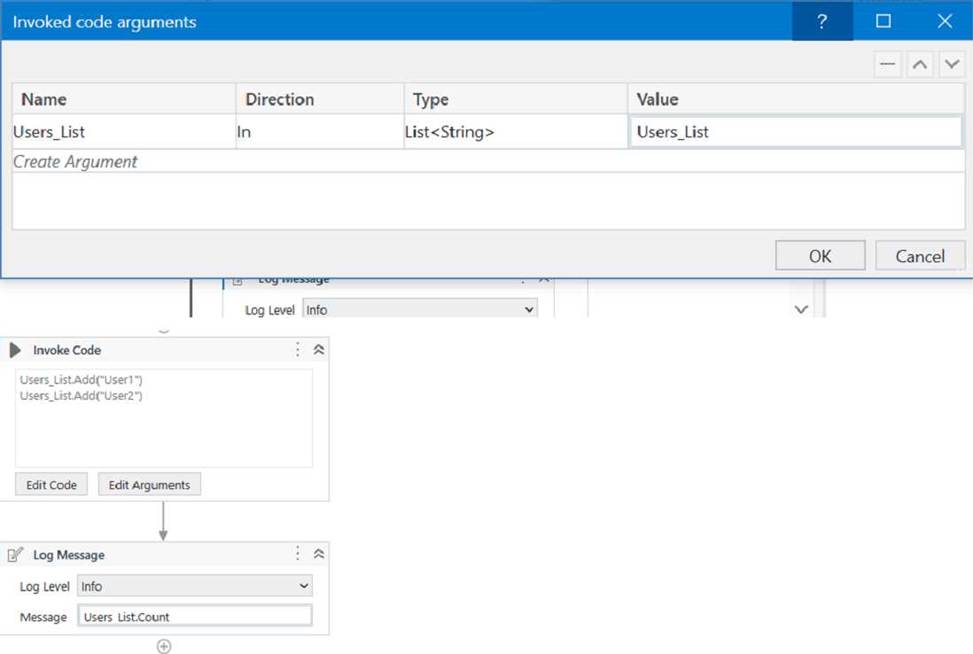
- A . 0
- B . 2
- C . Object reference not set to an instance exception is thrown
- D . System Argument Exception is thrown
A
Explanation:
The code is adding two items to the list, but since the list is initialized as an empty list, the count will be 0.
Reference: Data Manipulation with Lists and Dictionaries in Studio course, Lesson 2: Lists, Topic: Creating Lists How to initiate List<String[]>? forum post, Answer by @VishalS
Which action can be performed from UiPath Assistant?
- A . Set reminders for processes
- B . Set text assets for processes
- C . Set credential assets for processes
- D . Set queues for processes
A
Explanation:
The action that can be performed from UiPath Assistant is setting reminders for processes. UiPath Assistant is a desktop application that allows users to view, manage, and run processes that are published from UiPath Studio or Orchestrator. UiPath Assistant also enables users to set reminders for processes that they want to execute at a specific time or date. Reminders can be added, edited, or deleted from the Reminders widget in UiPath Assistant. Reminders can also be organized into folders and configured with different options, such as recurrence, priority, or notification2.
By setting reminders for processes, users can automate their tasks more efficiently and conveniently.
References: UiPath Assistant and Reminders from UiPath documentation.