
UiPath UiPath-ADAv1 Practice Exams
Last updated on Oct 22,2026- Exam Code: UiPath-ADAv1
- Exam Name: UiPath Automation Developer Associate v1 Exam
- Certification Provider: UiPath
- Latest update: Oct 22,2026
A developer wants to create a process which runs in the background and uses Excel activities.
Which property of the Excel Application Scope activity must be configured for the process to run in the background?
- A . Private
- B . Visible
- C . Save changes
- D . Read-only
B
Explanation:
The Visible property of the Excel Application Scope activity determines whether the Excel file is opened in the foreground or in the background. If the Visible property is set to True (default value), the Excel file is opened and displayed on the screen. If the Visible property is set to False, the Excel file is opened and processed in the background, without showing the user interface. This can improve the performance and speed of the automation, as well as avoid any interference with the user’s work. Therefore, to create a process that runs in the background and uses Excel activities, the Visible property of the Excel Application Scope activity must be configured to False.
References: Excel Application Scope from UiPath documentation.
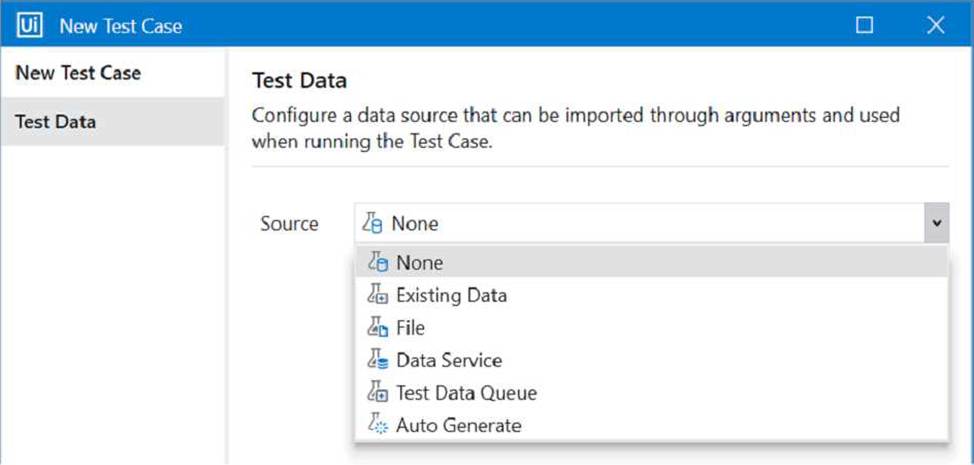
When creating a new test case, which option restricts dynamic data update in UiPath Orchestrator once the test case is published?
- A . Data Service
- B . File
- C . Test Data Queue
- D . Data Service with Filter
B
Explanation:
When creating a new test case in UiPath Orchestrator, you can choose a source for the test data that can be imported through arguments and used when running the test case1. The source can be one of the following options: None, Existing Data, File, Data Service, or Test Data Queue2. The option that restricts dynamic data update once the test case is published is File. This option allows you to upload a file (such as Excel or JSON) that contains the test data2. However, once the file is uploaded, you cannot modify or replace it without republishing the test case3. Therefore, the test data is static and cannot be updated dynamically. The other options allow dynamic data update in different ways. For example, Data Service allows you to use an existing table from Data Service as the test data source and filter it by using a SQL query2. You can update the table in Data Service and the changes will be reflected in the test case without republishing it4.
Reference: Test Cases documentation, New Test Case window description, Updating the test data sets forum post, Data Service documentation.
A developer is automating the process of entering sensitive information into text input fields that are constantly changing their position. Each text input field has a corresponding text label. The developer decides to automate the process by using Modern UI Activities with anchors.
Which activities should be used?
- A . Find Text Position activity as the anchor and Type Secure Text activity as the action.
- B . Type Into activity with a valid anchor and the input text provided in the Secure Text property.
- C . Find Text Position activity as the anchor and Set Text activity as the action.
- D . Type Into activity with a valid anchor and the input text provided in the Text property.
A
Explanation:
The Find Text Position activity is used to find the position of a text on the screen and return it as a UiElement variable. This can be used as an anchor to locate the text input field that corresponds to the text label. The Type Secure Text activity is used to type a password or other sensitive information into a UI element, without revealing the actual text. The input text is provided as a SecureString variable, which is encrypted and cannot be viewed in plain text. This ensures that the sensitive information is entered securely and accurately into the text input field..
References:Find Text Position – UiPath Activities
Type Secure Text – UiPath Activities
UiPath Anchor Base Tutorial & AnchorPosition Example
A developer examines a workflow in which filenames are stored within a collection. The collection is initialized with a single filename.
When adding a new filename to the collection, which collection variable type will cause an error?
- A . System.Collections.Generic. Dictionary
- B . System.Array
- C . System. Data. DataTable
- D . System.Collections.Generic.List
When choosing a process for automation, what factor contributes to its increased complexity?
- A . Unstructured input data source.
- B . Standard desktop applications.
- C . Low number of decision points.
- D . Low number of steps required in the automation.
A
Explanation:
Unstructured input data sources significantly contribute to the complexity of an automation process, making option A correct. Unstructured data is more challenging to interpret and process, requiring more sophisticated methods for data extraction and handling, thus increasing the complexity of the automation. Standard desktop applications (option B), a low number of decision points (option C), and a low number of steps (option D) typically reduce complexity.
Reference: UiPath Documentation: Input Methods
UiPath Best Practices: Project Organization
What role does the automation developer play in understanding business processes?
- A . Undertaking smaller projects independently.
- B . Collaborating with automation business analysts on technical skills.
- C . Creating complex written documents for procedures.
- D . Quickly understanding inputs, outputs, and decision points.
D
Explanation:
One of the important skills of an automation developer is to quickly understand the business processes that need to be automated. This involves identifying the inputs, outputs, and decision points of the processes, as well as the exceptions, rules, and dependencies. By doing so, the automation developer can design and develop the automation workflows and components that meet the business and technical requirements, as well as the best practices and standards. The automation developer can use various tools and methods to understand the business processes, such as process documentation, process diagrams, process mining, process analysis, and process simulation.
References:
Automation Developer – Ui Path
Process Analysis – UiPath Documentation Portal
Process Mining – UiPath Documentation Portal
A developer published a process to UiPath Orchestrator with only the Mam.xaml workflow file. There is one "In" argument of type String in the Main.xaml file with a default value of String.Empty.
When running the process from the Start Job window in Orchestrator what is the value of the argument at runtime?
- A . Only the default value of String.Empty will be used, overriding any values provided in Orchestrator
- B . An Input Dialog box will prompt the user to input a value and that value will be used
- C . Any input arguments provided in Orchestrator are used, otherwise the default value of String.Empty will be used
- D . A runtime error will occur as arguments are not allowed in the Main xaml file
C
Explanation:
UiPath Orchestrator is a web application that enables you to deploy, monitor, and manage UiPath Robots and processes. When you publish a process from UiPath Studio to UiPath Orchestrator, you can define input and output arguments for the process. Input arguments are used to pass data from Orchestrator to the process, while output arguments are used to pass data from the process to Orchestrator. When you run a process from the Start Job window in Orchestrator, you can provide values for the input arguments in the Input section. If you do not provide any values, the default values of the input arguments are used. The default values are defined in UiPath Studio when you create the arguments. In this case, the process has one “In” argument of type String in the Main.xaml file with a default value of String.Empty. This means that when you run the process from Orchestrator, you can either provide a value for the argument in the Input section, or leave it blank. If you provide a value, that value will be used by the process. If you leave it blank, the default value of String.Empty will be used by the process. Therefore, the answer is C. Any input arguments provided in Orchestrator are used, otherwise the default value of String.Empty will be used.
References: About Input and Output Arguments, Arguments
The following table is stored in a variable called "dt".
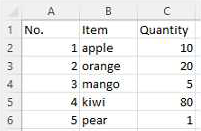
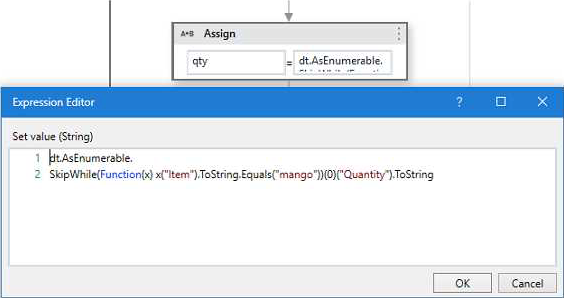
What will the value of the qty variable be after executing the Assign activity?
- A . 5
- B . 10
- C . 80
- D . null
C
Explanation:
The Assign activity is used to assign a value to a variable. In this case, the variable is “qty”. The value of the variable will be 80 after executing the Assign activity because the expression in the Assign activity is “dt.AsEnumerable().Where(Function(x)
x(“Item”).ToString.Equals(“mango”)).Select(Function(y) y(“Quantity”)).ToString”. This expression is filtering the data table “dt” for rows where the “Item” column is equal to “mango” and then selecting the “Quantity” column from those rows. Since there is only one row in the data table where “Item” is equal to “mango”, the value of the “Quantity” column in that row is 80. (UiPath Studio documentation)
References:
: [Assign – UiPath Activities].
Data from an Excel file is read into a data table named "dtEmployee", as displayed in the following graphic:
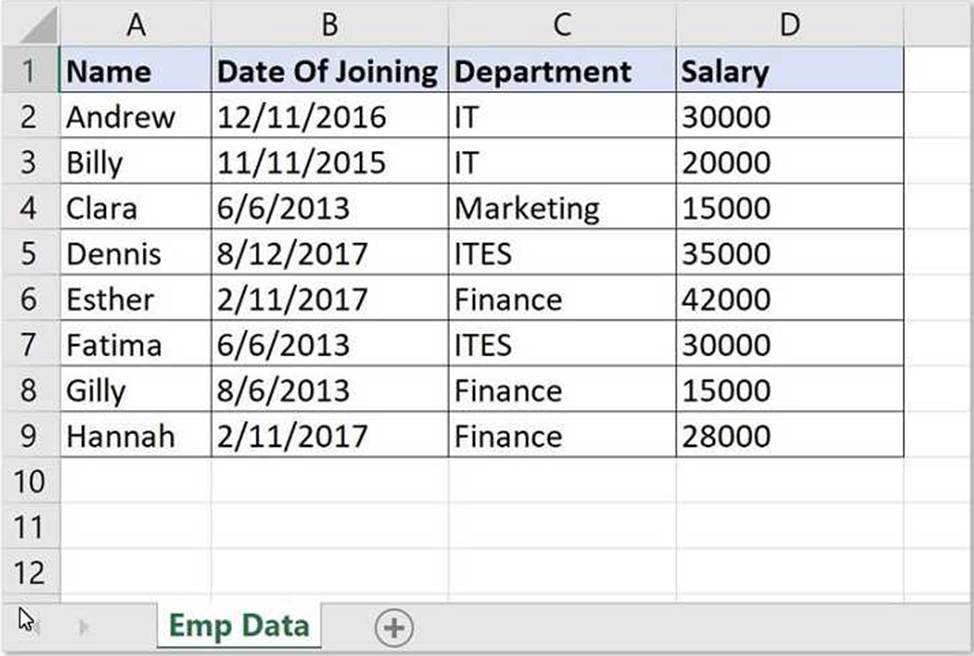
A developer needs to filter the data table to obtain all rows representing employees from the Finance and IT departments with a Salary under 30,000.
Which expression yields the desired outcomes?
- A . dtEmployee.Select("([Department]=’IT’ AND [Department]=’Finance’) AND [Salary] < 30000")
- B . dtEmployee.Select("[Department]=’IT’ OR [Department]=’Finance’ AND [Salary] < 30000")
- C . dtEmployee.Select("([Department]=’IT’ OR [Department]=’Finance’) AND [Salary] < 30000")
- D . dtEmployee.Select("[Department]=’IT’ OR [Department]=’Finance’ OR [Salary] < 30000")
C
Explanation:
This expression filters the data table to obtain all rows representing employees from the Finance and IT departments with a Salary under 30,000. The expression uses the Select method of the data table, which returns an array of data rows that match a specified condition. The condition is written as a string that follows the syntax and rules of the DataColumn.Expression property. The condition uses parentheses to group the logical operators OR and AND, which have different precedence levels. The OR operator returns true if either operand is true, while the AND operator returns true only if both operands are true. The condition also uses single quotes to enclose the string values of the Department column, and the less than operator to compare the numeric values of the Salary column. (UiPath Studio documentation1)
References: 1: DataTable.Select Method (System.Data) | Microsoft Docs.
At a minimum, what are the recommended properties a developer should configure to use the Get IMAP Mail Messages activity?
- A . MailFolder, Port, Server, Email, and Output Messages.
- B . Account, MailFolder, and Output Messages.
- C . To, Subject, Body, Port, Server, Email, Password or SecurePassword, and Name.
- D . MailFolder, Port, Server, Email, Password or SecurePassword, and Messages.
D
Explanation:
When using the "Get IMAP Mail Messages" activity, the minimum recommended properties to configure are: MailFolder (to specify the folder from which to retrieve the mails), Port (to specify the port used by the IMAP server), Server (the address of the IMAP server), Email (the email address to connect to), Password or SecurePassword (the password used to connect to the email account), and Messages (the output property where the retrieved emails will be stored).
Reference: UiPath Activities Guide: Get IMAP Mail Messages Properties