
UiPath UiPath-ADAv1 Practice Exams
Last updated on Oct 22,2026- Exam Code: UiPath-ADAv1
- Exam Name: UiPath Automation Developer Associate v1 Exam
- Certification Provider: UiPath
- Latest update: Oct 22,2026
How does UiPath handle different dependency versions for multiple running processes that run at the same time?
- A . Each running process uses its own required version of the dependency.
- B . Running processes use the earliest compatible dependency version.
- C . Each running process automatically adapts to the available dependency version.
- D . All running processes use the latest version of the dependency available.
A
Explanation:
UiPath handles different dependency versions for multiple running processes that run at the same time by using a feature called Dependency Isolation. This feature ensures that each running process can use the specific version of the dependency that it needs, without affecting or being affected by other processes. This way, UiPath avoids conflicts and errors caused by incompatible or missing dependency versions. (UiPath Automation Developer study guide).
References:Dependency Isolation
Managing Dependencies
Which activity is best suited for a developer to create a process that finds images on a website and stores them in a local folder, accounting for the need to potentially search for an image repeatedly due to errors on the website?
- A . Get Attribute
- B . Check App State
- C . Retry Scope
- D . Delay
C
Explanation:
For a process that involves finding images on a website and storing them, especially when accounting for potential errors on the website that may require repeated attempts, the "Retry Scope" activity is the best choice. This activity allows for the specification of a number of retries and a condition that must be met for the retry to occur. If the image is not found or if there is an error during the process, the "Retry Scope" will attempt the operation again as specified by the developer.
Reference: UiPath Activities Guide: Retry Scope
What is the default polling interval set for an event trigger?
- A . 1 minute
- B . 5 minutes
- C . 10 minutes
- D . 15 minutes
B
Explanation:
The default polling interval for an event trigger is 5 minutes, which means that the trigger checks for new object events every 5 minutes. This value can be customized using the Adjustable Polling Interval feature, which allows users to choose the interval on which event triggers check for new object events. The polling interval can be changed from a specific connector’s page or from the Connections tab. (UiPath Automation Developer study guide).
References:How to modify the polling interval for Integration Service Triggers?
Integration Service – Triggers
UiPath Integration Service – Vote on Tutorials
Consider the following Try Catch statement:
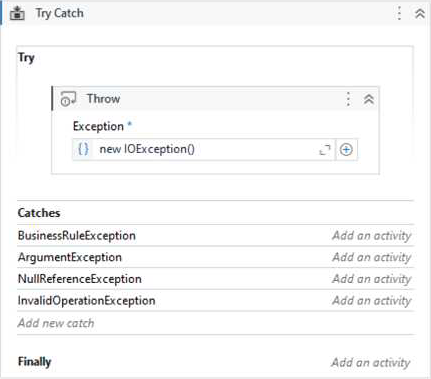
What will happen when the code is executed?
- A . The exception will be handled in the ArgumentException catch.
- B . There is no catch defined for the thrown exception type.
- C . The exception will be handled in the InvalidOperationException catch.
- D . The exception will be handled in the BusinessRuleException catch.
B
Explanation:
This is because the code is throwing a new IOException, but there is no catch block defined for IOException. The catch blocks present are for BusinessRuleException, ArgumentException, and InvalidOperationException. Therefore, the code will not be able to handle the thrown exception.
References: https://docs.uipath.com/activities/docs/try-catch
What is a prerequisite for performing Remote Debugging using a Remote Machine Connection?
- A . Studio and the remote robot must be connected to the same Orchestrator tenant.
- B . The same user must be signed in Studio and the remote robot.
- C . Studio, the remote robot, and Orchestrator are running version 2021.10 or later.
- D . TCP/IP connectivity exists between the Studio machine and the remote machine.
D
Explanation:
Remote Debugging is a feature that allows you to debug a process that is running on a remote machine or robot from your Studio1. To use Remote Debugging, you need to have a Remote Machine Connection, which is a connection type that enables you to interact with a remote machine using its IP address and port number2. The prerequisite for performing Remote Debugging using a Remote Machine Connection is that TCP/IP connectivity exists between the Studio machine and the remote machine3. TCP/IP is a protocol that defines how data is transmitted and received over a network4. Without TCP/IP connectivity, the Studio machine cannot communicate with the remote machine and cannot debug the process.
Option A is incorrect because Studio and the remote robot do not need to be connected to the same Orchestrator tenant for Remote Debugging using a Remote Machine Connection5. Option B is incorrect because the same user does not need to be signed in Studio and the remote robot for Remote Debugging using a Remote Machine Connection. Option C is incorrect because Remote Debugging using a Remote Machine Connection does not require Studio, the remote robot, and Orchestrator to be running version 2021.10 or later. Remote Debugging using a Remote Machine Connection was introduced in version 2020.10.
Which variable field is optional when creating a variable, in UiPath Studio?
- A . Default
- B . Variable type
- C . Name
- D . Scope
A
Explanation:
In UiPath Studio, when creating a variable, the "Default" field is optional. The "Default" field is where you can assign an initial value to the variable, which it will hold until changed during the execution of the workflow. The "Variable type" must be specified to determine what kind of data the variable will hold. The "Name" is required to reference the variable within the workflow, and the "Scope" determines where the variable can be accessed from within the project.
Reference: UiPath Studio Guide: Managing Variables
What is a true statement regarding the characteristics of dictionaries in UiPath?
- A . Dictionaries can have repeated keys.
- B . Dictionaries allow keys and values to be of different data types.
- C . Dictionaries must have unique values.
- D . Dictionaries provide automatic sorting of key-value pairs, ensuring efficient retrieval of data.
B
Explanation:
Dictionaries in UiPath, as in other .NET environments, allow for keys and values to be of different data types. Keys must be unique within a dictionary, but the values can be duplicates. Dictionaries do not provide automatic sorting; they are collections designed for quick lookup of values based on a key. Therefore, the correct answer is B.
Reference: UiPath Studio Guide: The Dictionary Data Type
What happens when the area selection feature in the UiPath Computer Vision wizard is used?
- A . The selected area is automatically resized to fit all UI elements within it.
- B . A portion of the application Ul can be selected, which is helpful when dealing with multiple fields bearing the same label.
- C . The selected area is treated as a single UI element, with no further analysis of its contents.
- D . A duplicated Ul can be selected, and the copy is modified in the automation process.
B
Explanation:
The area selection feature in the UiPath Computer Vision wizard is used to refine the scope of the UI elements that are detected by the Computer Vision activities1. By using this feature, you can select a specific region of the application UI that you want to automate, and the wizard will only show the UI elements within that region. This is helpful when dealing with multiple fields bearing the same label, such as “Name” or “Address”, as you can select only the field that you want to interact with2. The selected area is not automatically resized, treated as a single UI element, or duplicated by the wizard.
Reference:
Can we change the selector on computer vision? forum post from UiPath Community Computer Vision activities documentation from UiPath
Computer Vision Recording forum post from UiPath Community AI Computer Vision for RPA product page from UiPath
The New UiPath AI Computer Vision Is Now in Public Preview blog post from UiPath
A developer wants to assign the first row of the "ID" column in the "DT" datatable to a String variable.
Which expression should be added to the Value field of the Assign activity?
- A . DTRows(0)ID
- B . DTRows(0). ltem("ID")
- C . DTColumns(0)ID
- D . DTColumns(0) ("ID")
B
Explanation:
To assign the first row of the “ID” column in the “DT” datatable to a String variable, the expression that should be added to the Value field of the Assign activity is: DT.Rows(0).Item(“ID”)
This expression accesses the value of the “ID” column in the first row of the “DT” datatable using the Rows and Item properties. The Rows property returns a collection of DataRow objects that represent the rows in the datatable. The Item property returns or sets the value of the specified column in the DataRow object1. The expression uses the index 0 to refer to the first row in the Rows collection, and the column name “ID” to refer to the specific column in the Item property. The expression returns the value of the “ID” column in the first row as an Object type, which can be converted to a String type using the ToString method2. For example, if the “DT” datatable has the following values:
Then the expression DT.Rows(0).Item(“ID”) will return 1 as the value of the “ID” column in the first row.
References: DataTable.Rows Property and DataRow.Item Property from UiPath documentation.
Which command in the UiPath installation folder configures the UiPath.RemoteDebugging.Agent utility on a Windows robot to accept remote debugging requests from Studio?
- A . dotnet ./UiPath.RemoteDebugging.Agent.dll enable — port — password — verbose
- B . UiPath.Remote Debugging.Agent.exe start — port — password — verbose
- C . UiPath.Remote Debugging.Agent.exe enable — port — username — password — verbose
- D . UiPath.Remote Debugging.Agent.exe enable — port — password — verbose
D
Explanation:
The UiPath.RemoteDebugging.Agent utility is a tool that enables remote debugging on a Windows robot1. To configure the utility to accept remote debugging requests from Studio, you need to run a command in the UiPath installation folder using the Command Prompt2.
The command is: UiPath.RemoteDebugging.Agent.exe enable –port <port_number> –password <password> –verbose
The arguments in the command are:
–port <port_number>: Specify the port number to use for the remote debugging connection. The default value is 80803.
–password <password>: Specify the password to use for the remote debugging connection. The password must match the one entered in Studio when creating a Remote Machine Connection. –verbose: Enable verbose logging for the utility. This argument is optional.
Therefore, option D is the correct command to configure the UiPath.RemoteDebugging.Agent utility on a Windows robot to accept remote debugging requests from Studio. Option A is incorrect because it uses dotnet instead of exe, which is only applicable for macOS robots. Option B is incorrect because it uses start instead of enable, which is only used to start the utility after it is configured. Option C is incorrect because it uses username instead of password, which is not required for the remote debugging