
UiPath UiPath-ADAv1 Practice Exams
Last updated on Oct 22,2026- Exam Code: UiPath-ADAv1
- Exam Name: UiPath Automation Developer Associate v1 Exam
- Certification Provider: UiPath
- Latest update: Oct 22,2026
Once "Library A" has been imported as a dependency in the current project, how can the UI Object Repository defined in "Library A" be accessed?
- A . The Object Repository is only available in a Library.
- B . The Object Repository needs to be exported as a UI Library and imported in the Process for it to become available.
- C . The Object Repository will automatically be available in the Process.
- D . The Object Repository cannot be passed between a Process and a Library.
C
Explanation:
The UI Object Repository is a feature that allows you to store and reuse UI elements across different automation projects1. A UI Library is a type of project that contains UI elements and workflows that can be used as dependencies in other projects2. When you import a UI Library as a dependency in your current project, the UI Object Repository defined in the UI Library will automatically be available in your current project3. You can access the UI elements from the Object Repository panel in Studio and use them in your activities4. Therefore, the correct answer is C. The other options are incorrect because they do not reflect the actual behavior of the UI Object Repository and the UI Library.
Reference: Object Repository documentation, Reusing Objects and UI Libraries documentation, Object Repository course, [Object Repository in Studio course].
Where can a process be found, after being published from UiPath Studio and deployed as an automation in Orchestrator?
- A . Manage Packages
- B . UiPath Assistant
- C . Resources Panel
- D . Snippets Panel
B
Explanation:
A process can be found in the UiPath Assistant after being published from UiPath Studio and deployed as an automation in Orchestrator. UiPath Assistant is a desktop tool that enables users to easily access, manage, and run automation workflows on their machines. It displays all the available automations that the user can run, either from Orchestrator or locally. To run an automation from Orchestrator, the user needs to connect the UiPath Assistant to Orchestrator and synchronize the automations and settings with the cloud. The user can also add automations to the launchpad for quick and easy access, create custom folders and sections to organize the automations, view the status and progress of the running automations, and access the help and feedback options.
References: Software Robot Assistant – Desktop Automation | UiPath Robot – About UiPath Assistant – UiPath Documentation Portal
A developer wants to create a process using a Flow Switch activity.
What is a feature of this activity?
- A . Supports up to three expressions by default
- B . Two Default cases can be defined
- C . Default case is executed before the expression is evaluated
- D . Default case is executed if no cases match the expression
D
Explanation:
The Flow Switch activity is a conditional node that provides branching for the flow of control based on a match criterion when more than two alternative branches are required. The Flow Switch activity has an Expression property that can be of any type, and a dictionary of Cases that consists of pairs of keys and activities. The Flow Switch activity evaluates the Expression and compares it against each of the keys in the Cases. If a match is found, the corresponding activity is executed. If no match is found, the Default case is executed, if it is defined. The Default case is an optional activity that serves as a fallback option when none of the cases match the expression. Therefore, the answer is D. Default case is executed if no cases match the expression.
References: Flow Switch, About Control Flow
A developer is building an automation which types text into a text file.
The Activity Project Settings for UI Automation Modern activities are set as follows:
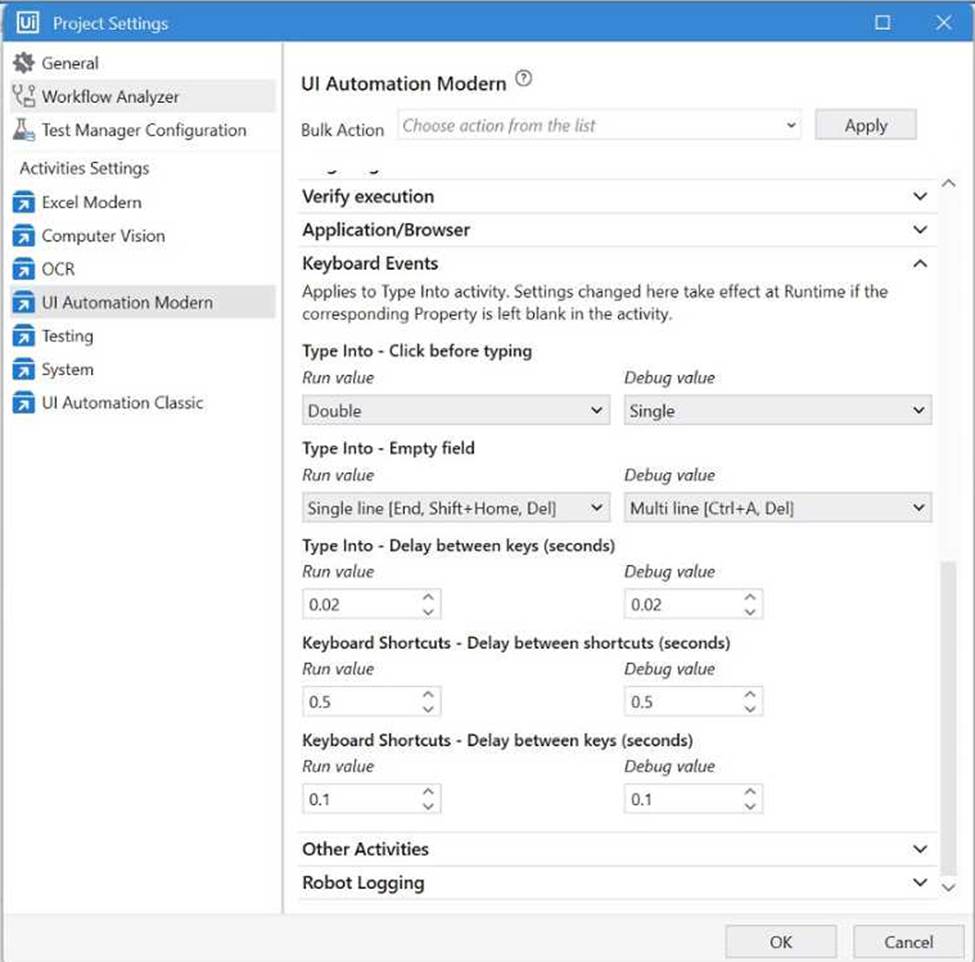
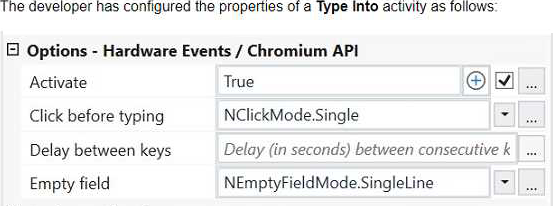
What is the behavior of the Type Into activity when executing the workflow?
- A . The activity will remove Multi Line in Run mode and a Single Line in Debug mode.
- B . The activity will use only properties set in Activity Project Settings.
- C . The activity will remove a Single Line in Run mode and in Debug mode.
- D . The activity will remove a Single Line in Run mode and Multi Line in Debug mode.
D
Explanation:
The Type Into activity is used to type text into a UI element. The activity has different properties that can be configured to control the input method, the delay between keystrokes, the cursor position, and the text formatting. The Activity Project Settings for UI Automation Modern activities allow you to set the default values for these properties at the project level. However, you can also override these values at the activity level by using the Properties panel. In this case, the Activity Project Settings are set to remove a Single Line in Run mode and Multi Line in Debug mode. This means that when the workflow is executed, the Type Into activity will delete any existing text in the UI element before typing the new text. If the workflow is run in Run mode, only one line of text will be deleted. If the workflow is run in Debug mode, all lines of text will be deleted. (UiPath Studio documentation1)
References:
1: Configuring Activity Project Settings – UiPath Studio.
Which set of properties, methods, or activities enables the developer to obtain a subset of data from a data table called "dt"?
- A . Output Data Table
Lookup Data Table
Build Data Table
Merge Data Table - B . Sort Data Table
Join Data Tables
Get Row Item - C . dt.Rows(1 .. 5)
Remove Data Row activity - D . Filter Data Table
dt.Select
dt.AsEnumerable().Where
D
Explanation:
These are the properties, methods, or activities that enable the developer to obtain a subset of data from a data table called “dt”:
Filter Data Table activity: This activity enables you to filter a data table by specifying conditions in the Filter Wizard. You can choose to keep or remove rows that match the filter criteria. You can also specify the columns to include or exclude in the output data table1.
dt.Select method: This method returns an array of data rows that match a specified filter expression. You can use this method to query a data table using SQL-like syntax2.
dt.AsEnumerable().Where method: This method returns an enumerable collection of data rows that satisfy a given predicate. You can use this method to query a data table using LINQ syntax3.
Reference:
1: Filter Data Table
2: DataTable.Select Method
3: Enumerable.Where Method
Which set of properties, methods, or activities enables the developer to obtain a subset of data from a data table called "dt"?
- A . Output Data Table
Lookup Data Table
Build Data Table
Merge Data Table - B . Sort Data Table
Join Data Tables
Get Row Item - C . dt.Rows(1 .. 5)
Remove Data Row activity - D . Filter Data Table
dt.Select
dt.AsEnumerable().Where
D
Explanation:
These are the properties, methods, or activities that enable the developer to obtain a subset of data from a data table called “dt”:
Filter Data Table activity: This activity enables you to filter a data table by specifying conditions in the Filter Wizard. You can choose to keep or remove rows that match the filter criteria. You can also specify the columns to include or exclude in the output data table1.
dt.Select method: This method returns an array of data rows that match a specified filter expression. You can use this method to query a data table using SQL-like syntax2.
dt.AsEnumerable().Where method: This method returns an enumerable collection of data rows that satisfy a given predicate. You can use this method to query a data table using LINQ syntax3.
Reference:
1: Filter Data Table
2: DataTable.Select Method
3: Enumerable.Where Method
A developer has created an automation that utilizes an Asset value from Orchestrator with the Get Asset activity. This value represents the email addresses of the process owners, which are subject to change.
What Asset type is most suitable for this situation?
- A . Integer
- B . Bool
- C . Text
- D . Credential
C
Explanation:
In the context of an automation that utilizes Asset values from Orchestrator representing email addresses, the most suitable Asset type is "Text". The "Text" type allows for the storage of string values, which is appropriate for email addresses. Other types like Integer, Bool, and Credential are not suitable for storing email addresses.
Reference: UiPath Orchestrator Guide: About Assets
A developer downloads a published package from UiPath Orchestrator 2021.10 to use locally.
What is the extension of the downloaded package?
- A . .csproj
- B . .dll
- C . .nupkg
- D . .zip
C
Explanation:
The extension of the downloaded package from UiPath Orchestrator 2021.10 to use locally is .nupkg. A package is a file that contains the workflows and the dependencies of a project that is ready to be executed by a robot. A package can be created and published from UiPath Studio, or uploaded manually to UiPath Orchestrator. A package can also be downloaded from UiPath Orchestrator to use locally, such as for debugging or testing purposes. The extension of the package file is .nupkg, which is the standard extension for NuGet packages. NuGet is a package manager that is used to manage the dependencies of a project, such as libraries, frameworks, or components3. A .nupkg file is essentially a ZIP archive that contains the files and metadata of the package4. For example, if a package named Process1 is downloaded from UiPath Orchestrator, the file name and extension will be Process1.nupkg. The .nupkg file can be opened or extracted using a ZIP utility, such as 7-Zip or WinZip, or renamed to .zip and extracted using Windows Explorer5.
In a UiPath REFramework project, what is the primary purpose of using Custom Log Fields?
- A . To add specific contextual information to log messages that are relevant to the automation process.
- B . To generate extra variables alongside log messages, enhancing workflow understanding.
- C . To maintain contextual insights within log messages, including secure details like credentials.
- D . To modify the representation of logged contextual data as it is displayed in the Orchestrator.
A
Explanation:
The Add Log Fields activity allows developers to create custom log fields that are added to the Robot Execution Logs. These custom log fields can be used to store and display additional information that is relevant to the automation process, such as transaction ID, invoice number, customer name, etc.
The custom log fields can help to improve the traceability and analysis of the automation process, as well as to filter and group the logs based on specific criteria. (UiPath Automation Developer study guide)
References:
Add Log Fields
Logging and Log Levels
A developer needs to create a workflow that manipulates items related to invoices inside a web application. The following selector represents a UI element inside an invoice represented by an 8-alphanumeric system-generated vendor tax ID. <html app=’chrome.exe’ title=’ACME System – Invoice – RO123456′ /> <webctrl tag=’DIV’ aaname=’RO123456" class=’InvoiceNumber’ />
Assuming only the Vendor Tax ID value changes in the selector, what represents an example of a good selector that matches only specific invoices with the vendor tax ID defined in a pre-selected existing list?
- A . <html app=’chrome.exe’ title=’ACME System – Invoice – {{VendorTaxID})’ /> <webctrl tag=’DIV’ aaname='{{VendorTaxID})’ class=’InvoiceNumber’ /> Where VendorTaxID is a 8-alphanumeric element.
- B . <html app=’chrome.exe’ title=’ACME System – Invoice – " /> <webctrl tag=’DIV’ aaname=’ ** class=’InvoiceNumber’ /> Where VendorTaxID is a 8-alphanumeric element.
- C . <html app=’chrome.exe’ title=’ACME System – Invoice – RO123456′ /> <webctrl tag=’DIV’ aaname='({VendorTaxID}}’ class=’InvoiceNumber’ /> Where VendorTaxID is a 8-alphanumeric element.
- D . <html app=’chrome.exe’ title=’ACME System – Invoice – RO123456′ /> <webctrl tag=’DIV’ aaname=’RO123456′ class=’InvoiceNumber’ /> Where VendorTaxID is a 8-alphanumeric element.
A
Explanation:
A good selector for matching specific invoices with the vendor tax ID defined in a pre-selected existing list would use variables or arguments to replace the specific vendor tax ID. The correct syntax for dynamic selectors in UiPath uses double braces {{VendorTaxID}} to represent variables within the selector. Therefore, the correct answer is A, as it correctly uses a variable placeholder for the VendorTaxID.
Reference: UiPath Studio Guide: Selectors with Variables