
Tableau TDS-C01 Practice Exams
Last updated on Oct 22,2026- Exam Code: TDS-C01
- Exam Name: Tableau Desktop Specialist
- Certification Provider: Tableau
- Latest update: Oct 22,2026
Using the Time Series table, create a cross-tab showing sales for each Assortment broken down by Year and Quarter.
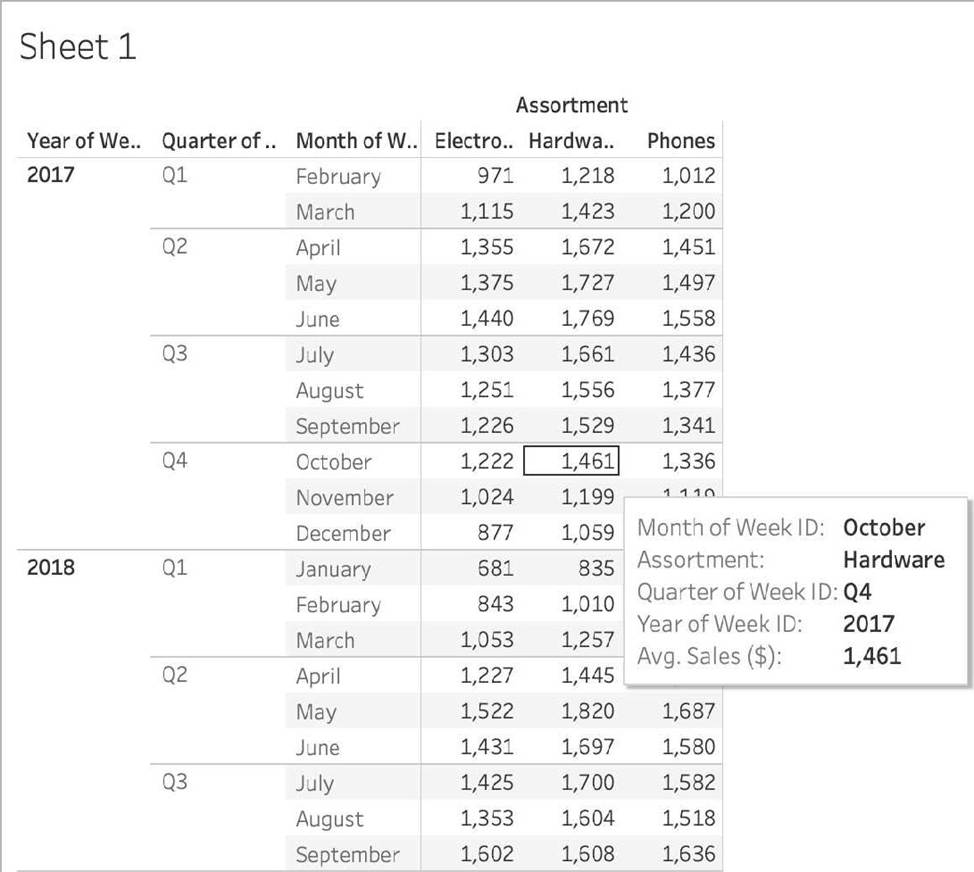
In Q4 of October 2017, what was the Average sales amount for the Hardware assortment?
- A . 111,060
- B . 1,461
- C . 112,256
- D . 1,222
C
Explanation:
If you chose 111,060 you were SO close to the correct answer but made a small mistake – you didn’t change the aggregation to AVERAGE! This is one of the common mistakes many test takers make, so keep this in mind.
To reach the correct answer, follow the steps below:
1) Draw Assortment to the Column shelf, and drag Year to the Rows Shelf. Then Drill down further on Year to accomodate Quarters and Months as well!
Although this seems enough, DON’T FORGET to change the aggregation like in the next step, which will completely change the values!
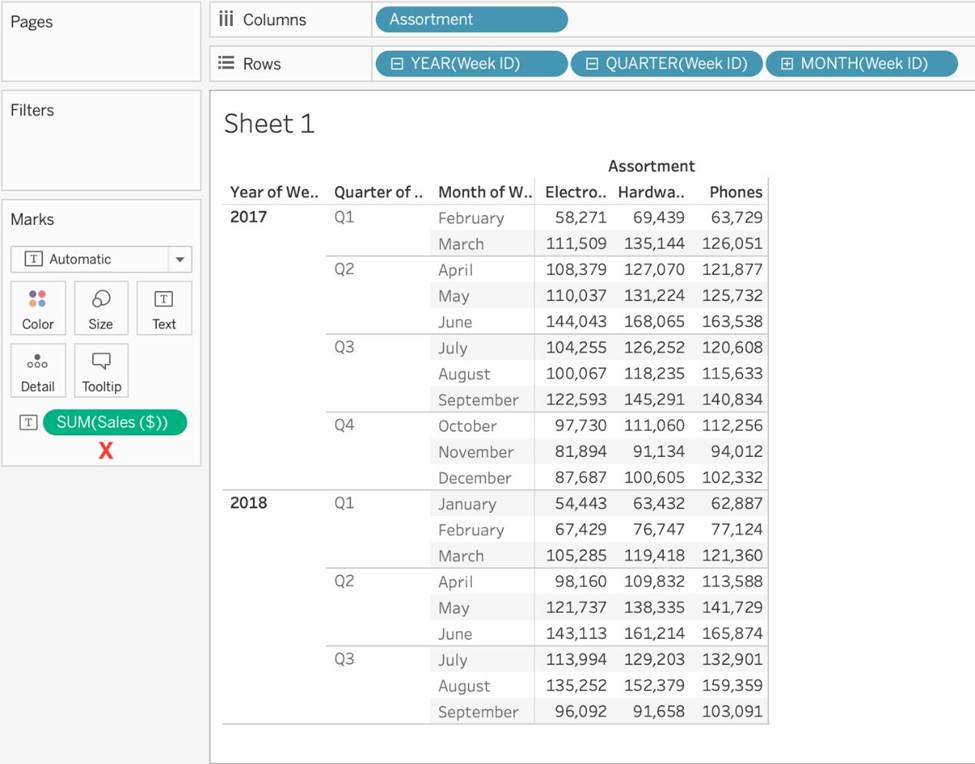
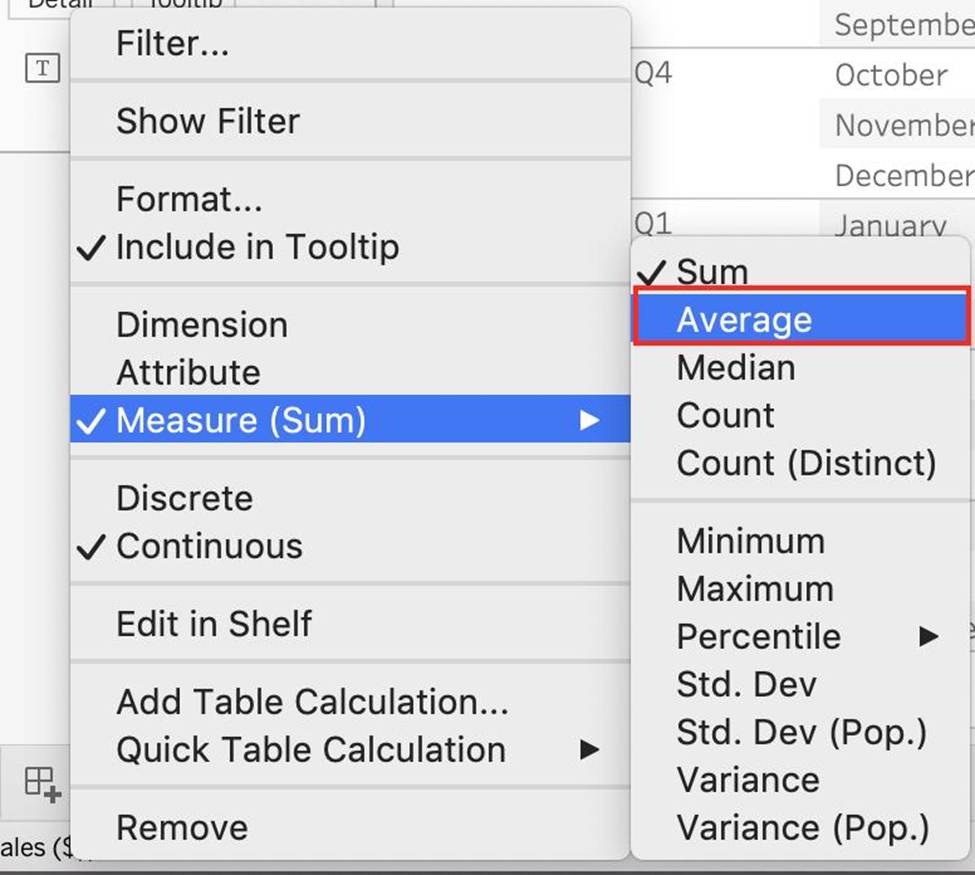
The correct answer as you can see is 1,461 – Sales for Harware Assortment in 2017 Q4, October
You need to create a calculation that returns a customer name followed by a comma, a space, and then the customer’s age (for example: John Doe, 32).
What should you include in the calculation?
- A . [Customer Name] + "," + "STR[Age]”
- B . STR ([Customer Name]) + "," STR(‘’Age")
- C . "Customer Name," + [Age]
- D . [Customer Name] + "," + STR([Age])
D
Explanation:
According to the Tableau Desktop Specialist Exam Readiness, to create a calculation that returns a customer name followed by a comma, a space, and then the customer’s age, you should use the formula [Customer Name] + “,” + STR([Age]). This is because you need to concatenate strings using the + operator, and convert the numeric field [Age] to a string using the STR () function.
You view the relationship canvas shown in the following exhibit.
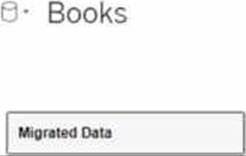
What does Migrated Data indicate?
- A . The workbook was created in previous version of Tableau Desktop.
- B . The data was imported from Tableau Server.
- C . The data was recently saved as a packaged data source.
- D . The workbook was downloaded from Tableau Online.
A
Explanation:
In the context of Tableau, "Migrated Data" typically refers to data or workbooks that have been upgraded from a previous version of Tableau Desktop. When you open a workbook in a newer version of Tableau, the data sources within that workbook might be labeled as "Migrated Data," indicating that they have undergone a conversion process to be compatible with the new version’s features and architecture.
Which of the following are valid Layout Container types when using Dashboards in Tableau?
- A . Vertical Container
- B . Diagonal Container
- C . Horizontal Container
- D . Split Container
AC
Explanation:
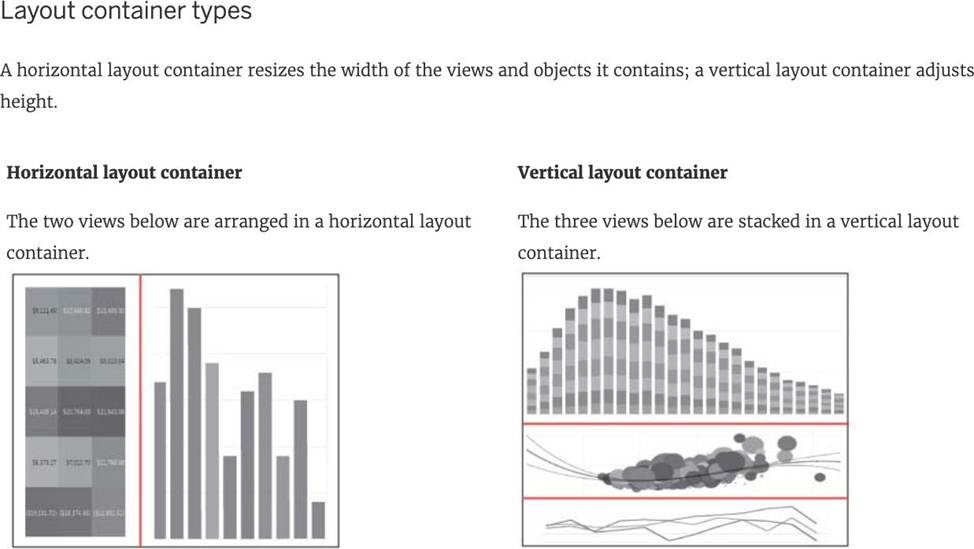
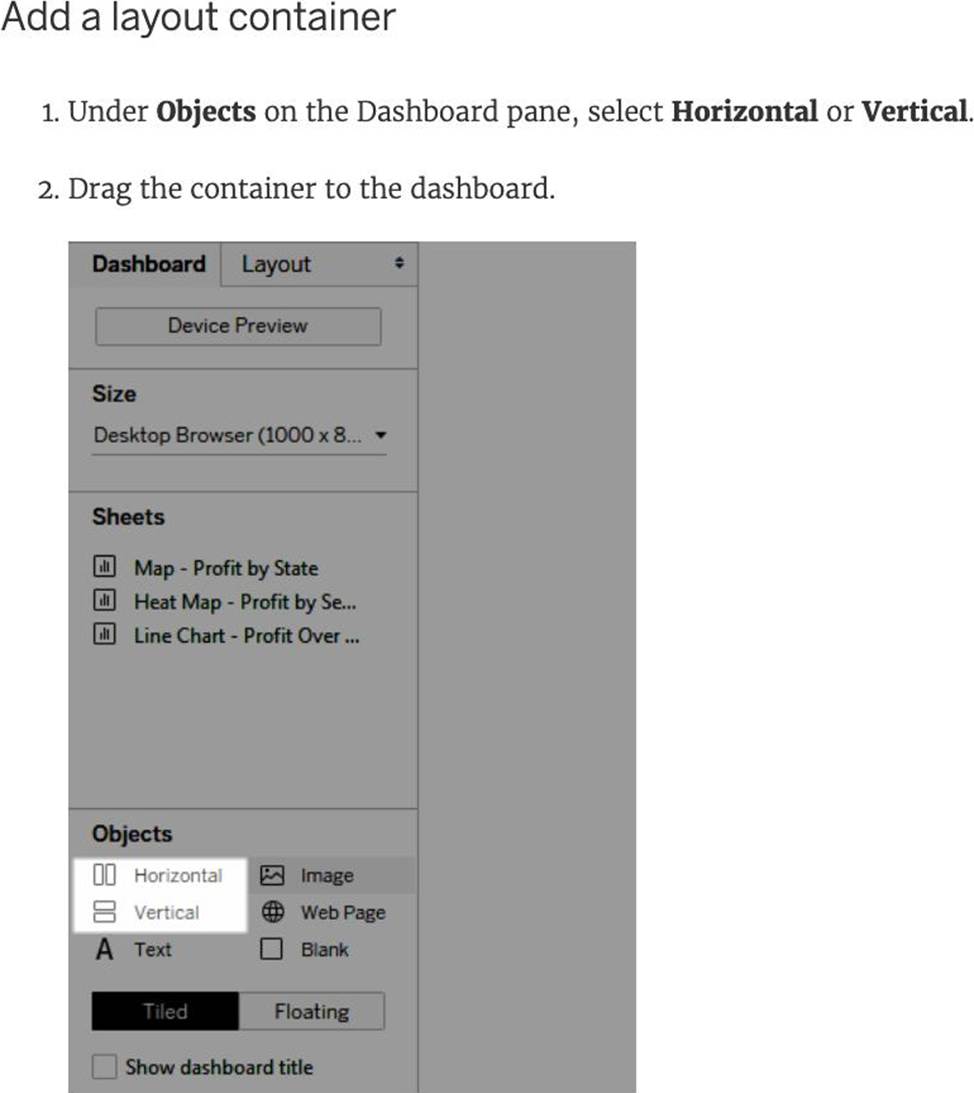
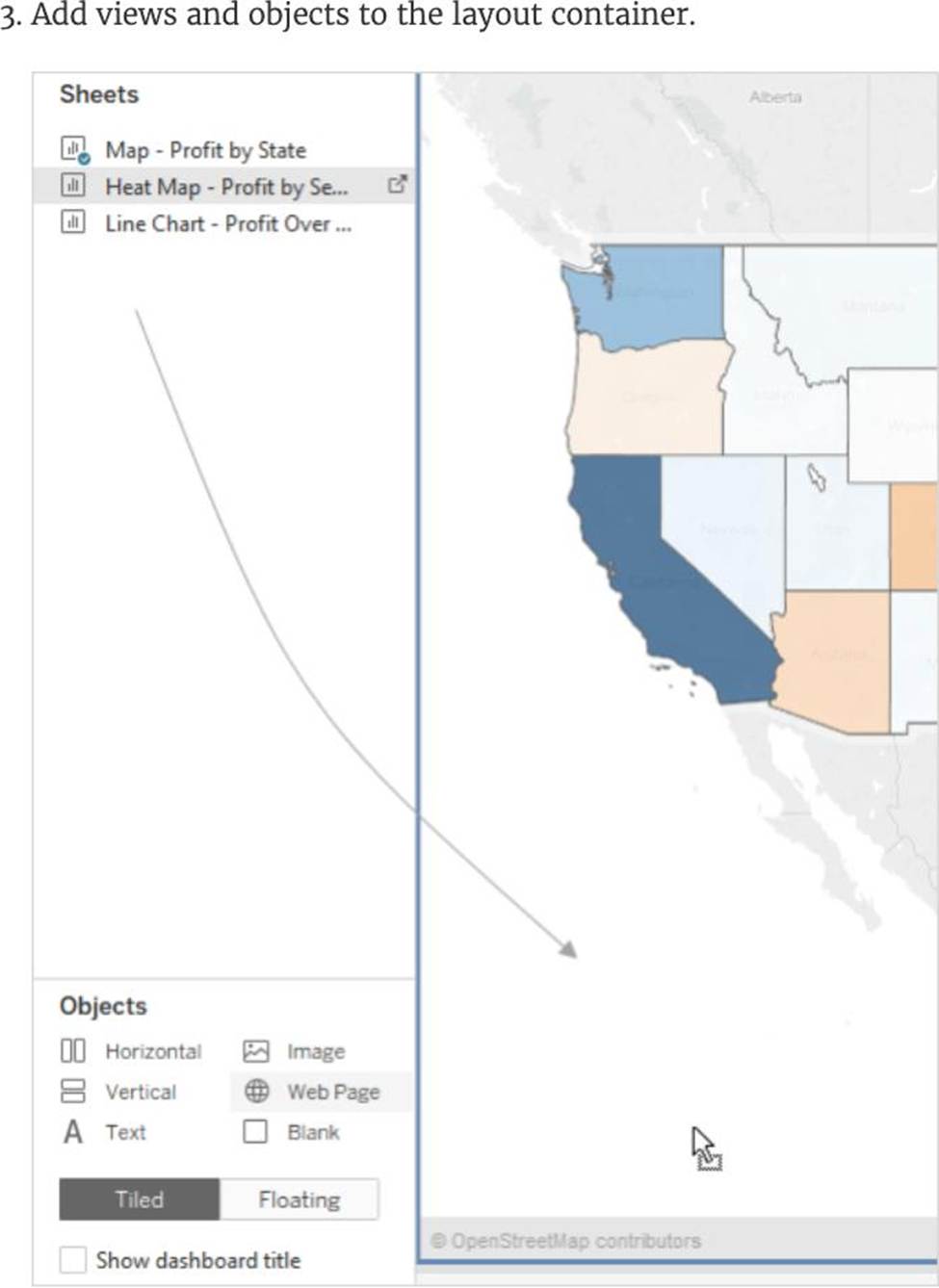
Reference: https://help.tableau.com/current/pro/desktop/en-us/dashboards_organize_floatingandtiled.htm
When creating a date filter in Tableau, to what does Anchor refer?
- A . The mid-point in the range of displayed dates.
- B . The date in a relative-date filter to which you anchor a unit of time.
- C . The date in a range-of-dates filter to which you anchor units of time.
- D . The latest date in the data source that can be found.
B
Explanation:
When creating a date filter in Tableau, anchor refers to the date in a relative-date filter to which you anchor a unit of time. A relative-date filter is a type of filter that allows you to dynamically filter data
based on a range of time relative to the current date or a specific date. For example, you can use a relative-date filter to show data for the last 7 days, the next 3 months, or the current quarter1. To create a relative-date filter, you need to specify the following options: The date field that you want to filter. The unit of time that you want to use for the filter, such as days, weeks, months, quarters, or years. The range of time that you want to show relative to the anchor date, such as last, next, this, or to date. The anchor date that you want to use as the reference point for the filter. You can use the current date or a custom date as the anchor date1 For example, if you want to create a relative-date filter that shows data for the last 3 months from January 1st, 2022, you would select the following options: Date field: Order Date Unit of time: Months Range of time: Last 3 Anchor date: Custom (01/01/2022) 1 The other options are not valid definitions of anchor when creating a date filter in Tableau. The mid-point in the range of displayed dates is not related to the anchor date, but rather to the center of the axis that represents the date field. The date in a range-of-dates filter to which you anchor units of time is not correct, because a range-of-dates filter does not use an anchor date, but rather a start and end date that can be fixed or dynamic. The latest date in the data source that can be found is not related to the anchor date, but rather to the maximum value of the date field in the data source2
What are two examples of a date value?
Choose two.
- A . 2020-05-01
- B . December
- C . Wednesday
- D . January 1.1995
A, D
Explanation:
Date values in Tableau represent specific points in time and are typically formatted in a standard date format.
Option A, "2020-05-01", is a standard date format representing the 1st of May, 2020.
Option D, "January 1, 1995", is another example of a date value, representing the 1st of January, 1995. Options B ("December") and C ("Wednesday") represent a month and a day of the week, respectively, but do not specify a particular date.
When you want to first apply a filter and THEN show the Top N or Bottom N elements, which of the following filters would you use?
- A . Data source Filter
- B . Extract Filter
- C . Context Filter
- D . None of the these
When you want to first apply a filter and THEN show the Top N or Bottom N elements, which of the following filters would you use?
- A . Data source Filter
- B . Extract Filter
- C . Context Filter
- D . None of the these
C
Explanation:
By default, all filters that you set in Tableau are computed independently. That is, each filter accesses all rows in your data source without regard to other filters. However, you can set one or more categorical filters as context filters for the view. You can think of a context filter as being an independent filter. Any other filters that you set are defined as dependent filters because they process only the data that passes through the context filter. You may create a context filter to:
1) Improve performance C If you set a lot of filters or have a large data source, the queries can be slow. You can set one or more context filters to improve performance.
2) Create a dependent numerical or top N filter C You can set a context filter to include only the data of interest, and then set a numerical or a top N filter.
Reference: https://help.tableau.com/current/pro/desktop/en-us/filtering_context.htm
Which of the following are compelling reasons to use a Stacked Bar Chart?
- A . To visualize parts of a whole
- B . To easily visualize trends over time
- C . To be able to visualize complex information with fewer bars / marks
- D . To visualize each discrete category using a separate bar.
AC
Explanation:
Stacked bar charts will usually have lesser number of bars compared to a normal bar chart:
Normal bar chart – 9 bars
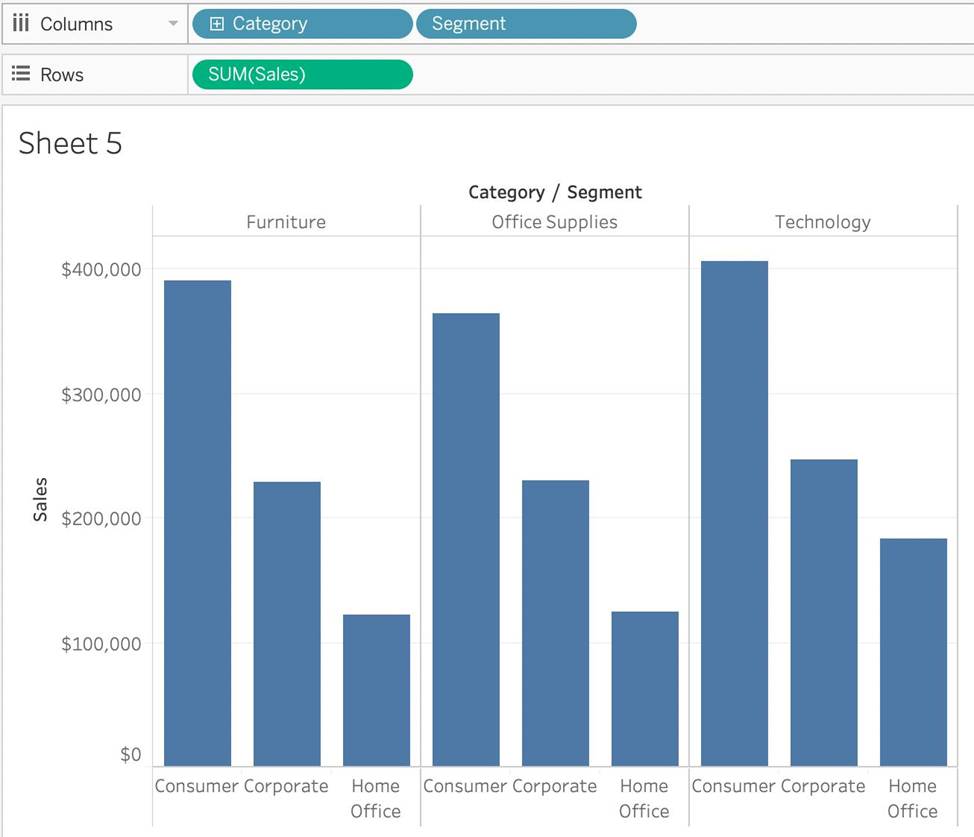
Stacked Bar Chart – 3 bars
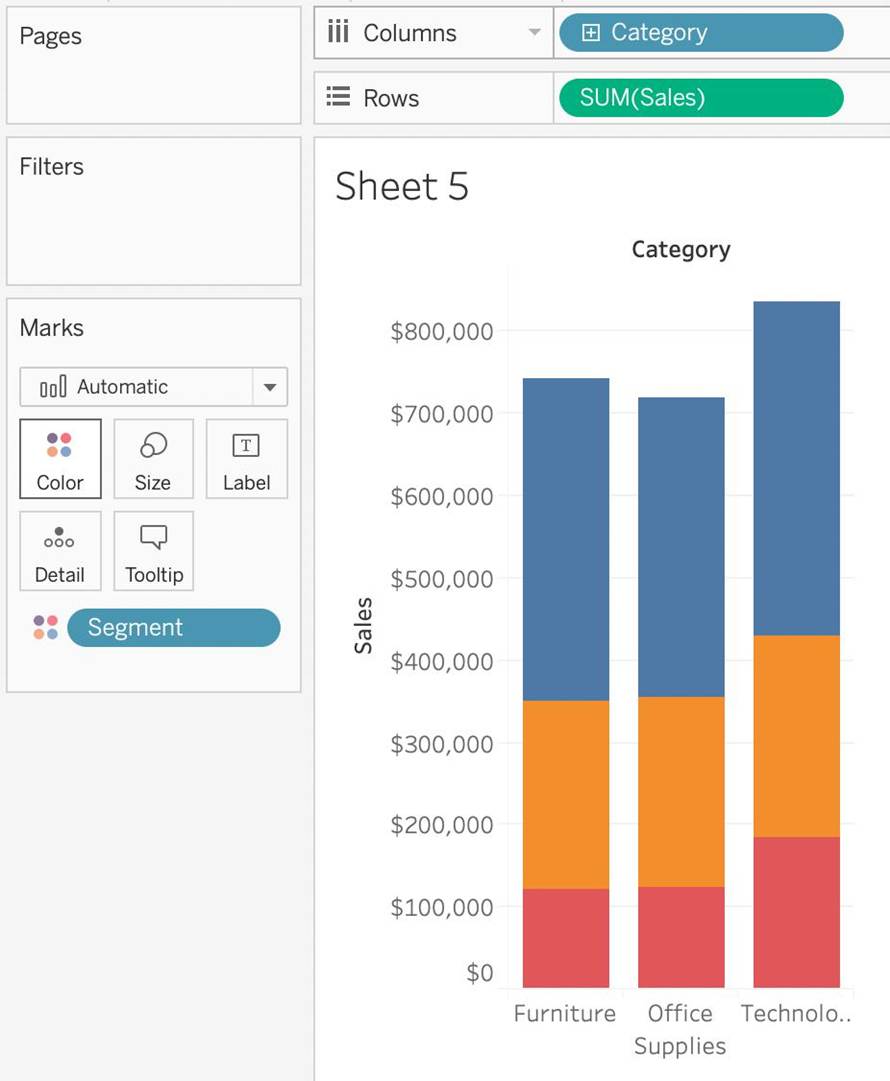
We can easily see a ‘part-of-a-whole’ methodology being used here as well – we are seeing the breakdown of Segments within each Category.
To easily visualize trends over time – This is the definition of a line chart.
To visualize each discrete category using a separate bar – This can be accomplished using a simple bar
chart, why use a stacked one?
You want to save a view as an image that you can paste into a Microsoft Word document.
Which two statements accurately describe exporting a view as an image? Choose two.
- A . Default exports include everything in the view, including Tableau fonts.
- B . The default export format is TIFF.
- C . The default export format is PNG.
- D . The exported image is a vector-based file that embeds the Tableau fonts.
C, D
Explanation:
When exporting a view as an image in Tableau, the default export includes everything that is currently displayed in the view, with Tableau applying its own styling, including fonts. The default format for an exported image is PNG, which is a raster-based file format that captures all visual elements as pixels. PNG is widely used for its lossless compression and is suitable for detailed images like those produced by Tableau. Unlike vector-based images, PNGs do not embed fonts, and the image quality remains consistent when the image is viewed on different platforms, which makes it ideal for inserting into documents like Microsoft Word.