
Tableau TDS-C01 Practice Exams
Last updated on Oct 22,2026- Exam Code: TDS-C01
- Exam Name: Tableau Desktop Specialist
- Certification Provider: Tableau
- Latest update: Oct 22,2026
Which of the following would you use to connect to multiple tables in a single data source at once?
- A . A Blend
- B . A Hierarchy
- C . A Set
- D . A Join
D
Explanation:
The data that you analyze in Tableau is often made up of a collection of tables that are related by specific fields (that is, columns). Joining is a method for combining data on based on those common fields. The result of combining data using a join is a virtual table that is typically extended horizontally by adding columns of data.
For example, consider the following two tables originating from a single data source:
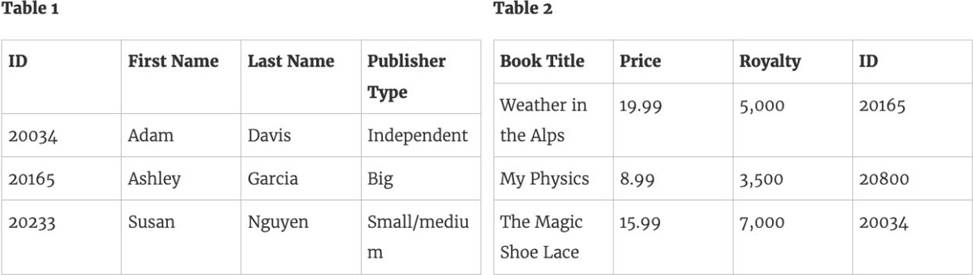
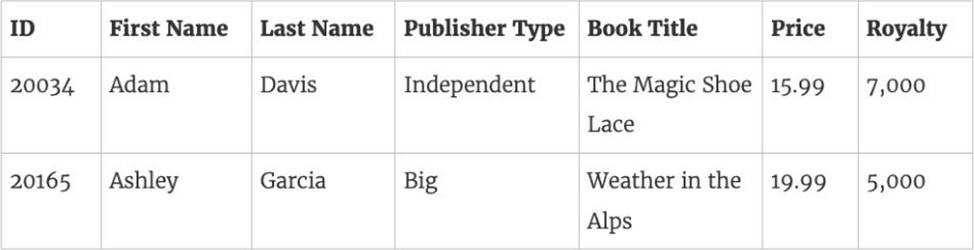
We can combine these 2 tables, simply by joining the tables on ID to answer questions like, "How much was paid in royalties for authors from a given publisher?". By combining tables using a join, you can view and use related data from different tables in your analysis.
Reference: https://help.tableau.com/current/pro/desktop/en-us/joining_tables.htm
Which of the following is a benefit of using a Tableau Data Source (.tds)?
- A . To hold one or more worksheets, plus zero or more dashboards and stories.
- B . To not contain the actual data but rather the information necessary to connect to the actual data as well as any modifications you’ve made on top of the actual data such as changing default properties, creating calculated fields etc
- C . To create a single zip file that contains a workbook along with any supporting local file data and background images. This is great for sharing your work with others who don’t have access to the original data.
- D . To create a local copy of a subset or entire data set that you can use to share data with others, when you need to work offline, and improve performance.
B
Explanation:
The following are the official definitions from the Tableau documentation for the various file types:
1) .tds (Tableau Data Source) – To not contain the actual data but rather the information necessary to connect to the actual data as well as any modifications you’ve made on top of the actual data such as changing default properties, creating calculated fields etc. (CORRECT ANSWER)
2) .twbx ( Tableau packaged workbook) – To create a single zip file that contains a workbook along with any supporting local file data and background images. This is great for sharing your work with others who don’t have access to the original data.
3) Extract (.hyper or .tde) C To create a local copy of a subset or entire data set that you can use to share data with others, when you need to work offline, and improve performance.
3) (.twb) Workbooks C To hold one or more worksheets, plus zero or more dashboards and stories.
Reference: https://help.tableau.com/current/pro/desktop/en-us/environ_filesandfolders.htm
With the Marks card drop-down menu set to Automatic, a line chart will be created whenever you place what on the Rows shelf and the Columns shelf?
- A . Measures on one shelf, and a date dimension on the other
- B . Zero or more dimensions on one shelf, and 2 or more measures on the other
- C . A date dimension followed by a continuous measure on one shelf
- D . Zero or more measures on one shelf, and 2 or more dimensions on the other
A
Explanation:
According to the Tableau Desktop Specialist Exam Readiness, a line chart will be created whenever you place measures on one shelf, and a date dimension on the other. This is because Tableau automatically recognizes date fields and treats them as continuous dimensions.
You may create a context filter to:
- A . To create a dependent filter
- B . Improve performance
- C . To replace a data source filter
- D . Create a dependent numerical or top N filter
BD
Explanation:
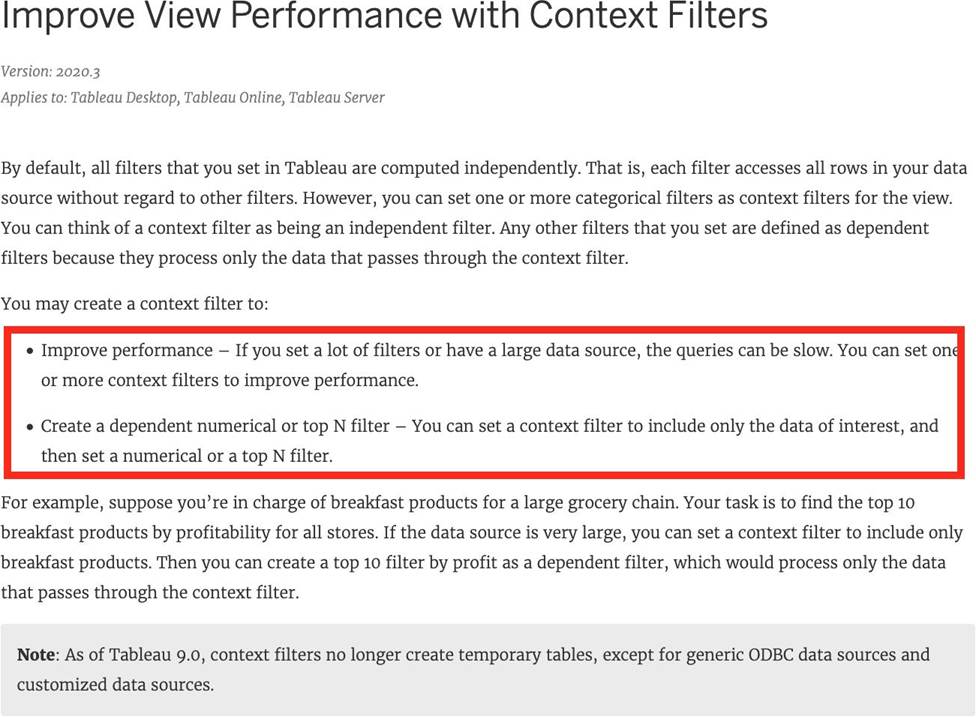
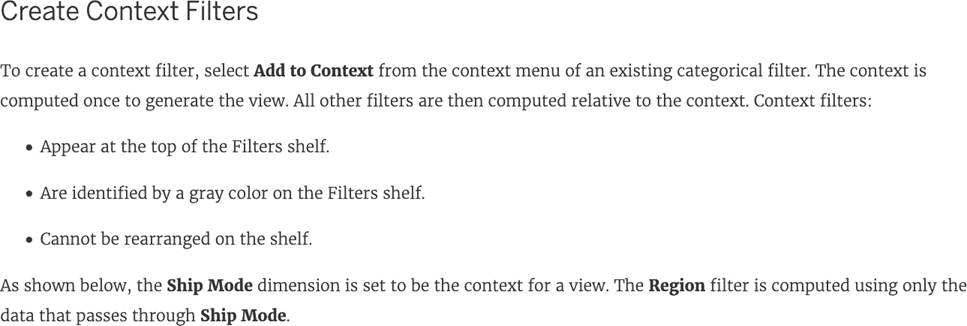
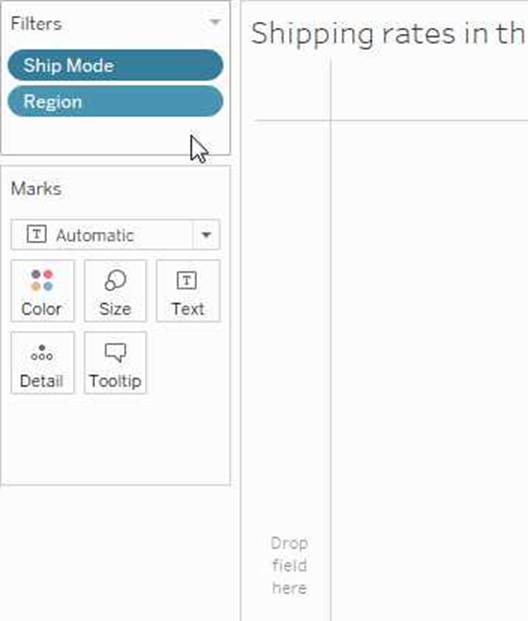
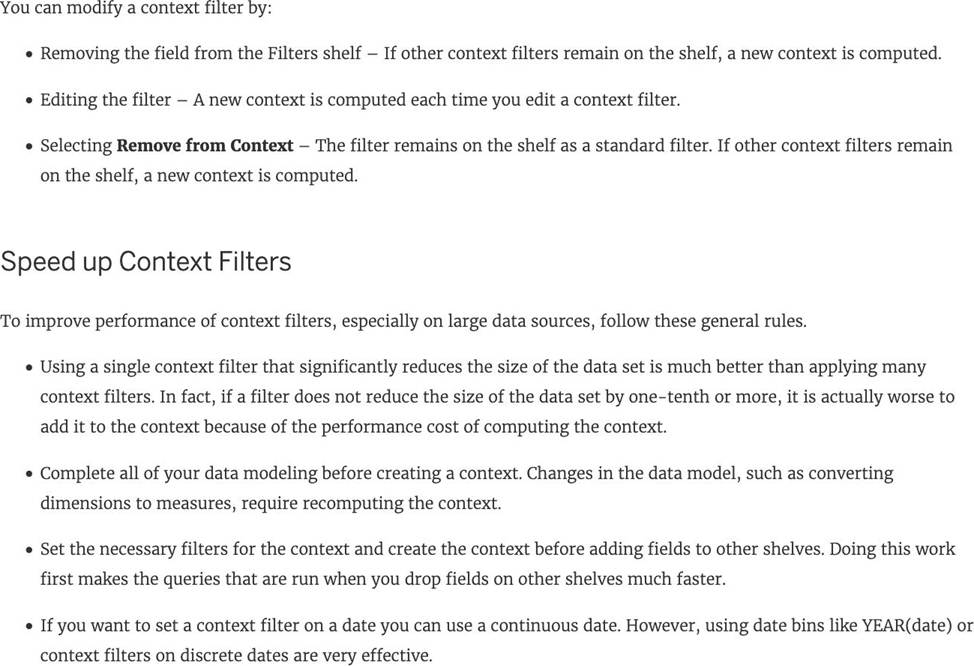
Important question! You cannot use a context filter to replace a data source filter since each filter type has its own use case. Also, a content filter is an Independent filter and all other filters are called dependent since they only process the data that passes through a context filter.
According to the official documentation:
Reference: https://help.tableau.com/current/pro/desktop/en-us/filtering_context.htm
By default, measures placed in a view are aggregated. The type of aggregation applied
______________
- A . is always sum
- B . depends on the context of the view
- C . is always COUNT
- D . is always AVERAGE
B
Explanation:
By default, measures placed in a view are aggregated. Mostly you’ll notice that the aggregation is SUM, but not ALWAYS.
The type of aggregation applied varies depending on the context of the view.
Reference: https://help.tableau.com/current/pro/desktop/en-us/calculations_aggregation.htm
What is created by a calculated field that has a formula of SUM(Sales)/SUM(Profit)?
- A . A parameter
- B . A measure
- C . A dimension
- D . A set
B
Explanation:
a calculated field that has a formula of SUM(Sales)/SUM(Profit) is a measure, because it returns a numeric value that can be aggregated and used for analysis. A parameter is a user-defined variable that can be used in calculations or filters. A dimension is a categorical field that can be used to group or slice data. A set is a subset of data based on some condition.
A field that shows average home values for the United States in 2016 is most likely:
- A . A discrete date part dimension
- B . A continuous date value dimension
- C . A geographical dimension
- D . An aggregated measure
D
Explanation:
This question is directly from the Official Tableau Desktop Specialist exam guide.
Since we are talking about the AVERAGE home values for the United States in 2016, the question is directly offering us a hint that the answer has something to do with aggregation and that too the values tell us that we’re working with MEASURES.
Date part and Date values don’t really make much sense given the question, and neither does geography.
Therefore, the answer naturally is "An aggregated measure".
Which of the following are interactive elements that can be added to a dashboard for users?
- A . URL Action
- B . Filter Action
- C . Highlight Action
- D . Edit Tooltip Action
A, B, C
Explanation:
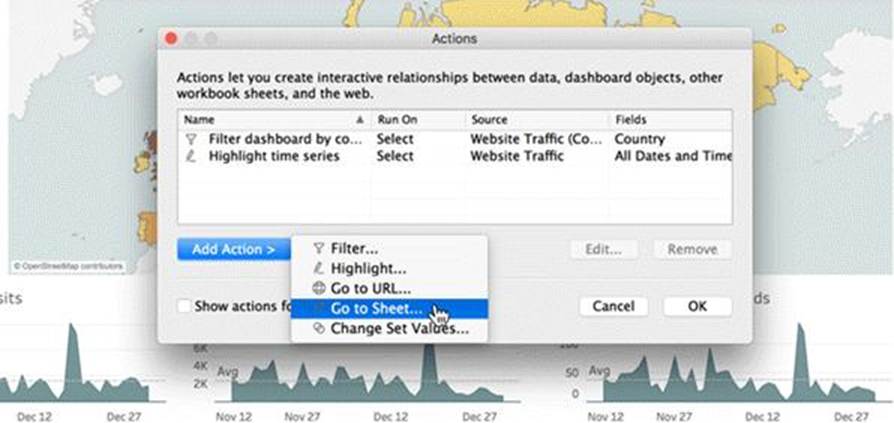
We can perform filter, URL and highlight actions out of the above given choices on a dashboard.
Please refer to the image below:
Reference: https://help.tableau.com/current/pro/desktop/en-us/actions_dashboards.htm
Which of the following is not a Trend Line Model?
- A . Linear Trend Line
- B . Exponential Trend Line
- C . binomial Trend Line
- D . Logarithmic Trend Line
C
Explanation:
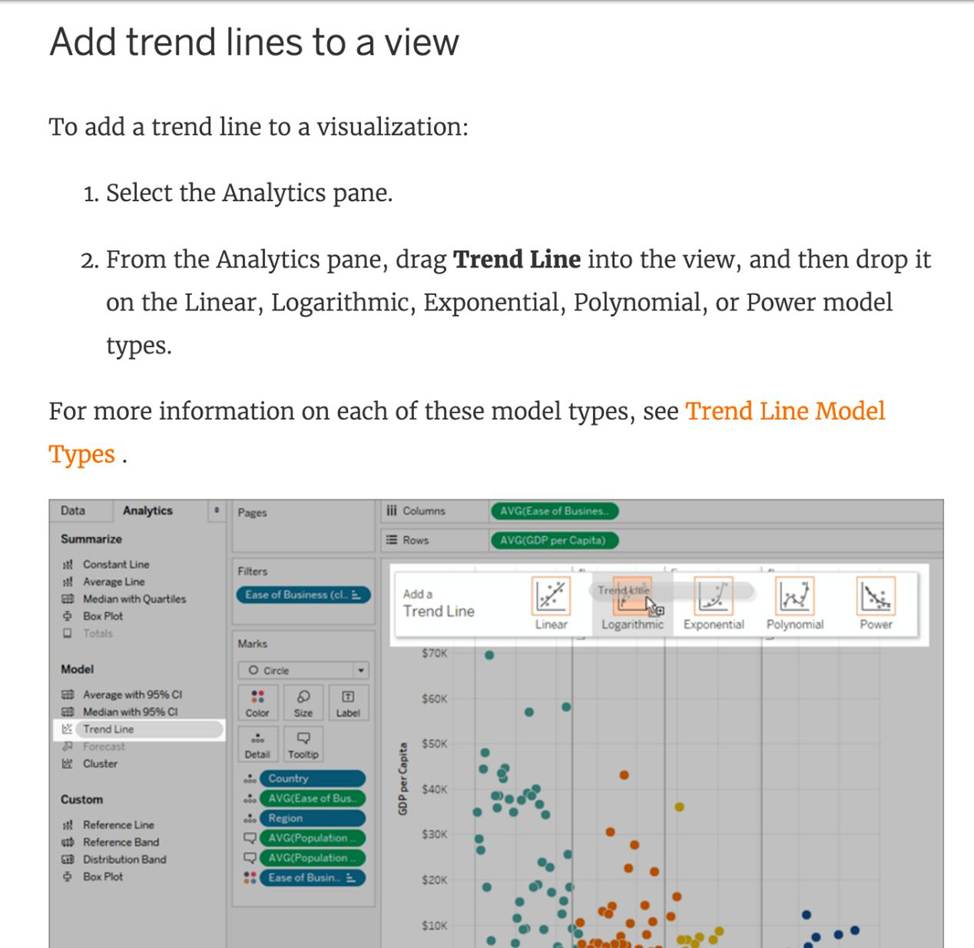
According to the official Tableau documentation, there are 5 types of trend lines which we can work with in Tableau:
1) Linear Trend Line
2) Logarithmic Trend Line
3) Exponential Trend Line
4) Polynomial Trend Line
5) Power Model
Hence, the correct answer is BINOMIAL trend line which is not present in Tableau.
See the following image:
For more information, refer to: https://help.tableau.com/current/pro/desktop/en-us/trendlines_add.htm
Which of the following can you use to create a Histogram?
- A . 2 measures
- B . 1 measure
- C . 2 dimensions
- D . 1 dimension
B
Explanation:
A histogram is a chart that displays the shape of a distribution. A histogram looks like a bar chart but groups values for a continuous measure into ranges, or bins.
The basic building blocks for a histogram are as follows:
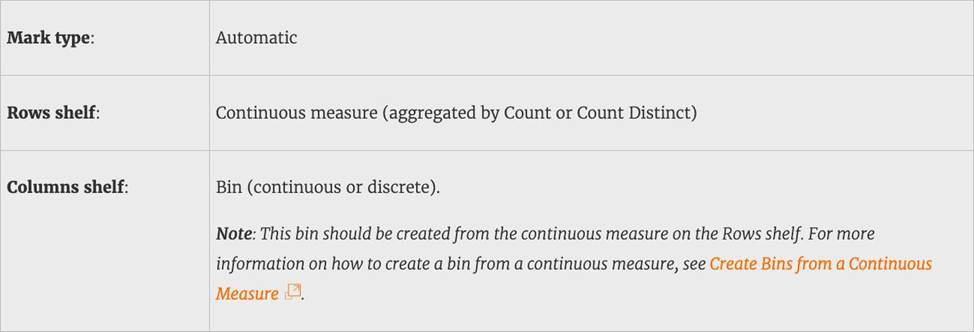
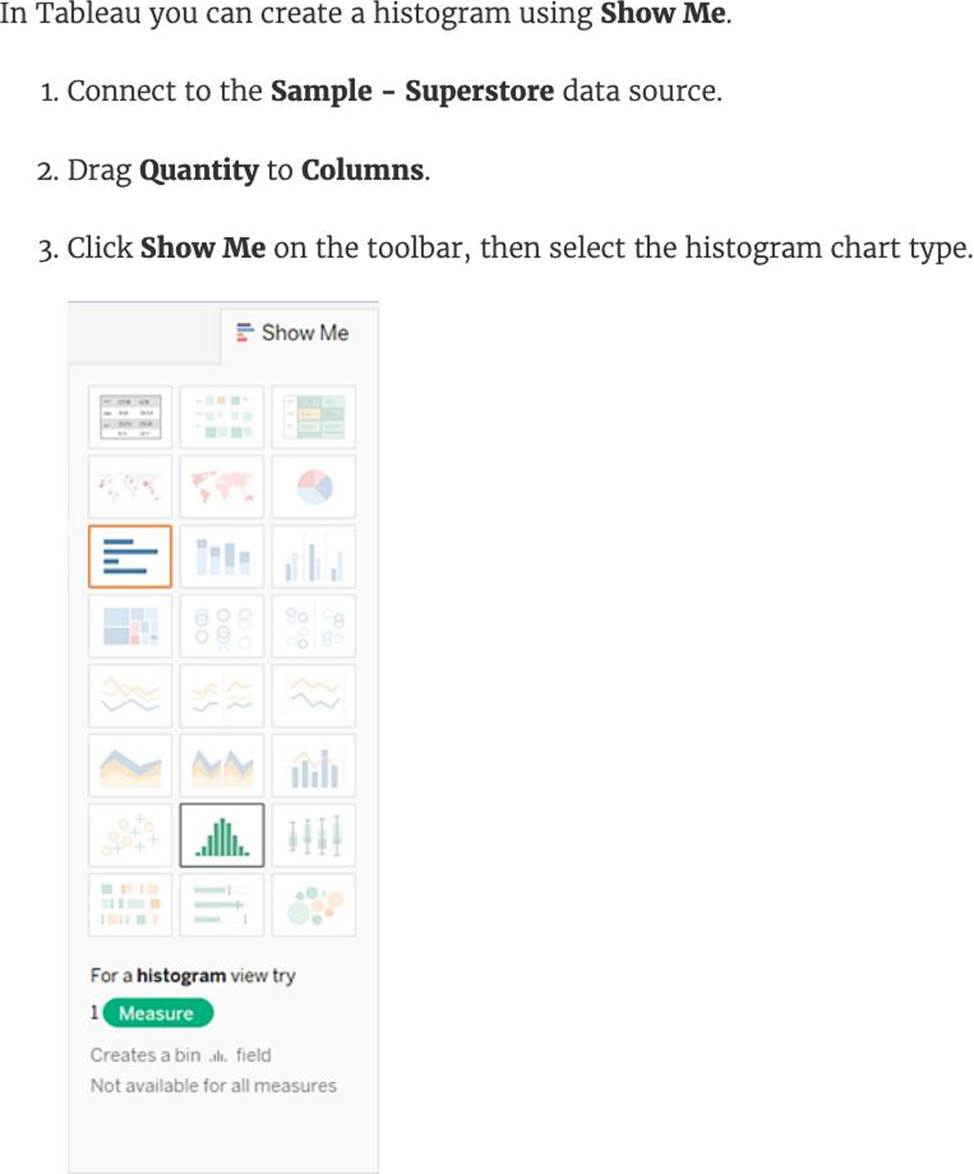
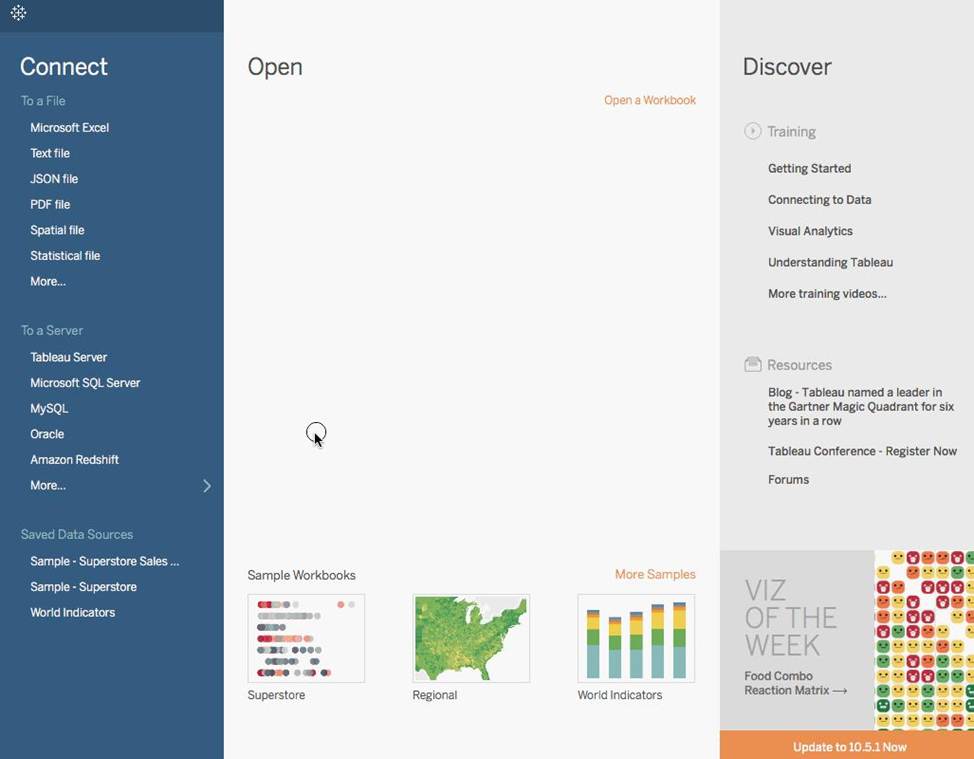
Demo:
Reference: https://help.tableau.com/current/pro/desktop/en-us/buildexamples_histogram.htm