
Tableau TDS-C01 Practice Exams
Last updated on Oct 22,2026- Exam Code: TDS-C01
- Exam Name: Tableau Desktop Specialist
- Certification Provider: Tableau
- Latest update: Oct 22,2026
_________________ are a local copy of a subset or entire data set that you can use to share data with others, when you need to work offline, and improve performance.
- A . .twb files
- B . .tbm files
- C . .twbx files
- D . .tde files
D
Explanation:
According to the official Tableau documentation:
Depending on the version the extract was created in, Tableau extract files can have either the .hyper or .tde file extension. Extract files are a local copy of a subset or entire data set that you can use to share data with others, when you need to work offline, and improve performance. For more information, see Extract Your Data.
Reference: https://help.tableau.com/current/pro/desktop/en-us/environ_filesandfolders.htm
True or False: To concatenate fields, they must be of same data type
- A . True
- B . False
A
Explanation:
Yes! To concatenate fields, they must be of same data type. However, there is a workaround which we can use – Type casting. See below:

Here, State and City are Strings, but Postal Code? Nope. It’s an Integer. So we can simply use the STR() function to convert it into a String, and hence the entire equation becomes valid!
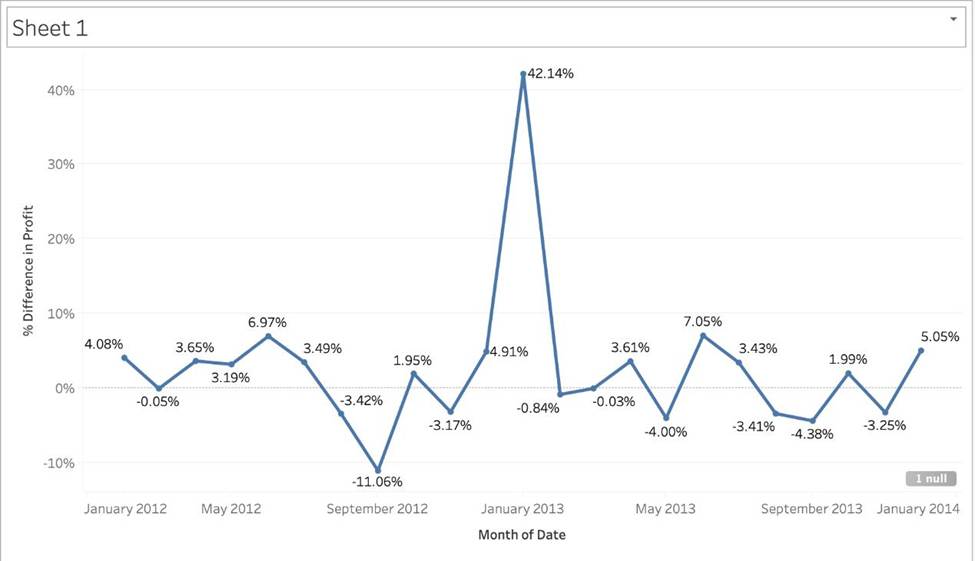
Using the CoffeeChain table, create a chart to see the monthly Percent difference change in Profit, from the beginning of 2012 to the end of 2013.
How many months saw a Negative percent difference in Profit?
- A . 9
- B . 7
- C . 10
- D . 8
C
Explanation:
Follow along to reach the correct answer:
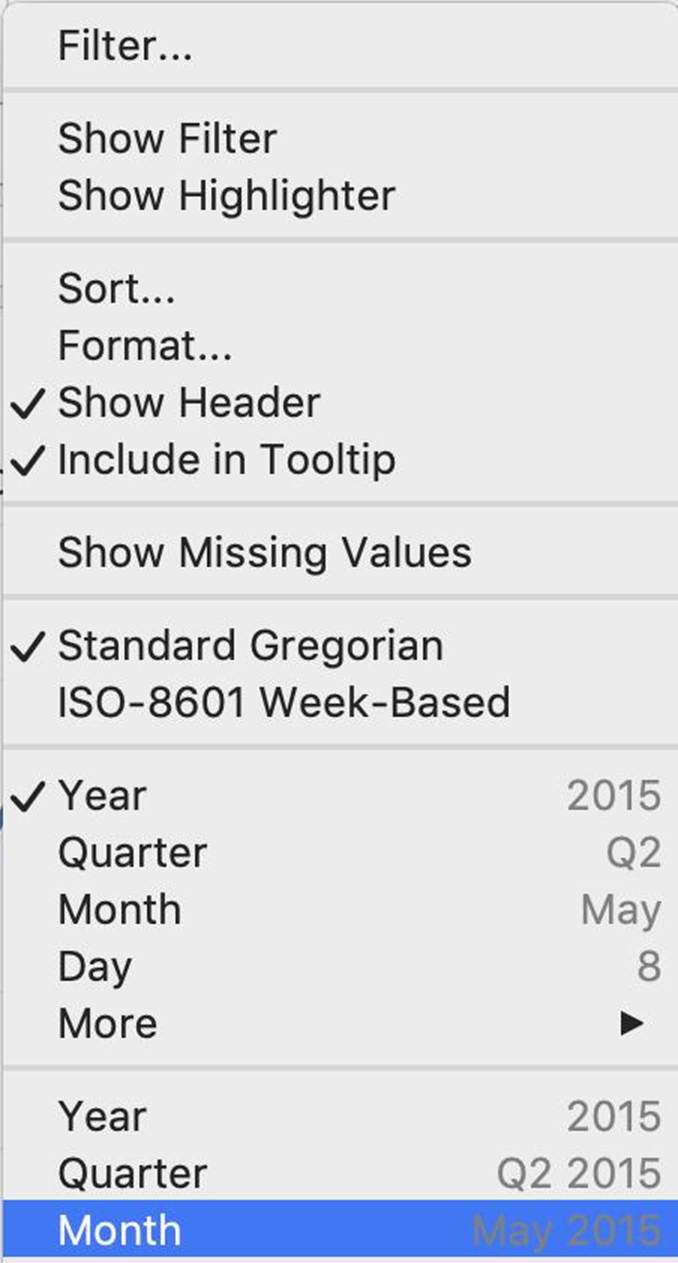
1) First, drag Date to the Column shelf and Profit to the Rows shelf. We need to see the 2 consecutive months over this two year period (2012-2013) so this tells us we need to work with continuous dates:
Click on Date in the Column shelf and convert it to continuous month:
2) Now, click on the Profit pill in the Rows shelf, go to quick table calculation and choose Percent difference:
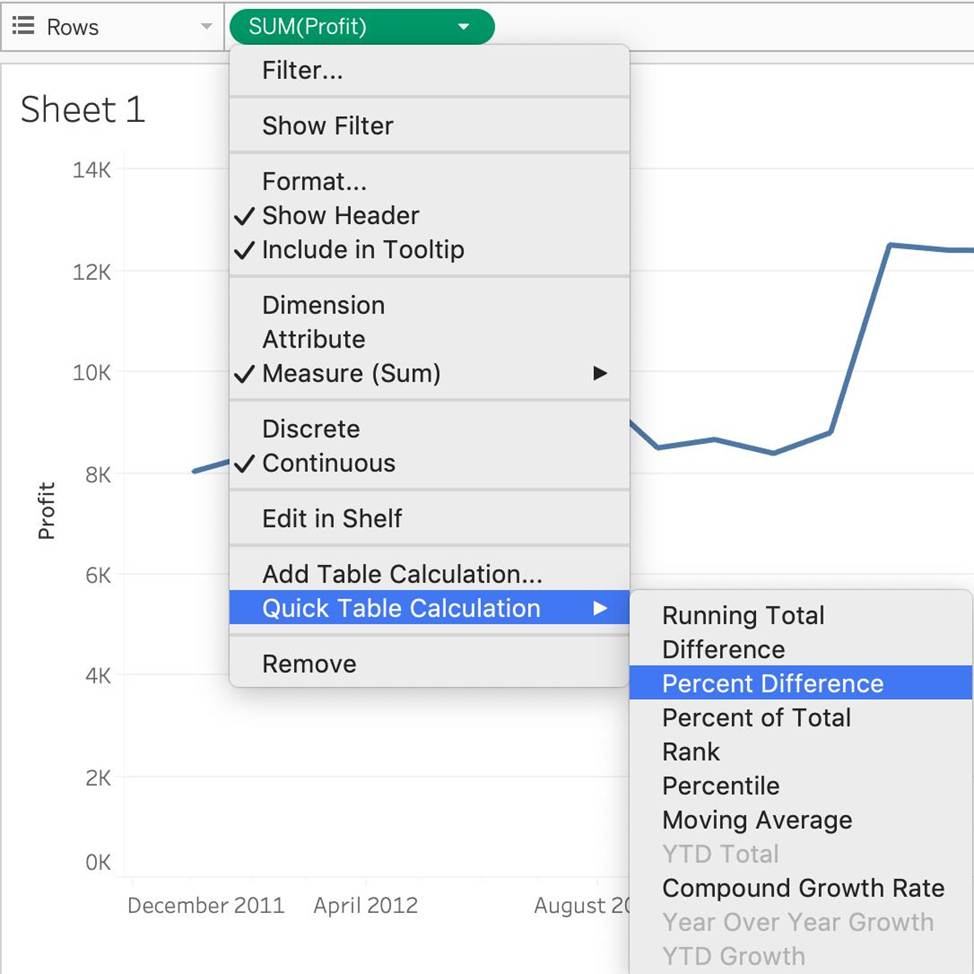
3) Finally, click on the Show mark Labels icon:

4) We finally have our view, and clearly, 10 Months have a NEGATIVE percent difference:
Which of the following 2 columns CANNOT be deleted in Tableau?
- A . Measure Names
- B . Number of Records
- C . Measure Values
- D . Calculated Fields
A, C
Explanation:
Measure names and values CANNOT be deleted in Tableau like other columns can. These are auto-generated.
Calculated Fields, and Number of records can both be deleted.
What are two requirements to combine two tables by using a union? Choose two.
- A . Related fields must have matching data types.
- B . Related fields must have different names.
- C . The tables must come from different connections.
- D . The tables must have the same number of fields.
A, D
Explanation:
To perform a union in Tableau, the tables must have a related field with matching data types, and they must have the same number of fields. This allows the tables to be appended vertically in the data source. Different names or tables from different connections do not affect the ability to union the tables.
In Tree maps, the size begins with the largest rectangle on the ________________ and the smallest
rectangle on the ________________.
- A . top left bottom left
- B . top right, bottom right
- C . top left, bottom right
- D . top right, bottom left
C
Explanation:
Tree maps size begins from maximum in top left to smallest in bottom right.
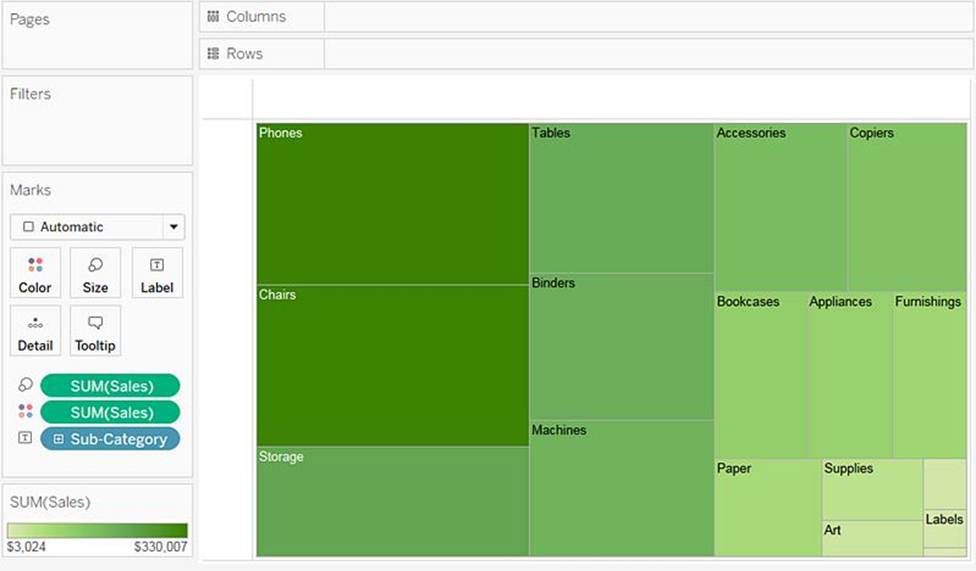
See below to learn how to create a TreeMap and add colours to it:
Reference: https://help.tableau.com/current/pro/desktop/en-us/buildexamples_treemap.htm
What is the minimum amount of RAM recommended for any production use of Tableau Server?
- A . 8GB
- B . 16GB
- C . 32GB
- D . 64GB
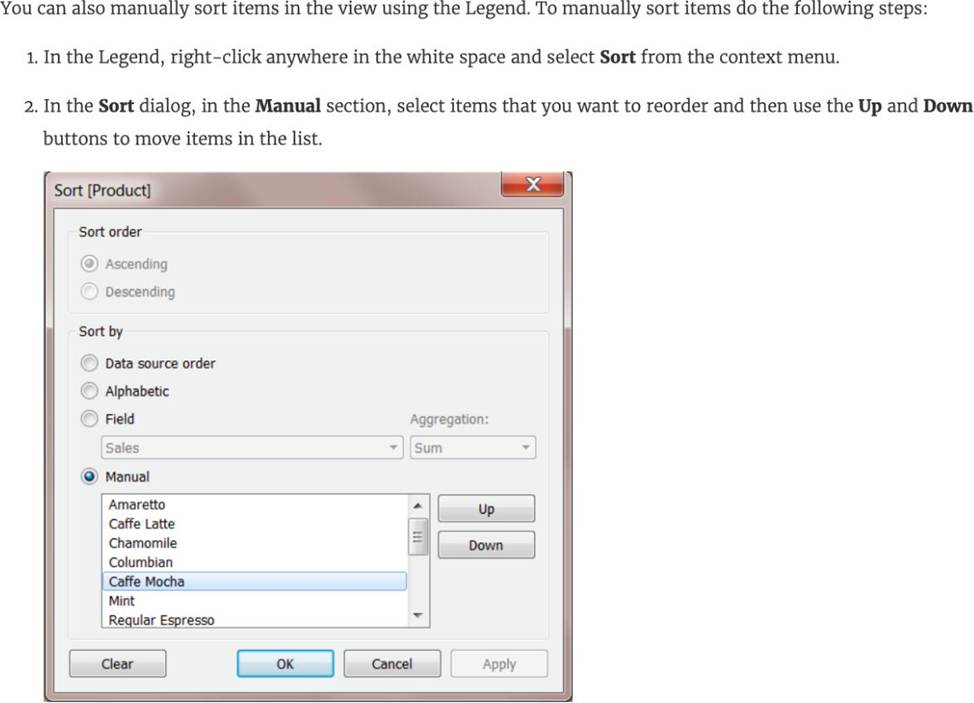
For a ____________ sort, no matter how the data changes, the values will always stay in the sort order we kept stuff in.
- A . Random
- B . Manual
- C . Topological
- D . Hierarchical
B
Explanation:
For a manual sort, no matter how the data changes, the values will always stay in the sort order you kept stuff in.
From the official website:
Reference: https://help.tableau.com/current/reader/desktop/en-us/reader_sort.htm
Which three elements are included in a packaged workbook (.twbx)? Choose three.
- A . A PDF copy of the workbook
- B . Background images
- C . Tableau Datasource Customization (TDC) files
- D . Extract files
- E . Custom shapes
BDE
Explanation:
According to the Tableau Desktop Specialist Exam Guide, a packaged workbook (.twbx) includes background images, extract files, and custom shapes. A PDF copy of the workbook and Tableau Datasource Customization (TDC) files are not included in a packaged workbook.
You have the following string value: Sales Data.
Which calculated field produces an output of Sales?
- A . LTRIM ("Sales Data")
- B . LEFT ("Sales Data", 5)
- C . LEFT ("Sales Data")
- D . RTRIM (“Sales Data")
B
Explanation:
The calculated field formula LEFT ("Sales Data", 5) will correctly produce the output "Sales" from the string value "Sales Data". The LEFT function in Tableau returns the specified number of characters from the start of the string. Here, the first 5 characters of "Sales Data" are "Sales".