
Tableau TDS-C01 Practice Exams
Last updated on Oct 23,2026- Exam Code: TDS-C01
- Exam Name: Tableau Desktop Specialist
- Certification Provider: Tableau
- Latest update: Oct 23,2026
Which of the following lets you group related dashboard items together so you can quickly position them?
- A . Layout Extensions
- B . Layout Blanks
- C . Layout Containers
- D . Layout positioners
C
Explanation:
Layout containers let you group related dashboard items together so you can quickly position them. As you change the size and placement of items inside a container, other container items automatically adjust
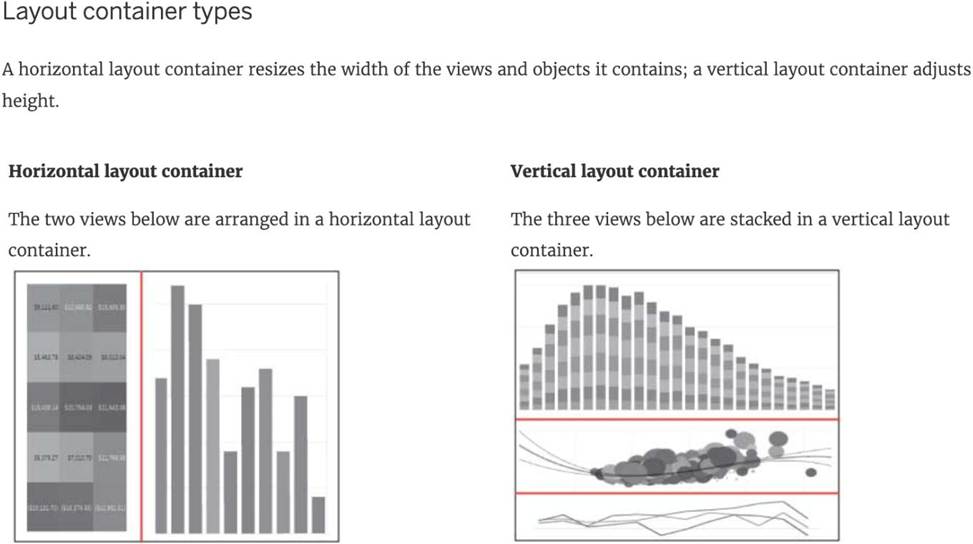
Reference: https://help.tableau.com/current/pro/desktop/en-us/dashboards_organize_floatingandtiled.htm
________________ is hosted by Tableau to share our visualisations publically with the world.
- A . Tableau Reader
- B . Tableau Desktop
- C . Tableau Server
- D . Tableau Public
D
Explanation:
Tableau Public is a free service that lets anyone publish interactive data visualizations to the web.
Visualizations that have been published to Tableau Public (“vizzes”) can be embedded into web pages and blogs, they can be shared via social media or email, and they can be made available for download to other users.
Check it out: https://public.tableau.com/en-us/s/
Which of the following are valid ways to make the font more readable in Tableau?
- A . Decrease the font size
- B . Don’t use backgrounds
- C . use a clear and readable font
- D . Make the Font color sharper / darker than the background
- E . Increase the font size
CDE
Explanation:
This is one of the most common questions on the Tableau Desktop Specialist Exam.
Wrong options –
1) Don’t use backgrounds – This is not a solution.
What if we want to use backgrounds? We can’t just stop using backgrounds to solve this problem.
2) Decrease the font size – Do you think using a smaller font will make the text more readable? No right? Hence, this is wrong too.
All other options are ways recommended to make your text more readable!
Which statement accurately describes creating a group by selecting headers in a view?
- A . A new group updates the aliases from the selected headers.
- B . The grouped dimension is added to Color.
- C . The grouped dimension replaces the original dimension field on Rows or Columns.
- D . A newly created group only exists in the current view.
C
Explanation:
When creating a group by selecting headers in a Tableau view, the newly created grouped dimension replaces the original dimension field on either the Rows or Columns shelf. This grouping action aggregates the selected headers into a single group, and this new group dimension is automatically placed in the view, replacing the original dimension. This functionality allows for more simplified and customized categorization within the data visualization, enhancing the ability to analyze and interpret data according to specific groupings.
You create a crosstab that shows a list of 100 hotel chains alongside their average nightly cost. You also create two groups showing, respectively, the top 10 and bottom 10 hotel chains by cost, with subtotals.
What should you do to improve the crosstab and compare the two groups to all the remaining hotel chains?
- A . Include an Other group.
- B . Include the Summary card.
- C . Color encode the hotel chain names.
- D . Create a new view.
A
Explanation:
According to the Tableau Help, one of the ways to improve a crosstab is to “Include an Other group”. The help also states that “If you have a large number of members in a dimension, you can create groups to combine low-frequency members into an Other group. This can help you focus on the most relevant data and reduce clutter in your view” (page 2).
When you connect to a new data source, all worksheets that previously referred to the original data source now refer to the new data source. If the new data source does not have the same field names as the original workbook, the fields are marked with an exclamation point.

Which feature helps us fix this issue?
- A . Replace Reference
- B . Fix Metadata
- C . Renaming
- D . Aliases
A
Explanation:
Replace
Reference: When you successfully connect to a new data source, all worksheets in the workbook that previously referred to the original data source now refer to the new data source. If the new data source does not have the same field names as the original workbook, the fields become invalid and are marked
with an exclamation point
. You can quickly resolve the problem by replacing the field’s references.
For example, say you have a workbook connected to a data source that contains a Customer Name
field. Then you edit the data source to point to a new data source that has all the same data but instead of Customer Name, the field name has been changed to Name. The Customer Name field remains in the Data pane but is marked as invalid. To make the field valid, you can replace the references, which means you can map the invalid field to a valid field in the new data source (for example, Customer Name corresponds to Name).
Read more at: https://help.tableau.com/current/pro/desktop/en-us/howto_connect.htm
Download the Dataset from:
https://drive.google.com/file/d/12AYHfiPWkwBmvH0zbumOURgUX6Az00Rw/view?usp=sharing
Using the Time Series Table, create a line chart to show Sales over time.
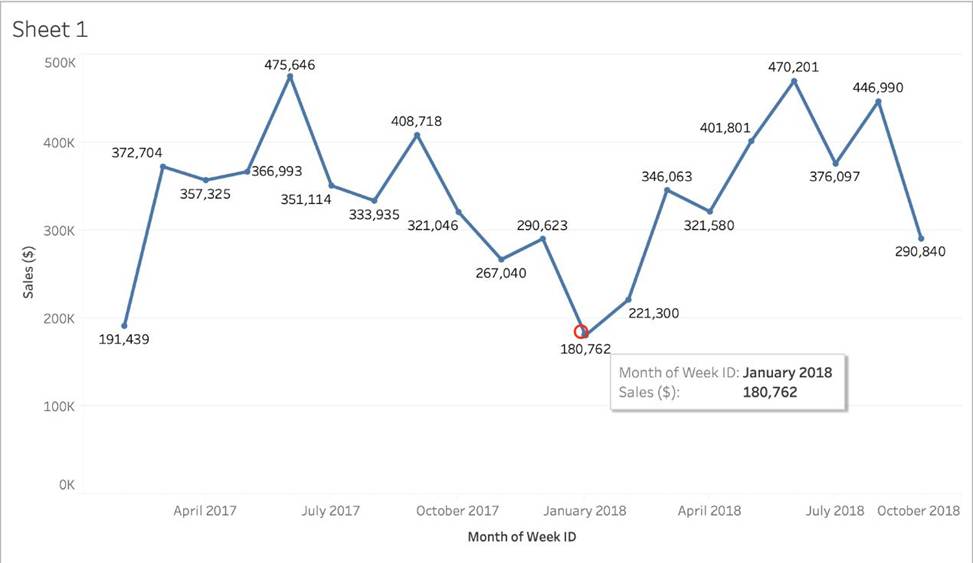
Which Month and Year witnessed the lowest Sales?
- A . September 2017
- B . March 2018
- C . December 2017
- D . January 2018
D
Explanation:
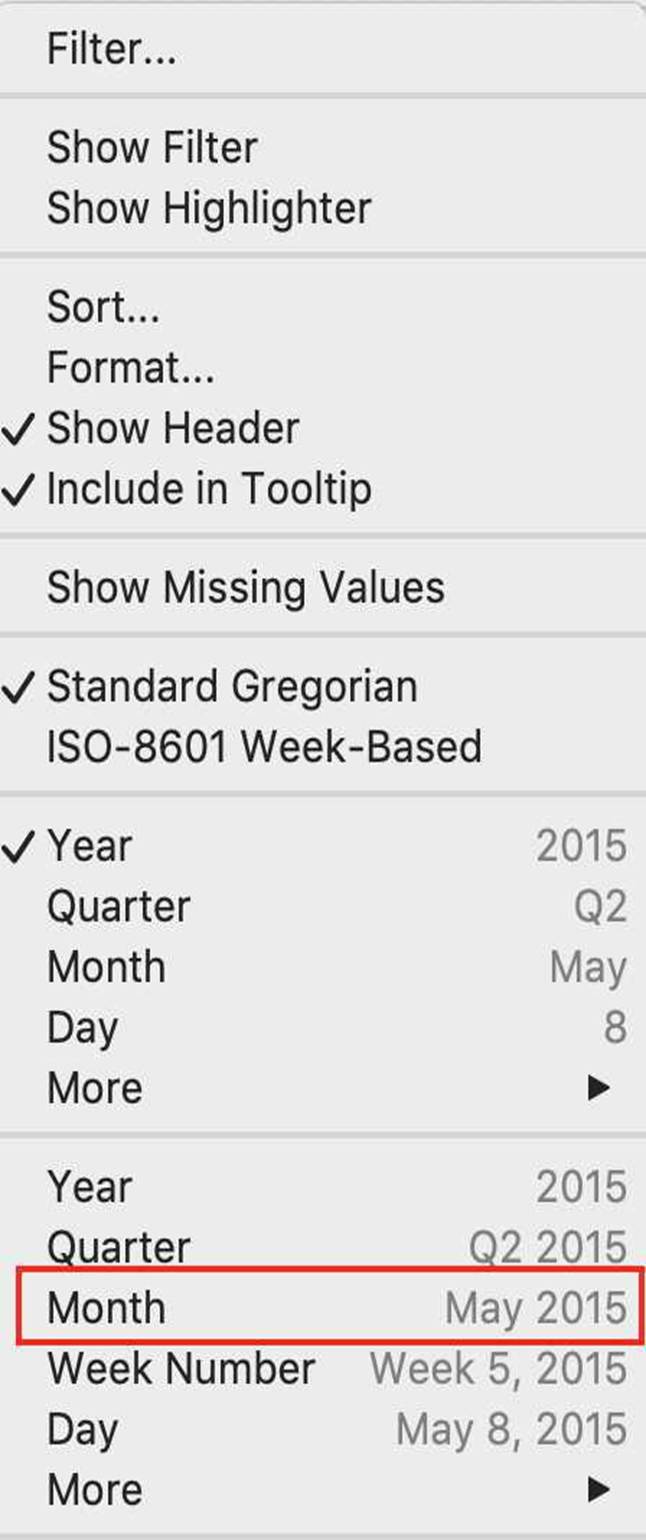
Follow the steps to get the correct answer: January 2018
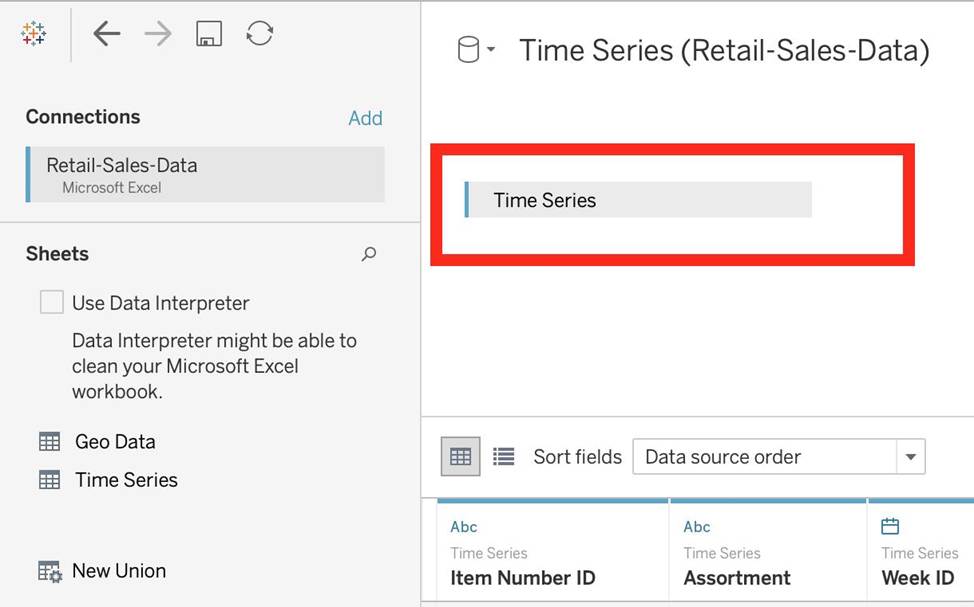
We are talking about dates, so use the Time series sheet as follows:
Next, the following should be your view and clearly, January 2018 is the lowest point:
Read more about dates: https://interworks.com/blog/rcurtis/2017/01/30/tableau-deep-dive-dates-introduction-dates/
What are two use cases for a story? Choose two.
- A . Provide additional editing and interactive capabilities to your audience.
- B . Present a data narrative to lead your audience to your conclusions.
- C . Assemble a sequenced analysis to share with collaborators.
- D . To allow for easier exporting to Power Point.
BC
Explanation:
You can use a story to present a data narrative to lead your audience to your conclusions, or to assemble a sequenced analysis to share with collaborators. A story is a sequence of visualizations that work together to convey information. You can create stories to tell a data story, provide context, demonstrate how decisions relate to outcomes, or to simply make a compelling case4
We can use ______________ as a static tool to open and interact with packaged workbooks with extracted data sources that have been created in Tableau Desktop.
- A . Tableau Reader
- B . Tableau Online
- C . Tableau Server
- D . Tableau Desktop
A
Explanation:
The word ‘static tool’ gives it away.
According to the official website:
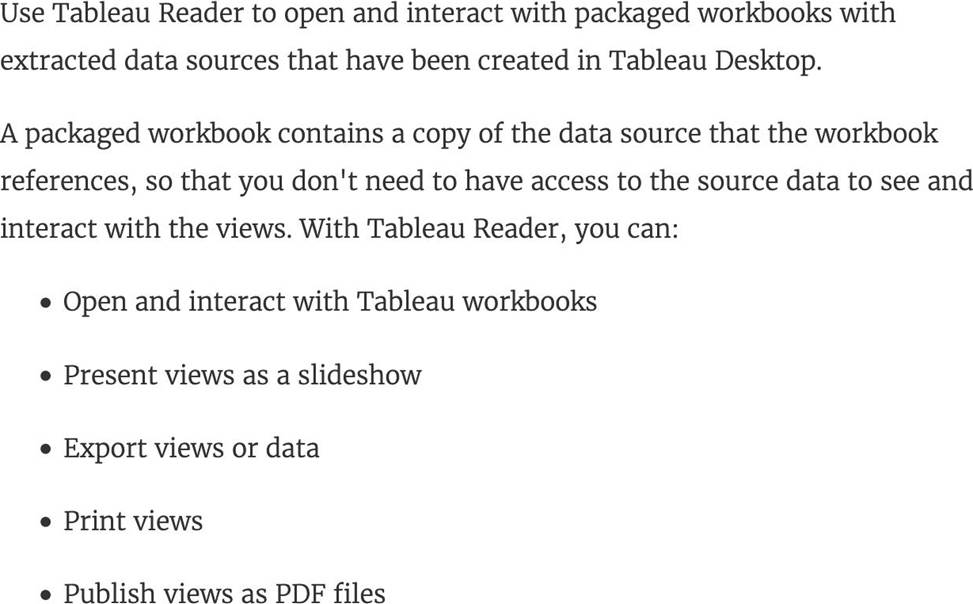
Reference: https://help.tableau.com/current/reader/desktop/en-us/reader_welcome.htm
Which two types of aggregations can be applied to string fields? Choose two.
- A . Sum
- B . Count Distinct
- C . Average
- D . Minimum
B, D
Explanation:
The two types of aggregations that can be applied to string fields in Tableau are Count Distinct and Minimum. Count Distinct counts the unique values of a field, and Minimum finds the smallest value in a field based on the alphanumeric order. String fields do not support numeric aggregations like Sum or Average.