
Tableau TDS-C01 Practice Exams
Last updated on Oct 23,2026- Exam Code: TDS-C01
- Exam Name: Tableau Desktop Specialist
- Certification Provider: Tableau
- Latest update: Oct 23,2026
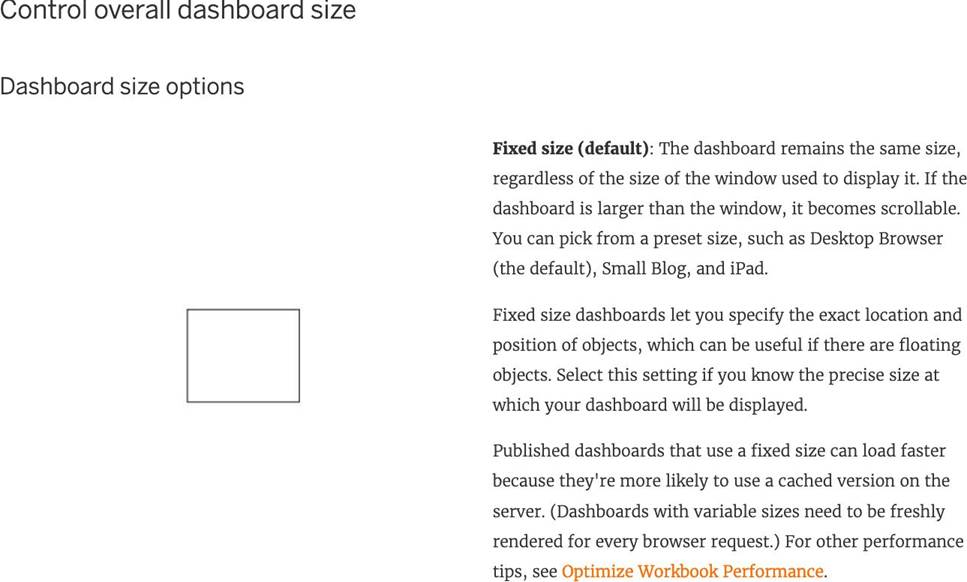
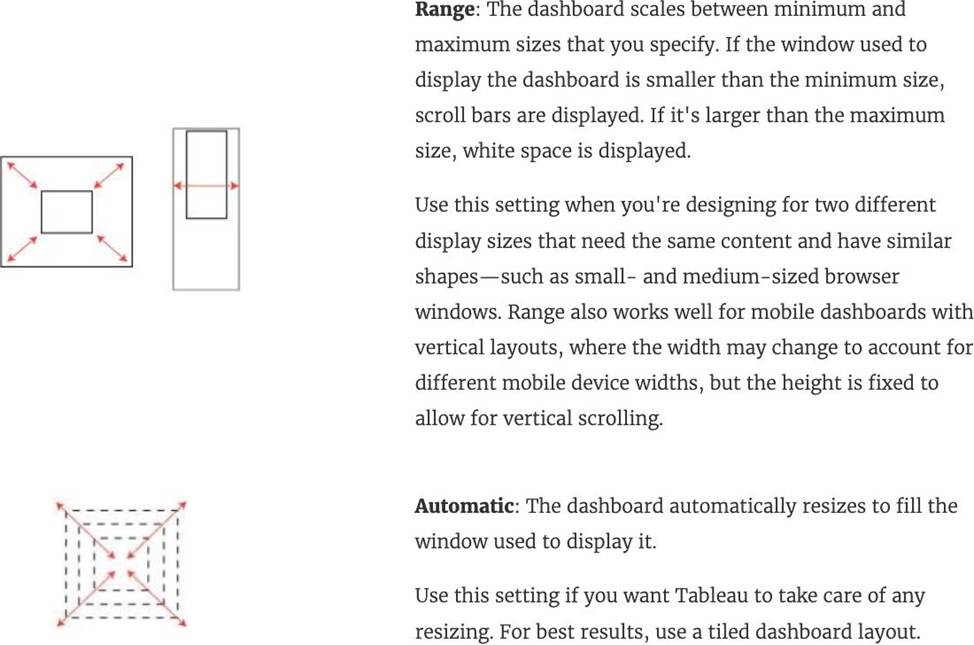
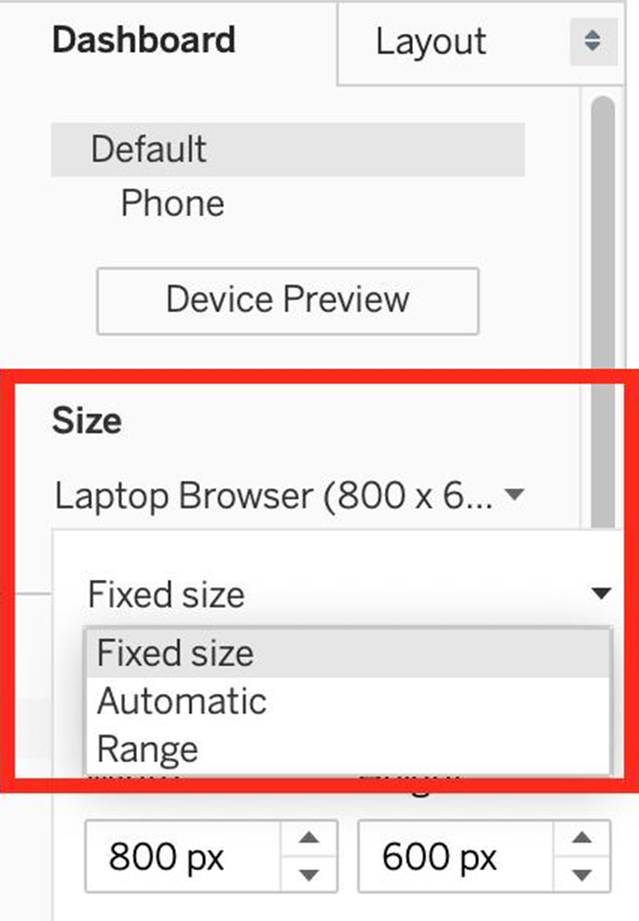
Which of the following are valid Dashboard size options?
- A . Range
- B . Fixed Size
- C . Automatic
- D . Scaled
ABC
Explanation:
Scaled is NOT a valid size options when creating Dashboards in Tableau!
After you create a dashboard, you might need to resize and reorganize it to work better for your users.
Reference: https://help.tableau.com/current/pro/desktop/en-us/dashboards_organize_floatingandtiled.htm
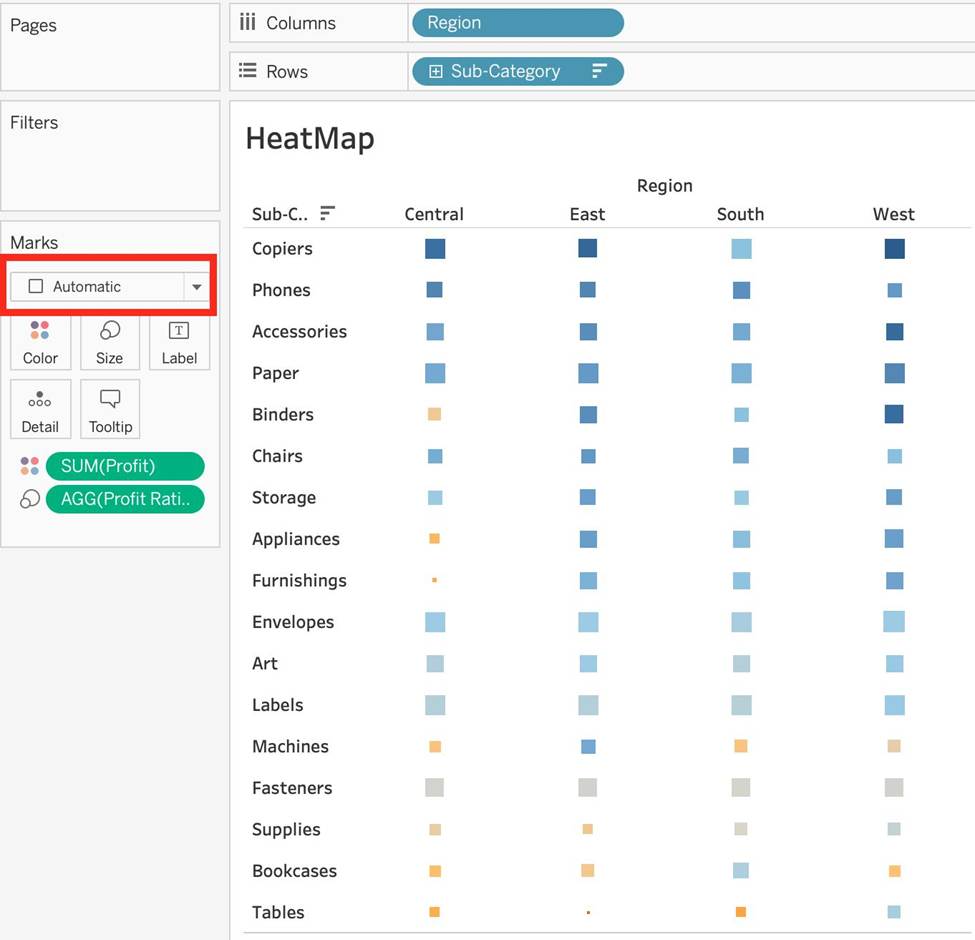
Which of the following shapes does a Heat Map use by default?
- A . Square
- B . Line
- C . Text
- D . Circle
A
Explanation:
By default, the shape that a Heap map uses is a "Square". See below:
Reference: https://help.tableau.com/current/pro/desktop/en-us/buildexamples_highlight.htm
_______________ enables us to create workbooks and views, dashboards, and data sources in Tableau Desktop, and then publish this content to our own server.
- A . Tableau Server
- B . Tableau Prep
- C . Tableau Public
- D . Tableau myServer
A
Explanation:
Tableau SERVER enables us to create workbooks and views, dashboards, and data sources in Tableau Desktop, and then publish this content to our own server.
Moreover, as a Tableau Server administrator you will control who has access to server content to help protect sensitive data. Administrators can set user permissions on projects, workbooks, views, and data sources.
Reference: https://www.tableau.com/learn/webinars/introduction-tableau-server
How can you format numbers in Tableau as currency?
- A . Right-click a measure or axis in the view and select Format. Then in the Format pane, click the Numbers drop-down menu.
- B . Right-click on the data source used in the view and select Format. Then in the Format pane, click the Numbers drop-down menu.
- C . Right-click a dimension in the view and select Format. Then in the Format pane, click the Numbers drop-down menu.
- D . Right-click on the Sheet name and select Format. Then in the Format pane, click the Numbers drop-down menu.
A
Explanation:
According to the official Tableau documentation:
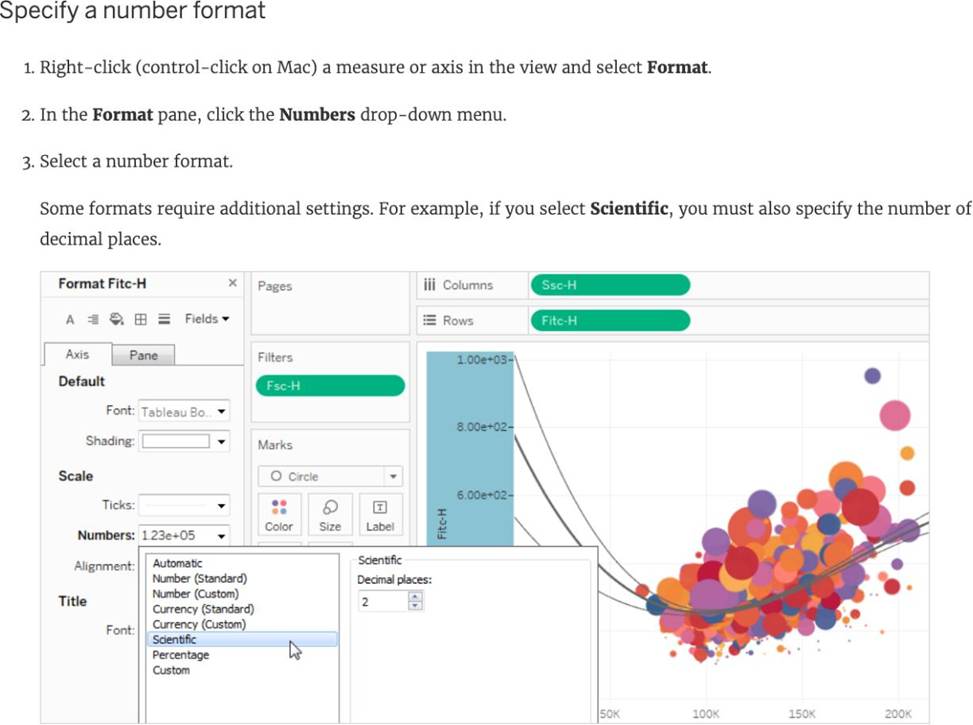
Reference: https://help.tableau.com/current/pro/desktop/en-us/formatting_specific_numbers.htm
________________ files are shortcuts for quickly connecting to the original data that you use often.
Data source files do not contain the actual data but rather the information necessary to connect to the actual data as well as any modifications you’ve made on top of the actual data such as changing default properties, creating calculated fields, adding groups, and so on.
- A . .tbm
- B . .tds
- C . .tde
- D . .twb
B
Explanation:
According to the official Tableau documentation:
Tableau data source files have the .tds file extension. Data source files are shortcuts for quickly connecting to the original data that you use often. Data source files do not contain the actual data but rather the information necessary to connect to the actual data as well as any modifications you’ve made on top of the actual data such as changing default properties, creating calculated fields, adding groups, and so on. For more information, see Save Data Sources.
Reference: https://help.tableau.com/current/pro/desktop/en-us/environ_filesandfolders.htm
How does Tableau know at which level to aggregate values?
- A . Values are always aggregated at the level of granularity of the worksheet.
- B . Tableau doesn’t aggregate values, we do!
- C . Values are always aggregated at the level of the Date Part
- D . Aggregation is always done by using Tableau special formulas
A
Explanation:
In Tableau, you can aggregate measures or dimensions, though it is more common to aggregate measures. Whenever you add a measure to your view, an aggregation is applied to that measure by default. The type of aggregation applied varies depending on the context of the view.
When you add a measure to the view, Tableau automatically aggregates its values. Sum, average, and median are common aggregations; for a complete list, see List of Predefined Aggregations in Tableau. The current aggregation appears as part of the measure’s name in the view. For example, Sales becomes SUM(Sales). Every measure has a default aggregation which is set by Tableau when you connect to a data source. You can view or change the default aggregation for a measure―see Set the Default Aggregation for a Measure.
You can change the aggregation for a measure in the view from its context menu:
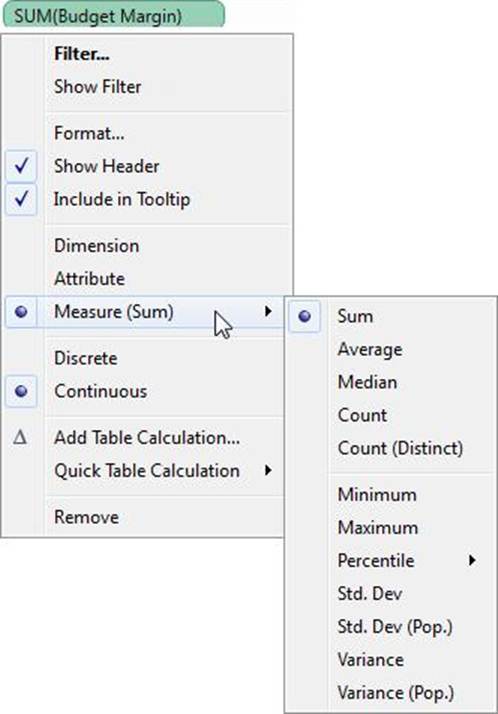
Reference: https://help.tableau.com/current/pro/desktop/en-us/calculations_aggregation.htm
The row and column shelves contain ___________________
- A . Pills
- B . Grand Totals
- C . Filters
- D . Parameters
A
Explanation:
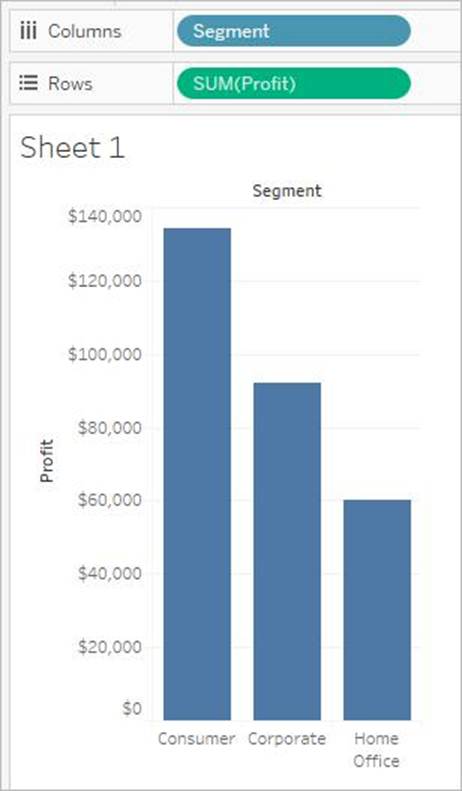
We can drag fields from the Data pane to create the structure for your visualizations.
The Columns shelf creates the columns of a table, while the Rows shelf creates the rows of a table.
You can place any number of fields on these shelves.
These FIELDS are also referred to as PILLS. See below:
Reference: https://help.tableau.com/current/pro/desktop/en-us/buildmanual_shelves.htm
Is it possible to add both a Dashboard and a Worksheet at the same time to a Story Point in Tableau?
- A . Yes
- B . No
B
Explanation:
This is a tricky question. We are talking about story POINTS, and not entire stories in the question.
To create a story, lets say I have a blank story with 1 dashboard and 1 worksheet.
I can simply drag the dashboard into the view to create a new story point.
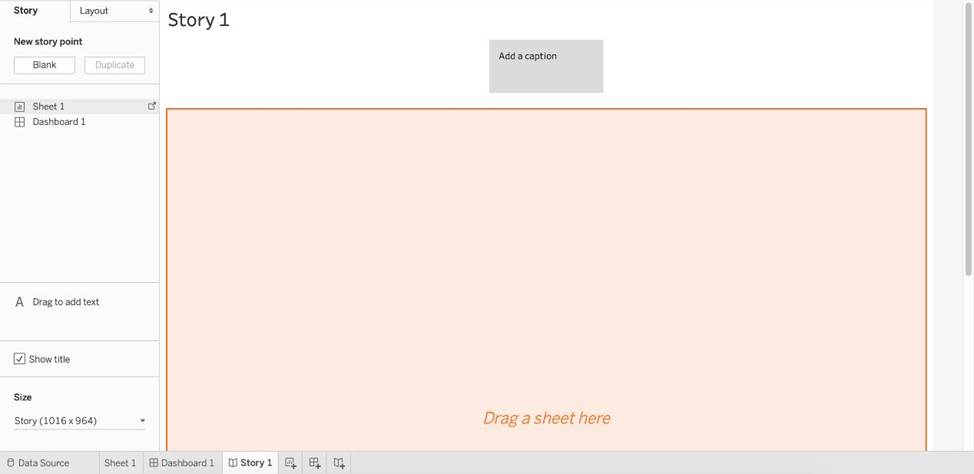
Now, if I try to adjust the worksheet beside it in this same view, I cannot. See below:
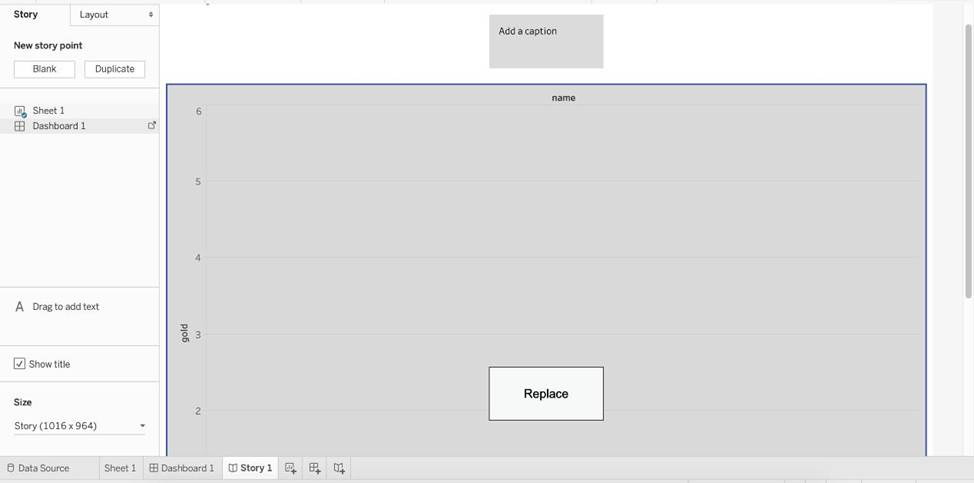
The only option available is to replace the existing view. Therefore, the answer is NO since they both cannot be added.
Read more about stories in Tableau: https://help.tableau.com/current/pro/desktop/en-us/story_create.htm
Which type of date filter can you use to choose a range of dates based on TODAY ()?
- A . Range of dates
- B . Relative dates
- C . Ending date
- D . Starting date
B
Explanation:
The relative date filter can be used to select a range of dates relative to the current date, such as the past month, the current quarter, etc. This filter type dynamically adjusts the range based on the current system date, making it suitable for use with the TODAY () function.
What is a Tableau story point?
- A . The pane where you set the size of the story
- B . A collection of talking points to drive the story
- C . An individual sheet or dashboard in the story
- D . A collection of sheets arranged in a sequence
C
Explanation:
A Tableau story point is an individual container in a story that holds a sheet or dashboard. It’s like a slide in a presentation, and a story is a sequence of these points that can be used to convey a data narrative, showing how facts are connected and guiding the audience through a sequence of analysis steps.