
Tableau TDS-C01 Practice Exams
Last updated on Oct 23,2026- Exam Code: TDS-C01
- Exam Name: Tableau Desktop Specialist
- Certification Provider: Tableau
- Latest update: Oct 23,2026
Which of the following are true about dimensions?
- A . They contain contain numeric, quantitative values
- B . They contain qualitative values (such as names, dates, or geographical data)
- C . They affect the level of detail in the view
- D . Dates are mostly placed in dimensions by default for relational data sources
BCD
Explanation:
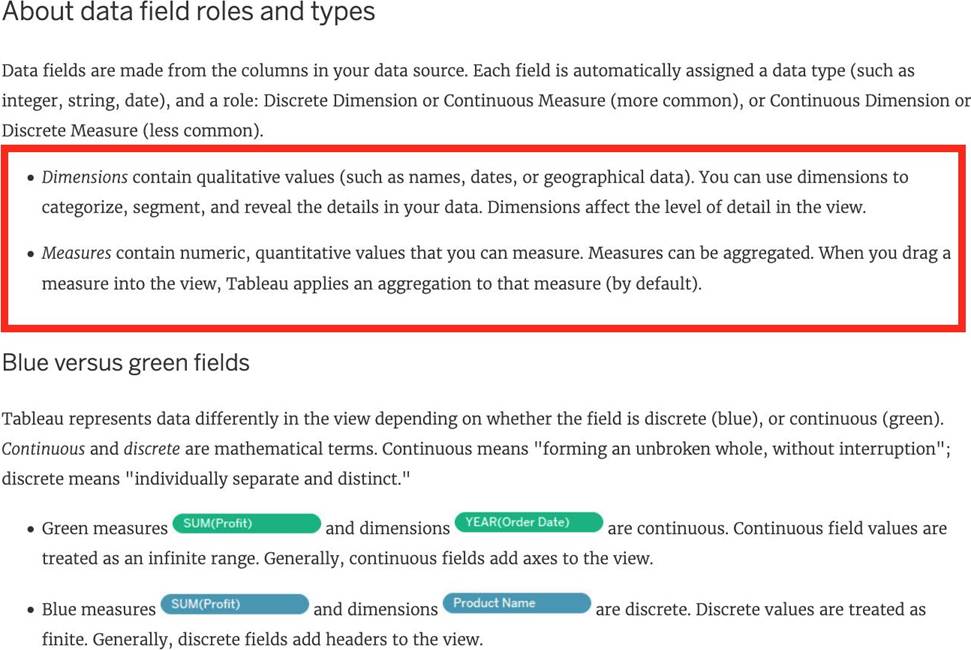
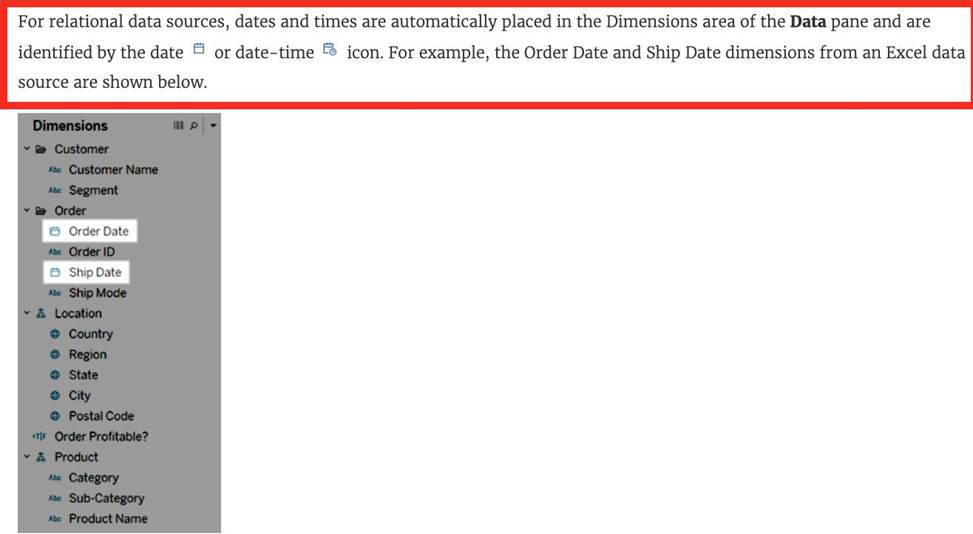
Measures contain numeric quantitative values hence that option is incorrect.
Reference 1: https://help.tableau.com/current/pro/desktop/en-us/datafields_typesandroles.htm
Reference 2: https://help.tableau.com/current/pro/desktop/en-us/dates.htm
Which two filter modes can you use with dimension filters? Choose two
- A . Multiple Values (drop-down)
- B . At most
- C . Wildcard Match
- D . Range of Values
AC
Explanation:
With dimension filters in Tableau, you can use several filter modes, including "Multiple Values (drop-down)" which allows users to select one or more values from a drop-down list of all the dimension’s members. Another mode is "Wildcard Match," which lets users filter the view by typing in a text box to match dimension members that contain the typed string. These filter types are particularly useful for string or categorical dimensions where users need to search or select specific members to display in the view.
What are three benefits of using an extract as compared to a live connection to a data source? Choose three.
- A . A live connection to a data source can be slow due to network and user traffic, whereas a connection to an extract improves performance.
- B . Extracts are stored in memory (RAM), resulting in faster query performance as compared with live data connections.
- C . A live connection to a data source provides the best performance for data connections.
- D . An extract reduces the amount of data stored on a client computer as compared to a live data connection.
- E . Calculated fields perform better in workbooks connected to extracts than in workbooks with live connections to a data source.
ABE
Explanation:
There are three benefits of using an extract as compared to a live connection to a data source:
A live connection to a data source can be slow due to network and user traffic, whereas a connection to an extract improves performance. An extract is a snapshot of data that is stored locally on your computer or on Tableau Server. An extract can reduce the load on the data source and speed up queries.
Extracts are stored in memory (RAM), resulting in faster query performance as compared with live data connections. When you use an extract, Tableau loads the data into memory and optimizes it for analysis. This allows Tableau to perform calculations and aggregations faster than with live connections.
Calculated fields perform better in workbooks connected to extracts than in workbooks with live connections to a data source. Calculated fields are custom fields that you create using formulas or expressions. When you use an extract, Tableau can process calculated fields more efficiently than with live connections.
What are two benefits of using a live connection to a data source as compared to an extract? Choose two.
- A . Alive connection to a database server requires less network overhead than an extract.
- B . A workbook connected to a live connection will have fresher data than a workbook connected to an extract.
- C . A live connection reduces the amount of memory used on a client computer as compared to an extract.
- D . A live connection is always faster than an extract.
B, C
Explanation:
The benefits of using a live connection over an extract include:
B: A live connection ensures that the data in the workbook is as up-to-date as the database itself, providing fresher data compared to a static extract which is updated at intervals.
C: A live connection queries the database server directly, which means it uses the server’s memory and processing power rather than relying on the client computer’s resources.
A live connection does not necessarily require less network overhead (A) as it may continually send queries over the network, and it is not always faster than an extract (D) because extracts can provide quicker response times for complex queries or large datasets.
A dual axis chart is useful for comparing two measures that___________.
- A . have different scales
- B . have little in common
- C . are Table Calculations
- D . are aggregated Dimensions
A
Explanation:
A dual axis chart is useful for comparing two measures that have different scales. A dual axis chart is a type of visualization that shows two measures using two independent axes layered on top of one another. A dual axis chart allows you to compare and contrast two measures that have different ranges or units of measurement, such as sales and profit margin, temperature and precipitation, or population and GDP per capita. A dual axis chart can also show different mark types for each measure, such as bars and lines, circles and areas, or shapes and texts. The other options are not valid reasons for using a dual axis chart for comparing two measures. Have little in common is not correct, because a dual axis chart is meant to show some kind of relationship or correlation between two measures, not just contrast them. Are Table Calculations is not correct, because a dual axis chart can be used with any type of measure, whether it is an aggregation, a calculation, or an expression. Are aggregated Dimensions is not correct, because a dual axis chart cannot be used with dimensions, only with measures. Dimensions are fields that contain qualitative values that are used to categorize or segment data, not compare them.
For creating variable sized bins we use __________________
- A . Calculated Fields
- B . Table Calculations
- C . Sets
- D . Groups
A
Explanation:
One way to view a measure in Tableau Desktop is to split it into bins. You can think of bins as buckets based on a range of values. For example, say you have a measure that represents age. Instead of aggregating the measure to calculate the average age, you can bin the measure to define age groups: 0C5, 6C10, 11C15, and so on. Then you can count the number of people in each age group.
Create a calculated field for variable bin size
Step 1
Select Analysis > Create Calculated Field.
Step 2
In the Calculated Field dialog box, complete the following steps:
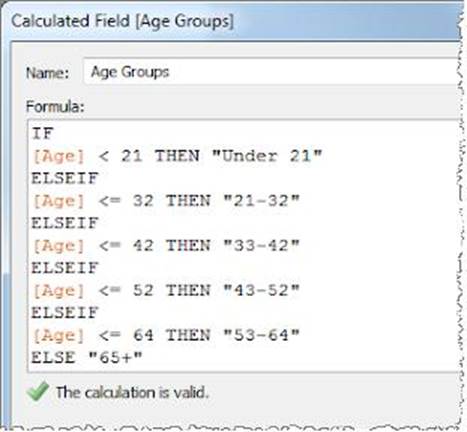
Reference: https://riti-ritesh.blogspot.com/2016/07/creating-variable-sized-bins_8.html
Which three statements accurately describe dimensions? Choose three.
- A . Contain qualitative values
- B . Affect the level of detail in the view
- C . Contain numeric, quantitative values
- D . Can be continuous or discrete
- E . Affect the formatting options in the view
A, B, D
Explanation:
Three statements that accurately describe dimensions are: Contain qualitative values Affect the level of detail in the view Can be continuous or discrete Dimensions are fields that contain qualitative values, such as names, dates, or geographical data. You can use dimensions to categorize, segment, and reveal the details in your data. Dimensions affect the level of detail in the view by creating headers or labels for marks or by defining how data is partitioned for table calculations. Dimensions can be continuous or discrete depending on their data type and format. Continuous dimensions are those that have an infinite range of possible values, such as numbers or ratios. Discrete dimensions are those that have a finite number of distinct values, such as names, categories, or dates3. The other options are not accurate statements about dimensions. Contain numeric, quantitative values is not correct, because fields that contain numeric, quantitative values are measures, not dimensions. Measures are fields that contain numeric values that you can measure and aggregate. Affect the formatting options in the view is not correct, because formatting options are not determined by dimensions, but rather by user preferences and choices. Formatting options allow you to change the appearance of various elements in the workbook, such as fonts, borders, shading, alignment, etc3
By default, measures placed in a view are aggregated by ______________
- A . COUNT
- B . AVERAGE
- C . MEDIAN
- D . SUM
D
Explanation:
By default, measures placed in a view are aggregated by SUM, which means that the data for that field in all of the rows is combined. Measures can also be aggregated as average, median, count, or count distinct.
Reference: https://help.tableau.com/current/pro/desktop/en-us/calculations_aggregation.htm
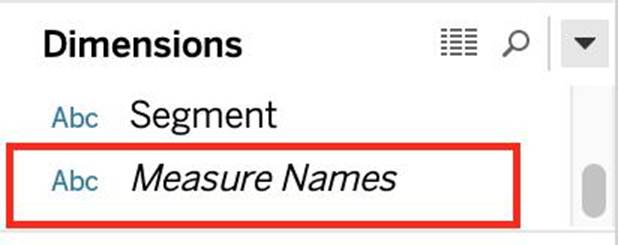
Which one of the following is a dimension?
- A . Longitude
- B . Measure Names
- C . Number of records
- D . Latitude
B
Explanation:
Measure Names is a dimension. Latitude, Longitude, and Number of records are all measures.
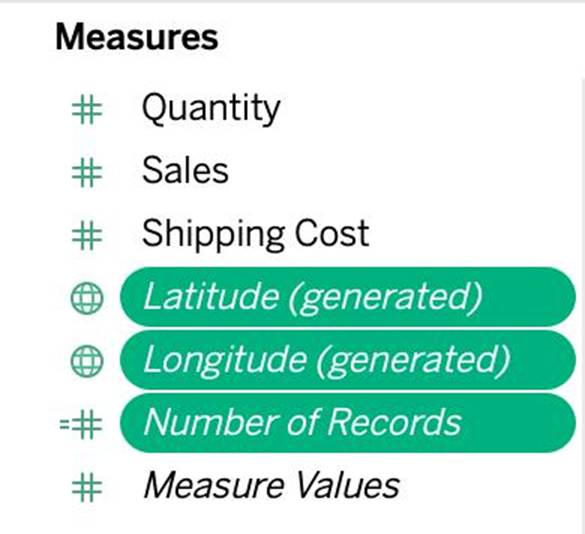
Reference: https://help.tableau.com/current/pro/desktop/en-us/datafields_understanddatawindow.htm
Which three statements accurately describes the capabilities of dashboard actions? Choose three.
- A . Can be set to dynamically update when a workbook opens
- B . Can be set to Filter, Highlight, or Go to URL
- C . Can be set to run on Hover, Select, or Menu
- D . Can be set to be triggered on a data value
- E . Can have multiple source and target sheets
B, A, E
Explanation:
Dashboard actions in Tableau are interactive elements that can be used to create a more dynamic experience. These actions can be set to filter data on the dashboard, highlight specific elements, or even direct the user to a URL when interacting with a visualization. They can be triggered by user interaction such as hover, selection, or accessing a context menu. Moreover, dashboard actions can have multiple source sheets (where the action originates) and target sheets (where the action takes effect), allowing for a complex interactivity between different parts of the dashboard.