
Snowflake ARA-C01 Practice Exams
Last updated on Oct 21,2026- Exam Code: ARA-C01
- Exam Name: SnowPro Advanced Architect Certification
- Certification Provider: Snowflake
- Latest update: Oct 21,2026
An Architect is troubleshooting a query with poor performance using the QUERY_HIST0RY function.
The Architect observes that the COMPILATIONJHME is greater than the EXECUTIONJTIME.
What is the reason for this?
- A . The query is processing a very large dataset.
- B . The query has overly complex logic.
- C . The query is queued for execution.
- D . The query is reading from remote storage.
B
Explanation:
Compilation time is the time it takes for the optimizer to create an optimal query plan for the efficient execution of the query. It also involves some pruning of partition files, making the query execution efficient2
If the compilation time is greater than the execution time, it means that the optimizer spent more time analyzing the query than actually running it. This could indicate that the query has overly complex logic, such as multiple joins, subqueries, aggregations, or expressions. The complexity of the query could also affect the size and quality of the query plan, which could impact the performance of the query3
To reduce the compilation time, the Architect can try to simplify the query logic, use views or common table expressions (CTEs) to break down the query into smaller parts, or use hints to guide the optimizer. The Architect can also use the EXPLAIN command to examine the query plan and identify potential bottlenecks or inefficiencies4
Reference: 1: SnowPro Advanced: Architect | Study Guide 5
2: Snowflake Documentation | Query Profile Overview 6
3: Understanding Why Compilation Time in Snowflake Can Be Higher than Execution Time 7
4: Snowflake Documentation | Optimizing Query Performance 8
: SnowPro Advanced: Architect | Study Guide
: Query Profile Overview
: Understanding Why Compilation Time in Snowflake Can Be Higher than Execution Time
: Optimizing Query Performance
A healthcare company is deploying a Snowflake account that may include Personal Health Information (PHI). The company must ensure compliance with all relevant privacy standards.
Which best practice recommendations will meet data protection and compliance requirements? (Choose three.)
- A . Use, at minimum, the Business Critical edition of Snowflake.
- B . Create Dynamic Data Masking policies and apply them to columns that contain PHI.
- C . Use the Internal Tokenization feature to obfuscate sensitive data.
- D . Use the External Tokenization feature to obfuscate sensitive data.
- E . Rewrite SQL queries to eliminate projections of PHI data based on current_role().
- F . Avoid sharing data with partner organizations.
A, B, D
Explanation:
A healthcare company that handles PHI data must ensure compliance with relevant privacy standards, such as HIPAA, HITRUST, and GDPR. Snowflake provides several features and best practices to help customers meet their data protection and compliance requirements1.
One best practice recommendation is to use, at minimum, the Business Critical edition of Snowflake. This edition provides the highest level of data protection and security, including end-to-end encryption with customer-managed keys, enhanced object-level security, and HIPAA and HITRUST compliance2. Therefore, option A is correct.
Another best practice recommendation is to create Dynamic Data Masking policies and apply them to columns that contain PHI. Dynamic Data Masking is a feature that allows masking or redacting sensitive data based on the current user’s role. This way, only authorized users can view the unmasked data, while others will see masked values, such as NULL, asterisks, or random characters3. Therefore, option B is correct.
A third best practice recommendation is to use the External Tokenization feature to obfuscate sensitive data. External Tokenization is a feature that allows replacing sensitive data with tokens that are generated and stored by an external service, such as Protegrity. This way, the original data is never stored or processed by Snowflake, and only authorized users can access the tokenized data through the external service4. Therefore, option D is correct.
Option C is incorrect, because the Internal Tokenization feature is not available in
Snowflake. Snowflake does not provide any native tokenization functionality, but only supports integration with external tokenization services4.
Option E is incorrect, because rewriting SQL queries to eliminate projections of PHI data based on current_role() is not a best practice. This approach is error-prone, inefficient, and hard to maintain. A better alternative is to use Dynamic Data Masking policies, which can automatically mask data based on the user’s role without modifying the queries3.
Option F is incorrect, because avoiding sharing data with partner organizations is not a best practice. Snowflake enables secure and governed data sharing with internal and external consumers, such as business units, customers, or partners. Data sharing does not involve copying or moving data, but only granting access privileges to the shared objects. Data sharing can also leverage Dynamic Data Masking and External Tokenization features to protect sensitive data5.
Reference: Snowflake’s Security & Compliance Reports: Snowflake Editions: Dynamic Data
Masking: External Tokenization: Secure Data Sharing
Which steps are recommended best practices for prioritizing cluster keys in Snowflake? (Choose two.)
- A . Choose columns that are frequently used in join predicates.
- B . Choose lower cardinality columns to support clustering keys and cost effectiveness.
- C . Choose TIMESTAMP columns with nanoseconds for the highest number of unique rows.
- D . Choose cluster columns that are most actively used in selective filters.
- E . Choose cluster columns that are actively used in the GROUP BY clauses.
A, D
Explanation:
According to the Snowflake documentation, the best practices for choosing clustering keys are: Choose columns that are frequently used in join predicates. This can improve the join performance by reducing the number of micro-partitions that need to be scanned and joined.
Choose columns that are most actively used in selective filters. This can improve the scan efficiency by skipping micro-partitions that do not match the filter predicates.
Avoid using low cardinality columns, such as gender or country, as clustering keys. This can result in poor clustering and high maintenance costs.
Avoid using TIMESTAMP columns with nanoseconds, as they tend to have very high cardinality and low correlation with other columns. This can also result in poor clustering and high maintenance costs.
Avoid using columns with duplicate values or NULLs, as they can cause skew in the clustering and reduce the benefits of pruning.
Cluster on multiple columns if the queries use multiple filters or join predicates. This can increase the chances of pruning more micro-partitions and improve the compression ratio.
Clustering is not always useful, especially for small or medium-sized tables, or tables that are not frequently queried or updated. Clustering can incur additional costs for initially clustering the data and maintaining the clustering over time.
Reference: Clustering Keys & Clustered Tables | Snowflake Documentation [Considerations for Choosing Clustering for a Table | Snowflake Documentation]
A user has the appropriate privilege to see unmasked data in a column.
If the user loads this column data into another column that does not have a masking policy, what will
occur?
- A . Unmasked data will be loaded in the new column.
- B . Masked data will be loaded into the new column.
- C . Unmasked data will be loaded into the new column but only users with the appropriate privileges will be able to see the unmasked data.
- D . Unmasked data will be loaded into the new column and no users will be able to see the unmasked data.
A
Explanation:
According to the SnowPro Advanced: Architect documents and learning resources, column masking policies are applied at query time based on the privileges of the user who runs the query. Therefore, if a user has the privilege to see unmasked data in a column, they will see the original data when they query that column. If they load this column data into another column that does not have a masking policy, the unmasked data will be loaded in the new column, and any user who can query the new column will see the unmasked data as well. The masking policy does not affect the underlying data in the column, only the query results.
Reference: Snowflake Documentation: Column Masking
Snowflake Learning: Column Masking
An Architect clones a database and all of its objects, including tasks. After the cloning, the tasks stop running.
Why is this occurring?
- A . Tasks cannot be cloned.
- B . The objects that the tasks reference are not fully qualified.
- C . Cloned tasks are suspended by default and must be manually resumed.
- D . The Architect has insufficient privileges to alter tasks on the cloned database.
C
Explanation:
When a database is cloned, all of its objects, including tasks, are also cloned. However, cloned tasks are suspended by default and must be manually resumed by using the ALTER TASK command. This is to prevent the cloned tasks from running unexpectedly or interfering with the original tasks.
Therefore, the reason why the tasks stop running after the cloning is because they are suspended by default (Option C). Options A, B, and D are not correct because tasks can be cloned, the objects that the tasks reference are also cloned and do not need to be fully qualified, and the Architect does not need to alter the tasks on the cloned database, only resume them.
Reference: The answer can be verified from Snowflake’s official documentation on cloning and tasks available on their website. Here are some relevant links:
Cloning Objects | Snowflake Documentation
Tasks | Snowflake Documentation
ALTER TASK | Snowflake Documentation
A Snowflake Architect is setting up database replication to support a disaster recovery plan. The primary database has external tables.
How should the database be replicated?
- A . Create a clone of the primary database then replicate the database.
- B . Move the external tables to a database that is not replicated, then replicate the primary database.
- C . Replicate the database ensuring the replicated database is in the same region as the external tables.
- D . Share the primary database with an account in the same region that the database will be replicated to.
B
Explanation:
Database replication is a feature that allows you to create a copy of a database in another account, region, or cloud platform for disaster recovery or business continuity purposes. However, not all database objects can be replicated. External tables are one of the exceptions, as they reference data files stored in an external stage that is not part of Snowflake. Therefore, to replicate a database that contains external tables, you need to move the external tables to a separate database that is not replicated, and then replicate the primary database that contains the other objects. This way, you can avoid replication errors and ensure consistency between the primary and secondary databases. The other options are incorrect because they either do not address the issue of external tables, or they use an alternative method that is not supported by Snowflake. You cannot create a clone of the primary database and then replicate it, as replication only works on the original database, not on its clones. You also cannot share the primary database with another account, as sharing is a different feature that does not create a copy of the database, but rather grants access to the shared objects. Finally, you do not need to ensure that the replicated database is in the same region as the external tables, as external tables can access data files stored in any region or cloud platform, as long as the stage URL is valid and accessible.
Reference: [Replication and Failover/Failback] 1
[Introduction to External Tables] 2
[Working with External Tables] 3
[Replication: How to migrate an account from One Cloud Platform or Region to another in Snowflake] 4
A Snowflake Architect is setting up database replication to support a disaster recovery plan. The primary database has external tables.
How should the database be replicated?
- A . Create a clone of the primary database then replicate the database.
- B . Move the external tables to a database that is not replicated, then replicate the primary database.
- C . Replicate the database ensuring the replicated database is in the same region as the external tables.
- D . Share the primary database with an account in the same region that the database will be replicated to.
B
Explanation:
Database replication is a feature that allows you to create a copy of a database in another account, region, or cloud platform for disaster recovery or business continuity purposes. However, not all database objects can be replicated. External tables are one of the exceptions, as they reference data files stored in an external stage that is not part of Snowflake. Therefore, to replicate a database that contains external tables, you need to move the external tables to a separate database that is not replicated, and then replicate the primary database that contains the other objects. This way, you can avoid replication errors and ensure consistency between the primary and secondary databases. The other options are incorrect because they either do not address the issue of external tables, or they use an alternative method that is not supported by Snowflake. You cannot create a clone of the primary database and then replicate it, as replication only works on the original database, not on its clones. You also cannot share the primary database with another account, as sharing is a different feature that does not create a copy of the database, but rather grants access to the shared objects. Finally, you do not need to ensure that the replicated database is in the same region as the external tables, as external tables can access data files stored in any region or cloud platform, as long as the stage URL is valid and accessible.
Reference: [Replication and Failover/Failback] 1
[Introduction to External Tables] 2
[Working with External Tables] 3
[Replication: How to migrate an account from One Cloud Platform or Region to another in Snowflake] 4
An Architect is designing a data lake with Snowflake. The company has structured, semi-structured, and unstructured data. The company wants to save the data inside the data lake within the Snowflake system. The company is planning on sharing data among its corporate branches using Snowflake data sharing.
What should be considered when sharing the unstructured data within Snowflake?
- A . A pre-signed URL should be used to save the unstructured data into Snowflake in order to share data over secure views, with no time limit for the URL.
- B . A scoped URL should be used to save the unstructured data into Snowflake in order to share data over secure views, with a 24-hour time limit for the URL.
- C . A file URL should be used to save the unstructured data into Snowflake in order to share data over secure views, with a 7-day time limit for the URL.
- D . A file URL should be used to save the unstructured data into Snowflake in order to share data over secure views, with the "expiration_time" argument defined for the URL time limit.
B
Explanation:
When sharing unstructured data within Snowflake, using a scoped URL is recommended. Scoped URLs provide temporary access to staged files without granting privileges to the stage itself, enhancing security. The URL expires when the persisted query result period ends, which is currently set to 24 hours. This approach is suitable for sharing unstructured data over secure views within Snowflake’s data sharing framework.
Reference: The answer is based on Snowflake’s official documentation regarding the sharing of unstructured data and the use of scoped URLs1.
An Architect is designing a data lake with Snowflake. The company has structured, semi-structured, and unstructured data. The company wants to save the data inside the data lake within the Snowflake system. The company is planning on sharing data among its corporate branches using Snowflake data sharing.
What should be considered when sharing the unstructured data within Snowflake?
- A . A pre-signed URL should be used to save the unstructured data into Snowflake in order to share data over secure views, with no time limit for the URL.
- B . A scoped URL should be used to save the unstructured data into Snowflake in order to share data over secure views, with a 24-hour time limit for the URL.
- C . A file URL should be used to save the unstructured data into Snowflake in order to share data over secure views, with a 7-day time limit for the URL.
- D . A file URL should be used to save the unstructured data into Snowflake in order to share data over secure views, with the "expiration_time" argument defined for the URL time limit.
B
Explanation:
When sharing unstructured data within Snowflake, using a scoped URL is recommended. Scoped URLs provide temporary access to staged files without granting privileges to the stage itself, enhancing security. The URL expires when the persisted query result period ends, which is currently set to 24 hours. This approach is suitable for sharing unstructured data over secure views within Snowflake’s data sharing framework.
Reference: The answer is based on Snowflake’s official documentation regarding the sharing of unstructured data and the use of scoped URLs1.
When activating Tri-Secret Secure in a hierarchical encryption model in a Snowflake account, at what level is the customer-managed key used?
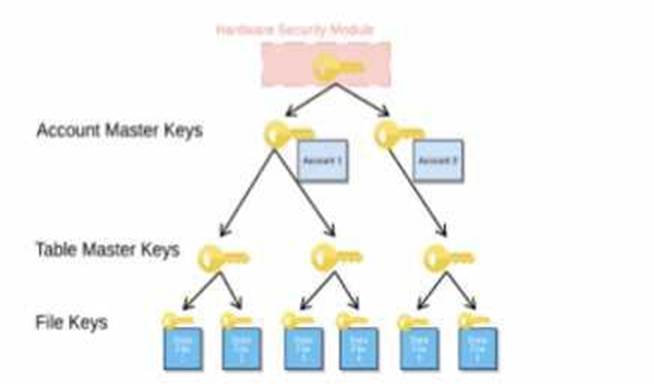
- A . At the root level (HSM)
- B . At the account level (AMK)
- C . At the table level (TMK)
- D . At the micro-partition level
B
Explanation:
Tri-Secret Secure is a feature that allows customers to use their own key, called the customer-managed key (CMK), in addition to the Snowflake-managed key, to create a composite master key that encrypts the data in Snowflake. The composite master key is also known as the account master key (AMK), as it is unique for each account and encrypts the table master keys (TMKs) that encrypt the file keys that encrypt the data files. The customer-managed key is used at the account level, not at the root level, the table level, or the micro-partition level. The root level is protected by a hardware security module (HSM), the table level is protected by the TMKs, and the micro-partition level is protected by the file keys12.
Reference: Understanding Encryption Key Management in Snowflake Tri-Secret Secure FAQ for Snowflake on AWS