
Snowflake ARA-C01 Practice Exams
Last updated on Oct 21,2026- Exam Code: ARA-C01
- Exam Name: SnowPro Advanced Architect Certification
- Certification Provider: Snowflake
- Latest update: Oct 21,2026
Consider the following scenario where a masking policy is applied on the CREDICARDND column of the CREDITCARDINFO table.
The masking policy definition Is as follows:

Sample data for the CREDITCARDINFO table is as follows:
NAME EXPIRYDATE CREDITCARDNO
JOHN DOE 2022-07-23 4321 5678 9012 1234
if the Snowflake system rotes have not been granted any additional roles, what will be the result?
- A . The sysadmin can see the CREDICARDND column data in clear text.
- B . The owner of the table will see the CREDICARDND column data in clear text.
- C . Anyone with the Pl_ANALYTICS role will see the last 4 characters of the CREDICARDND column data in dear text.
- D . Anyone with the Pl_ANALYTICS role will see the CREDICARDND column as*** ‘MASKED* **’.
D
Explanation:
The masking policy defined in the image indicates that if a user has the PI_ANALYTICS role, they will be able to see the last 4 characters of the CREDITCARDNO column data in clear text. Otherwise, they will see ‘MASKED’. Since Snowflake system roles have not been granted any additional roles, they won’t have the PI_ANALYTICS role and therefore cannot view the last 4 characters of credit card numbers.
To apply a masking policy on a column in Snowflake, you need to use the ALTER TABLE … ALTER COLUMN command or the ALTER VIEW command and specify the policy name. For example, to apply the creditcardno_mask policy on the CREDITCARDNO column of the CREDITCARDINFO table, you can use the following command:
ALTER TABLE CREDITCARDINFO ALTER COLUMN CREDITCARDNO SET MASKING POLICY creditcardno_mask;
For more information on how to create and use masking policies in Snowflake, you can refer to the following resources:
CREATE MASKING POLICY: This document explains the syntax and usage of the CREATE MASKING POLICY command, which allows you to create a new masking policy or replace an existing one. Using Dynamic Data Masking: This guide provides instructions on how to configure and use dynamic data masking in Snowflake, which is a feature that allows you to mask sensitive data based on the execution context of the user.
ALTER MASKING POLICY: This document explains the syntax and usage of the ALTER MASKING POLICY command, which allows you to modify the properties of an existing masking policy.
Reference: 1: https://docs.snowflake.com/en/sql-reference/sql/create-masking-policy 2: https://docs.snowflake.com/en/user-guide/security-column-ddm-use 3: https://docs.snowflake.com/en/sql-reference/sql/alter-masking-policy
There is often a count on Uniqueld
Which field(s) should be used for the clustering key?
- A . lOT_timestamp
- B . City and DeviceManuf acturer
- C . Deviceld and Customerld
- D . Uniqueld
C
Explanation:
A clustering key is a subset of columns or expressions that are used to co-locate the data in the same micro-partitions, which are the units of storage in Snowflake. Clustering can improve the performance of queries that filter on the clustering key columns, as it reduces the amount of data that needs to be scanned. The best choice for a clustering key depends on the query patterns and the data distribution in the table. In this case, the columns DeviceId, IOT_timestamp, and CustomerId are frequently used in the filter predicate for the select statement, which means they are good candidates for the clustering key. The columns City and DeviceManufacturer are often retrieved, but not filtered on, so they are not as important for the clustering key. The column UniqueId is used for counting, but it is not a good choice for the clustering key, as it is likely to have a high cardinality and a uniform distribution, which means it will not help to co-locate the data. Therefore, the best option is to use DeviceId and CustomerId as the clustering key, as they can help to prune the micro-partitions and speed up the queries.
Reference: Clustering Keys & Clustered Tables, Micro-partitions & Data Clustering, A Complete Guide to Snowflake Clustering
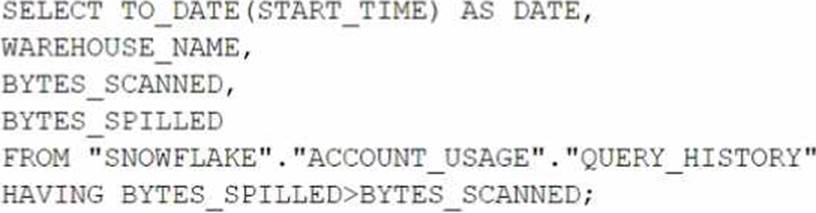
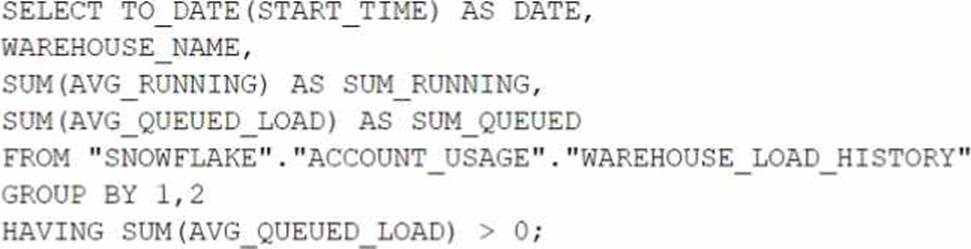
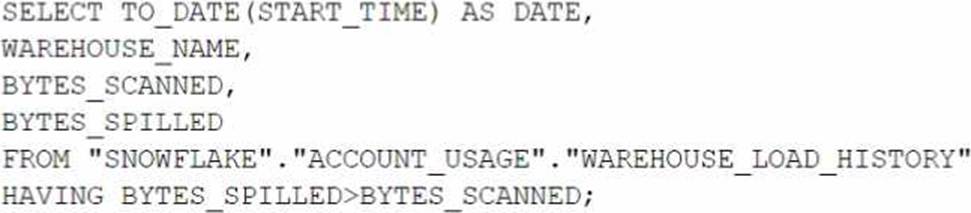
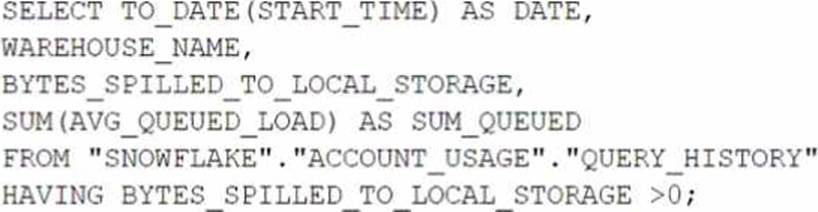
Which query will identify the specific days and virtual warehouses that would benefit from a multi-cluster warehouse to improve the performance of a particular workload?
A)
B)
C)
D)
- A . Option A
- B . Option B
- C . Option C
- D . Option D
B
Explanation:
The correct answer is option B. This query is designed to assess the need for a multi-cluster warehouse by examining the queuing time (AVG_QUEUED_LOAD) on different days and virtual warehouses. When the AVG_QUEUED_LOAD is greater than zero, it suggests that queries are waiting for resources, which can be an indicator that performance might be improved by using a multi-cluster warehouse to handle the workload more efficiently. By grouping by date and warehouse name and filtering on the sum of the average queued load being greater than zero, the query identifies specific days and warehouses where the workload exceeded the available compute resources. This information is valuable when considering scaling out warehouses to multi-cluster configurations for improved performance.
You are a snowflake architect in an organization. The business team came to to deploy an use case which requires you to load some data which they can visualize through tableau. Everyday new data comes in and the old data is no longer required.
What type of table you will use in this case to optimize cost
- A . TRANSIENT
- B . TEMPORARY
- C . PERMANENT
A
Explanation:
A transient table is a type of table in Snowflake that does not have a Fail-safe period and can have a Time Travel retention period of either 0 or 1 day. Transient tables are suitable for temporary or intermediate data that can be easily reproduced or replicated1.
A temporary table is a type of table in Snowflake that is automatically dropped when the session ends or the current user logs out. Temporary tables do not incur any storage costs, but they are not visible to other users or sessions2.
A permanent table is a type of table in Snowflake that has a Fail-safe period and a Time Travel retention period of up to 90 days. Permanent tables are suitable for persistent and durable data that needs to be protected from accidental or malicious deletion3.
In this case, the use case requires loading some data that can be visualized through Tableau. The data is updated every day and the old data is no longer required. Therefore, the best type of table to use in this case to optimize cost is a transient table, because it does not incur any Fail-safe costs and it can have a short Time Travel retention period of 0 or 1 day. This way, the data can be loaded and queried by Tableau, and then deleted or overwritten without incurring any unnecessary storage costs.
Reference: Transient Tables: Temporary Tables: Understanding & Using Time Travel
Give the materialized views access to the dashboard tool.
Explanation:
Using Snowpipe for continuous, automated data ingestion minimizes the need for manual intervention and ensures that data is available in Snowflake promptly after it is generated. Leveraging Snowflake’s data sharing capabilities allows for efficient and secure access to the vendor’s data without the need for complex API integrations. Materialized views provide pre-aggregated data for fast access, which is ideal for dashboards that require high performance1234.
Reference =
• Snowflake Documentation on Snowpipe4
• Snowflake Documentation on Secure Data Sharing2
• Best Practices for Data Ingestion with Snowflake1
Share the reader account’s URL and credentials with the customer
Explanation:
Option C is the correct answer because it allows the company to share data privately with the customer across different cloud platforms and regions. The company can create a new Snowflake account in Azure East US 2 (Virginia) and set up replication between AWS us-west-2 (Oregon) and Azure East US 2 (Virginia) for the database objects to be shared. This way, the company can ensure that the data is always up to date and consistent in both accounts. The company can then create a share and add the database privileges to the share, and alter the share and add the customer’s Snowflake account to the share. The customer can then access the shared data from their own Snowflake account in Azure East US 2 (Virginia).
Option A is incorrect because the Snowflake Marketplace is not a private way of sharing data. The Snowflake Marketplace is a public data exchange platform that allows anyone to browse and subscribe to data sets from various providers. The company would not be able to control who can access their data if they use the Snowflake Marketplace.
Option B is incorrect because it requires the customer to create a new Snowflake account in Azure East US 2 (Virginia), which may not be feasible or desirable for the customer. The customer may already have an existing Snowflake account in a different cloud platform or region, and may not want to incur additional costs or complexity by creating a new account.
Option D is incorrect because it involves creating a reader account in Azure East US 2 (Virginia), which is a limited and temporary way of sharing data. A reader account is a special type of Snowflake account that can only access data from a single share, and has a fixed duration of 30 days. The company would have to manage the reader account’s URL and credentials, and renew the account
every 30 days. The customer would not be able to use their own Snowflake account to access the shared data, and would have to rely on the company’s reader account.
Reference: Snowflake Replication
Secure Data Sharing Overview
Snowflake Marketplace Overview
Reader Account Overview
A user has activated primary and secondary roles for a session.
What operation is the user prohibited from using as part of SQL actions in Snowflake using the secondary role?
- A . Insert
- B . Create
- C . Delete
- D . Truncate
B
Explanation:
In Snowflake, when a user activates a secondary role during a session, certain privileges associated with DDL (Data Definition Language) operations are restricted. The CREATE statement, which falls under DDL operations, cannot be executed using a secondary role. This limitation is designed to enforce role-based access control and ensure that schema modifications are managed carefully, typically reserved for primary roles that have explicit permissions to modify database structures.
Reference: Snowflake’s security and access control documentation specifying the limitations and capabilities of primary versus secondary roles in session management.
An Architect has been asked to clone schema STAGING as it looked one week ago, Tuesday June 1st at 8:00 AM, to recover some objects.
The STAGING schema has 50 days of retention.
The Architect runs the following statement:
CREATE SCHEMA STAGING_CLONE CLONE STAGING at (timestamp => ‘2021-06-01 08:00:00’);
The Architect receives the following error: Time travel data is not available for schema STAGING. The requested time is either beyond the allowed time travel period or before the object creation time.
The Architect then checks the schema history and sees the following:
CREATED_ON|NAME|DROPPED_ON
2021-06-02 23:00:00 | STAGING | NULL
2021-05-01 10:00:00 | STAGING | 2021-06-02 23:00:00
How can cloning the STAGING schema be achieved?
- A . Undrop the STAGING schema and then rerun the CLONE statement.
- B . Modify the statement: CREATE SCHEMA STAGING_CLONE CLONE STAGING at (timestamp => ‘2021-05-01 10:00:00’);
- C . Rename the STAGING schema and perform an UNDROP to retrieve the previous STAGING schema version, then run the CLONE statement.
- D . Cloning cannot be accomplished because the STAGING schema version was not active during the proposed Time Travel time period.
D
Explanation:
The error encountered during the cloning attempt arises because the schema STAGING as it existed on June 1st, 2021, is not within the Time Travel retention period. According to the schema history, STAGING was recreated on June 2nd, 2021, after being dropped on the same day. The requested timestamp of ‘2021-06-01 08:00:00’ is prior to this recreation, hence not available. The STAGING schema from before June 2nd was dropped and exceeded the Time Travel period for retrieval by the time of the cloning attempt. Therefore, cloning STAGING as it looked on June 1st, 2021, cannot be achieved because the data from that time is no longer available within the allowed Time Travel window.
Reference: Snowflake documentation on Time Travel and data cloning, which is covered under the SnowPro Advanced: Architect certification resources.
An Architect has been asked to clone schema STAGING as it looked one week ago, Tuesday June 1st at 8:00 AM, to recover some objects.
The STAGING schema has 50 days of retention.
The Architect runs the following statement:
CREATE SCHEMA STAGING_CLONE CLONE STAGING at (timestamp => ‘2021-06-01 08:00:00’);
The Architect receives the following error: Time travel data is not available for schema STAGING. The requested time is either beyond the allowed time travel period or before the object creation time.
The Architect then checks the schema history and sees the following:
CREATED_ON|NAME|DROPPED_ON
2021-06-02 23:00:00 | STAGING | NULL
2021-05-01 10:00:00 | STAGING | 2021-06-02 23:00:00
How can cloning the STAGING schema be achieved?
- A . Undrop the STAGING schema and then rerun the CLONE statement.
- B . Modify the statement: CREATE SCHEMA STAGING_CLONE CLONE STAGING at (timestamp => ‘2021-05-01 10:00:00’);
- C . Rename the STAGING schema and perform an UNDROP to retrieve the previous STAGING schema version, then run the CLONE statement.
- D . Cloning cannot be accomplished because the STAGING schema version was not active during the proposed Time Travel time period.
D
Explanation:
The error encountered during the cloning attempt arises because the schema STAGING as it existed on June 1st, 2021, is not within the Time Travel retention period. According to the schema history, STAGING was recreated on June 2nd, 2021, after being dropped on the same day. The requested timestamp of ‘2021-06-01 08:00:00’ is prior to this recreation, hence not available. The STAGING schema from before June 2nd was dropped and exceeded the Time Travel period for retrieval by the time of the cloning attempt. Therefore, cloning STAGING as it looked on June 1st, 2021, cannot be achieved because the data from that time is no longer available within the allowed Time Travel window.
Reference: Snowflake documentation on Time Travel and data cloning, which is covered under the SnowPro Advanced: Architect certification resources.
An Architect is troubleshooting a query with poor performance using the QUERY_HIST0RY function.
The Architect observes that the COMPILATIONJHME is greater than the EXECUTIONJTIME.
What is the reason for this?
- A . The query is processing a very large dataset.
- B . The query has overly complex logic.
- C . The query is queued for execution.
- D . The query is reading from remote storage.
B
Explanation:
Compilation time is the time it takes for the optimizer to create an optimal query plan for the efficient execution of the query. It also involves some pruning of partition files, making the query execution efficient2
If the compilation time is greater than the execution time, it means that the optimizer spent more time analyzing the query than actually running it. This could indicate that the query has overly complex logic, such as multiple joins, subqueries, aggregations, or expressions. The complexity of the query could also affect the size and quality of the query plan, which could impact the performance of the query3
To reduce the compilation time, the Architect can try to simplify the query logic, use views or common table expressions (CTEs) to break down the query into smaller parts, or use hints to guide the optimizer. The Architect can also use the EXPLAIN command to examine the query plan and identify potential bottlenecks or inefficiencies4
Reference: 1: SnowPro Advanced: Architect | Study Guide 5
2: Snowflake Documentation | Query Profile Overview 6
3: Understanding Why Compilation Time in Snowflake Can Be Higher than Execution Time 7
4: Snowflake Documentation | Optimizing Query Performance 8
: SnowPro Advanced: Architect | Study Guide
: Query Profile Overview
: Understanding Why Compilation Time in Snowflake Can Be Higher than Execution Time
: Optimizing Query Performance