
Snowflake ARA-C01 Practice Exams
Last updated on Oct 21,2026- Exam Code: ARA-C01
- Exam Name: SnowPro Advanced Architect Certification
- Certification Provider: Snowflake
- Latest update: Oct 21,2026
Which system functions does Snowflake provide to monitor clustering information within a table (Choose two.)
- A . SYSTEM$CLUSTERING_INFORMATION
- B . SYSTEM$CLUSTERING_USAGE
- C . SYSTEM$CLUSTERING_DEPTH
- D . SYSTEM$CLUSTERING_KEYS
- E . SYSTEM$CLUSTERING_PERCENT
A, C
Explanation:
According to the Snowflake documentation, these two system functions are provided by Snowflake to monitor clustering information within a table. A system function is a type of function that allows executing actions or returning information about the system. A clustering key is a feature that allows organizing data across micro-partitions based on one or more columns in the table. Clustering can improve query performance by reducing the number of files to scan.
SYSTEM$CLUSTERING_INFORMATION is a system function that returns clustering information, including average clustering depth, for a table based on one or more columns in the table. The function takes a table name and an optional column name or expression as arguments, and returns a JSON string with the clustering information. The clustering information includes the cluster by keys, the total partition count, the total constant partition count, the average overlaps, and the average depth1.
SYSTEM$CLUSTERING_DEPTH is a system function that returns the clustering depth for a table based on one or more columns in the table. The function takes a table name and an optional column name or expression as arguments, and returns an integer value with the clustering depth. The clustering depth is the maximum number of overlapping micro-partitions for any micro-partition in the table. A lower clustering depth indicates a better clustering2.
Reference: SYSTEM$CLUSTERING_INFORMATION | Snowflake Documentation SYSTEM$CLUSTERING_DEPTH | Snowflake Documentation
When loading data into a table that captures the load time in a column with a default value of either CURRENT_TIME () or CURRENT_TIMESTAMP() what will occur?
- A . All rows loaded using a specific COPY statement will have varying timestamps based on when the rows were inserted.
- B . Any rows loaded using a specific COPY statement will have varying timestamps based on when the rows were read from the source.
- C . Any rows loaded using a specific COPY statement will have varying timestamps based on when the rows were created in the source.
- D . All rows loaded using a specific COPY statement will have the same timestamp value.
D
Explanation:
According to the Snowflake documentation, when loading data into a table that captures the load time in a column with a default value of either CURRENT_TIME () or CURRENT_TIMESTAMP(), the default value is evaluated once per COPY statement, not once per row. Therefore, all rows loaded using a specific COPY statement will have the same timestamp value. This behavior ensures that the timestamp value reflects the time when the data was loaded into the table, not when the data was read from the source or created in the source.
Reference: Snowflake Documentation: Loading Data into Tables with Default Values
Snowflake Documentation: COPY INTO table
When loading data into a table that captures the load time in a column with a default value of either CURRENT_TIME () or CURRENT_TIMESTAMP() what will occur?
- A . All rows loaded using a specific COPY statement will have varying timestamps based on when the rows were inserted.
- B . Any rows loaded using a specific COPY statement will have varying timestamps based on when the rows were read from the source.
- C . Any rows loaded using a specific COPY statement will have varying timestamps based on when the rows were created in the source.
- D . All rows loaded using a specific COPY statement will have the same timestamp value.
D
Explanation:
According to the Snowflake documentation, when loading data into a table that captures the load time in a column with a default value of either CURRENT_TIME () or CURRENT_TIMESTAMP(), the default value is evaluated once per COPY statement, not once per row. Therefore, all rows loaded using a specific COPY statement will have the same timestamp value. This behavior ensures that the timestamp value reflects the time when the data was loaded into the table, not when the data was read from the source or created in the source.
Reference: Snowflake Documentation: Loading Data into Tables with Default Values
Snowflake Documentation: COPY INTO table
When loading data into a table that captures the load time in a column with a default value of either CURRENT_TIME () or CURRENT_TIMESTAMP() what will occur?
- A . All rows loaded using a specific COPY statement will have varying timestamps based on when the rows were inserted.
- B . Any rows loaded using a specific COPY statement will have varying timestamps based on when the rows were read from the source.
- C . Any rows loaded using a specific COPY statement will have varying timestamps based on when the rows were created in the source.
- D . All rows loaded using a specific COPY statement will have the same timestamp value.
D
Explanation:
According to the Snowflake documentation, when loading data into a table that captures the load time in a column with a default value of either CURRENT_TIME () or CURRENT_TIMESTAMP(), the default value is evaluated once per COPY statement, not once per row. Therefore, all rows loaded using a specific COPY statement will have the same timestamp value. This behavior ensures that the timestamp value reflects the time when the data was loaded into the table, not when the data was read from the source or created in the source.
Reference: Snowflake Documentation: Loading Data into Tables with Default Values
Snowflake Documentation: COPY INTO table
A user, analyst_user has been granted the analyst_role, and is deploying a SnowSQL script to run as a background service to extract data from Snowflake.
What steps should be taken to allow the IP addresses to be accessed? (Select TWO).
- A . ALTER ROLE ANALYST_ROLE SET NETWORK_POLICY=’ANALYST_POLICY’;
- B . ALTER USER ANALYSTJJSER SET NETWORK_POLICY=’ANALYST_POLICY’;
- C . ALTER USER ANALYST_USER SET NETWORK_POLICY=’10.1.1.20′;
- D . USE ROLE SECURITYADMIN;
CREATE OR REPLACE NETWORK POLICY ANALYST_POLICY ALLOWED_IP_LIST = (‘10.1.1.20’); - E . USE ROLE USERADMIN;
CREATE OR REPLACE NETWORK POLICY ANALYST_POLICY ALLOWED_IP_LIST = (‘10.1.1.20’);
BD
Explanation:
To ensure that an analyst_user can only access Snowflake from specific IP addresses, the following steps are required:
Option B: This alters the network policy directly linked to analyst_user. Setting a network policy on the user level is effective and ensures that the specified network restrictions apply directly and exclusively to this user.
Option D: Before a network policy can be set or altered, the appropriate role with permission to manage network policies must be used. SECURITYADMIN is typically the role that has privileges to create and manage network policies in Snowflake. Creating a network policy that specifies allowed IP addresses ensures that only requests coming from those IPs can access Snowflake under this policy. After creation, this policy can be linked to specific users or roles as needed.
Options A and E mention altering roles or using the wrong role (USERADMIN typically does not manage network security settings), and option C incorrectly attempts to set a network policy directly as an IP address, which is not syntactically or functionally valid.
Reference: Snowflake’s security management documentation covering network policies and role-based access controls.
An Architect needs to design a Snowflake account and database strategy to store and analyze large amounts of structured and semi-structured data. There are many business units and departments within the company. The requirements are scalability, security, and cost efficiency.
What design should be used?
- A . Create a single Snowflake account and database for all data storage and analysis needs, regardless of data volume or complexity.
- B . Set up separate Snowflake accounts and databases for each department or business unit, to ensure data isolation and security.
- C . Use Snowflake’s data lake functionality to store and analyze all data in a central location, without the need for structured schemas or indexes
- D . Use a centralized Snowflake database for core business data, and use separate databases for departmental or project-specific data.
D
Explanation:
The best design to store and analyze large amounts of structured and semi-structured data for different business units and departments is to use a centralized Snowflake database for core business data, and use separate databases for departmental or project-specific data.
This design allows for scalability, security, and cost efficiency by leveraging Snowflake’s features such as:
Database cloning: Cloning a database creates a zero-copy clone that shares the same data files as the original database, but can be modified independently. This reduces storage costs and enables fast and consistent data replication for different purposes.
Database sharing: Sharing a database allows granting secure and governed access to a subset of data in a database to other Snowflake accounts or consumers. This enables data collaboration and monetization across different business units or external partners.
Warehouse scaling: Scaling a warehouse allows adjusting the size and concurrency of a warehouse to match the performance and cost requirements of different workloads. This enables optimal resource utilization and flexibility for different data analysis needs.
Reference: Snowflake Documentation: Database Cloning, Snowflake Documentation: Database Sharing, [Snowflake Documentation:
Warehouse Scaling]
An Architect is troubleshooting a query with poor performance using the QUERY function. The Architect observes that the COMPILATION_TIME Is greater than the EXECUTION_TIME.
What is the reason for this?
- A . The query is processing a very large dataset.
- B . The query has overly complex logic.
- C . The query Is queued for execution.
- D . The query Is reading from remote storage
B
Explanation:
The correct answer is B because the compilation time is the time it takes for the optimizer to create an optimal query plan for the efficient execution of the query. The compilation time depends on the complexity of the query, such as the number of tables, columns, joins, filters, aggregations, subqueries, etc. The more complex the query, the longer it takes to compile.
Option A is incorrect because the query processing time is not affected by the size of the dataset, but by the size of the virtual warehouse. Snowflake automatically scales the compute resources to match the data volume and parallelizes the query execution. The size of the dataset may affect the execution time, but not the compilation time.
Option C is incorrect because the query queue time is not part of the compilation time or the execution time. It is a separate metric that indicates how long the query waits for a warehouse slot before it starts running. The query queue time depends on the warehouse load, concurrency, and priority settings.
Option D is incorrect because the query remote IO time is not part of the compilation time or the execution time. It is a separate metric that indicates how long the query spends reading data from remote storage, such as S3 or Azure Blob Storage. The query remote IO time depends on the network latency, bandwidth, and caching efficiency.
Reference: Understanding Why Compilation Time in Snowflake Can Be Higher than Execution Time: This article explains why the total duration (compilation + execution) time is an essential metric to measure query performance in Snowflake. It discusses the reasons for the long compilation time, including query complexity and the number of tables and columns.
Exploring Execution Times: This document explains how to examine the past performance of queries and tasks using Snowsight or by writing queries against views in the ACCOUNT_USAGE schema. It also describes the different metrics and dimensions that affect query performance, such as duration, compilation, execution, queue, and remote IO time.
What is the “compilation time” and how to optimize it?: This community post provides some tips and best practices on how to reduce the compilation time, such as simplifying the query logic, using views or common table expressions, and avoiding unnecessary columns or joins.
A table, EMP_ TBL has three records as shown:
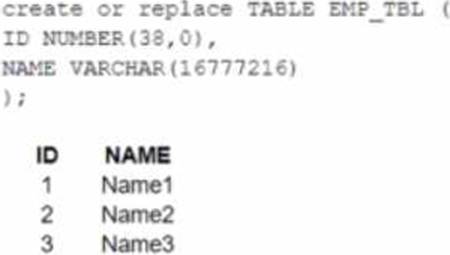
The following variables are set for the session:

Which SELECT statements will retrieve all three records? (Select TWO).
- A . Select * FROM Stbl_ref WHERE Scol_ref IN (‘Name1′,’Nam2′,’Name3’);
- B . SELECT * FROM EMP_TBL WHERE identifier(Scol_ref) IN (‘Namel’,’Name2′, ‘Name3’);
- C . SELECT * FROM identifier<Stbl_ref> WHERE NAME IN ($var1, $var2, $var3);
- D . SELECT * FROM identifier($tbl_ref) WHERE ID IN Cvarl’,’var2′,’var3′);
- E . SELECT * FROM $tb1_ref WHERE $col_ref IN ($var1, Svar2, Svar3);
B, E
Explanation:
The correct answer is B and E because they use the correct syntax and values for the identifier function and the session variables.
The identifier function allows you to use a variable or expression as an identifier (such as a table name or column name) in a SQL statement. It takes a single argument and returns it as an identifier. For example, identifier($tbl_ref) returns EMP_TBL as an identifier.
The session variables are set using the SET command and can be referenced using the $ sign. For example, $var1 returns Name1 as a value.
Option A is incorrect because it uses Stbl_ref and Scol_ref, which are not valid session variables or identifiers. They should be $tbl_ref and $col_ref instead.
Option C is incorrect because it uses identifier<Stbl_ref>, which is not a valid syntax for the identifier function. It should be identifier($tbl_ref) instead.
Option D is incorrect because it uses Cvarl, var2, and var3, which are not valid session variables or values. They should be $var1, $var2, and $var3 instead.
Reference: Snowflake Documentation: Identifier Function
Snowflake Documentation: Session Variables
Snowflake Learning: SnowPro Advanced: Architect Exam Study Guide
An Architect has a VPN_ACCESS_LOGS table in the SECURITY_LOGS schema containing timestamps of the connection and disconnection, username of the user, and summary statistics.
What should the Architect do to enable the Snowflake search optimization service on this table?
- A . Assume role with OWNERSHIP on future tables and ADD SEARCH OPTIMIZATION on the SECURITY_LOGS schema.
- B . Assume role with ALL PRIVILEGES including ADD SEARCH OPTIMIZATION in the SECURITY LOGS schema.
- C . Assume role with OWNERSHIP on VPN_ACCESS_LOGS and ADD SEARCH OPTIMIZATION in the SECURITY_LOGS schema.
- D . Assume role with ALL PRIVILEGES on VPN_ACCESS_LOGS and ADD SEARCH OPTIMIZATION in the SECURITY_LOGS schema.
C
Explanation:
According to the SnowPro Advanced: Architect Exam Study Guide, to enable the search optimization service on a table, the user must have the ADD SEARCH OPTIMIZATION privilege on the table and the schema. The privilege can be granted explicitly or inherited from a higher-level object, such as a database or a role. The OWNERSHIP privilege on a table implies the ADD SEARCH OPTIMIZATION privilege, so the user who owns the table can enable the search optimization service on it. Therefore, the correct answer is to assume a role with OWNERSHIP on VPN_ACCESS_LOGS and ADD SEARCH OPTIMIZATION in the SECURITY_LOGS schema. This will allow the user to enable the search optimization service on the VPN_ACCESS_LOGS table and any future tables created in the SECURITY_LOGS schema. The other options are incorrect because they either grant excessive privileges or do not grant the required privileges on the table or the schema.
Reference: SnowPro Advanced: Architect Exam Study Guide, page 11, section 2.3.1
Snowflake Documentation: Enabling the Search Optimization Service
Consider the following scenario where a masking policy is applied on the CREDICARDND column of the CREDITCARDINFO table.
The masking policy definition Is as follows:

Sample data for the CREDITCARDINFO table is as follows:
NAME EXPIRYDATE CREDITCARDNO
JOHN DOE 2022-07-23 4321 5678 9012 1234
if the Snowflake system rotes have not been granted any additional roles, what will be the result?
- A . The sysadmin can see the CREDICARDND column data in clear text.
- B . The owner of the table will see the CREDICARDND column data in clear text.
- C . Anyone with the Pl_ANALYTICS role will see the last 4 characters of the CREDICARDND column data in dear text.
- D . Anyone with the Pl_ANALYTICS role will see the CREDICARDND column as*** ‘MASKED* **’.
D
Explanation:
The masking policy defined in the image indicates that if a user has the PI_ANALYTICS role, they will be able to see the last 4 characters of the CREDITCARDNO column data in clear text. Otherwise, they will see ‘MASKED’. Since Snowflake system roles have not been granted any additional roles, they won’t have the PI_ANALYTICS role and therefore cannot view the last 4 characters of credit card numbers.
To apply a masking policy on a column in Snowflake, you need to use the ALTER TABLE … ALTER COLUMN command or the ALTER VIEW command and specify the policy name. For example, to apply the creditcardno_mask policy on the CREDITCARDNO column of the CREDITCARDINFO table, you can use the following command:
ALTER TABLE CREDITCARDINFO ALTER COLUMN CREDITCARDNO SET MASKING POLICY creditcardno_mask;
For more information on how to create and use masking policies in Snowflake, you can refer to the following resources:
CREATE MASKING POLICY: This document explains the syntax and usage of the CREATE MASKING POLICY command, which allows you to create a new masking policy or replace an existing one. Using Dynamic Data Masking: This guide provides instructions on how to configure and use dynamic data masking in Snowflake, which is a feature that allows you to mask sensitive data based on the execution context of the user.
ALTER MASKING POLICY: This document explains the syntax and usage of the ALTER MASKING POLICY command, which allows you to modify the properties of an existing masking policy.
Reference: 1: https://docs.snowflake.com/en/sql-reference/sql/create-masking-policy 2: https://docs.snowflake.com/en/user-guide/security-column-ddm-use 3: https://docs.snowflake.com/en/sql-reference/sql/alter-masking-policy