
Snowflake ARA-C01 Practice Exams
Last updated on Oct 21,2026- Exam Code: ARA-C01
- Exam Name: SnowPro Advanced Architect Certification
- Certification Provider: Snowflake
- Latest update: Oct 21,2026
An Architect runs the following SQL query:
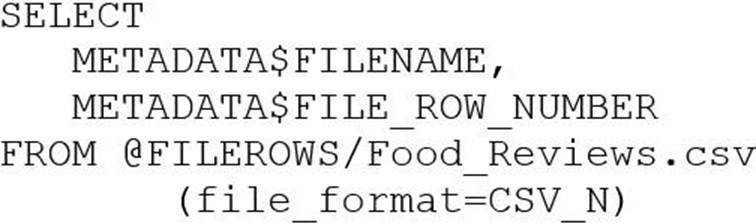
How can this query be interpreted?
- A . FILEROWS is a stage. FILE_ROW_NUMBER is line number in file.
- B . FILEROWS is the table. FILE_ROW_NUMBER is the line number in the table.
- C . FILEROWS is a file. FILE_ROW_NUMBER is the file format location.
- D . FILERONS is the file format location. FILE_ROW_NUMBER is a stage.
A
Explanation:
A stage is a named location in Snowflake that can store files for data loading and unloading. A stage can be internal or external, depending on where the files are stored.
The query in the question uses the LIST function to list the files in a stage named FILEROWS. The function returns a table with various columns, including FILE_ROW_NUMBER, which is the line number of the file in the stage.
Therefore, the query can be interpreted as listing the files in a stage named FILEROWS and showing
the line number of each file in the stage.
Reference: Stages
: LIST Function
Which Snowflake architecture recommendation needs multiple Snowflake accounts for implementation?
- A . Enable a disaster recovery strategy across multiple cloud providers.
- B . Create external stages pointing to cloud providers and regions other than the region hosting the Snowflake account.
- C . Enable zero-copy cloning among the development, test, and production environments.
- D . Enable separation of the development, test, and production environments.
D
Explanation:
The Snowflake architecture recommendation that necessitates multiple Snowflake accounts for implementation is the separation of development, test, and production environments. This approach, known as Account per Tenant (APT), isolates tenants into separate Snowflake accounts, ensuring dedicated resources and security isolation12.
Reference
• Snowflake’s white paper on “Design Patterns for Building Multi-Tenant Applications on Snowflake” discusses the APT model and its requirement for separate Snowflake accounts for each tenant1.
• Snowflake Documentation on Secure Data Sharing, which mentions the possibility of sharing data across multiple accounts3.
Which Snowflake architecture recommendation needs multiple Snowflake accounts for implementation?
- A . Enable a disaster recovery strategy across multiple cloud providers.
- B . Create external stages pointing to cloud providers and regions other than the region hosting the Snowflake account.
- C . Enable zero-copy cloning among the development, test, and production environments.
- D . Enable separation of the development, test, and production environments.
D
Explanation:
The Snowflake architecture recommendation that necessitates multiple Snowflake accounts for implementation is the separation of development, test, and production environments. This approach, known as Account per Tenant (APT), isolates tenants into separate Snowflake accounts, ensuring dedicated resources and security isolation12.
Reference
• Snowflake’s white paper on “Design Patterns for Building Multi-Tenant Applications on Snowflake” discusses the APT model and its requirement for separate Snowflake accounts for each tenant1.
• Snowflake Documentation on Secure Data Sharing, which mentions the possibility of sharing data across multiple accounts3.
A company’s client application supports multiple authentication methods, and is using Okta.
What is the best practice recommendation for the order of priority when applications authenticate to Snowflake?
- A . 1) OAuth (either Snowflake OAuth or External OAuth)
2) External browser
3) Okta native authentication
4) Key Pair Authentication, mostly used for service account users
5) Password - B . 1) External browser, SSO
2) Key Pair Authentication, mostly used for development environment users
3) Okta native authentication
4) OAuth (ether Snowflake OAuth or External OAuth)
5) Password - C . 1) Okta native authentication
2) Key Pair Authentication, mostly used for production environment users
3) Password
4) OAuth (either Snowflake OAuth or External OAuth)
5) External browser, SSO - D . 1) Password
2) Key Pair Authentication, mostly used for production environment users
3) Okta native authentication
4) OAuth (either Snowflake OAuth or External OAuth)
5) External browser, SSO
A
Explanation:
This is the best practice recommendation for the order of priority when applications authenticate to Snowflake, according to the Snowflake documentation and the web search results. Authentication is the process of verifying the identity of a user or application that connects to Snowflake. Snowflake supports multiple authentication methods, each with different advantages and disadvantages.
The recommended order of priority is based on the following factors:
Security: The authentication method should provide a high level of security and protection against unauthorized access or data breaches. The authentication method should also support multi-factor authentication (MFA) or single sign-on (SSO) for additional security.
Convenience: The authentication method should provide a smooth and easy user experience, without requiring complex or manual steps. The authentication method should also support seamless integration with external identity providers or applications.
Flexibility: The authentication method should provide a range of options and features to suit different use cases and scenarios. The authentication method should also support customization and configuration to meet specific requirements.
Based on these factors, the recommended order of priority is:
OAuth (either Snowflake OAuth or External OAuth): OAuth is an open standard for authorization that allows applications to access Snowflake resources on behalf of a user, without exposing the user’s credentials. OAuth provides a high level of security, convenience, and flexibility, as it supports MFA, SSO, token-based authentication, and various grant types and scopes. OAuth can be implemented using either Snowflake OAuth or External OAuth, depending on the identity provider and the application12.
External browser: External browser is an authentication method that allows users to log in to Snowflake using a web browser and an external identity provider, such as Okta, Azure AD, or Ping Identity. External browser provides a high level of security and convenience, as it supports MFA, SSO, and federated authentication. External browser also provides a consistent user interface and experience across different platforms and devices34.
Okta native authentication: Okta native authentication is an authentication method that allows users to log in to Snowflake using Okta as the identity provider, without using a web browser. Okta native authentication provides a high level of security and convenience, as it supports MFA, SSO, and federated authentication. Okta native authentication also provides a native user interface and experience for Okta users, and supports various Okta features, such as password policies and user management56.
Key Pair Authentication: Key Pair Authentication is an authentication method that allows users to log in to Snowflake using a public-private key pair, without using a password. Key Pair Authentication provides a high level of security, as it relies on asymmetric encryption and digital signatures. Key Pair Authentication also provides a flexible and customizable authentication option, as it supports various key formats, algorithms, and expiration times. Key Pair Authentication is mostly used for service account users, such as applications or scripts that connect to Snowflake programmatically7.
Password: Password is the simplest and most basic authentication method that allows users to log in to Snowflake using a username and password. Password provides a low level of security, as it relies on symmetric encryption and is vulnerable to brute force attacks or phishing. Password also provides a low level of convenience and flexibility, as it requires manual input and management, and does not support MFA or SSO. Password is the least recommended authentication method, and should be used only as a last resort or for testing purposes .
Reference: Snowflake Documentation: Snowflake OAuth
Snowflake Documentation: External OAuth
Snowflake Documentation: External Browser Authentication
Snowflake Blog: How to Use External Browser Authentication with Snowflake
Snowflake Documentation: Okta Native Authentication
Snowflake Blog: How to Use Okta Native Authentication with Snowflake
Snowflake Documentation: Key Pair Authentication
[Snowflake Blog: How to Use Key Pair Authentication with Snowflake]
[Snowflake Documentation: Password Authentication]
[Snowflake Blog: How to Use Password Authentication with Snowflake]
An Architect needs to design a solution for building environments for development, test, and pre-production, all located in a single Snowflake account. The environments should be based on production data.
Which solution would be MOST cost-effective and performant?
- A . Use zero-copy cloning into transient tables.
- B . Use zero-copy cloning into permanent tables.
- C . Use CREATE TABLE … AS SELECT (CTAS) statements.
- D . Use a Snowflake task to trigger a stored procedure to copy data.
A
Explanation:
Zero-copy cloning is a feature in Snowflake that allows for the creation of a clone of a database, schema, or table without duplicating any data, which is cost-effective as it saves on storage costs.
Transient tables are temporary and do not incur storage costs for the time they are not accessed, making them a cost-effective option for development, test, and pre-production environments that do not require the durability of permanent tables123.
Reference
• Snowflake Documentation on Zero-Copy Cloning3.
• Articles discussing the cost-effectiveness and performance benefits of zero-copy cloning12.
An Architect needs to design a solution for building environments for development, test, and pre-production, all located in a single Snowflake account. The environments should be based on production data.
Which solution would be MOST cost-effective and performant?
- A . Use zero-copy cloning into transient tables.
- B . Use zero-copy cloning into permanent tables.
- C . Use CREATE TABLE … AS SELECT (CTAS) statements.
- D . Use a Snowflake task to trigger a stored procedure to copy data.
A
Explanation:
Zero-copy cloning is a feature in Snowflake that allows for the creation of a clone of a database, schema, or table without duplicating any data, which is cost-effective as it saves on storage costs.
Transient tables are temporary and do not incur storage costs for the time they are not accessed, making them a cost-effective option for development, test, and pre-production environments that do not require the durability of permanent tables123.
Reference
• Snowflake Documentation on Zero-Copy Cloning3.
• Articles discussing the cost-effectiveness and performance benefits of zero-copy cloning12.
At which object type level can the APPLY MASKING POLICY, APPLY ROW ACCESS POLICY and APPLY SESSION POLICY privileges be granted?
- A . Global
- B . Database
- C . Schema
- D . Table
A
Explanation:
The object type level at which the APPLY MASKING POLICY, APPLY ROW ACCESS POLICY and APPLY SESSION POLICY privileges can be granted is global. These are account-level privileges that control who can apply or unset these policies on objects such as columns, tables, views, accounts, or users. These privileges are granted to the ACCOUNTADMIN role by default, and can be granted to other roles as needed. The other options are incorrect because they are not the object type level at which these privileges can be granted. Database, schema, and table are lower-level object types that do not support these privileges.
Reference: Access Control Privileges | Snowflake Documentation, Using Dynamic Data Masking | Snowflake Documentation, Using Row Access Policies | Snowflake Documentation, Using Session Policies | Snowflake Documentation
At which object type level can the APPLY MASKING POLICY, APPLY ROW ACCESS POLICY and APPLY SESSION POLICY privileges be granted?
- A . Global
- B . Database
- C . Schema
- D . Table
A
Explanation:
The object type level at which the APPLY MASKING POLICY, APPLY ROW ACCESS POLICY and APPLY SESSION POLICY privileges can be granted is global. These are account-level privileges that control who can apply or unset these policies on objects such as columns, tables, views, accounts, or users. These privileges are granted to the ACCOUNTADMIN role by default, and can be granted to other roles as needed. The other options are incorrect because they are not the object type level at which these privileges can be granted. Database, schema, and table are lower-level object types that do not support these privileges.
Reference: Access Control Privileges | Snowflake Documentation, Using Dynamic Data Masking | Snowflake Documentation, Using Row Access Policies | Snowflake Documentation, Using Session Policies | Snowflake Documentation
What are purposes for creating a storage integration? (Choose three.)
- A . Control access to Snowflake data using a master encryption key that is maintained in the cloud provider’s key management service.
- B . Store a generated identity and access management (IAM) entity for an external cloud provider regardless of the cloud provider that hosts the Snowflake account.
- C . Support multiple external stages using one single Snowflake object.
- D . Avoid supplying credentials when creating a stage or when loading or unloading data.
- E . Create private VPC endpoints that allow direct, secure connectivity between VPCs without traversing the public internet.
- F . Manage credentials from multiple cloud providers in one single Snowflake object.
BCD
Explanation:
The purpose of creating a storage integration in Snowflake includes:
B. Store a generated identity and access management (IAM) entity for an external cloud provider – This helps in managing authentication and authorization with external cloud storage without embedding credentials in Snowflake. It supports various cloud providers like AWS, Azure, or GCP, ensuring that the identity management is streamlined across platforms.
C. Support multiple external stages using one single Snowflake object – Storage integrations allow you to set up access configurations that can be reused across multiple external stages, simplifying the management of external data integrations.
D. Avoid supplying credentials when creating a stage or when loading or unloading data – By using a
storage integration, Snowflake can interact with external storage without the need to continuously manage or expose sensitive credentials, enhancing security and ease of operations.
Reference: Snowflake documentation on storage integrations, found within the SnowPro Advanced:
Architect course materials.
A healthcare company wants to share data with a medical institute. The institute is running a Standard edition of Snowflake; the healthcare company is running a Business Critical edition.
How can this data be shared?
- A . The healthcare company will need to change the institute’s Snowflake edition in the accounts panel.
- B . By default, sharing is supported from a Business Critical Snowflake edition to a Standard edition.
- C . Contact Snowflake and they will execute the share request for the healthcare company.
- D . Set the share_restriction parameter on the shared object to false.
D
Explanation:
By default, Snowflake does not allow sharing data from a Business Critical edition to a non-Business Critical edition. This is because Business Critical edition provides enhanced security and data protection features that are not available in lower editions. However, this restriction can be overridden by setting the share_restriction parameter on the shared object (database, schema, or table) to false. This parameter allows the data provider to explicitly allow sharing data with lower edition accounts. Note that this parameter can only be set by the data provider, not the data consumer. Also, setting this parameter to false may reduce the level of security and data protection for the shared data.
Reference: Enable Data Share:Business Critical Account to Lower Edition Sharing Is Not Allowed From An Account on BUSINESS CRITICAL Edition to an Account On A Lower Edition
SQL Execution Error: Sharing is Not Allowed from an Account on BUSINESS CRITICAL Edition to an Account on a Lower Edition
Snowflake Editions | Snowflake Documentation