
Snowflake ARA-C01 Practice Exams
Last updated on Oct 22,2026- Exam Code: ARA-C01
- Exam Name: SnowPro Advanced Architect Certification
- Certification Provider: Snowflake
- Latest update: Oct 22,2026
A company has several sites in different regions from which the company wants to ingest data.
Which of the following will enable this type of data ingestion?
- A . The company must have a Snowflake account in each cloud region to be able to ingest data to that account.
- B . The company must replicate data between Snowflake accounts.
- C . The company should provision a reader account to each site and ingest the data through the reader accounts.
- D . The company should use a storage integration for the external stage.
D
Explanation:
This is the correct answer because it allows the company to ingest data from different regions using a storage integration for the external stage. A storage integration is a feature that enables secure and easy access to files in external cloud storage from Snowflake. A storage integration can be used to create an external stage, which is a named location that references the files in the external storage.
An external stage can be used to load data into Snowflake tables using the COPY INTO command, or to unload data from Snowflake tables using the COPY INTO LOCATION command. A storage integration can support multiple regions and cloud platforms, as long as the external storage service is compatible with Snowflake12.
Reference: Snowflake Documentation: Storage Integrations
Snowflake Documentation: External Stages
A company has a source system that provides JSON records for various loT operations. The JSON Is loading directly into a persistent table with a variant field. The data Is quickly growing to 100s of millions of records and performance to becoming an issue. There is a generic access pattern that Is used to filter on the create_date key within the variant field.
What can be done to improve performance?
- A . Alter the target table to Include additional fields pulled from the JSON records. This would Include a create_date field with a datatype of time stamp. When this field Is used in the filter, partition pruning will occur.
- B . Alter the target table to include additional fields pulled from the JSON records. This would include a create_date field with a datatype of varchar. When this field is used in the filter, partition pruning will occur.
- C . Validate the size of the warehouse being used. If the record count is approaching 100s of millions, size XL will be the minimum size required to process this amount of data.
- D . Incorporate the use of multiple tables partitioned by date ranges. When a user or process needs to query a particular date range, ensure the appropriate base table Is used.
A
Explanation:
The correct answer is A because it improves the performance of queries by reducing the amount of data scanned and processed. By adding a create_date field with a timestamp data type, Snowflake can automatically cluster the table based on this field and prune the micro-partitions that do not match the filter condition. This avoids the need to parse the JSON data and access the variant field for every record.
Option B is incorrect because it does not improve the performance of queries. By adding a create_date field with a varchar data type, Snowflake cannot automatically cluster the table based on this field and prune the micro-partitions that do not match the filter condition. This still requires parsing the JSON data and accessing the variant field for every record.
Option C is incorrect because it does not address the root cause of the performance issue. By validating the size of the warehouse being used, Snowflake can adjust the compute resources to match the data volume and parallelize the query execution. However, this does not reduce the amount of data scanned and processed, which is the main bottleneck for queries on JSON data. Option D is incorrect because it adds unnecessary complexity and overhead to the data loading and querying process. By incorporating the use of multiple tables partitioned by date ranges, Snowflake can reduce the amount of data scanned and processed for queries that specify a date range. However, this requires creating and maintaining multiple tables, loading data into the appropriate table based on the date, and joining the tables for queries that span multiple date ranges.
Reference: Snowflake Documentation: Loading Data Using Snowpipe: This document explains how to use Snowpipe to continuously load data from external sources into Snowflake tables. It also describes the syntax and usage of the COPY INTO command, which supports various options and parameters to control the loading behavior, such as ON_ERROR, PURGE, and SKIP_FILE.
Snowflake Documentation: Date and Time Data Types and Functions: This document explains the different data types and functions for working with date and time values in Snowflake. It also describes how to set and change the session timezone and the system timezone.
Snowflake Documentation: Querying Metadata: This document explains how to query the metadata of the objects and operations in Snowflake using various functions, views, and tables. It also describes how to access the copy history information using the COPY_HISTORY function or the COPY_HISTORY view.
Snowflake Documentation: Loading JSON Data: This document explains how to load JSON data into Snowflake tables using various methods, such as the COPY INTO command, the INSERT command, or the PUT command. It also describes how to access and query JSON data using the dot notation, the FLATTEN function, or the LATERAL join.
Snowflake Documentation: Optimizing Storage for Performance: This document explains how to optimize the storage of data in Snowflake tables to improve the performance of queries. It also describes the concepts and benefits of automatic clustering, search optimization service, and materialized views.
A company has a source system that provides JSON records for various loT operations. The JSON Is loading directly into a persistent table with a variant field. The data Is quickly growing to 100s of millions of records and performance to becoming an issue. There is a generic access pattern that Is used to filter on the create_date key within the variant field.
What can be done to improve performance?
- A . Alter the target table to Include additional fields pulled from the JSON records. This would Include a create_date field with a datatype of time stamp. When this field Is used in the filter, partition pruning will occur.
- B . Alter the target table to include additional fields pulled from the JSON records. This would include a create_date field with a datatype of varchar. When this field is used in the filter, partition pruning will occur.
- C . Validate the size of the warehouse being used. If the record count is approaching 100s of millions, size XL will be the minimum size required to process this amount of data.
- D . Incorporate the use of multiple tables partitioned by date ranges. When a user or process needs to query a particular date range, ensure the appropriate base table Is used.
A
Explanation:
The correct answer is A because it improves the performance of queries by reducing the amount of data scanned and processed. By adding a create_date field with a timestamp data type, Snowflake can automatically cluster the table based on this field and prune the micro-partitions that do not match the filter condition. This avoids the need to parse the JSON data and access the variant field for every record.
Option B is incorrect because it does not improve the performance of queries. By adding a create_date field with a varchar data type, Snowflake cannot automatically cluster the table based on this field and prune the micro-partitions that do not match the filter condition. This still requires parsing the JSON data and accessing the variant field for every record.
Option C is incorrect because it does not address the root cause of the performance issue. By validating the size of the warehouse being used, Snowflake can adjust the compute resources to match the data volume and parallelize the query execution. However, this does not reduce the amount of data scanned and processed, which is the main bottleneck for queries on JSON data. Option D is incorrect because it adds unnecessary complexity and overhead to the data loading and querying process. By incorporating the use of multiple tables partitioned by date ranges, Snowflake can reduce the amount of data scanned and processed for queries that specify a date range. However, this requires creating and maintaining multiple tables, loading data into the appropriate table based on the date, and joining the tables for queries that span multiple date ranges.
Reference: Snowflake Documentation: Loading Data Using Snowpipe: This document explains how to use Snowpipe to continuously load data from external sources into Snowflake tables. It also describes the syntax and usage of the COPY INTO command, which supports various options and parameters to control the loading behavior, such as ON_ERROR, PURGE, and SKIP_FILE.
Snowflake Documentation: Date and Time Data Types and Functions: This document explains the different data types and functions for working with date and time values in Snowflake. It also describes how to set and change the session timezone and the system timezone.
Snowflake Documentation: Querying Metadata: This document explains how to query the metadata of the objects and operations in Snowflake using various functions, views, and tables. It also describes how to access the copy history information using the COPY_HISTORY function or the COPY_HISTORY view.
Snowflake Documentation: Loading JSON Data: This document explains how to load JSON data into Snowflake tables using various methods, such as the COPY INTO command, the INSERT command, or the PUT command. It also describes how to access and query JSON data using the dot notation, the FLATTEN function, or the LATERAL join.
Snowflake Documentation: Optimizing Storage for Performance: This document explains how to optimize the storage of data in Snowflake tables to improve the performance of queries. It also describes the concepts and benefits of automatic clustering, search optimization service, and materialized views.
Which command will create a schema without Fail-safe and will restrict object owners from passing on access to other users?
- A . create schema EDW.ACCOUNTING WITH MANAGED ACCESS;
- B . create schema EDW.ACCOUNTING WITH MANAGED ACCESS DATA_RETENTION_TIME_IN_DAYS – 7;
- C . create TRANSIENT schema EDW.ACCOUNTING WITH MANAGED ACCESS
DATA_RETENTION_TIME_IN_DAYS = 1; - D . create TRANSIENT schema EDW.ACCOUNTING WITH MANAGED ACCESS DATA_RETENTION_TIME_IN_DAYS = 7;
D
Explanation:
A transient schema in Snowflake is designed without a Fail-safe period, meaning it does not incur additional storage costs once it leaves Time Travel, and it is not protected by Fail-safe in the event of a data loss. The WITH MANAGED ACCESS option ensures that all privilege grants, including future grants on objects within the schema, are managed by the schema owner, thus restricting object owners from passing on access to other users1.
Reference =
• Snowflake Documentation on creating schemas1
• Snowflake Documentation on configuring access control2
• Snowflake Documentation on understanding and viewing Fail-safe3
Consider the following COPY command which is loading data with CSV format into a Snowflake table from an internal stage through a data transformation query.
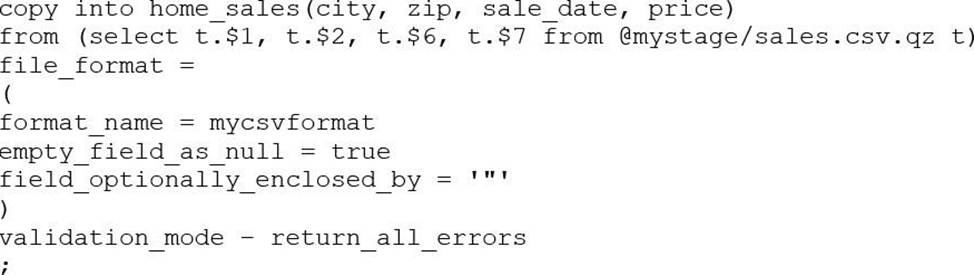
This command results in the following error:
SQL compilation error: invalid parameter ‘validation_mode’ Assuming the syntax is correct, what is the cause of this error?
- A . The VALIDATION_MODE parameter supports COPY statements that load data from external stages only.
- B . The VALIDATION_MODE parameter does not support COPY statements with CSV file formats.
- C . The VALIDATION_MODE parameter does not support COPY statements that transform data during a load.
- D . The value return_all_errors of the option VALIDATION_MODE is causing a compilation error.
C
Explanation:
The VALIDATION_MODE parameter is used to specify the behavior of the COPY statement when loading data into a table. It is used to specify whether the COPY statement should return an error if any of the rows in the file are invalid or if it should continue loading the valid rows. The VALIDATION_MODE parameter is only supported for COPY statements that load data from external stages1.
The query in the question uses a data transformation query to load data from an internal stage. A data transformation query is a query that transforms the data during the load process, such as parsing JSON or XML data, applying functions, or joining with other tables2.
According to the documentation, VALIDATION_MODE does not support COPY statements that transform data during a load. If the parameter is specified, the COPY statement returns an error1. Therefore, option C is the correct answer.
Reference: COPY INTO <table>: Transforming Data During a Load
What is a key consideration when setting up search optimization service for a table?
- A . Search optimization service works best with a column that has a minimum of 100 K distinct values.
- B . Search optimization service can significantly improve query performance on partitioned external tables.
- C . Search optimization service can help to optimize storage usage by compressing the data into a GZIP format.
- D . The table must be clustered with a key having multiple columns for effective search optimization.
A
Explanation:
A Developer is having a performance issue with a Snowflake query. The query receives up to 10 different values for one parameter and then performs an aggregation over the majority of a fact table. It then joins against a smaller dimension table. This parameter value is selected by the different query users when they execute it during business hours. Both the fact and dimension tables are loaded with new data in an overnight import process.
On a Small or Medium-sized virtual warehouse, the query performs slowly. Performance is acceptable on a size Large or bigger warehouse. However, there is no budget to increase costs. The Developer needs a recommendation that does not increase compute costs to run this query.
What should the Architect recommend?
- A . Create a task that will run the 10 different variations of the query corresponding to the 10 different parameters before the users come in to work. The query results will then be cached and ready to respond quickly when the users re-issue the query.
- B . Create a task that will run the 10 different variations of the query corresponding to the 10 different parameters before the users come in to work. The task will be scheduled to align with the users’ working hours in order to allow the warehouse cache to be used.
- C . Enable the search optimization service on the table. When the users execute the query, the search optimization service will automatically adjust the query execution plan based on the frequently-used parameters.
- D . Create a dedicated size Large warehouse for this particular set of queries. Create a new role that has USAGE permission on this warehouse and has the appropriate read permissions over the fact and dimension tables. Have users switch to this role and use this warehouse when they want to access this data.
C
Explanation:
Enabling the search optimization service on the table can improve the performance of queries that have selective filtering criteria, which seems to be the case here. This service optimizes the execution of queries by creating a persistent data structure called a search access path, which allows some micro-partitions to be skipped during the scanning process. This can significantly speed up query performance without increasing compute costs1.
Reference
• Snowflake Documentation on Search Optimization Service1.
What does a Snowflake Architect need to consider when implementing a Snowflake Connector for Kafka?
- A . Every Kafka message is in JSON or Avro format.
- B . The default retention time for Kafka topics is 14 days.
- C . The Kafka connector supports key pair authentication, OAUTH. and basic authentication (for example, username and password).
- D . The Kafka connector will create one table and one pipe to ingest data for each topic. If the connector cannot create the table or the pipe it will result in an exception.
D
Explanation:
The Snowflake Connector for Kafka is a Kafka Connect sink connector that reads data from one or more Apache Kafka topics and loads the data into a Snowflake table. The connector supports different authentication methods to connect to Snowflake, such as key pair authentication, OAUTH, and basic authentication (for example, username and password). The connector also supports different encryption methods, such as HTTPS and SSL1. The connector does not require that every Kafka message is in JSON or Avro format, as it can handle other formats such as CSV, XML, and Parquet2. The default retention time for Kafka topics is not relevant for the connector, as it only consumes the messages that are available in the topics and does not store them in Kafka. The connector will create one table and one pipe to ingest data for each topic by default, but this behavior can be customized by using the snowflake.topic2table.map configuration property3. If the connector cannot create the table or the pipe, it will log an error and retry the operation until it succeeds or the connector is stopped4.
Reference: Installing and Configuring the Kafka Connector
Overview of the Kafka Connector
Managing the Kafka Connector
Troubleshooting the Kafka Connector
A company has an external vendor who puts data into Google Cloud Storage. The company’s Snowflake account is set up in Azure.
What would be the MOST efficient way to load data from the vendor into Snowflake?
- A . Ask the vendor to create a Snowflake account, load the data into Snowflake and create a data share.
- B . Create an external stage on Google Cloud Storage and use the external table to load the data into Snowflake.
- C . Copy the data from Google Cloud Storage to Azure Blob storage using external tools and load data from Blob storage to Snowflake.
- D . Create a Snowflake Account in the Google Cloud Platform (GCP), ingest data into this account and use data replication to move the data from GCP to Azure.
B
Explanation:
The most efficient way to load data from the vendor into Snowflake is to create an external stage on Google Cloud Storage and use the external table to load the data into Snowflake (Option B). This way, you can avoid copying or moving the data across different cloud platforms, which can incur additional costs and latency. You can also leverage the external table feature to query the data directly from Google Cloud Storage without loading it into Snowflake tables, which can save storage space and improve performance. Option A is not efficient because it requires the vendor to create a Snowflake account and a data share, which can be complicated and costly. Option C is not efficient because it involves copying the data from Google Cloud Storage to Azure Blob storage using external tools, which can be slow and expensive. Option D is not efficient because it requires creating a Snowflake account in the Google Cloud Platform (GCP), ingesting data into this account, and using data replication to move the data from GCP to Azure, which can be complex and time-consuming.
Reference: The answer can be verified from Snowflake’s official documentation on external stages and external tables available on their website. Here are some relevant links: Using External Stages | Snowflake Documentation Using External Tables | Snowflake Documentation
Loading Data from a Stage | Snowflake Documentation
In a managed access schema, what are characteristics of the roles that can manage object privileges? (Select TWO).
- A . Users with the SYSADMIN role can grant object privileges in a managed access schema.
- B . Users with the SECURITYADMIN role or higher, can grant object privileges in a managed access schema.
- C . Users who are database owners can grant object privileges in a managed access schema.
- D . Users who are schema owners can grant object privileges in a managed access schema.
- E . Users who are object owners can grant object privileges in a managed access schema.
BD
Explanation:
In a managed access schema, the privilege management is centralized with the schema owner, who has the authority to grant object privileges within the schema. Additionally, the SECURITYADMIN role has the capability to manage object grants globally, which includes within managed access schemas. Other roles, such as SYSADMIN or database owners, do not inherently have this privilege unless explicitly granted.
Reference: The verified answers are based on Snowflake’s official documentation, which outlines the roles and privileges associated with managed access schemas12.