
Snowflake ARA-C01 Practice Exams
Last updated on Oct 22,2026- Exam Code: ARA-C01
- Exam Name: SnowPro Advanced Architect Certification
- Certification Provider: Snowflake
- Latest update: Oct 22,2026
An Architect has chosen to separate their Snowflake Production and QA environments using two
separate Snowflake accounts.
The QA account is intended to run and test changes on data and database objects before pushing those changes to the Production account. It is a requirement that all database objects and data in the QA account need to be an exact copy of the database objects, including privileges and data in the Production account on at least a nightly basis.
Which is the LEAST complex approach to use to populate the QA account with the Production account’s data and database objects on a nightly basis?
- A . 1) Create a share in the Production account for each database
2) Share access to the QA account as a Consumer
3) The QA account creates a database directly from each share
4) Create clones of those databases on a nightly basis
5) Run tests directly on those cloned databases - B . 1) Create a stage in the Production account
2) Create a stage in the QA account that points to the same external object-storage location
3) Create a task that runs nightly to unload each table in the Production account into the stage
4) Use Snowpipe to populate the QA account - C . 1) Enable replication for each database in the Production account
2) Create replica databases in the QA account
3) Create clones of the replica databases on a nightly basis
4) Run tests directly on those cloned databases - D . 1) In the Production account, create an external function that connects into the QA account and returns all the data for one specific table
2) Run the external function as part of a stored procedure that loops through each table in the Production account and populates each table in the QA account
C
Explanation:
This approach is the least complex because it uses Snowflake’s built-in replication feature to copy the data and database objects from the Production account to the QA account. Replication is a fast and efficient way to synchronize data across accounts, regions, and cloud platforms. It also preserves the privileges and metadata of the replicated objects. By creating clones of the replica databases, the QA account can run tests on the cloned data without affecting the original data. Clones are also zero-copy, meaning they do not consume any additional storage space unless the data is modified. This approach does not require any external stages, tasks, Snowpipe, or external functions, which can add complexity and overhead to the data transfer process.
Reference: Introduction to Replication and Failover
Replicating Databases Across Multiple Accounts
Cloning Considerations
A Snowflake Architect is designing a multi-tenant application strategy for an organization in the Snowflake Data Cloud and is considering using an Account Per Tenant strategy.
Which requirements will be addressed with this approach? (Choose two.)
- A . There needs to be fewer objects per tenant.
- B . Security and Role-Based Access Control (RBAC) policies must be simple to configure.
- C . Compute costs must be optimized.
- D . Tenant data shape may be unique per tenant.
- E . Storage costs must be optimized.
B, D
Explanation:
The Account Per Tenant strategy involves creating separate Snowflake accounts for each tenant within the multi-tenant application. This approach offers a number of advantages.
Option B: With separate accounts, each tenant’s environment is isolated, making security and RBAC policies simpler to configure and maintain. This is because each account can have its own set of roles and privileges without the risk of cross-tenant access or the complexity of maintaining a highly granular permission model within a shared environment.
Option D: This approach also allows for each tenant to have a unique data shape, meaning that the database schema can be tailored to the specific needs of each tenant without affecting others. This can be essential when tenants have different data models, usage patterns, or application customizations.
A Snowflake Architect is designing a multi-tenant application strategy for an organization in the Snowflake Data Cloud and is considering using an Account Per Tenant strategy.
Which requirements will be addressed with this approach? (Choose two.)
- A . There needs to be fewer objects per tenant.
- B . Security and Role-Based Access Control (RBAC) policies must be simple to configure.
- C . Compute costs must be optimized.
- D . Tenant data shape may be unique per tenant.
- E . Storage costs must be optimized.
B, D
Explanation:
The Account Per Tenant strategy involves creating separate Snowflake accounts for each tenant within the multi-tenant application. This approach offers a number of advantages.
Option B: With separate accounts, each tenant’s environment is isolated, making security and RBAC policies simpler to configure and maintain. This is because each account can have its own set of roles and privileges without the risk of cross-tenant access or the complexity of maintaining a highly granular permission model within a shared environment.
Option D: This approach also allows for each tenant to have a unique data shape, meaning that the database schema can be tailored to the specific needs of each tenant without affecting others. This can be essential when tenants have different data models, usage patterns, or application customizations.
A company’s Architect needs to find an efficient way to get data from an external partner, who is also a Snowflake user. The current solution is based on daily JSON extracts that are placed on an FTP server and uploaded to Snowflake manually. The files are changed several times each month, and the ingestion process needs to be adapted to accommodate these changes.
What would be the MOST efficient solution?
- A . Ask the partner to create a share and add the company’s account.
- B . Ask the partner to use the data lake export feature and place the data into cloud storage where Snowflake can natively ingest it (schema-on-read).
- C . Keep the current structure but request that the partner stop changing files, instead only appending new files.
- D . Ask the partner to set up a Snowflake reader account and use that account to get the data for ingestion.
A
Explanation:
The most efficient solution is to ask the partner to create a share and add the company’s account (Option A). This way, the company can access the live data from the partner without any data movement or manual intervention. Snowflake’s secure data sharing feature allows data providers to share selected objects in a database with other Snowflake accounts. The shared data is read-only and does not incur any storage or compute costs for the data consumers. The data consumers can query the shared data directly or create local copies of the shared objects in their own databases. Option B is not efficient because it involves using the data lake export feature, which is intended for exporting data from Snowflake to an external data lake, not for importing data from another Snowflake account. The data lake export feature also requires the data provider to create an external stage on cloud storage and use the COPY INTO <location> command to export the data into parquet files. The data consumer then needs to create an external table or a file format to load the data from the cloud storage into Snowflake. This process can be complex and costly, especially if the data changes frequently. Option C is not efficient because it does not solve the problem of manual data ingestion and adaptation. Keeping the current structure of daily JSON extracts on an FTP server and requesting the partner to stop changing files, instead only appending new files, does not improve the efficiency or reliability of the data ingestion process. The company still needs to upload the data to Snowflake manually and deal with any schema changes or data quality issues. Option D is not efficient because it requires the partner to set up a Snowflake reader account and use that account to get the data for ingestion. A reader account is a special type of account that can only consume data from the provider account that created it. It is intended for data consumers who are not Snowflake customers and do not have a licensing agreement with Snowflake. A reader account is not suitable for data ingestion from another Snowflake account, as it does not allow uploading, modifying, or unloading data. The company would need to use external tools or interfaces to access the data from the reader account and load it into their own account, which can be slow and expensive.
Reference: The answer can be verified from Snowflake’s official documentation on secure data sharing, data lake export, and reader accounts available on their website. Here are some relevant links:
Introduction to Secure Data Sharing | Snowflake Documentation
Data Lake Export Public Preview Is Now Available on Snowflake | Snowflake Blog Managing Reader Accounts | Snowflake Documentation
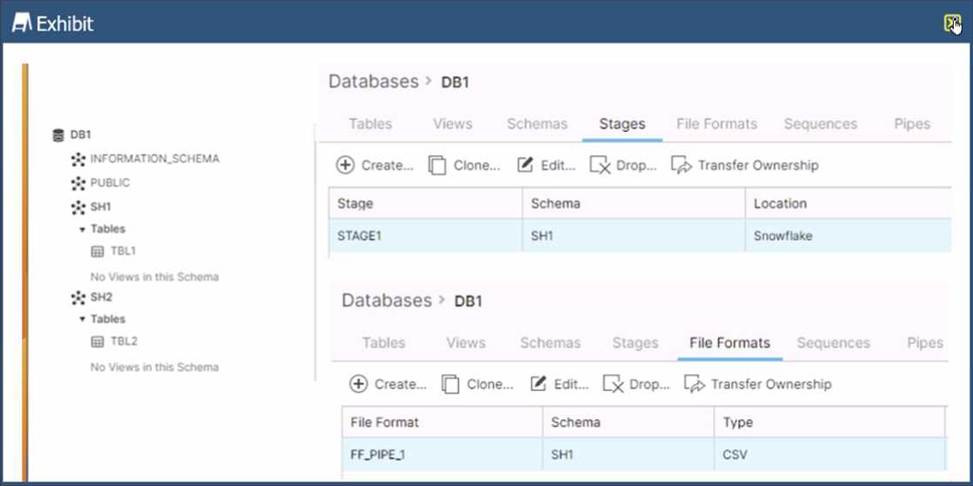
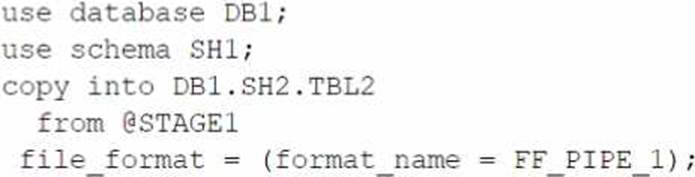
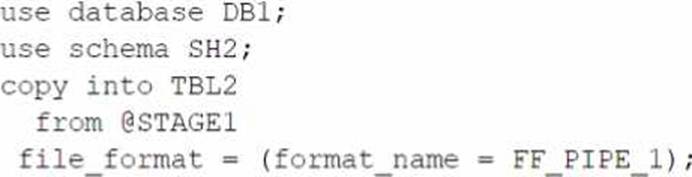
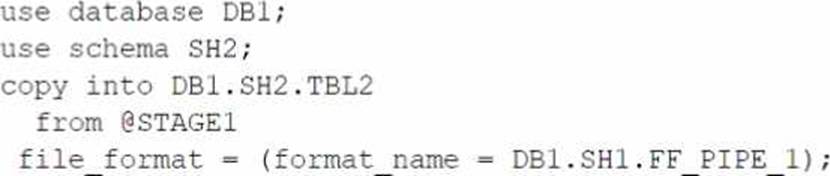
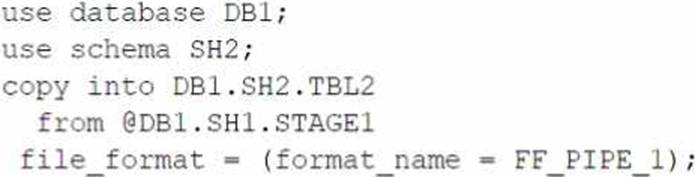
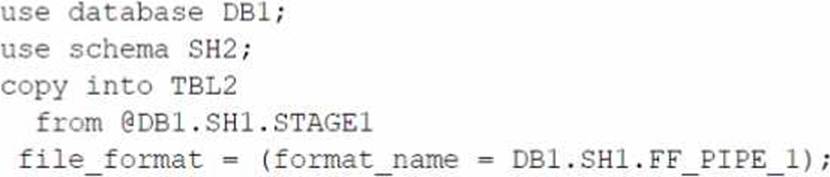
Based on the architecture in the image, how can the data from DB1 be copied into TBL2? (Select TWO).
A)
B)
C)
D)
E)
- A . Option A
- B . Option B
- C . Option C
- D . Option D
- E . Option E
B,E
Explanation:
The architecture in the image shows a Snowflake data platform with two databases, DB1 and DB2, and two schemas, SH1 and SH2. DB1 contains a table TBL1 and a stage STAGE1. DB2 contains a table TBL2. The image also shows a snippet of code written in SQL language that copies data from STAGE1 to TBL2 using a file format FF PIPE 1.
To copy data from DB1 to TBL2, there are two possible options among the choices given:
Option B: Use a named external stage that references STAGE1. This option requires creating an external stage object in DB2.SH2 that points to the same location as STAGE1 in DB1.SH1. The external stage can be created using the CREATE STAGE command with the URL parameter specifying the location of STAGE11. For example:
SQLAI-generated code. Review and use carefully. More info on FAQ.
use database DB2;
use schema SH2;
create stage EXT_STAGE1
url = @DB1.SH1.STAGE1;
Then, the data can be copied from the external stage to TBL2 using the COPY INTO command with the FROM parameter specifying the external stage name and the FILE FORMAT parameter specifying the file format name2. For example:
SQLAI-generated code. Review and use carefully. More info on FAQ.
copy into TBL2
from @EXT_STAGE1
file format = (format name = DB1.SH1.FF PIPE 1);
Option E: Use a cross-database query to select data from TBL1 and insert into TBL2. This option requires using the INSERT INTO command with the SELECT clause to query data from TBL1 in DB1.SH1 and insert it into TBL2 in DB2.SH2. The query must use the fully-qualified names of the tables, including the database and schema names3.
For example:
SQLAI-generated code. Review and use carefully. More info on FAQ.
use database DB2;
use schema SH2;
insert into TBL2
select * from DB1.SH1.TBL1;
The other options are not valid because:
Option A: It uses an invalid syntax for the COPY INTO command. The FROM parameter cannot specify a table name, only a stage name or a file location2.
Option C: It uses an invalid syntax for the COPY INTO command. The FILE FORMAT parameter cannot specify a stage name, only a file format name or options2.
Option D: It uses an invalid syntax for the CREATE STAGE command. The URL parameter cannot
specify a table name, only a file location1.
Reference: 1: CREATE STAGE | Snowflake Documentation
2: COPY INTO table | Snowflake Documentation
3: Cross-database Queries | Snowflake Documentation
Add a consumer account to the share for the vendor to access.
Explanation:
The correct way to securely share data with a vendor using a Snowflake account on a different cloud platform and region is to create a share, add objects to the share, and add a consumer account to the share for the vendor to access. This way, the company can control what data is shared, who can access it, and how long the share is valid. The vendor can then query the shared data without copying or moving it to their own account. The other options are either incorrect or inefficient, as they involve creating unnecessary reader accounts, users, roles, or database replication. https://learn.snowflake.com/en/certifications/snowpro-advanced-architect/
Add a consumer account to the share for the vendor to access.
Explanation:
The correct way to securely share data with a vendor using a Snowflake account on a different cloud platform and region is to create a share, add objects to the share, and add a consumer account to the share for the vendor to access. This way, the company can control what data is shared, who can access it, and how long the share is valid. The vendor can then query the shared data without copying or moving it to their own account. The other options are either incorrect or inefficient, as they involve creating unnecessary reader accounts, users, roles, or database replication. https://learn.snowflake.com/en/certifications/snowpro-advanced-architect/
A table contains five columns and it has millions of records.
The cardinality distribution of the columns is shown below:
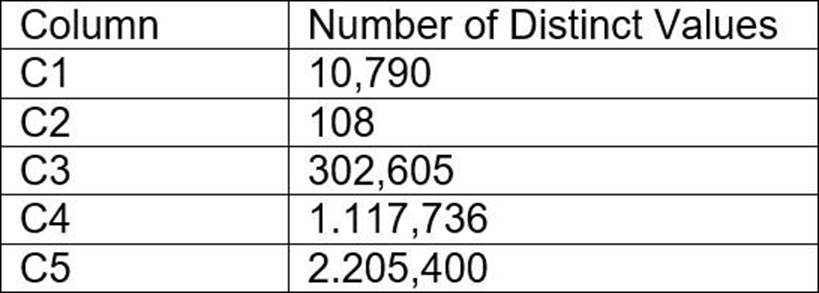
Column C4 and C5 are mostly used by SELECT queries in the GROUP BY and ORDER BY clauses.
Whereas columns C1, C2 and C3 are heavily used in filter and join conditions of SELECT queries.
The Architect must design a clustering key for this table to improve the query performance.
Based on Snowflake recommendations, how should the clustering key columns be ordered while defining the multi-column clustering key?
- A . C5, C4, C2
- B . C3, C4, C5
- C . C1, C3, C2
- D . C2, C1, C3
D
Explanation:
According to the Snowflake documentation, the following are some considerations for choosing
clustering for a table1:
Clustering is optimal when either:
You require the fastest possible response times, regardless of cost.
Your improved query performance offsets the credits required to cluster and maintain the table.
Clustering is most effective when the clustering key is used in the following types of query predicates:
Filter predicates (e.g. WHERE clauses)
Join predicates (e.g. ON clauses)
Grouping predicates (e.g. GROUP BY clauses)
Sorting predicates (e.g. ORDER BY clauses)
Clustering is less effective when the clustering key is not used in any of the above query predicates, or when the clustering key is used in a predicate that requires a function or expression to be applied to the key (e.g. DATE_TRUNC, TO_CHAR, etc.).
For most tables, Snowflake recommends a maximum of 3 or 4 columns (or expressions) per key.
Adding more than 3-4 columns tends to increase costs more than benefits.
Based on these considerations, the best option for the clustering key columns is C. C1, C3, C2, because:
These columns are heavily used in filter and join conditions of SELECT queries, which are the most effective types of predicates for clustering.
These columns have high cardinality, which means they have many distinct values and can help reduce the clustering skew and improve the compression ratio.
These columns are likely to be correlated with each other, which means they can help co-locate similar rows in the same micro-partitions and improve the scan efficiency.
These columns do not require any functions or expressions to be applied to them, which means they can be directly used in the predicates without affecting the clustering.
Reference: 1: Considerations for Choosing Clustering for a Table | Snowflake Documentation
Data is being imported and stored as JSON in a VARIANT column. Query performance was fine, but most recently, poor query performance has been reported.
What could be causing this?
- A . There were JSON nulls in the recent data imports.
- B . The order of the keys in the JSON was changed.
- C . The recent data imports contained fewer fields than usual.
- D . There were variations in string lengths for the JSON values in the recent data imports.
B
Explanation:
Data is being imported and stored as JSON in a VARIANT column. Query performance was fine, but most recently, poor query performance has been reported. This could be caused by the following factors:
The order of the keys in the JSON was changed. Snowflake stores semi-structured data internally in a column-like structure for the most common elements, and the remainder in a leftovers-like column. The order of the keys in the JSON affects how Snowflake determines the common elements and how it optimizes the query performance. If the order of the keys in the JSON was changed, Snowflake might have to re-parse the data and re-organize the internal storage, which could result in slower query performance.
There were variations in string lengths for the JSON values in the recent data imports. Non-native values, such as dates and timestamps, are stored as strings when loaded into a VARIANT column. Operations on these values could be slower and also consume more space than when stored in a relational column with the corresponding data type. If there were variations in string lengths for the JSON values in the recent data imports, Snowflake might have to allocate more space and perform more conversions, which could also result in slower query performance. The other options are not valid causes for poor query performance:
There were JSON nulls in the recent data imports. Snowflake supports two types of null values in semi-structured data: SQL NULL and JSON null. SQL NULL means the value is missing or unknown, while JSON null means the value is explicitly set to null. Snowflake can distinguish between these two types of null values and handle them accordingly. Having JSON nulls in the recent data imports should not affect the query performance significantly.
The recent data imports contained fewer fields than usual. Snowflake can handle semi-structured data with varying schemas and fields. Having fewer fields than usual in the recent data imports should not affect the query performance significantly, as Snowflake can still optimize the data ingestion and query execution based on the existing fields.
Reference: Considerations for Semi-structured Data Stored in VARIANT Snowflake Architect Training
Snowflake query performance on unique element in variant column Snowflake variant performance
Is it possible for a data provider account with a Snowflake Business Critical edition to share data with an Enterprise edition data consumer account?
- A . A Business Critical account cannot be a data sharing provider to an Enterprise consumer. Any consumer accounts must also be Business Critical.
- B . If a user in the provider account with role authority to create or alter share adds an Enterprise account as a consumer, it can import the share.
- C . If a user in the provider account with a share owning role sets share_restrictions to False when adding an Enterprise consumer account, it can import the share.
- D . If a user in the provider account with a share owning role which also has override share restrictions privilege share_restrictions set to False when adding an Enterprise consumer account, it can import the share.
B
Explanation:
In Snowflake, data sharing capabilities allow a Business Critical edition account to share data with an Enterprise edition consumer account. The ability to share data is contingent upon the role permissions within the provider account. If a user has the necessary role authority (like ACCOUNTADMIN or a role with similar privileges to create or manage shares), they can add an Enterprise edition account as a consumer. This feature enables flexibility in data sharing across different Snowflake account editions, facilitating broader data collaboration and accessibility.
Reference: Snowflake’s data sharing documentation and the specifics of edition-based capabilities
discussed in SnowPro Advanced: Architect certification materials.