
Snowflake ARA-C01 Practice Exams
Last updated on Oct 22,2026- Exam Code: ARA-C01
- Exam Name: SnowPro Advanced Architect Certification
- Certification Provider: Snowflake
- Latest update: Oct 22,2026
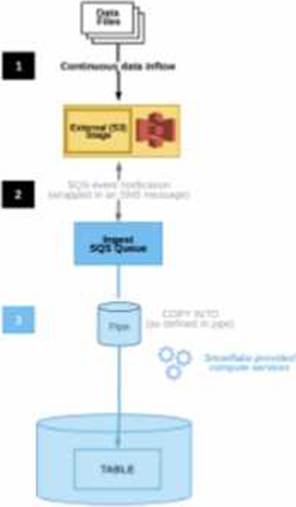
The diagram shows the process flow for Snowpipe auto-ingest with Amazon Simple Notification
Service (SNS) with the following steps:
Step 1: Data files are loaded in a stage.
Step 2: An Amazon S3 event notification, published by SNS, informs Snowpipe ― by way of Amazon Simple Queue Service (SQS) – that files are ready to load. Snowpipe copies the files into a queue.
Step 3: A Snowflake-provided virtual warehouse loads data from the queued files into the target table based on parameters defined in the specified pipe.
If an AWS Administrator accidentally deletes the SQS subscription to the SNS topic in Step 2, what will happen to the pipe that references the topic to receive event messages from Amazon S3?
- A . The pipe will continue to receive the messages as Snowflake will automatically restore the subscription to the same SNS topic and will recreate the pipe by specifying the same SNS topic name in the pipe definition.
- B . The pipe will no longer be able to receive the messages and the user must wait for 24 hours from the time when the SNS topic subscription was deleted. Pipe recreation is not required as the pipe will reuse the same subscription to the existing SNS topic after 24 hours.
- C . The pipe will continue to receive the messages as Snowflake will automatically restore the subscription by creating a new SNS topic. Snowflake will then recreate the pipe by specifying the new SNS topic name in the pipe definition.
- D . The pipe will no longer be able to receive the messages. To restore the system immediately, the user needs to manually create a new SNS topic with a different name and then recreate the pipe by specifying the new SNS topic name in the pipe definition.
D
Explanation:
If an AWS Administrator accidentally deletes the SQS subscription to the SNS topic in Step 2, the pipe that references the topic to receive event messages from Amazon S3 will no longer be able to receive the messages. This is because the SQS subscription is the link between the SNS topic and the Snowpipe notification channel. Without the subscription, the SNS topic will not be able to send notifications to the Snowpipe queue, and the pipe will not be triggered to load the new files. To restore the system immediately, the user needs to manually create a new SNS topic with a different name and then recreate the pipe by specifying the new SNS topic name in the pipe definition. This will create a new notification channel and a new SQS subscription for the pipe. Alternatively, the user can also recreate the SQS subscription to the existing SNS topic and then alter the pipe to use the same SNS topic name in the pipe definition. This will also restore the notification channel and the pipe functionality.
Reference: Automating Snowpipe for Amazon S3
Enabling Snowpipe Error Notifications for Amazon SNS
HowTo: Configuration steps for Snowpipe Auto-Ingest with AWS S3 Stages
When using the copy into <table> command with the CSV file format, how does the match_by_column_name parameter behave?
- A . It expects a header to be present in the CSV file, which is matched to a case-sensitive table column name.
- B . The parameter will be ignored.
- C . The command will return an error.
- D . The command will return a warning stating that the file has unmatched columns.
B
Explanation:
Option B is the best design to meet the requirements because it uses Snowpipe to ingest the data continuously and efficiently as new records arrive in the object storage, leveraging event notifications. Snowpipe is a service that automates the loading of data from external sources into Snowflake tables1. It also uses streams and tasks to orchestrate transformations on the ingested data. Streams are objects that store the change history of a table, and tasks are objects that execute SQL statements on a schedule or when triggered by another task2. Option B also uses an external function to do model inference with Amazon Comprehend and write the final records to a Snowflake table. An external function is a user-defined function that calls an external API, such as Amazon Comprehend, to perform computations that are not natively supported by Snowflake3. Finally, option B uses the Snowflake Marketplace to make the de-identified final data set available publicly for advertising companies who use different cloud providers in different regions. The Snowflake Marketplace is a platform that enables data providers to list and share their data sets with data consumers, regardless of the cloud platform or region they use4.
Option A is not the best design because it uses copy into to ingest the data, which is not as efficient and continuous as Snowpipe. Copy into is a SQL command that loads data from files into a table in a single transaction. It also exports the data into Amazon S3 to do model inference with Amazon Comprehend, which adds an extra step and increases the operational complexity and maintenance of the infrastructure.
Option C is not the best design because it uses Amazon EMR and PySpark to ingest and transform the data, which also increases the operational complexity and maintenance of the infrastructure. Amazon EMR is a cloud service that provides a managed Hadoop framework to process and analyze large-scale data sets. PySpark is a Python API for Spark, a distributed computing framework that can run on Hadoop. Option C also develops a python program to do model inference by leveraging the Amazon Comprehend text analysis API, which increases the development effort.
Option D is not the best design because it is identical to option A, except for the ingestion method. It still exports the data into Amazon S3 to do model inference with Amazon Comprehend, which adds an extra step and increases the operational complexity and maintenance of the infrastructure.
Reference: 1: Snowpipe Overview 2: Using Streams and Tasks to Automate Data Pipelines 3: External Functions Overview 4: Snowflake Data Marketplace Overview: [Loading Data Using COPY INTO]:
[What is Amazon EMR?]: [PySpark Overview]
The copy into <table> command is used to load data from staged files into an existing table in Snowflake. The command supports various file formats, such as CSV, JSON, AVRO, ORC, PARQUET, and XML1.
The match_by_column_name parameter is a copy option that enables loading semi-structured data into separate columns in the target table that match corresponding columns represented in the source data. The parameter can have one of the following values2:
CASE_SENSITIVE: The column names in the source data must match the column names in the target table exactly, including the case. This is the default value.
CASE_INSENSITIVE: The column names in the source data must match the column names in the target table, but the case is ignored.
NONE: The column names in the source data are ignored, and the data is loaded based on the order of the columns in the target table.
The match_by_column_name parameter only applies to semi-structured data, such as JSON, AVRO, ORC, PARQUET, and XML. It does not apply to CSV data, which is considered structured data2. When using the copy into <table> command with the CSV file format, the match_by_column_name parameter behaves as follows2:
It expects a header to be present in the CSV file, which is matched to a case-sensitive table column name. This means that the first row of the CSV file must contain the column names, and they must match the column names in the target table exactly, including the case. If the header is missing or does not match, the command will return an error.
The parameter will not be ignored, even if it is set to NONE. The command will still try to match the column names in the CSV file with the column names in the target table, and will return an error if they do not match.
The command will not return a warning stating that the file has unmatched columns. It will either load the data successfully if the column names match, or return an error if they do not match.
Reference: 1: COPY INTO <table> | Snowflake Documentation
2: MATCH_BY_COLUMN_NAME | Snowflake Documentation
An Architect needs to automate the daily Import of two files from an external stage into Snowflake.
One file has Parquet-formatted data, the other has CSV-formatted data.
How should the data be joined and aggregated to produce a final result set?
- A . Use Snowpipe to ingest the two files, then create a materialized view to produce the final result set.
- B . Create a task using Snowflake scripting that will import the files, and then call a User-Defined Function (UDF) to produce the final result set.
- C . Create a JavaScript stored procedure to read. join, and aggregate the data directly from the external stage, and then store the results in a table.
- D . Create a materialized view to read, Join, and aggregate the data directly from the external stage, and use the view to produce the final result set
B
Explanation:
According to the Snowflake documentation, tasks are objects that enable scheduling and execution of SQL statements or JavaScript user-defined functions (UDFs) in Snowflake. Tasks can be used to automate data loading, transformation, and maintenance operations. Snowflake scripting is a feature that allows writing procedural logic using SQL statements and JavaScript UDFs. Snowflake scripting can be used to create complex workflows and orchestrate tasks. Therefore, the best option to automate the daily import of two files from an external stage into Snowflake, join and aggregate the data, and produce a final result set is to create a task using Snowflake scripting that will import the files using the COPY INTO command, and then call a UDF to perform the join and aggregation logic. The UDF can return a table or a variant value as the final result set.
Reference: Tasks
Snowflake Scripting
User-Defined Functions
An Architect needs to automate the daily Import of two files from an external stage into Snowflake.
One file has Parquet-formatted data, the other has CSV-formatted data.
How should the data be joined and aggregated to produce a final result set?
- A . Use Snowpipe to ingest the two files, then create a materialized view to produce the final result set.
- B . Create a task using Snowflake scripting that will import the files, and then call a User-Defined Function (UDF) to produce the final result set.
- C . Create a JavaScript stored procedure to read. join, and aggregate the data directly from the external stage, and then store the results in a table.
- D . Create a materialized view to read, Join, and aggregate the data directly from the external stage, and use the view to produce the final result set
B
Explanation:
According to the Snowflake documentation, tasks are objects that enable scheduling and execution of SQL statements or JavaScript user-defined functions (UDFs) in Snowflake. Tasks can be used to automate data loading, transformation, and maintenance operations. Snowflake scripting is a feature that allows writing procedural logic using SQL statements and JavaScript UDFs. Snowflake scripting can be used to create complex workflows and orchestrate tasks. Therefore, the best option to automate the daily import of two files from an external stage into Snowflake, join and aggregate the data, and produce a final result set is to create a task using Snowflake scripting that will import the files using the COPY INTO command, and then call a UDF to perform the join and aggregation logic. The UDF can return a table or a variant value as the final result set.
Reference: Tasks
Snowflake Scripting
User-Defined Functions
The data share exists between a data provider account and a data consumer account. Five tables from the provider account are being shared with the consumer account. The consumer role has been granted the imported privileges privilege.
What will happen to the consumer account if a new table (table_6) is added to the provider schema?
- A . The consumer role will automatically see the new table and no additional grants are needed.
- B . The consumer role will see the table only after this grant is given on the consumer side:
grant imported privileges on database PSHARE_EDW_4TEST_DB to DEV_ROLE; - C . The consumer role will see the table only after this grant is given on the provider side:
use role accountadmin;
Grant select on table EDW.ACCOUNTING.Table_6 to share PSHARE_EDW_4TEST; - D . The consumer role will see the table only after this grant is given on the provider side:
use role accountadmin;
grant usage on database EDW to share PSHARE_EDW_4TEST ;
grant usage on schema EDW.ACCOUNTING to share PSHARE_EDW_4TEST ;
Grant select on table EDW.ACCOUNTING.Table_6 to database PSHARE_EDW_4TEST_DB ;
D
Explanation:
When a new table (table_6) is added to a schema in the provider’s account that is part of a data share, the consumer will not automatically see the new table. The consumer will only be able to access the new table once the appropriate privileges are granted by the provider. The correct process, as outlined in option D, involves using the provider’s ACCOUNTADMIN role to grant USAGE privileges on the database and schema, followed by SELECT privileges on the new table, specifically to the share that includes the consumer’s database. This ensures that the consumer account can access the new table under the established data sharing setup.
Reference: Snowflake Documentation on Managing Access Control
Snowflake Documentation on Data Sharing
The data share exists between a data provider account and a data consumer account. Five tables from the provider account are being shared with the consumer account. The consumer role has been granted the imported privileges privilege.
What will happen to the consumer account if a new table (table_6) is added to the provider schema?
- A . The consumer role will automatically see the new table and no additional grants are needed.
- B . The consumer role will see the table only after this grant is given on the consumer side:
grant imported privileges on database PSHARE_EDW_4TEST_DB to DEV_ROLE; - C . The consumer role will see the table only after this grant is given on the provider side:
use role accountadmin;
Grant select on table EDW.ACCOUNTING.Table_6 to share PSHARE_EDW_4TEST; - D . The consumer role will see the table only after this grant is given on the provider side:
use role accountadmin;
grant usage on database EDW to share PSHARE_EDW_4TEST ;
grant usage on schema EDW.ACCOUNTING to share PSHARE_EDW_4TEST ;
Grant select on table EDW.ACCOUNTING.Table_6 to database PSHARE_EDW_4TEST_DB ;
D
Explanation:
When a new table (table_6) is added to a schema in the provider’s account that is part of a data share, the consumer will not automatically see the new table. The consumer will only be able to access the new table once the appropriate privileges are granted by the provider. The correct process, as outlined in option D, involves using the provider’s ACCOUNTADMIN role to grant USAGE privileges on the database and schema, followed by SELECT privileges on the new table, specifically to the share that includes the consumer’s database. This ensures that the consumer account can access the new table under the established data sharing setup.
Reference: Snowflake Documentation on Managing Access Control
Snowflake Documentation on Data Sharing
A company is storing large numbers of small JSON files (ranging from 1-4 bytes) that are received from IoT devices and sent to a cloud provider. In any given hour, 100,000 files are added to the cloud provider.
What is the MOST cost-effective way to bring this data into a Snowflake table?
- A . An external table
- B . A pipe
- C . A stream
- D . A copy command at regular intervals
B
Explanation:
A pipe is a Snowflake object that continuously loads data from files in a stage (internal or external) into a table. A pipe can be configured to use auto-ingest, which means that Snowflake automatically detects new or modified files in the stage and loads them into the table without any manual intervention1.
A pipe is the most cost-effective way to bring large numbers of small JSON files into a Snowflake table, because it minimizes the number of COPY commands executed and the number of micro-partitions created. A pipe can use file aggregation, which means that it can combine multiple small files into a single larger file before loading them into the table. This reduces the load time and the storage cost of the data2.
An external table is a Snowflake object that references data files stored in an external location, such as Amazon S3, Google Cloud Storage, or Microsoft Azure Blob Storage. An external table does not store the data in Snowflake, but only provides a view of the data for querying. An external table is not a cost-effective way to bring data into a Snowflake table, because it does not support file aggregation, and it requires additional network bandwidth and compute resources to query the external data3.
A stream is a Snowflake object that records the history of changes (inserts, updates, and deletes) made to a table. A stream can be used to consume the changes from a table and apply them to another table or a task. A stream is not a way to bring data into a Snowflake table, but a way to process the data after it is loaded into a table4.
A copy command is a Snowflake command that loads data from files in a stage into a table. A copy command can be executed manually or scheduled using a task. A copy command is not a cost-effective way to bring large numbers of small JSON files into a Snowflake table, because it does not support file aggregation, and it may create many micro-partitions that increase the storage cost of the data5.
Reference: Pipes: Loading Data Using Snowpipe: External Tables: Streams: COPY INTO <table>
An Architect on a new project has been asked to design an architecture that meets Snowflake security, compliance, and governance requirements as follows:
1) Use Tri-Secret Secure in Snowflake
2) Share some information stored in a view with another Snowflake customer
3) Hide portions of sensitive information from some columns
4) Use zero-copy cloning to refresh the non-production environment from the production environment
To meet these requirements, which design elements must be implemented? (Choose three.)
- A . Define row access policies.
- B . Use the Business-Critical edition of Snowflake.
- C . Create a secure view.
- D . Use the Enterprise edition of Snowflake.
- E . Use Dynamic Data Masking.
- F . Create a materialized view.
B, C, E
Explanation:
These three design elements are required to meet the security, compliance, and governance requirements for the project.
To use Tri-Secret Secure in Snowflake, the Business Critical edition of Snowflake is required. This edition provides enhanced data protection features, such as customer-managed encryption keys, that are not available in lower editions. Tri-Secret Secure is a feature that combines a Snowflake-maintained key and a customer-managed key to create a composite master key to encrypt the data in Snowflake1.
To share some information stored in a view with another Snowflake customer, a secure view is recommended. A secure view is a view that hides the underlying data and the view definition from unauthorized users. Only the owner of the view and the users who are granted the owner’s role can see the view definition and the data in the base tables of the view2. A secure view can be shared with another Snowflake account using a data share3.
To hide portions of sensitive information from some columns, Dynamic Data Masking can be used. Dynamic Data Masking is a feature that allows applying masking policies to columns to selectively mask plain-text data at query time. Depending on the masking policy conditions and the user’s role, the data can be fully or partially masked, or shown as plain-text4.
An Architect Is designing a data lake with Snowflake. The company has structured, semi-structured, and unstructured data. The company wants to save the data inside the data lake within the Snowflake system. The company is planning on sharing data among Its corporate branches using Snowflake data sharing.
What should be considered when sharing the unstructured data within Snowflake?
- A . A pre-signed URL should be used to save the unstructured data into Snowflake in order to share data over secure views, with no time limit for the URL.
- B . A scoped URL should be used to save the unstructured data into Snowflake in order to share data over secure views, with a 24-hour time limit for the URL.
- C . A file URL should be used to save the unstructured data into Snowflake in order to share data over secure views, with a 7-day time limit for the URL.
- D . A file URL should be used to save the unstructured data into Snowflake in order to share data over secure views, with the "expiration_time" argument defined for the URL time limit.
D
Explanation:
According to the Snowflake documentation, unstructured data files can be shared by using a secure view and Secure Data Sharing. A secure view allows the result of a query to be accessed like a table, and a secure view is specifically designated for data privacy. A scoped URL is an encoded URL that permits temporary access to a staged file without granting privileges to the stage. The URL expires when the persisted query result period ends, which is currently 24 hours. A scoped URL is recommended for file administrators to give scoped access to data files to specific roles in the same account. Snowflake records information in the query history about who uses a scoped URL to access a file, and when. Therefore, a scoped URL is the best option to share unstructured data within Snowflake, as it provides security, accountability, and control over the data access.
Reference: Sharing unstructured Data with a secure view
Introduction to Loading Unstructured Data
A user is executing the following command sequentially within a timeframe of 10 minutes from start to finish:

What would be the output of this query?
- A . Table T_SALES_CLONE successfully created.
- B . Time Travel data is not available for table T_SALES.
- C . The offset -> is not a valid clause in the clone operation.
- D . Syntax error line 1 at position 58 unexpected ‘at’.
A
Explanation:
The query is executing a clone operation on an existing table t_sales with an offset to account for the retention time. The syntax used is correct for cloning a table in Snowflake, and the use of the at(offset => -60*30) clause is valid. This specifies that the clone should be based on the state of the table 30 minutes prior (60 seconds * 30). Assuming the table t_sales exists and has been modified within the last 30 minutes, and considering the data_retention_time_in_days is set to 1 day (which enables time travel queries for the past 24 hours), the table t_sales_clone would be successfully created based on the state of t_sales 30 minutes before the clone command was issued.