
Nutanix NCP-MCA Practice Exams
Last updated on Nov 21,2026- Exam Code: NCP-MCA
- Exam Name: Nutanix Certified Professional - Multicloud Automation (NCP-MCA) 6 Exam
- Certification Provider: Nutanix
- Latest update: Nov 21,2026
Where would a Calm Developer find logging related to blueprint package failures?
- A . In Calm select Application icon > select application name > Audit Tab
- B . In Calm select Application icon > select application name > Services Tab
- C . SSH to Prism Central > /home/calm/log/styx.log
- D . In Prism Central go to Activities > Audits and get the audits filter by date
C
Explanation:
The styx.log file contains the logs related to blueprint packaging and deployment. It can be accessed by SSHing to Prism Central and navigating to the /home/calm/log directory. The other options are not relevant for blueprint package failures, as they show the application status, audit events, or service logs.
Reference: Nutanix Certified Professional – Multicloud Automation (NCP-MCA) 6.5 Exam Blueprint Guide, page 9; Nutanix Certified Professional – Multicloud Automation (NCP-MCA), section 3; NCP-MCA Exam Dumps – Nutanix Certified Professional – Multicloud …, question 63.
Where can an administrator view the last two actions taken by a single VM blueprint?
- A . AMIS tab
- B . service tab
- C . Metrics tab
- D . History Tab
D
Explanation:
To view the last two actions taken by a single VM blueprint, the administrator should go to the History Tab. This tab shows the history of all the actions performed on the blueprint, such as launch, update, delete, etc. The administrator can filter the history by date, action, status, and user. The history tab also provides details of each action, such as the start time, end time, duration, and logs.
The other three options are not correct because:
The AMIS tab shows the list of Amazon Machine Images (AMIs) that are available for the blueprint.
The administrator can use this tab to select an AMI for the blueprint or create a custom AMI.
The service tab shows the list of services that are part of the blueprint. The administrator can use this tab to add, edit, or delete services, as well as configure the dependencies, tasks, and variables for each service.
The Metrics tab shows the performance metrics of the blueprint, such as CPU, memory, disk, and network usage. The administrator can use this tab to monitor the health and performance of the blueprint and its services.
Reference: Nutanix Certified Professional – Multicloud Automation (NCP-MCA) 6.5 Exam, page 18 Nutanix Calm User Guide, section “Blueprint History”
An administrator has an existing set of VMs that were deployed before the company started using Calm. The administrator would like to now use Calm to manage those existing VMs.
What should the administrator do to manage the existing VMs?
- A . Create a Greenfield Application, select the snapshots of the VMs to manage and redeploy the VMs from the latest snapshot.
- B . Create a Brownfield Application, select the VMs that are needed for each deployment from the drop down list.
- C . Create a Greenfield Application, select the VMs that are needed for each deployment from the drop down list.
- D . Create a Brownfield Application, select the snapshots of the VMs to manage and redeploy the VMs from the latest snapshot.
B
Explanation:
A Brownfield Application is a type of application that allows you to import and manage existing VMs that were not deployed by Calm. You can use a Brownfield Application to perform actions such as start, stop, restart, delete, or execute scripts on the imported VMs. You can also add services, credentials, variables, and policies to the Brownfield Application blueprint. To create a Brownfield Application, you need to select a multi-VM blueprint and then choose the VMs that you want to include in the application from the drop down list. You can also filter the VMs by name, cluster, or power state.
A Greenfield Application is a type of application that allows you to deploy new VMs from scratch using Calm. You can use a Greenfield Application to provision and configure VMs on different cloud platforms, such as Nutanix AHV, VMware ESXi, AWS, Azure, or GCP. You can also add services, credentials, variables, and policies to the Greenfield Application blueprint. To create a Greenfield Application, you need to select a single-VM or a multi-VM blueprint and then specify the VM properties, such as name, image, flavor, network, storage, etc.
Reference: Nutanix Calm DSL C Brownfield Apps the Easy Way
Nutanix Support & Insights
Getting started with Nutanix Calm
Refer to the exhibit.
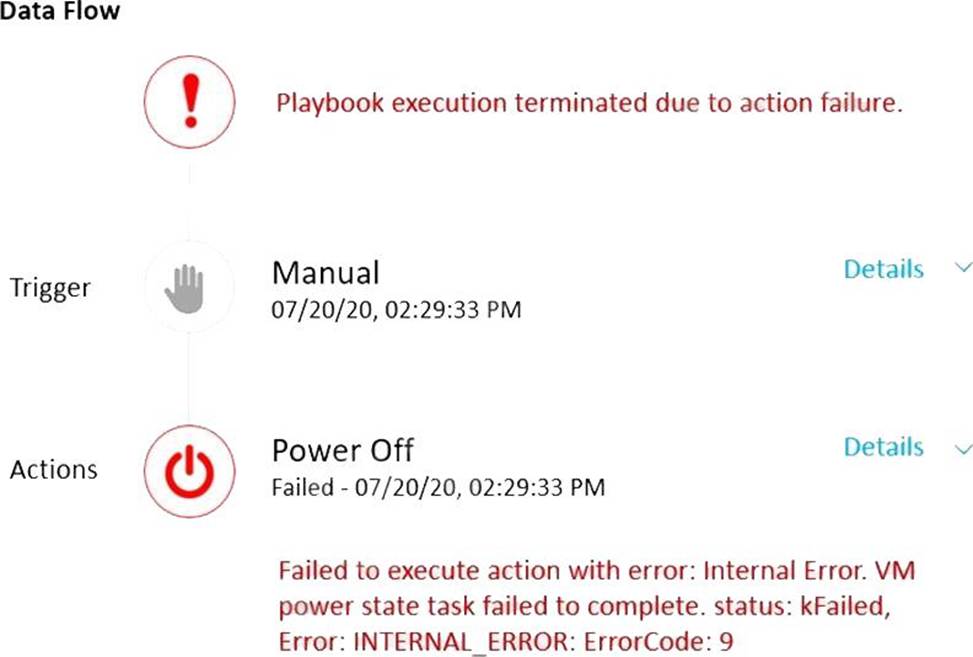
A subset of Linux VMs are required to be gracefully shutdown each evening. A Playbook is created to shutdown the targeted VMs, however the error message shown in the exhibit is displayed when the Playbook is executed.
What is causing the error message?
- A . User executing the Playbook does not have Admin privileges.
- B . The VM is already powered off.
- C . The VM is missing Nutanix Guest Tools.
- D . The SSH Service is not running on the VMs.
D
Explanation:
According to the Nutanix Multicloud Automation Administration (NMCAA) course1, one of the prerequisites for using X-Play to automate tasks on VMs is to have SSH enabled and configured on the target VMs. This allows X-Play to connect to the VMs and execute commands or scripts remotely. If the SSH service is not running on the VMs, then X-Play will fail to connect and perform the actions, resulting in the error message shown in the exhibit. The other options are not likely to cause this error, as they are either unrelated to X-Play (A and B) or not required for X-Play to work ©.
Reference: Nutanix Multicloud Automation Administration (NMCAA) course
When a developer launches the created Blueprint within the Blueprint Editor, the application gets deployed correctly. However, when the Blueprint is launched via Marketplace, it gets a check login error.
What is causing this issue?
- A . Prism Central can’t communicate with Active Directory.
- B . The SSH key within the user’s laptop is not valid.
- C . User is not authorized to launch Blueprints.
- D . The credential in the Project Environment is invalid.
D
Explanation:
When a Blueprint is launched via Marketplace, it uses the credential that is configured in the Project Environment. If the credential is invalid, the Blueprint deployment will fail with a check login error. To fix this issue, the developer needs to verify and update the credential in the Project Environment and ensure that it has the required permissions to access the target infrastructure and applications.
Reference: Nutanix Multicloud Automation Administration (NMCAA), page 29-30; [Nutanix Certified Professional – Multicloud Automation (NCP-MCA) Exam Blueprint Guide] (https://www.nutanix.com/content/dam/nutanix/resources/support/ncp-mca-ebg.pdf), section 3.1.
Reference: https://portal.nutanix.com/page/documents/details?targetId=Nutanix-Calm-Admin-Operations-Guide-v3_2_7:nuc-nucalm-blueprint-management-c.html
A developer has been asked to update the existing blueprint with an additional option of scaling it both out and in.
Where in the Blueprint Editor should the developer make the relevant changes?
- A . Environment, Actions
- B . Configuration, Settings
- C . Blueprint, Configuration
- D . Application Profile, Actions
D
Explanation:
To enable scaling for a blueprint, the developer needs to add scaling actions to the application profile. Scaling actions are scripts that define how to scale out (add more instances) or scale in (remove instances) of an application tier. The developer can also specify the minimum and maximum number of instances allowed for each tier, and the scaling policy (manual or automatic) based on metrics or schedules. The developer can access the application profile from the Blueprint Editor by clicking on the application name and then selecting the Actions tab.
Reference: Nutanix Multicloud Automation Administration (NMCAA) course, Nutanix Certified Professional – Multicloud Automation (NCP-MCA) 6.5 Exam Guide, [Nutanix Calm User Guide]
Reference: https://portal.nutanix.com/page/documents/details?targetId=Nutanix-Calm-Admin-Operations-Guide-v3_2_2:nuc-nucalm-blueprint-overview-c.html
What are the two Calm SaaS API Key components? (Choose two.)
- A . SaaS Token
- B . Token
- C . JSON file
- D . Name
BD
Explanation:
The Calm SaaS API key consists of two components: name and token. The name component is analogous to the ID or username you provide when you configure your Calm tunnel client VM to establish the tunnel connection. The token component is analogous to the password portion of the HTTP basic authentication. The Calm SaaS API key is used along with the Calm APIs and Calm DSL to access Calm. The API key file that you download will have the name and token components in the JSON format.
Reference: Nutanix Support & Insights
A director would like to have an up to date Cluster Efficiency Summary report emailed on the first of every month to keep management up to date on how the cluster is being utilized.
How could a playbook be configured to satisfy this request with the least human interaction?
- A . Manual Trigger > Wait Until Day of Month > Generate Report > Email
- B . Manual Trigger > Generate Report > Email
- C . Report Trigger > Wait Until Day of Month > Email
- D . Time Trigger > Generate Report > Email
D
Explanation:
A time trigger is a type of playbook trigger that allows the user to specify a schedule for running a playbook. This trigger is useful for automating tasks that need to be performed periodically or at a specific time. A manual trigger requires the user to initiate the playbook execution manually, which is not ideal for a recurring task. A report trigger is a type of playbook trigger that allows the user to run a playbook when a specific report is generated. However, this trigger does not guarantee that the report will be generated on the first of every month, as it depends on the report settings. A wait until day of month action is a type of playbook action that pauses the playbook execution until a specified day of the month. This action is unnecessary if the playbook already has a time trigger that specifies the desired schedule.
Reference: Nutanix Multicloud Automation Administration (NMCAA) course, Module 4: Playbooks, Lesson 4.1:
Playbook Triggers
Nutanix Certified Professional – Multicloud Automation (NCP-MCA) 6.5 Exam Blueprint Guide, Section 3.1: Create a playbook to automate IT operations using X-Play
Reference: https://portal.nutanix.com/page/documents/kbs/details?targetId=kA00e000000LU6BCAW
An administrator needs to create a Playbook to be notified when VMs are deleted.
Which X-Play Trigger would satisfy this task?
- A . Alert
- B . Audit
- C . Event
- D . Time
C
Explanation:
An X-Play Trigger is a condition that initiates a Playbook. There are four types of X-Play Triggers: Alert, Audit, Event, and Time1. An Alert Trigger is based on a Prism alert, such as a VM power state change or a disk failure. An Audit Trigger is based on a Prism audit entry, such as a user login or a cluster operation. An Event Trigger is based on a Prism event, such as a VM creation or deletion. A Time Trigger is based on a schedule, such as daily, weekly, or monthly2. In this scenario, the administrator needs to create a Playbook to be notified when VMs are deleted. Therefore, the appropriate X-Play Trigger would be an Event Trigger, since VM deletion is a Prism event.
Reference: 1: Nutanix Certified Professional – Multicloud Automation (NCP-MCA) Exam
Blueprint Guide, page 42: Getting Started with Nutanix X-Play C Nutanix.dev
A new Blueprint has been created for the Marketing Department and published to the Marketplace but is not visible to the Marketing Project Developers/Consumers.
What needs to be done to allow the Marketing Project to consume to the Marketplace Blueprint?
- A . The Blueprint needs to have the Published Category applied in the Marketplace Item.
- B . The Blueprint needs to have e higher version number than previous Blueprints.
- C . The Blueprint needs to be Approved and Published with the Marketing Project.
- D . The Blueprint needs to have the Marketing Category assigned in the Marketplace Item.
C
Explanation:
To make a Blueprint visible to a specific Project, it needs to be approved and published with that Project. This ensures that only authorized Blueprints are available for consumption by the Project members. Applying a Category or a version number to the Blueprint does not affect its visibility to the Project.
Reference: Nutanix Certified Professional – Multicloud Automation (NCP-MCA) Exam Blueprint Guide, page 14, section 3.1.2