
Nutanix NCP-MCA Practice Exams
Last updated on Nov 21,2026- Exam Code: NCP-MCA
- Exam Name: Nutanix Certified Professional - Multicloud Automation (NCP-MCA) 6 Exam
- Certification Provider: Nutanix
- Latest update: Nov 21,2026
Which action should an administrator use to request a static IP address from an IPAM solution?
- A . Profile
- B . Pre-create
- C . Guest Customization
- D . Create
B
Explanation:
When integrating with an IP Address Management (IPAM) solution within Nutanix Calm, an administrator would use a ‘Pre-create’ task to request a static IP address. This task is performed before the actual creation of the VM, ensuring that the IP address is allocated and can be assigned during the VM’s creation process. Profiles (A) are used to define deployment environments, Guest Customization (C) is used for configuring the OS settings, and Create (D) is typically the task for provisioning the actual VM, not for requesting an IP.
An administrator wants to be alerted when production VMs become idle. The VMs will be determined to be idle when CPU usage is lower than 5% for more than 5 minutes. All affected VMs are categorized as Environment: Production, since they have Flow microsegmentation rules.
What should the administrator do to satisfy this requirement?
- A . Create an alert for all VMs, create a Playbook with this alert as the trigger and send an email as the action.
- B . Create an alert for VMs in the correct category, create a Playbook with this alert as the trigger > take a snapshot > send an email as the action.
- C . Create an alert for all VMs, create a Playbook with this alert as the trigger > reduce 1 CPU > send an email as the action.
- D . Create an alert for VMs in the correct category, create a Playbook with this alert as the trigger and send an email as the action.
D
Explanation:
To create an alert for idle VMs, the administrator needs to specify the following parameters: Scope: Select the category value Environment: Production to filter the VMs that are affected by the alert.
Metric: Select CPU Usage (%) as the metric to monitor the VMs’ CPU utilization.
Condition: Select Less Than as the operator and enter 5 as the threshold value to define the idle state.
Duration: Enter 5 as the duration value and select Minutes as the unit to set the time period for the idle state.
To create a Playbook with the alert as the trigger, the administrator needs to do the following steps:
Name: Enter a descriptive name for the Playbook, such as Idle VM Alert.
Trigger: Select Alert as the trigger type and choose the alert that was created for idle VMs.
Action: Select Email as the action type and enter the recipient email address, subject, and message for the notification.
The Playbook will run whenever the alert is triggered and send an email to the administrator
informing them about the idle VMs.
Reference: Nutanix Certified Professional Multicloud Automation (NCP-MCA) 6 Exam, page 9 Nutanix University – NCP-MCA 6 Exam Prep – Alerts and Playbooks
Within a Calm blueprint, which two actions can an administrator apply to a Service under the Guest Customization section? (Choose two.)
- A . Apply a Cloudinit Script
- B . Apply a Sysprep file
- C . Modify the base OS image
- D . Choose UEFI or Legacy BIOS
A, B
Explanation:
Within a Calm blueprint, an administrator can apply two actions to a Service under the Guest Customization section: Apply a Cloudinit Script and Apply a Sysprep file. These actions allow the administrator to customize the configuration and behavior of the virtual machines that are provisioned from the blueprint. A Cloudinit Script is a set of commands or scripts that run on Linux-based virtual machines during the boot process. A Sysprep file is a configuration file that specifies the Windows settings and options for the virtual machines. These actions can be used to perform tasks such as setting the hostname, network configuration, user accounts, software installation, and more.
Reference: Nutanix Certified Professional – Multicloud Automation (NCP-MCA) v6.5, Section 2 – Deploy and Configure Nutanix Calm and Related Components, page 3
Nutanix Multicloud Automation Administration (NMCAA), Module 2 – Nutanix Calm, Lesson 2.2 – Blueprint Management, page 9
Nutanix Calm User Guide, Blueprint, Guest Customization
Reference: https://portal.nutanix.com/page/documents/details?targetId=Nutanix-Calm-Admin-Operations-Guide-v3_2_7:nuc-nucalm-blueprints-intro-c.html
A blueprint service needs to use scaling.
The requirements are:
Windows 2019 VM (12 vCPU, 24 GB memory, 500 GB volume)
Minimum VMs needed at any time and at time of deployment is 2 VMs
VMs should not exceed the project quota of 100 vCPUs or 300 GB of memory
There are no other services in use within the project
Which scaling VM replica settings meet all requirements?
- A . MIN: 2, MAX: 11, Default: 2
- B . MIN: 2, MAX: 7, Default: 2
- C . MIN: 2, MAX: 10, Default: 1
- D . MIN: 2, MAX: 8, Default: 1
B
Explanation:
Scaling VM replica settings allow you to specify the minimum, maximum, and default number of VMs that can be created from a blueprint service. The minimum and default values must be equal to or greater than the number of VMs needed at any time and at time of deployment, which is 2 in this case. The maximum value must be equal to or less than the project quota divided by the VM resources, which is 100/12 = 8 for vCPUs and 300/24 = 12 for memory. The lowest of these two values is the limit for the maximum value, which is 8. Therefore, the only option that meets all the requirements is B. MIN: 2, MAX: 7, Default: 2.
Reference: Nutanix Certified Professional – Multicloud Automation (NCP-MCA) Exam Blueprint Guide, page 10, Objective 3.1: Given a scenario, create a blueprint to deploy infrastructure and applications using Self-Service
Nutanix Multicloud Automation Administration (NMCAA), Module 5: Self-Service, Lesson 5.2:
Blueprint Design, slide 23: Scaling VM Replica Settings
Nutanix Certified Professional Multicloud Automation (NCP-MCA) 6 Exam, page 10, Objective 3.1:
Given a scenario, create a blueprint to deploy infrastructure and applications using Self-Service
Refer to the exhibit.
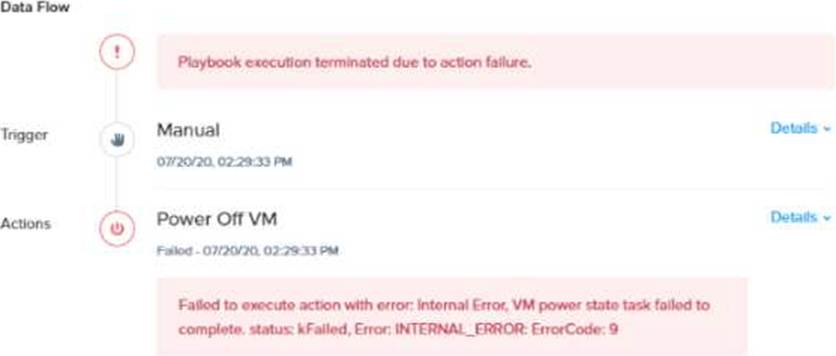
A subset of Linux VMS is required to be gracefully shutdown each evening. A Playbook is created to shut down the targeted VMs, however, the error message shown in the error message when the Playbook is executed.
Data flow
Playbook execution terminated due to action failure.
Trigger
Manual
Action
Power of vm
Error message Failed to with Internal Error. VM power state task failed to complete. status: Error:
INTERNAL_ERROR: Errorcode: 9
What is causing the error message?
- A . The VM is missing Nutanix Guest Tool.
- B . executing the not have privileges.
- C . The VM is Off.
- D . The SSH Service is not running on the VMs.
D
Explanation:
The error message “INTERNAL_ERROR: ErrorCode: 9” typically indicates an issue with the SSH service on the VMs. In this context, where a playbook is being executed to shut down Linux VMs, it’s essential that the SSH service is running to allow for remote management and execution of commands. If the SSH service isn’t running, the playbook won’t be able to execute commands on the VMs, leading to an internal error.
Reference: Nutanix Multicloud Automation Administration (NMCAA) Course, Module 3: X-Play, Lesson 3.3:
Creating and Managing Playbooks, Slide 19: Action Settings
Nutanix Certified Professional – Multicloud Automation (NCP-MCA) Exam Blueprint Guide, Section 3: Validate Blueprints, Playbooks, and Automation Settings, Objective 3.3: Determine the correct method to validate required Playbook configurations
A company has started a new project team and has asked an administrator to build the first blueprint for a new public cloud environment that was defined last week. This will be the first deployment to AWS.
The administrator has been given the following information:
VM Name: web01-@@{unique}@@
IP Address: Provider-assigned
OS version: Windows Server 2016
Deployment location: AWS
Region: us-west-1
Project: Default
What should the administrator do first when building the first blueprint?
- A . Create a new blueprint
- B . Create a new provider
- C . Create a new project
- D . Create a new service
B
Explanation:
A provider is a configuration that allows Nutanix Calm to interact with a public cloud platform, such as AWS, Azure, or GCP. A provider contains the credentials, settings, and policies required to deploy and manage VMs on the public cloud. Before creating a blueprint for a new public cloud environment, the administrator should create a new provider for AWS and specify the region, access key, secret key, and other parameters. This will enable the administrator to select the AWS provider as the deployment location for the blueprint and configure the VM attributes accordingly.
Reference: Nutanix Multicloud Automation Administration (NMCAA), page 15; Nutanix Certified Professional – Multicloud Automation (NCP-MCA), section 2.
Which two statements are true regarding the Nutanix public Github repository? (Choose two.)
- A . Nutanix provides a documented process to seed Github based scripts into the Calm Task Library.
- B . Calm’s public repository contains Nutanix-vetted custom scripts created and published by community members.
- C . Nutanix publishes official vetted blueprints and tasks to Nutanix’s public Github Calm repository.
- D . Nutanix provides documented processes to seed scripts from any source repository.
A, C
Explanation:
Nutanix provides a documented process to seed Github based scripts into the Calm Task Library, which allows users to import and use custom tasks from the Nutanix public Github repository or any other Github repository. This process is described in the Nutanix Calm DSL User Guide and the Nutanix Calm DSL Tutorial.
Nutanix also publishes official vetted blueprints and tasks to Nutanix’s public Github Calm repository, which is located at https://github.com/nutanix/blueprints. These blueprints and tasks are created and maintained by Nutanix engineers and can be used as reference or templates for building Calm applications.
Some examples of these blueprints and tasks are:
Kubernetes Cluster: A blueprint that deploys a Kubernetes cluster on Nutanix AHV using Calm. MySQL HA: A blueprint that deploys a MySQL cluster with high availability on Nutanix AHV using Calm.
Windows Server: A blueprint that deploys a Windows Server 2019 VM on Nutanix AHV using Calm.
[Install Python]: A task that installs Python on a Linux VM using Calm.
Calm’s public repository does not contain Nutanix-vetted custom scripts created and published by community members. These scripts are hosted in a separate repository called [Automation], which is a centralized repo for community driven Nutanix automation. These scripts are not officially supported or endorsed by Nutanix and may not be compatible with the latest versions of Calm or Nutanix products.
Nutanix does not provide documented processes to seed scripts from any source repository. Users can only import scripts from Github repositories using the Calm Task Library.
Other source repositories are not supported by Calm.
Reference: Nutanix Calm DSL User Guide
Nutanix Calm DSL Tutorial
Nutanix Calm Blueprints
Kubernetes Cluster
MySQL HA
Windows Server
[Install Python]
[Automation]
What two pieces of information can an administrator obtain from Plays? (Choose two.)
- A . Host where the action runs
- B . Start time and end time of each action
- C . Execution result status
- D . CVM IP where the alert was triggered
A, C
Explanation:
Plays are event-driven automation workflows that can be triggered by alerts, schedules, or manual actions. They consist of one or more actions that run on specified hosts or clusters. An administrator can obtain the following information from Plays:
Host where the action runs: Each action in a Play can be configured to run on a specific host or cluster, or on the host or cluster where the alert was triggered. The administrator can view the host or cluster name for each action in the Play details page.
Execution result status: Each action in a Play has an execution result status that indicates whether the action was successful, failed, skipped, or cancelled. The administrator can view the status for each action in the Play details page, as well as the overall status of the Play. The other options are incorrect because:
Start time and end time of each action: Plays do not show the start time and end time of each action, only the duration of the action. The administrator can view the duration for each action in the Play details page, as well as the overall duration of the Play.
CVM IP where the alert was triggered: Plays do not show the CVM IP where the alert was triggered, only the host or cluster name where the alert was triggered. The administrator can view the host or cluster name for the alert in the Play details page.
Reference: Nutanix Certified Professional – Multicloud Automation (NCP-MCA) Exam Blueprint Guide, Section 1.2
Nutanix Multicloud Automation Administration (NMCAA) Course, Module 4: X-Play
Training Spotlight: Nutanix Multicloud Automation Administration (NMCAA), Video 4: X-Play
Reference: https://portal.nutanix.com/page/documents/solutions/details?targetId=Nutanix_Hybrid_Cloud_Reference_Architecture:top-incorporating-optional-nutanix-products-and-services.html
A DevOps team created a Calm blueprint that includes the scale-out of the application layer (made with Linux VMs). Now the DevOps team would like to automate the scale-out using a third-party tool so they can further automate the CI/CD environment with a single command.
Which action should the administrator take to accomplish this task?
- A . Contact professional services to modify the third-party tool to add the Calm integration.
- B . Create a Playbook with a webhook as a trigger and a REST API call as an action
- C . Create script to run the Calm scale out action.
- D . Configure an alert to notify the administrator.
B
Explanation:
The best way to automate the scale-out of the application layer using a third-party tool is to create a Playbook with a webhook as a trigger and a REST API call as an action. A webhook is a mechanism that allows a third-party service to send a notification to a Calm server when a certain event occurs, such as a code commit or a build completion. A REST API call is a way to interact with the Calm server programmatically, such as launching a blueprint or scaling out a service. By creating a Playbook that combines these two elements, the administrator can enable the third-party tool to trigger the scale-out action on the Calm server with a single command. The other options are either not feasible, not efficient, or not relevant for this task.
Reference: Nutanix Calm: Playbooks – Read the Docs and Nutanix Calm: REST API – Read the Docs.
A developer updated a blueprint to ensure that the IP address of the VM is reserved in IPAM as part of the deployment process. The developer noticed that when new VMs are created, they still get a DHCP IP address and not a reserved IP address.
What is the most likely reason for this behavior?
- A . Developer created a pre-create task for reserving the IP address
- B . Developer created a post-create task for reserving the IP address
- C . Developer forgot to save the updated blueprint
- D . Developer forgot to publish the updated blueprint
B
Explanation:
The most likely reason for this behavior is that the developer created a post-create task for reserving the IP address. A post-create task is executed after the VM is created and powered on, which means that the VM already obtained a DHCP IP address before the task is run. To reserve the IP address in IPAM as part of the deployment process, the developer should create a pre-create task instead. A pre-create task is executed before the VM is created and powered on, which allows the task to reserve the IP address in IPAM and assign it to the VM.
Reference: Nutanix Certified Professional – Multicloud Automation (NCP-MCA) Exam Blueprint Guide, page 15; Nutanix NCP-MCA Questions, question 57.