
Nutanix NCP-MCA Practice Exams
Last updated on Nov 21,2026- Exam Code: NCP-MCA
- Exam Name: Nutanix Certified Professional - Multicloud Automation (NCP-MCA) 6 Exam
- Certification Provider: Nutanix
- Latest update: Nov 21,2026
An administrator has been asked to review and clean up all existing categories within the Nutanix environment.
What information should the administrator filter on to organize the findings and eliminate unused categories?
- A . Policies, Triggers, Categories, and Entities
- B . Blueprint, Triggers, Categories, and Polices
- C . Blueprint, Policies, Value, and Entities
- D . Name, Value, Entities, and Policies
D
Explanation:
According to the Nutanix Prism Central Guide1, categories are key-value pairs that can be assigned to entities such as VMs, images, blueprints, etc. Categories can be used to filter, group, and manage entities based on their attributes. To review and clean up all existing categories within the Nutanix environment, the administrator should filter on the name, value, entities, and policies of the categories. The name and value of the categories identify the category type and the category value respectively. The entities show how many and which entities are assigned to the category. The policies show how many and which policies are associated with the category. By filtering on these information, the administrator can organize the findings and eliminate unused categories.
Reference: 1 Nutanix Prism Central Guide: Categories2
Refer to the exhibit.
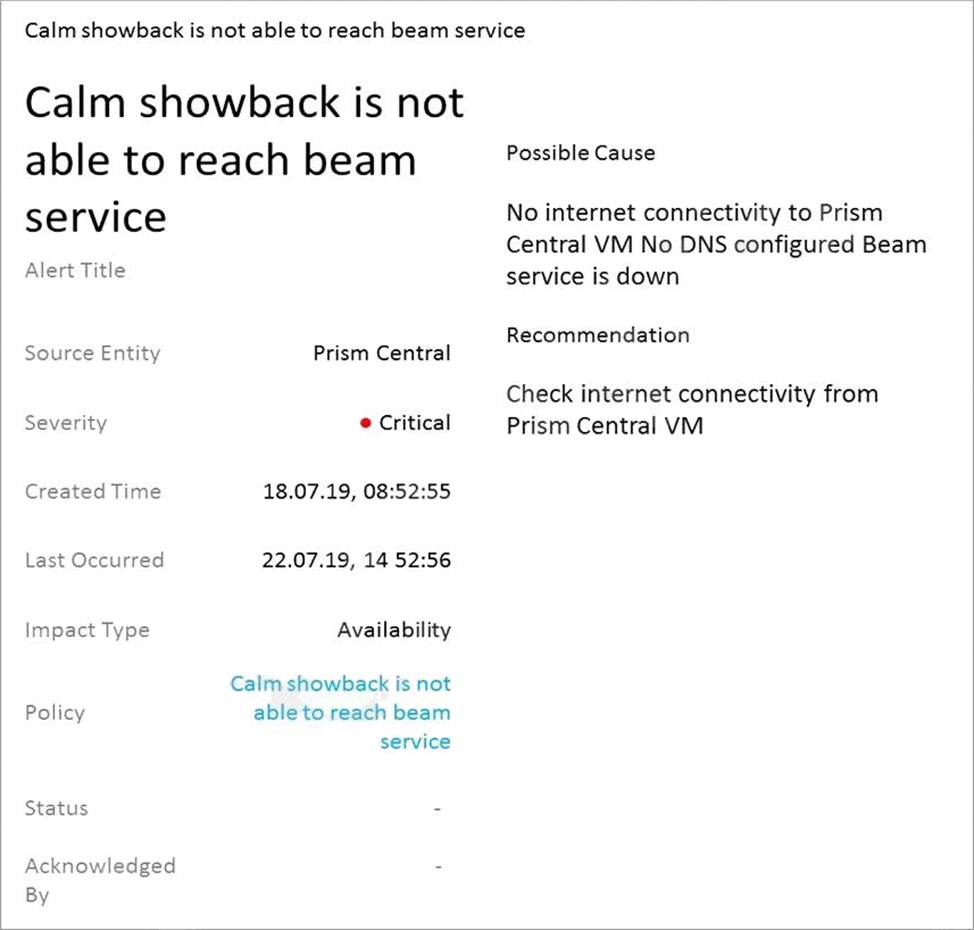
A customer has decided to enable Calm Showback feature but started to receive an alert in Prism Central stating that Calm showback is not able to reach beam service.
Which two configuration items should the administrator check to ensure Calm can communicate with Beam? (Choose two.)
- A . DNS configuration in Prism Central
- B . Ensure Pulse is enabled
- C . Prism Element is configured with Proxy settings
- D . Flow is enabled in the same Prism Central
A, C
Explanation:
The alert in Prism Central indicates that Calm showback is not able to reach the beam service. This could be due to network connectivity issues or incorrect configurations. The administrator should check the DNS configuration in Prism Central (Option A) to ensure that it is correctly configured to allow communication with the Beam service. Additionally, checking if Prism Element is configured with Proxy settings (Option C) is essential as it can also affect the communication between Calm and
Beam. Pulse (Option B) and Flow (Option D) are not related to the Calm showback feature and do not
impact its functionality.
Reference: Nutanix Certified Professional – Multicloud Automation (NCP-MCA) v6.5, Section 2 – Deploy and Configure Nutanix Calm and Related Components, Objective 2.4 – Identify required configuration settings for a Nutanix Calm deployment
Enabling and Disabling Showback in Calm | Nutanix Community
A company’s NOC personnel have a custom Python script they run manually by logging into each VM to fix a common issue across all of the corporate VMs. Management has no audit history of who is running the script or when it is occurring. The company has recently implemented Calm and management has asked its administrators to accomplish these tasks: Reduce the manual effort for the NOC personnel.
Ensure the process is repeatable across all applications.
Provide audit history for management of the actions.
Which two actions should the administrators take to accomplish these tasks? (Choose two.)
- A . Create a new Action, Add an Execute task with a script type of EScript, paste the custom script into the action
- B . View the Execution History tab under the Runbook page for audit purposes
- C . Create a new Runbook Add an Execute task with a script type of EScript paste the custom script into the action
- D . View the Audit tab under the Application view for audit purposes
A, C
Explanation:
To reduce the manual effort for the NOC personnel, the administrators can create a new Action that contains the custom Python script as an Execute task with a script type of EScript. This will allow the NOC personnel to run the script on any VM from the Calm UI or API without logging into each VM. To ensure the process is repeatable across all applications, the administrators can create a new Runbook that contains the same Action and assign it to the relevant Projects. This will enable the NOC personnel to run the script on multiple VMs across different applications in a single workflow. To provide audit history for management of the actions, the administrators can view the Execution History tab under the Runbook page for audit purposes. This will show the details of each Runbook execution, such as the status, duration, user, and logs. Alternatively, the administrators can also view the Audit tab under the Application view for audit purposes. This will show the history of all actions performed on the application, such as launch, update, delete, and run actions.
Reference: Nutanix Certified Professional – Multicloud Automation (NCP-MCA) Exam Blueprint Guide, page 18, section 4.2.1.
Which Calm feature provides the ability for administrators to approve Single or Multi-VM Blueprints for assignment to Projects?
- A . Application Manager
- B . Marketplace
- C . Projects
- D . Marketplace Manager
D
Explanation:
The alert in Prism Central indicates that Calm showback is not able to reach the beam service. This could be due to network connectivity issues or incorrect configurations. The administrator should check the DNS configuration in Prism Central (Option A) to ensure that it is correctly configured to allow communication with the Beam service. Additionally, checking if Prism Element is configured with Proxy settings (Option C) is essential as it can also affect the communication between Calm and Beam. Pulse (Option B) and Flow (Option D) are not related to the Calm showback feature and do not impact its functionality.
Reference: Nutanix Certified Professional – Multicloud Automation (NCP-MCA) v6.5, Section 2 – Deploy and Configure Nutanix Calm and Related Components, Objective 2.4 – Identify required configuration settings for a Nutanix Calm deployment
Enabling and Disabling Showback in Calm | Nutanix Community
Reference: https://portal.nutanix.com/page/documents/details?targetId=Nutanix-Calm-Admin-Operations-Guide-v3_2_7:nuc-nucalm-major-components-c.html
What are two valid trigger types available for executing Playbooks? (Choose two.)
- A . Manual
- B . Alert
- C . Report
- D . Audit
A, B
Explanation:
Playbooks are a collection of tasks that can be executed on demand or based on a trigger. There are two types of triggers available for executing Playbooks: manual and alert. A manual trigger allows you to run a Playbook on demand from the Prism Central UI or the Calm API. An alert trigger allows you to run a Playbook automatically when a specific alert is generated by Prism Central or a third-party system. Report and audit are not valid trigger types for Playbooks.
Reference: Nutanix Multicloud Automation Administration (NMCAA), page 9; Nutanix Certified Professional – Multicloud Automation (NCP-MCA), section 1.
Reference: https://portal.nutanix.com/page/documents/details?targetId=Prism-Central-Guide-Prism-v6_0:mul-playbook-creation-using-triggers-pc-c.html
Why is an administrator unable to update the running configuration for a mufti-VM application in AWS using the Manage tab for the application in Calm?
- A . It is supported only on a Nutanix platform.
- B . A required Category is not assigned.
- C . The AWS account used is invalid.
- D . The provider information is missing.
D
Explanation:
To update the running configuration for a multi-VM application in AWS using the Manage tab for the application in Calm, the administrator needs to provide the provider information for the AWS account. This includes the access key, secret key, region, and VPC ID. If the provider information is missing, the administrator will not be able to perform any actions on the application from Calm.
Reference: Nutanix Certified Professional – Multicloud Automation (NCP-MCA) Exam Blueprint Guide, page 16, section 4.1.1.
An administrator wants to execute a post-create task that will trigger an API call to create a front end application.
Which task type should the administrator use?
- A . HTTP
- B . Predefined
- C . eScript
- D . Simple
A
Explanation:
A post-create task is a task that runs after a blueprint or runbook deployment is completed. A post-create task can be used to perform additional configuration or automation on the deployed resources. An HTTP task is a task that executes an HTTP request to a specified URL, with optional headers, body, and authentication. An HTTP task can be used to trigger an API call to another system or service, such as creating a front end application. A predefined task is a task that uses a predefined script or command to perform a common operation, such as installing a package or running a service.
A predefined task cannot be used to trigger an API call to another system or service. An eScript task is a task that executes a custom script written in JavaScript or Python. An eScript task can be used to perform complex logic or operations that are not available in predefined tasks. However, an eScript task requires more coding skills and testing than an HTTP task. A simple task is a task that executes a simple command or script on the target VM or host. A simple task cannot be used to trigger an API call to another system or service.
Reference:
https://www.nutanix.com/content/dam/nutanix/resources/support/ebg-ncp-mca-6.pdf
https://www.nutanix.com/support-services/training-certification/certifications/certification-details-nutanix-certified-professional-multicloud-automation-v6-5
Refer to the exhibit.
A company has the following departments:
HR
Accounting
Support
Sales
e-commerce
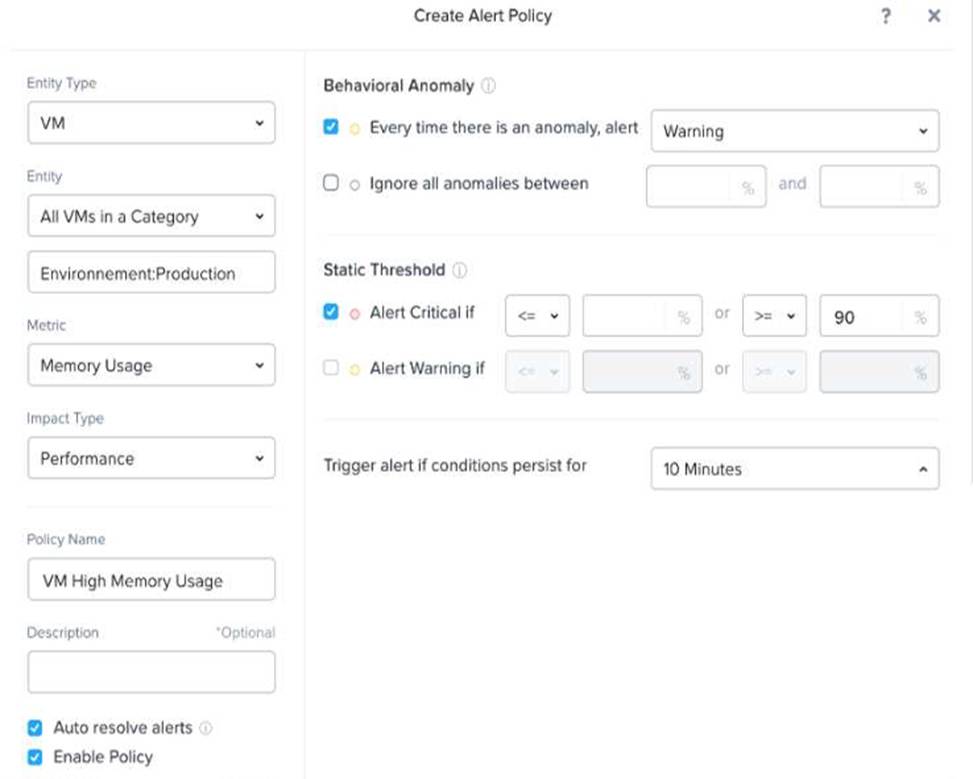
An administrator has created a Playbook that will add memory to the affected VMS when the configured alert is triggered.
Which VMS will get more memory?
- A . Production VMS from Support and eCommerce
- B . Production VMS from the eCommerce department
- C . All the VMS categorized as Production.
- D . All the VMS from Sales
A
Explanation:
Which products or features are dependencies of Calm? (Choose two.)
- A . Prism Central
- B . Data Service IP
- C . Prism Element
- D . Block Storage IP
AC
Explanation:
Nutanix Calm is a feature of Prism Central that enables you to automate the deployment and management of infrastructure and applications across multiple clouds. Prism Central is a centralized management plane that provides unified visibility and control over Nutanix clusters and services. Prism Element is the local management plane for each Nutanix cluster that runs the Acropolis Operating System (AOS). Both Prism Central and Prism Element are required for Nutanix Calm to function properly and access the resources and services of the Nutanix platform.
Reference: Nutanix Certified Professional – Multicloud Automation (NCP-MCA) v6.5, Section 2 – Deploy and Configure Nutanix Calm and Related Components, page 1
Nutanix Multicloud Automation Administration (NMCAA), Module 1 – Introduction to Nutanix Multicloud Automation, Lesson 1.1 – Nutanix Multicloud Automation Overview, page 4 Nutanix Calm User Guide, Introduction to Nutanix Calm, Nutanix Calm Architecture
Which Calm feature enables the ability to enforce project quotas for the ESXi hypervisor?
- A . Project Environments
- B . Project Quotas
- C . Runbooks
- D . Policy Engine
D
Explanation:
The Policy Engine is a Calm feature that allows you to define and enforce policies for your projects, such as quotas, approvals, and actions. You can use the Policy Engine to set project quotas for the ESXi hypervisor, such as the number of VMs, CPU cores, memory, and storage that can be provisioned by the project. This helps you to control the resource consumption and allocation of your ESXi clusters.
Reference: Nutanix Support & Insights: This is the official Nutanix documentation for Calm on ESXi, where you can find information about the Policy Engine and how to configure it for your projects.
Nutanix Exam NCP-MCA Topic 2 Question 28 Discussion: This is a forum where you can find discussions and explanations for Nutanix certification exam questions, including question 28 from topic 2, which is similar to your question.
Calm on ESXi Deployment: This is a Nutanix community post where you can learn more about how to deploy and use Calm on ESXi.
Reference: https://www.nutanix.com/content/dam/nutanix/resources/misc/private-cloud-reference-architecture-tech-note.pdf