
Nutanix NCP-MCA Practice Exams
Last updated on Nov 21,2026- Exam Code: NCP-MCA
- Exam Name: Nutanix Certified Professional - Multicloud Automation (NCP-MCA) 6 Exam
- Certification Provider: Nutanix
- Latest update: Nov 21,2026
An end user for an application that has been assigned the Consumer role within the project has noticed multiple issues with a blueprint that need to be addressed. The decision has been made to bring the end user onto the team to be able to modify the blueprints for this project.
Using the concept of least privilege, what role should the end user be assigned?
- A . Developer
- B . Project Admin
- C . Consumer
- D . Operator
A
Explanation:
The Developer role is the most appropriate role for the end user who needs to modify the blueprints for the project. The Developer role allows the user to create, edit, and delete blueprints and runbooks within the project, as well as launch and manage applications from the Marketplace. The Developer role does not have the privileges to create or manage projects, users, roles, or categories, which are reserved for the Project Admin role. The Consumer role only allows the user to launch and manage applications from the Marketplace, but not to modify the blueprints or runbooks. The Operator role allows the user to monitor and manage the infrastructure and applications within the project, but not to create or edit the blueprints or runbooks.
Reference: Nutanix Certified Professional – Multicloud Automation (NCP-MCA) v6.5, Section 1 – Describe and Differentiate Automation Concepts and Principles, Objective 1.5 – Identify the capabilities of Projects Nutanix Multicloud Automation Administration (NMCAA), Module 3 – Self-Service Projects, Lesson 3.1 – Project Roles and Permissions
Refer to the exhibit.
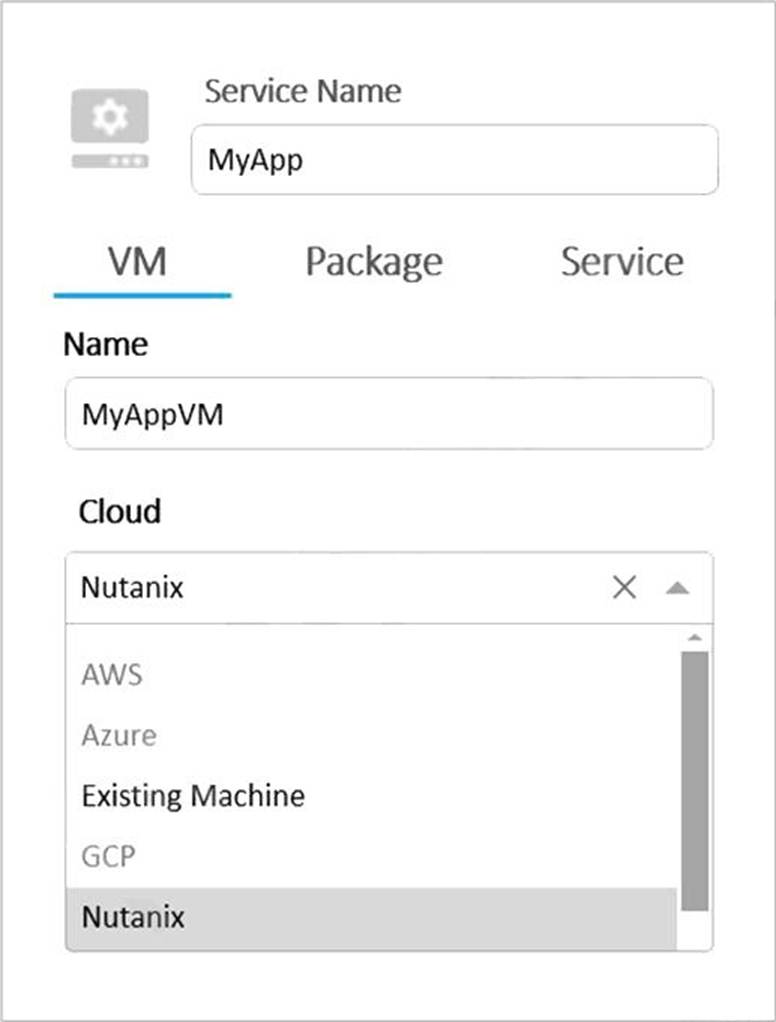
What needs to be done in order to enable the developer to complete this requested task? (Choose two.)
- A . Create AWS and Azure Providers
- B . Add the Providers to the Project
- C . Enable Environment for AWS and Azure
- D . Upgrade Calm to version 3.2.x
AB
Explanation:
In order to enable the developer to complete the requested task, AWS and Azure Providers need to be created (Option A). This is because, in the context of Nutanix Calm, providers are integrations with public and private cloud infrastructures. The developer is trying to deploy an application on AWS and Azure clouds but currently only has Nutanix as a configured provider. After creating the providers, they need to be added to the project (Option B) so that applications can be deployed on them. Option C is incorrect because environments are not required for multicloud deployments. Option D is also incorrect because Calm version 3.2.x is not relevant to the question.
Reference: The information can be verified from Nutanix official training and certification documents available at Nutanix Training & Certification. You can also check out the Nutanix Certified Professional
– Multicloud Automation (NCP-MCA) 6.5 Exam guide for more details on the exam objectives and format. Additionally, you can watch the Nutanix Calm – Multicloud Automation playlist on YouTube for some video tutorials on Nutanix Calm features and functionalities.
Reference: https://portal.nutanix.com/page/documents/details?targetId=Nutanix-Calm-Admin-Operations-Guide-v3_3_0:Projects%20and%20Environments
A new monitoring application is being rolled out across the Organization. An administrator has been tasked with automating the installation of the local agent on all Linux VMs.
The current environment has the following VMS deployed:
18 VMS created pre-Calm adoption.
32 VMS created post-Calm adoption.
Which action should the administrator take to automate this deployment for existing VMs?
- A . In Calm, create a Brownfield deployment attaching to both pre-Calm and post-Calm created VMS and add the Agent installation script to the Blueprint.
- B . In Calm, create an Endpoint that includes all Linux VMS and include the Endpoint a Runbook that executes a shell script for agent installation.
- C . Create a new golden image that includes the monitoring client and deploy all VMS again to bring them under Calm management.
B
Explanation:
The best option to automate the installation of the local agent on all Linux VMs is to create an Endpoint that includes all Linux VMs and include the Endpoint in a Runbook that executes a shell script for agent installation. This way, the administrator can leverage the Calm Runbook feature, which allows orchestrating tasks across multiple VMs without the need of a blueprint or an application. The administrator can also filter the VMs by name, tag, or other criteria to select the target VMs for the Endpoint. The shell script can be added as a task in the Runbook and run on the selected Endpoint.
Option A is not correct because a Brownfield deployment is used to create an application from existing VMs and an existing blueprint. It is not suitable for automating tasks across multiple VMs without a blueprint. Moreover, a Brownfield deployment cannot attach to post-Calm created VMs, as they are already managed by Calm.
Option C is not correct because creating a new golden image and deploying all VMs again is a very time-consuming and disruptive process. It also requires the administrator to migrate the data and configuration of the existing VMs to the new ones. This option does not leverage the Calm automation capabilities and is not recommended.
Reference: Nutanix Calm Runbooks & API Automation, Nutanix Support & Insights, Calm 3.0 is Here!, Nutanix Cloud Manager
A customer is trying to deploy an application with Calm and receives this error for a Linux VM:

What is the cause of this error within the blueprint?
- A . Connection section has a network adapter selected for the Address box in Connection section.
- B . Connection section has no network adapters selected for the Address box in Connection section.
- C . Connection Type has a protocol selected.
- D . Connection Type has no protocol selected.
B
Explanation:
In the context of deploying an application with Calm, if a customer receives an error for a Linux VM, it could be due to the absence of network adapters selected for the Address box in the Connection section within the blueprint. This means that there is no specified network connection for the VM, leading to a failure in script execution.
Reference: I found some references from Nutanix Multicloud Automation (NCP-MCA) Learning documents or resources that might be helpful for you:
Nutanix Certified Professional – Multicloud Automation (NCP-MCA) Exam Blueprint Guide: This is the official exam blueprint guide that covers the objectives, topics, and skills required for the certification. It also provides some sample questions and answers. The question you asked is similar to the one in section 3.1.1.
Nutanix Multicloud Automation Administration (NMCAA): This is a training course that teaches you the skills needed to install, configure, operate, and manage Nutanix X-Play and Nutanix Calm. It includes topics such as blueprint creation, connection configuration, and script execution.
Nutanix Calm User Guide: This is a user guide that explains how to use Nutanix Calm to automate the deployment and management of applications across different environments. It includes topics such as connection settings, blueprint validation, and error handling.
An administrator has a Linux VM that does batch processing out of a queue. Currently, a technician connects to the VM console and runs a command on the VM to initiate or terminate the batch processing application, as there is no programmatic interface for the application.
The application is processor intensive, so it should only run outside of business hours. The VM has the ability to send REST API calls to Prism.
How should the administrator configure a Playbook to satisfy the needs of this process with minimal external interaction?
- A . Manual Trigger > Power On > VM SSH > Wait for Some Time > Power Off VM
- B . Time Trigger > VM SSH > Wait for Some Time > VM SSH
- C . Webhook Trigger > REST API > Wait for Some Time > REST API
- D . Manual Trigger > VM SSH > Wait for Some Time > VM SSH
B
Explanation:
A Playbook is a collection of tasks that can be executed based on a trigger, such as a time, a webhook, or a manual action. A Playbook can be used to automate workflows across different systems and services, such as Nutanix Prism, VMs, hosts, and external APIs. A Playbook can also use variables, conditions, and loops to customize the execution logic and data.
In this scenario, the administrator wants to automate the batch processing application on the Linux VM, which can only be controlled by a command on the VM console. The application should run only outside of business hours, and the VM should send REST API calls to Prism to report its status.
The best way to configure a Playbook for this process is to use a Time Trigger, which allows the administrator to specify a schedule for the Playbook execution, such as daily, weekly, or monthly. The
Time Trigger can also be configured to run only on certain days or hours, such as weekdays or nights. This way, the administrator can ensure that the Playbook runs only outside of business hours, without requiring any manual intervention.
The Playbook should then have two VM SSH tasks, one to initiate the batch processing application, and one to terminate it. A VM SSH task is a task that executes a command or script on a target VM using SSH. A VM SSH task can be used to control applications or services that do not have a programmatic interface, such as the batch processing application in this scenario. The VM SSH task can also use variables to pass data to or from the command or script, such as the VM name, IP address, or output.
The Playbook should also have a Wait for Some Time task, which is a task that pauses the Playbook execution for a specified duration or until a condition is met. A Wait for Some Time task can be used to ensure that the batch processing application has enough time to complete its work, or to wait for a certain event or state to occur, such as a file creation, a service status, or a VM power state.
The Playbook should also have two REST API tasks, one before and one after the Wait for Some Time task. A REST API task is a task that executes an HTTP request to a specified URL, with optional headers, body, and authentication. A REST API task can be used to interact with external systems or services that expose an API, such as Nutanix Prism in this scenario. The REST API task can also use variables to pass data to or from the HTTP request, such as the VM name, IP address, or response. The REST API tasks should be configured to send the VM status to Prism, such as the start and end time of the batch processing, the CPU and memory usage, or the output of the application. This way, the administrator can monitor and manage the VM and the application from Prism, without having to connect to the VM console.
The Playbook configuration should look something like this:
Time Trigger: Set the schedule to run daily, only on weekdays, and only at night (e.g., 10 PM to 6 AM).
VM SSH: Set the target VM to the Linux VM, and set the command or script to initiate the batch processing application (e.g., ./batch.sh start).
REST API: Set the URL to the Prism API endpoint, and set the HTTP method, headers, body, and authentication as required. Use variables to pass the VM name, IP address, and start time of the batch processing to the HTTP request (e.g., {"vm_name": "{{vm_name}}", "vm_ip": "{{vm_ip}}", "start_time": "{{start_time}}"}).
Wait for Some Time: Set the duration to the expected time for the batch processing to finish, or set a condition to wait until a certain event or state occurs (e.g., wait until file /tmp/batch.done exists). REST API: Set the URL to the Prism API endpoint, and set the HTTP method, headers, body, and authentication as required. Use variables to pass the VM name, IP address, end time, and output of the batch processing to the HTTP request (e.g., {"vm_name": "{{vm_name}}", "vm_ip": "{{vm_ip}}", "end_time": "{{end_time}}", "output": "{{output}}"}).
VM SSH: Set the target VM to the Linux VM, and set the command or script to terminate the batch
processing application (e.g., ./batch.sh stop).
Reference:
https://www.nutanix.com/content/dam/nutanix/resources/datasheets/ds-ncp-mca-6-5.pdf
https://www.nutanix.com/content/dam/nutanix/resources/support/ds-ncp-mca.pdf
An administrator needs to simplify daily operations within Prism Central for multiple clusters.
Which entity can a category be assigned to?
- A . Cluster
- B . Hypervisor
- C . Protection Domain
- D . Storage Container
A
Explanation:
A category is a key-value pair that can be assigned to an entity in Prism Central to simplify daily operations and management. Categories can be used to filter, search, and group entities based on common attributes. Categories can also be used to define policies and permissions for different
entities. A category can be assigned to a cluster, a VM, an image, a network, a blueprint, an application, or a project. A category cannot be assigned to a hypervisor, a protection domain, or a storage container, as these are not entities in Prism Central.
Reference: Nutanix Certified Professional
– Multicloud Automation (NCP-MCA) Exam Blueprint Guide, page 12; Nutanix Prism Central Guide, section 4.1.
In which two locations can an administrator look to view a list of executed playbooks? (Choose two.)
- A . Executions
- B . Plays
- C . Lists
- D . Dashboard
AB
Explanation:
An administrator can look to view a list of executed playbooks in two locations: Executions and Plays. The Executions page shows the status and details of all the playbooks that have been executed across all the projects. The Plays page shows the status and details of all the playbooks that have been executed within a specific project. The Lists page shows the predefined and custom lists that can be used as inputs for playbooks. The Dashboard page shows the overview and statistics of the X-Play service.
Reference: Nutanix Certified Professional – Multicloud Automation (NCP-MCA) v6.5, Section 3 – Validate Blueprints, Runbooks, Playbooks, and Automation Settings, page 4
Nutanix Multicloud Automation Administration (NMCAA), Module 5 – X-Play, Lesson 5.3 – Playbook Management, page 2
Nutanix Calm User Guide, X-Play, Executions
An administrator wants to create two database VMS using replicas and needs to access the same mount_path for hosting the backup files during the deployment on both VMs.
What should the administrator do on the Blueprint to achieve this requirement?
- A . Set mount_path = u01/app/backup as a runtime variable
- B . Set mount_path = u01/app/backup as a runtime replica
- C . Set mount_path = u01/app/backup as a runtime task
- D . Set mount_path = u01/app/backup as a runtime service
A
Explanation:
Runtime variables are used to pass information between different components of a Blueprint, such as VMs, services, tasks, and replicas. They can be defined in the Blueprint YAML file or in the UI. By setting the mount_path as a runtime variable, the administrator can ensure that both database VMs use the same value for the mount_path during the deployment. This way, the backup files can be hosted on the same location for both VMs.
Reference: Nutanix Certified Professional – Multicloud Automation (NCP-MCA) 6.5 Exam, page 25, section 2.1.1:
“Runtime Variables”
[Nutanix University: NCP-MCA 6.5 Exam Prep – Runtime Variables], video 2: “Runtime Variables”
In order to give Consumers the ability to modify attributes, what should the Blueprint creator implement in the design?
- A . Custom actions
- B . eScript task with custom macros
- C . Runtime variables
- D . HTTP task with built-in macros
C
Explanation:
Runtime variables are variables that can be modified by the Consumer during the deployment of a Blueprint or after the deployment is complete. They allow the Consumer to customize the attributes of the infrastructure and applications according to their needs. Runtime variables can be defined in the Blueprint settings or in the Blueprint YAML file. They can also be used in the Blueprint tasks to pass dynamic values to the scripts or commands. Runtime variables can be of different types, such as text, number, boolean, list, or password. They can also have default values, constraints, and descriptions to guide the Consumer.
Reference: Nutanix Certified Professional – Multicloud Automation (NCP-MCA) Exam Blueprint Guide, Section 2, Objective 2.1
Nutanix Multicloud Automation Administration (NMCAA) Course, Module 4, Lesson 4.3 Nutanix Calm User Guide, Chapter 4, Section 4.2
Reference: https://portal.nutanix.com/page/documents/details?targetId=Nutanix-Calm-Admin-Operations-Guide-v3_2_7:nuc-nucalm-blueprint-management-c.html
What is the correct syntax for using a macro within a Calm blueprint?
- A . @@{calm.object}(@@
- B . %calm.object%
- C . {{calm.object}}
- D . $_calm.object_$
A
Explanation:
A macro is a placeholder for a value that is resolved at runtime. Macros can be used to reference various Calm objects, such as variables, secrets, credentials, tasks, and services. The correct syntax for using a macro within a Calm blueprint is @@{calm.object}(@@, where calm.object is the name of the object to be referenced. For example, @@{username}(@@ would resolve to the value of the username variable at runtime. The other options are incorrect syntaxes for macros and would not be resolved by Calm.
Reference: Nutanix Certified Professional – Multicloud Automation (NCP-MCA)
v6.5, Nutanix Certified Professional – Multicloud Automation (NCP-MCA) 6 Exam, Nutanix Certified Professional – Multicloud Automation
Reference: https://portal.nutanix.com/page/documents/details?targetId=Nutanix-Calm-Admin-Operations-Guide-v3_2_7:nuc-components-macros-overview-c.html