
Nutanix NCP-MCA Practice Exams
Last updated on Nov 21,2026- Exam Code: NCP-MCA
- Exam Name: Nutanix Certified Professional - Multicloud Automation (NCP-MCA) 6 Exam
- Certification Provider: Nutanix
- Latest update: Nov 21,2026
An administrator is trying to deploy a VM from an image onto a newly-built cluster, but the image is unavailable. The administrator is able to deploy the image onto other clusters with no issue. Image placement policies have already been created within Prism Central.
Why is the image unavailable for deployment on the cluster?
- A . The cluster does not have the proper category assigned for the placement policy,
- B . The image is corrupted.
- C . The image does not have the proper category assigned for the placement policy,
- D . The image has not been directly uploaded to the cluster
A C
Explanation:
The image is unavailable for deployment on the cluster because the cluster and the image do not have the proper categories assigned for the placement policy. A placement policy is a set of rules that determines which clusters and images are available for VM deployment based on the categories and values assigned to them. If the cluster and the image do not match the placement policy criteria, they will not be shown as options for VM deployment. Therefore, the administrator needs to assign the appropriate categories and values to the cluster and the image to make them compatible with the placement policy.
Reference: Nutanix Certified Professional – Multicloud Automation (NCP-MCA) Exam Blueprint Guide, page 12; Nutanix NCP-MCA Questions, question 111.
Which two providers are supported in Calm? (Choose two.)
- A . Oracle Cloud
- B . Kubernetes
- C . GCP
- D . IBM Cloud
B, C
Explanation:
Nutanix Calm supports various providers to manage and orchestrate applications across different cloud environments. Providers are the cloud platforms or services that host the VMs or containers that run the application components. Calm supports the following providers12: Nutanix AHV
VMware vSphere
AWS
Azure
GCP
Kubernetes
Bare Metal
OpenStack
Cloud-Init
Terraform
Among the options given, only Kubernetes and GCP are supported providers in Calm. Oracle Cloud and IBM Cloud are not supported providers in Calm.
Reference:
1: Nutanix Calm Admin and Operations Guide3
2: Nutanix Calm Configuration and Training4
Reference: https://portal.nutanix.com/page/documents/details?targetId=Nutanix-Calm-Admin-Operations-Guide-v3_2_7:nuc-nucalm-major-components-c.html
What is the minimum number of actions required in the Branch Condition for X-Play?
- A . 1
- B . 2
- C . 3
- D . 4
B
Explanation:
A Branch Condition is a type of action in X-Play that allows you to create conditional logic based on the output of a previous action or a custom expression. A Branch Condition can have multiple branches, each with a different condition and a different set of actions to execute if the condition is met. The minimum number of actions required in a Branch Condition is two: one for the condition itself, and one for the action to perform if the condition is true. If the condition is false, the Branch Condition will skip to the next action in the Playbook. You can add more branches to a Branch Condition, but you cannot have less than two.
Reference: Nutanix Calm: Playbooks – Read the Docs and Nutanix Calm: Branch Condition – Read the Docs.
A Consumer has been tasked with deleting a running Calm managed application.
How can the Consumer ensure all underlying VMS are deleted with the removal of the application?
- A . Go to the Manage tab of the application and select the Hard Delete action.
- B . From the Applications page, select the checkbox next to the application and select Delete from the action’s menu.
- C . From the Marketplace page, select the checkbox next to the application and select Delete from the actions menu.
- D . Go to the Manage tab of the application and select the Delete action.
A
Explanation:
The Consumer can ensure all underlying VMs are deleted with the removal of the application by going to the Manage tab of the application and selecting the Hard Delete action. This option will delete the application and all its associated resources from the Nutanix platform, without leaving any traces or backups. This option is useful when the application is no longer needed or has to be removed for compliance reasons.
From the Applications page, selecting the checkbox next to the application and selecting Delete from the action’s menu will not delete all underlying VMs. This option will only delete the application from the Calm UI, but not from the Nutanix platform. The application and its resources will still be available in the Nutanix cluster and can be restored from the Calm UI using the Restore action.
From the Marketplace page, selecting the checkbox next to the application and selecting Delete from the actions menu will not delete the application or its underlying VMs. This option will only delete the application from the Marketplace, but not from the Calm UI or the Nutanix platform. The application and its resources will still be available in the Calm UI and the Nutanix cluster.
Going to the Manage tab of the application and selecting the Delete action will also not delete all underlying VMs. This option will only delete the application from the Calm UI, but not from the Nutanix platform. The application and its resources will still be available in the Nutanix cluster and can be restored from the Calm UI using the Restore action.
Reference: Nutanix Calm User Guide: Chapter 6: Managing Applications
Nutanix Calm DSL User Guide: Chapter 4: Blueprints
Nutanix Certified Professional – Multicloud Automation (NCP-MCA) Exam Blueprint Guide: Section 2:
Deploy and Configure Self-service and Related Components
Which two groups of operations can a Prism Admin or Super Admin role perform? (Choose two.)
- A . Create, read, automate, or delete an action template in the action gallery
- B . Create, read, update, or delete an action template in the action gallery
- C . Create, read, automate, delete, enable, and run playbooks
- D . Create, read, update, delete, enable, and run playbooks
B, D
Explanation:
A Prism Admin or Super Admin role can perform the following operations related to X-Play and Nutanix Calm12:
Create, read, update, or delete an action template in the action gallery Create, read, update, delete, enable, and run playbooks
Create, read, update, delete, enable, and run blueprints and runbooks
Manage applications and projects
Configure endpoints and plug-ins
Access the library and categories Option A is incorrect because the action gallery does not support automation of action templates. Option C is incorrect because only a Prism Admin or Super Admin role can enable and run playbooks, not a Prism User role3.
Reference: Nutanix Certified Professional – Multicloud Automation (NCP-MCA) v6.5 Nutanix Multicloud Automation Administration (NMCAA)
Prism user permissions C what are the options?
Reference: https://portal.nutanix.com/page/documents/details?targetId=Nutanix-Security-Guide-v5_16:wc-user-management-using-pe-topichead.html
Which Prism Central setting must first be configured in order to add users to a Project?
- A . HTTP Proxy
- B . Authentication Directory
- C . Pulse
- D . Local User Role Mapping
B
Explanation:
In order to add users to a Project, the Prism Central administrator must first configure an Authentication Directory. This is a service that provides user authentication and authorization for Prism Central, such as Active Directory or OpenLDAP. By configuring an Authentication Directory, the administrator can enable users to log in to Prism Central using their existing credentials and assign them roles and permissions based on their group membership. The administrator can also create local user accounts for users who do not belong to any Authentication Directory.
Reference: Nutanix Certified Professional – Multicloud Automation (NCP-MCA) Exam Blueprint Guide, Section 2, Objective 2.5
Nutanix Multicloud Automation Administration (NMCAA) Course, Module 2, Lesson 2.2 Configuring Authentication | Nutanix Community
Reference: https://download.nutanix.com/documentation/v60/Prism-Central-Guide-Prism-v6_0.pdf
An administrator creates a blueprint to deploy VMs to multiple clouds, so that business will remain
functional in the event of a disaster.
What component describes this feature?
- A . Service
- B . Profile Actions
- C . Package
- D . Substrates
D
Explanation:
Substrates are the components of a blueprint that define the cloud resources and configurations for deploying VMs or applications. Substrates can be associated with different cloud accounts, such as AWS, Azure, GCP, or Nutanix, to enable multicloud deployments. By using substrates, an administrator can create a blueprint that can deploy VMs to multiple clouds, depending on the availability, cost, or performance requirements.
Reference: Nutanix Multicloud Automation Administration (NMCAA) course, Module 3: Blueprints, Lesson 3.2:
Substrates1
Nutanix Certified Professional – Multicloud Automation (NCP-MCA) Exam Blueprint Guide, Section 2.1: Create a blueprint to deploy infrastructure and applications using Nutanix Calm2
Which are valid entity types to be associated with a playbook using a manual trigger?
- A . VM, Host, Prism Central
- B . VM, Host, Cluster
- C . VM, Category, Prism Element
- D . VM, Category, Cluster
B
Explanation:
Reference: https://portal.nutanix.com/page/documents/details?targetId=Prism-Central-Guide-Prism-v6_0:mul-playbooks-create-manual-triggers-pc-t.html#suppression-rules-add-aws-sc-t
Which method will result in unique names per VM when scaling out a Service in a Calm Blueprint?
- A . Guest OS customization using sysprep contains <ComputerName>@@{name}@@</ComputerName>.
- B . Service VM Name field contains the macro variable @@{calm_array_index}@@.
- C . Call an external Python eScript that uses an IPAM API to register the VM name in DNS.
- D . Set the VM Name field to allow user edits at launch so the user can enter a custom value at launch.
B
Explanation:
The correct method to result in unique names per VM when scaling out a Service in a Calm Blueprint is to use the macro variable @@{calm_array_index}@@ in the Service VM Name field (Option B). This variable will append a unique index number to each VM name based on the scale-out count. For example, if the Service VM Name is MyAppVM-@@{calm_array_index}@@ and the scale-out count is 3, the resulting VM names will be MyAppVM-0, MyAppVM-1, and MyAppVM-2. Option A is incorrect because the <ComputerName> tag in the sysprep file will only affect the hostname of the guest OS, not the VM name in the cloud provider. Option C is incorrect because calling an external Python eScript to register the VM name in DNS will not change the VM name in the cloud provider either. Option D is incorrect because setting the VM Name field to allow user edits at launch will require manual input from the user for each VM, which is not scalable or automated.
Reference: The information can be verified from Nutanix official training and certification documents available at Nutanix Training & Certification. You can also check out the Nutanix Certified Professional – Multicloud Automation (NCP-MCA) 6.5 Exam guide for more details on the exam objectives and format. Additionally, you can watch the Nutanix Calm – Multicloud Automation playlist on YouTube for some video tutorials on Nutanix Calm features and functionalities.
Reference: https://portal.nutanix.com/page/documents/details?targetId=Nutanix-Calm-Admin-Operations-Guide-v3_2_7:nuc-multi-vm-blueprints.html
Refer to the exhibit.
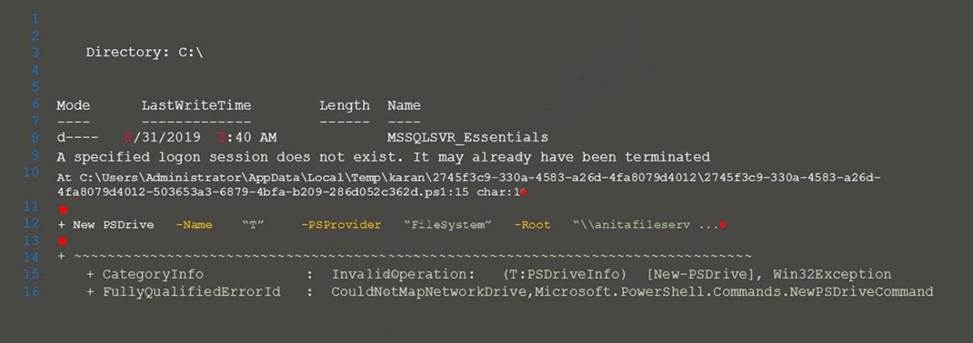
Calm encountered the error shown in the exhibit when importing a script that maps a network drive. Upon further investigation, the Calm administrator was unable to run the script manually on a VM and discovered that elevated permissions were needed.
Which command should the administrator add to the script?
- A . Enable-WSManCredSSP -Role Server -Force
- B . Enable-WSManCredSSP -Role Client
- C . Enable-WSManCredSSP -Role Server
- D . Disable-WSManCredSSP -Role Server -Force
B
Explanation:
The error message indicates that the script failed to authenticate to the remote server using CredSSP.
CredSSP is a security mechanism that allows a client to delegate its credentials to a remote server for authentication. To use CredSSP, both the client and the server need to enable it and configure the role and the trusted hosts. The command Enable-WSManCredSSP -Role Client enables CredSSP on the client side and specifies the remote server as a trusted host. This command should be added to the script before invoking the Invoke-Command cmdlet that runs the script block on the remote server. The other commands are either irrelevant or incorrect for this scenario.
Reference: Nutanix Calm: PowerShell Scripts – Read the Docs and Enable-WSManCredSSP (Microsoft.PowerShell.Management) – PowerShell | Microsoft Docs.
Reference: https://portal.nutanix.com/page/documents/details?targetId=Nutanix-Calm-Admin-Operations-Guide-v3_2_7:Nutanix-Calm-Admin-Operations-Guide-v3_2_7