
Nutanix NCP-MCA Practice Exams
Last updated on Oct 06,2026- Exam Code: NCP-MCA
- Exam Name: Nutanix Certified Professional - Multicloud Automation (NCP-MCA) 6 Exam
- Certification Provider: Nutanix
- Latest update: Oct 06,2026
An administrator needs to notify the on-call pager after hours using their PagerDuty incident management platform.
How should the administrator integrate notifications via PagerDuty in a Playbook using the least number of configurations possible?
- A . Create an action to notify PagerDuty via IP address.
- B . Create an action to send an alert to PagerDuty’.
- C . Send Alert to Webhook which will use APIs to send notification to PagerDuty.
- D . Send Alert to Nutanix v3 API which will use APIs to send notification to PagerDuty.
C
Explanation:
The Send Alert to Webhook action allows the administrator to send an HTTP request to a specified URL, which can be used to trigger a PagerDuty incident via its REST API1. This action requires the least number of configurations compared to the other options, as it only needs the webhook URL, the HTTP method, and the payload. The other options would require additional steps, such as creating a custom action, configuring the IP address, or using the Nutanix v3 API, which is not designed for integrating with third-party services.
Reference: Nutanix Certified Professional – Multicloud Automation (NCP-MCA) v6.5, Section 3, Objective 3.3 Nutanix Multicloud Automation Administration (NMCAA), Module 5, Lesson 5.2
Training Spotlight: Nutanix Multicloud Automation Administration (NMCAA), Video 5.2 Process Automation | PagerDuty
Which two features does the Calm Marketplace provide? (Choose two.)
- A . Published and versioned Blueprints
- B . Library of executable tasks
- C . Store of all Blueprints created in Calm
- D . Set of pre-seeded application Blueprints
A, D
Explanation:
The Calm Marketplace acts as an application store, providing end users with a catalog of available applications. By default, Calm comes pre-seeded with validated Blueprints for multiple open source and enterprise applications. These are the set of pre-seeded application Blueprints. Additionally, Marketplace Manager acts as a staging area for publishing default and user-created Blueprints to your local Marketplace. These are the published and versioned Blueprints. The other two options, library of executable tasks and store of all Blueprints created in Calm, are not features of the Calm Marketplace.
Reference: Calm: Marketplace – Read the Docs and Calm: Marketplace – Read the Docs
An administrator has been tasked with automating the optimization of plays with the autopilot feature.
What must the administrator be aware of before configuring autopilot?
- A . Autopilot never waits for approvals.
- B . Autopilot feature only applies to metric-based alerts as triggers.
- C . Autopilot only applies to new playbooks.
- D . Autopilot will only attempt to apply the playbook a single time
A
Explanation:
Autopilot is a feature of Nutanix Calm that allows the administrator to automate the execution of playbooks based on predefined conditions or triggers. Autopilot can optimize the performance, availability, and cost of applications by applying the appropriate actions in response to events or metrics. Before configuring autopilot, the administrator must be aware of the following limitations12:
Autopilot never waits for approvals. This means that the administrator must ensure that the playbooks are tested and verified before enabling autopilot. Autopilot will execute the playbooks without any human intervention or confirmation.
Autopilot feature only applies to metric-based alerts as triggers. This means that the administrator can only use metrics from the Nutanix Prism Central or the Nutanix Karbon clusters as the conditions for triggering the playbooks. Autopilot does not support other types of triggers such as schedules, webhooks, or manual triggers.
Reference: Nutanix Certified Professional – Multicloud Automation (NCP-MCA) Exam Blueprint Guide, page 10; Nutanix Calm SaaS User Guide, section 4.3.
Which task in Nutanix Calm blueprints is specifically designed to call external APIs?
- A . Execute Task
- B . HTTP Task
- C . Script Task
- D . Notification Task
Which option is used to test or validate scripts before deployment?
- A . Test Script
- B . EScript
- C . PowerShell
- D . Shell
A
Explanation:
Test Script is a feature of Nutanix Cloud Manager (NCM) Self-Service that allows users to test or validate scripts before deployment. Test Script enables users to run scripts on a VM without creating a blueprint or a runbook. Users can select a VM, choose a script type, enter the script content, and execute the script. The output of the script is displayed in the Test Script window. Test Script can be used to troubleshoot errors, verify functionality, or preview the results of a script before using it in a blueprint or a runbook.
Reference: Nutanix Certified Professional – Multicloud Automation (NCP-MCA) Exam Blueprint Guide, page 14, section 3.1. Nutanix Multicloud Automation Administration (NMCAA) course, module 3, lesson 4. Validate Your Nutanix Cloud Manager Self-Service Skills + Access Special Offer.
An administrator is notified of changes made to VMs on an AHV cluster and wants to verify the changes inside of a Calm application.
Where should the administrator check for synchronized changes between Prism Central and Calm?
- A . On the Prism Central Tasks page
- B . On the Audit tab of the Calm application
- C . On the Environments tab of the Calm project
- D . On the Overview tab of the Calm application
B
Explanation:
The Audit tab of the Calm application shows the history of actions performed on the application, such as create, update, delete, launch, stop, etc. It also shows the status of the synchronization between Prism Central and Calm, which indicates if the changes made to the VMs on the AHV cluster are reflected in the Calm application. The administrator can check the Audit tab to verify the changes and troubleshoot any issues with the synchronization.
Reference: Nutanix NCP-MCA Certification Exam Sample Questions, Question 15 Nutanix Certified Professional – Multicloud Automation, Page 17 Nutanix Calm User Guide
Where would a Calm administrator find the archived application logs within Prism Central?
- A . Services > Calm > Projects
- B . Services > Calm > Settings
- C . Services > Calm > Applications
- D . Services > Calm > Blueprints
B
Explanation:
The archived application logs within Prism Central can be found under Services > Calm > Settings. Calm automatically archives run logs of the deleted applications and custom actions that are older than three months. The administrator can download the archives within 7 days from the time of archive creation. For a running application, data is not archived for the system-generated Create actions.
Reference: Nutanix Support & Insights
Reference: https://portal.nutanix.com/page/documents/details?targetId=Nutanix-Calm-Admin-Operations-Guide-v3_3_1:nuc-application-log-archive-download-t.html
An administrator is providing users with access to the company’s LOB applications through a VDI solution. The administrator received information that the company are going to hire 200 new employees who will be using these applications.
The environment is monitored by a third-party tool that notifies the administrator when the VDI solution is about to run out of capacity. This gives the administrator time to create additional resources and add them to the VDI solution.
What should the administrator use when creating a playbook to automate this?
- A . A trigger based on a REST API
- B . A trigger based on an email
- C . A trigger based on an event
- D . A trigger based on an alert
C
Explanation:
The administrator should use a trigger based on an event when creating a playbook to automate the scaling of the VDI solution. An event trigger is a type of trigger that executes a playbook when a specific event occurs in the Nutanix environment or in a third-party system. An event trigger can be configured to listen to events from various sources, such as Prism alerts, Calm actions, or external webhooks. In this scenario, the administrator can use an event trigger to listen to the webhook from the third-party monitoring tool and execute a playbook that creates additional resources and adds them to the VDI solution.
A trigger based on a REST API is not the best option, because it requires the administrator to manually invoke the playbook using an API call. This is not as efficient or reliable as using an event trigger that automatically executes the playbook when the capacity threshold is reached.
A trigger based on an email is also not the best option, because it requires the administrator to configure an email server and a mailbox to receive the notification from the third-party tool. This adds complexity and overhead to the automation process and may not be as secure or timely as using an event trigger.
A trigger based on an alert is a valid option, but it depends on the availability and compatibility of the Prism alert system with the third-party tool. If the third-party tool can send alerts to Prism, then the administrator can use an alert trigger to execute the playbook. However, if the third-party tool does not integrate with Prism, then the administrator cannot use an alert trigger and has to use an event trigger instead.
Reference: Nutanix Calm User Guide: Chapter 8: X-Play
Nutanix Calm DSL User Guide: Chapter 5: Playbooks
Nutanix Certified Professional – Multicloud Automation (NCP-MCA) Exam Blueprint Guide: Section 1:
Describe and Differentiate Automation Concepts and Principles
An administrator receives the following error while running a script through Calm on VM:

Which two conditions could cause this issue? (Choose two.)
- A . The VM port is not allowed by the firewall.
- B . The credentials have insufficient permissions.
- C . The VM is still in the boot process.
- D . There is an error in the script.
A, B
Explanation:
The error “Connection refused” can occur due to several reasons but in the context of running a script through Calm on VM, it is most likely caused by firewall restrictions or insufficient permissions. Option A suggests that the VM port is not allowed by the firewall, meaning that the firewall settings are preventing the connection. This could be because specific ports needed for the script to run are being blocked. Option B indicates that the credentials have insufficient permissions, meaning that the user or system trying to execute the script does not have the necessary permissions to establish a connection. Option C is unlikely because the VM should be ready before the script is executed. Option D is possible but not specific enough to explain the connection issue.
Reference: You can find more information about this topic in the following sources:
Nutanix Certified Professional – Multicloud Automation (NCP-MCA) Exam Blueprint Guide, Section 3 – Validate Blueprints, Runbooks, Playbooks, and Automation Settings, page 9
Nutanix Multicloud Automation Administration (NMCAA), Module 5 – Troubleshooting, Lesson 1 – Troubleshooting Calm, page 5-4
Refer to exhibits.
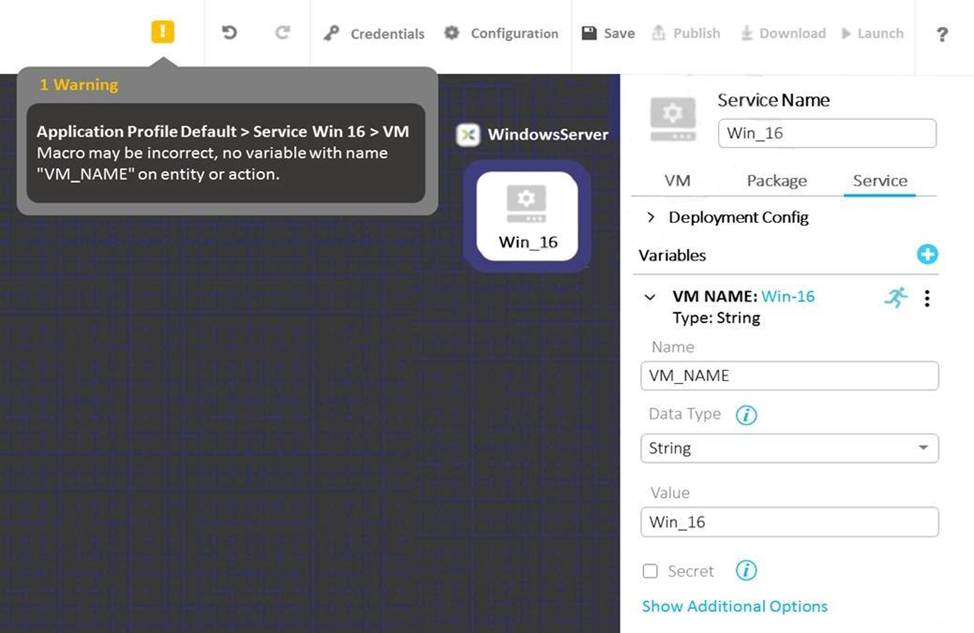
The variable VM_NAME is giving a warning that indicates that the variable is not found.
When checking the Service tab, the variable is found to match the VM_NAME field entry as shown in the exhibit below:

What is causing this warning message?
- A . VM_NAME variable must be defined under Application Profile
- B . Service Name matches the variable name
- C . @@{calm_time}@@ output is longer than allowed for a Service Name
- D . User modifiable variable for VM_NAME is not allowed
D
Explanation:
https://portal.nutanix.com/page/documents/details?targetId=Nutanix-Calm-Admin-Operations-Guide-v3_6_2:nuc-macros-variables-overview-c.html