
Nutanix NCP-MCA Practice Exams
Last updated on Oct 06,2026- Exam Code: NCP-MCA
- Exam Name: Nutanix Certified Professional - Multicloud Automation (NCP-MCA) 6 Exam
- Certification Provider: Nutanix
- Latest update: Oct 06,2026
Which feature of Calm allows for the creation of task-based automation against dynamic lists of Windows or Linux VMs?
- A . Projects
- B . Blueprints
- C . Playbooks
- D . Runbooks
D
Explanation:
Runbooks are a feature of Calm that allows for the creation of task-based automation against dynamic lists of Windows or Linux VMs. A runbook is a collection of tasks that can be executed on one or more VMs or services. A task is a unit of automation that can perform actions such as executing commands, running scripts, invoking APIs, or sending notifications. A runbook can be triggered manually, on a schedule, or based on an event. Runbooks can be used to automate common operations such as backup, restore, patching, scaling, or troubleshooting.
Reference: Nutanix Certified Professional – Multicloud Automation (NCP-MCA) Exam Blueprint Guide, page 16; Nutanix Calm User Guide, section 3.4.
Reference: https://portal.nutanix.com/page/documents/details?targetId=Nutanix-Calm-Admin-Operations-Guide-v3_2_7:nuc-nucalm-using-nucalm-c.html
An administrator needs to deploy blueprints to Calm SaaS and begin executing them.
Before the administrator can execute a blueprint, what must be configured in the environment where the blueprint will be deployed?
- A . vpc
- B . Site-to-Site VPN Tunnel
- C . VPN Client
- D . Tunnel Entity
B
Explanation:
To deploy blueprints to Calm SaaS and execute them, the administrator must first configure a site-to-site VPN tunnel and a tunnel entity in the environment where the blueprint will be deployed. A site-to-site VPN tunnel is a secure connection between two networks over the internet that allows Calm SaaS to communicate with the on-premises or cloud environment. A tunnel entity is a logical representation of the VPN tunnel in Calm SaaS that contains the tunnel configuration and credentials. The administrator must also register the environment and the provider accounts in Calm SaaS before deploying the blueprints.
Reference: Nutanix Certified Professional – Multicloud Automation (NCP-MCA) Exam Blueprint Guide, page 9; Nutanix Calm SaaS User Guide, section 3.1.1 and 3.1.2.
An administrator had provided Linux VM console access to the OS Team. However, the team is unable to access one of the newly-created Linux VMs.
How can the administrator resolve this issue?
- A . Create a local user in Linux OS and provide access to the OS Team.
- B . Provide Prism Admin access to the OS Team Active Directory Group.
- C . Create a role for the OS Team Active Directory Group and add the VMs to it.
- D . Assign new VMs to a category and provide category access to the OS Team.
D
Explanation:
Categories are a way of organizing and managing resources in Nutanix Calm. Categories can be used to define access policies, filter resources, and group applications. By assigning new VMs to a category, the administrator can grant access to the OS Team based on their Active Directory Group membership. The OS Team can then use the web SSH console to access the Linux VMs from the Calm UI.
Reference: Nutanix Support & Insights, section “Categories”
Nutanix Support & Insights, section “Accessing the Web SSH Console”
Nutanix Command Line Interface | Nutanix Community, section “SSH to any CVM as a nutanix user and type ncli and hit return to enter the ncli command shell and will be the same process for acli.” Nutanix Support & Insights, section “Customizing a Linux VM with Cloud-Init”
An administrator has built a Playbook to run a Powershell script in a VM when a specific alert is
generated. Several days later, the alert is generated, but the script does not execute and there are no
Plays recorded for the Playbook.
What is causing this issue?
- A . The Playbook was never enabled.
- B . The version of Playbooks is not correct for the version of Prism Central.
- C . The script executed, but closed with an error code.
- D . The path to the script was not correct.
A
Explanation:
A Playbook is a set of actions that are triggered by an event or a schedule. To run a Playbook, it must be enabled first. If a Playbook is not enabled, it will not respond to any events or schedules, and no Plays will be recorded for it. Therefore, the most likely cause of the issue is that the administrator forgot to enable the Playbook after building it.
Reference: Nutanix Certified Professional – Multicloud Automation (NCP-MCA) Exam Blueprint Guide, page 13, section 3.2. Nutanix Multicloud Automation Administration (NMCAA) course, module 4, lesson 2.
Reference: https://portal.nutanix.com/page/documents/details?targetId=Prism-Central-Guide-Prism-v6_0:Prism-Central-Guide-Prism-v6_0
Refer to the exhibit.
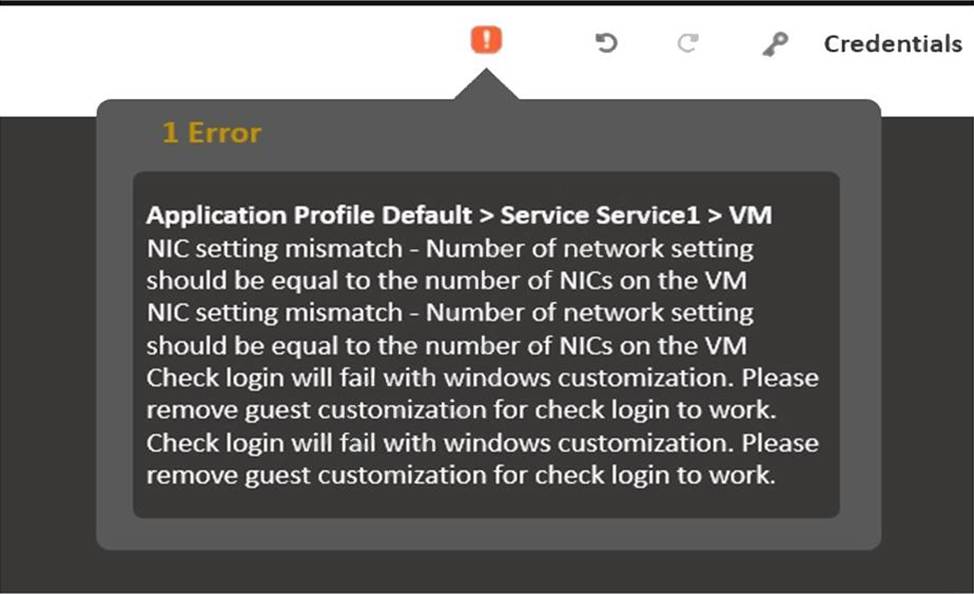
Saving the Calm Blueprint gives the validation error for VMware Blueprints shown in the exhibit.
What could be the cause of the error?
- A . Number of Template vCPU components should be equal to the number of pCPU configured.
- B . Number of Template NICs components should be equal to the number of Network Settings configured.
- C . Number of Template devices components should be equal to the number of Devices configured.
- D . Number of Template VMXNET3 components should be equal to the number of Virtual e1000 adapters configured.
B
Explanation:
The error message in the exhibit indicates a mismatch between the number of network settings and the number of NICs on the VM. This is a common validation error when saving Calm Blueprints for VMware, where it is essential to ensure that these configurations match to avoid issues with VM deployment and operation1.
Reference: 1: Nutanix NCP-MCA Certification Exam Sample Questions2
During the deployment of a multi-step Blueprint, a failure is encountered. The administrator corrected the failed step and saved the Blueprint.
What should the administrator do next?
- A . Delete the failed application and Launch a new application.
- B . Soft Delete the failed application and Launch a new application.
- C . Use Continue in the failed application to retry.
- D . Upon clicking Save the Blueprint task will be retried automatically.
C
Explanation:
If a Blueprint deployment fails, the administrator can use the Continue option in the Self-Service Portal to resume the deployment from the point of failure. This option will retry the failed task and continue with the remaining tasks in the Blueprint. The administrator does not need to delete the application or launch a new one, as this would waste time and resources. Saving the Blueprint will not automatically retry the task, as the Blueprint is only a template for the deployment.
Reference: Nutanix Certified Professional – Multicloud Automation (NCP-MCA) v6.5, Section 3, Objective 3.1:
Determine the causes of a Blueprint or Runbook deployment failure.
Nutanix NCP-MCA Certification Exam Sample Questions, Question 17.
Reference: https://portal.nutanix.com/page/documents/details?targetId=Nutanix-Calm-Admin-Operations-Guide-v3_3_0:Blueprint%20Configurations
An administrator had provided Linux VM console access to the OS Team. However, the team is unable to access one of the newly-created Linux VMS within Prism Central.
How can the administrator resolve this issue?
- A . Create and assign the Linux OS Category to the newly-created VM,
- B . Create and assign the Linux OS Category to the OS Team Active Directory Group,
- C . Create a role for the OS Team Active Directory Group and add the VMS to it.
- D . Create a local user in Linux OS and provide access to the OS Team.
A
Explanation:
Categories are a way of organizing and managing resources in Nutanix Calm. Categories can be used to define access policies, filter resources, and group applications. By creating and assigning the Linux OS Category to the newly-created VM, the administrator can grant access to the OS Team based on their Active Directory Group membership. The OS Team can then use the web SSH console to access the Linux VM from the Calm UI.
Reference: Nutanix Support & Insights, section “Categories”
Nutanix Support & Insights, section “Accessing the Web SSH Console”
A blueprint was developed for deploying a standard 3-tier hosting environment for a company’s applications. The blueprint includes a load balancer, multiple web servers, a database server, and a small test application.
During testing of the blueprint, the application fails to connect to the database. The cause is found to be the database software is still installing when the application starts.
Which method most efficiently prevents the application from starting before the database?
- A . Use a local install instead of downloading
- B . Create a loop to retry connection
- C . Create a service dependency
- D . Use a sleep statement in a start script
C
Explanation:
A service dependency is a feature of Nutanix Calm that allows you to define the order of execution and the conditions for starting and stopping services in a blueprint. By creating a service dependency between the application and the database, you can ensure that the application will not start until the database is fully installed and ready. This avoids the need for manual intervention or inefficient workarounds like loops or sleep statements.
Reference: Nutanix Multicloud Automation Administration (NMCAA), page 41; Nutanix Certified Professional – Multicloud Automation (NCP-MCA), section 2.
Reference: https://portal.nutanix.com/page/documents/details?targetId=Nutanix-Calm-Admin-Operations-Guide-v3_2_7:Nutanix-Calm-Admin-Operations-Guide-v3_2_7
A developer created blueprints in a development environment, and everything worked as expected. The developer then moved the blueprints to the production environment but noticed that the deployment is noticeable slower in production compared to the development environment.
What is the most likely issue causing this behavior?
- A . The production Prism Central is not compatible with Calm.
- B . The production Prism Element Data service IP address is incorrect.
- C . The production Prism Central only has 26 RAM allocated.
- D . Prism Central is not able to reach the DNS server.
C
Explanation:
According to the Nutanix Calm Administration Guide1, the minimum system requirements for Prism Central are 32 GB of RAM and 8 vCPUs. If the production Prism Central has less than the minimum RAM, it may affect the performance of Calm and other services running on Prism Cen
What is included in the PagerDuty Integration service during configuration?
- A . Plays
- B . Alert Grouping
- C . reports
- D . Manual Parameter
A
Explanation:
The PagerDuty Integration service allows you to create and manage incidents in PagerDuty based on events in Nutanix X-Play. To configure the PagerDuty Integration service, you need to provide the following information:
Service Name: The name of the PagerDuty service that you want to integrate with X-Play.
API Key: The API key generated from the PagerDuty service settings.
Plays: The plays that you want to trigger incidents in PagerDuty. You can select one or more plays from the list of available plays in X-Play. You can also specify the incident priority, escalation policy, and alert details for each play.
Alert Grouping: (Optional) The alert grouping strategy that you want to use for the PagerDuty incidents.
You can choose from the following options:
Intelligent: PagerDuty will group alerts based on their content and context.
Time: PagerDuty will group alerts based on the time they are received.
None: PagerDuty will not group alerts and create a new incident for each alert.
Reference: Nutanix Multicloud Automation Administration (NMCAA) course, Nutanix Certified Professional – Multicloud Automation (NCP-MCA) 6.5 Exam Guide, Process Automation | PagerDuty