
Nutanix NCP-MCA Practice Exams
Last updated on Nov 21,2026- Exam Code: NCP-MCA
- Exam Name: Nutanix Certified Professional - Multicloud Automation (NCP-MCA) 6 Exam
- Certification Provider: Nutanix
- Latest update: Nov 21,2026
An administrator needs to configure a Prism Central automation task to be notified if production VMs
exceed the CPU threshold of 70%.
How can this be achieved?
- A . Create an NCC alert based on performance data.
- B . Create an Alert policy for Category Env:Production.
- C . Create an Alert policy for all VMs.
- D . Create a script from the Guest OS for the alert.
B
Explanation:
To create a custom alert policy, the administrator needs to specify the entity type, the impact, the severity, the condition, and the notification method. In this case, the entity type is VM, the impact is performance, the severity is warning, the condition is CPU usage > 70%, and the notification method is email. Additionally, the administrator can use categories to filter the entities that are affected by the alert policy. By selecting the category Env:Production, the administrator can limit the alert policy to only apply to the production VMs.

Reference:
Nutanix Certified Professional – Multicloud Automation (NCP-MCA) v6.5, Section 2 – Deploy and Configure Self-service and Related Components, Objective 2.5 – Identify required configuration settings for a Self-Service deployment
How to create custom alert policies | Prism central | Nutanix Community
Reference: https://portal.nutanix.com/page/documents/details?targetId=Prism-Central-Guide-Prism-v6_0:mul-alerts-management-pc-c.html
Which actions can you perform with Nutanix Calm’s self-service portal? (Choose two.)
- A . Automatically install updates for applications
- B . Request resources and services as a consumer
- C . Directly modify the underlying infrastructure code
- D . Access detailed logs and metrics of applications
What role must a user have in order to create or update a Playbook?
- A . Calm Developer
- B . Prism Admin
- C . Calm Admin
- D . Project Admin
A
Explanation:
A Calm Developer is a role that allows a user to create, update, and execute Playbooks in Calm. A Playbook is a collection of Tasks that can be executed on one or more Targets, such as VMs, applications, or services. A Calm Developer can also create and use Runbooks, Blueprints, and Library items in Calm. A Prism Admin is a role that allows a user to manage the Prism Central instance and its features, such as users, roles, alerts, policies, etc. A Calm Admin is a role that allows a user to manage the Calm service and its settings, such as endpoints, credentials, projects, etc. A Project Admin is a role that allows a user to manage a specific project and its resources, such as applications, Blueprints, Runbooks, etc.
Reference: Nutanix Certified Professional – Multicloud Automation (NCP-MCA) Exam Blueprint Guide, page 14, section 4.1.1
Nutanix Calm Roles and Permissions
Nutanix Calm Playbooks
Refer to the exhibit.
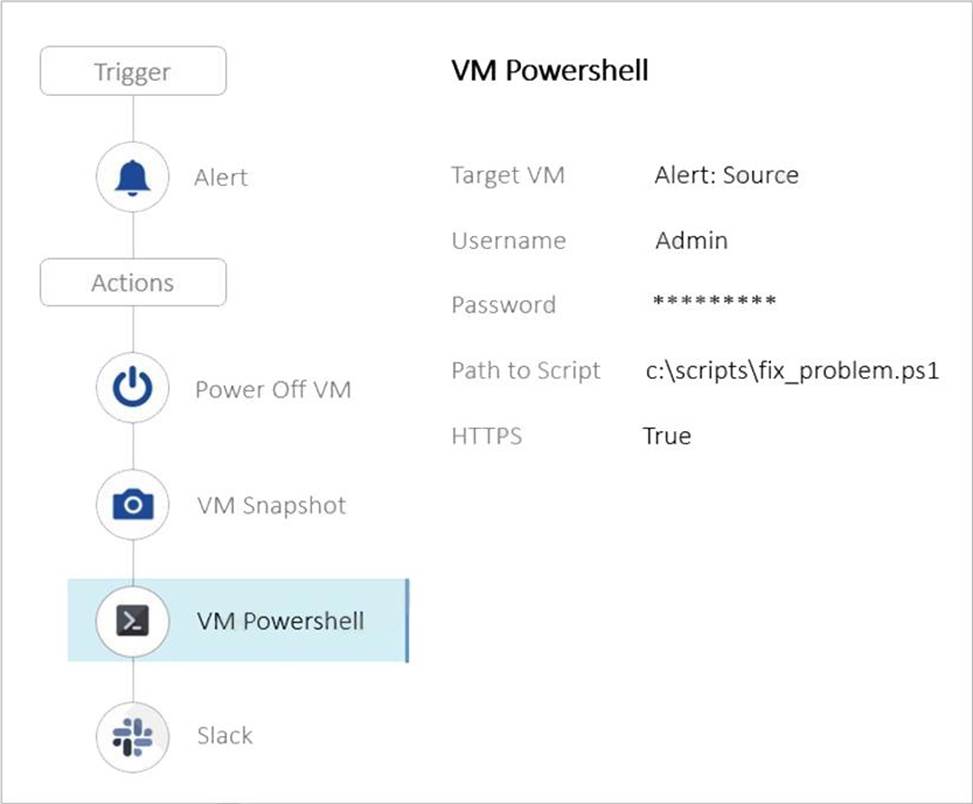
The Playbook is designed to execute a script, in order to fix a known problem in the application.
However, it keeps failing.
Why is this Playbook continuing to fail?
- A . Slack configuration should be reviewed.
- B . The script is incorrect.
- C . The Playbook actions are in the wrong order.
- D . Not enough storage space in order to take a snapshot.
C
Explanation:
In the context of Nutanix Multicloud Automation (NCP-MCA), the order of actions in a playbook is crucial for its successful execution. In this case, the playbook is designed to execute a script to fix a known problem in an application but keeps failing because it attempts to power off the VM and take a snapshot before executing the script. The correct order should be to execute the script first, then power off the VM if necessary, and finally take a snapshot.
Reference: I found some references from Nutanix Multicloud Automation (NCP-MCA) Learning documents or resources that might be helpful for you:
Nutanix Certified Professional – Multicloud Automation (NCP-MCA) 6.5 Exam: This is the official exam blueprint guide that covers the objectives, topics, and skills required for the certification. It also
provides some sample questions and answers.
Nutanix Certified Professional – Multicloud Automation (NCP-MCA) Exam Blueprint Guide: This is another version of the exam blueprint guide that has similar content as the previous one.
Free Questions for NCP-MCA by certscare – p2pexams.com: This is a PDF document that contains 11 questions and answers for the NCP-MCA exam. The question you asked is one of them, and the answer is the same as mine.
What is the primary purpose of using variables in a Nutanix Calm blueprint?
- A . To store static values for application configuration
- B . To allow for dynamic interactions during blueprint execution
- C . To restrict access to resources based on user roles
- D . To provide a backup for application data
An administrator has been tasked in auditing the company’s Configuration Management Database (CMDB) and notices that there are several entries for VMS that were previously decommissioned.
Current VM Decommission Process:
Application owners delete the application from the Calm project.
Application owners submit a ticket to IT for:
Removal of the Domain object
DNS record removal
CMDB entry removal
What Blueprint activity should be used to automate the manual steps listed above? Creation of Calm Tasks for each of the three steps added to Library and consumed inside of a post VM Delete Task.
- A . Creation of Calm Runbooks for each of the three steps added as Post VM Delete Task.
- B . Creation of Calm Runbooks for each of the three Steps to the Library and consumed inside of a post VM Task.
- C . Creation of Calm Runbooks for each of the three steps &added to the library end consumed inside of Post VM Delete Task.
- D . Creation of Calm Endpoint that includes all steps added 35 a Post VM Delete Task
C
Explanation:
Calm Runbooks are a way to automate workflows that span across multiple applications, services, or platforms. They can be used to perform actions such as provisioning, scaling, backup, restore, etc. Calm Runbooks can be added to the Library and reused in different Blueprints or Projects. A Post VM Delete Task is a special type of Task that is executed after a VM is deleted from a Blueprint. By creating Calm Runbooks for each of the manual steps required to decommission a VM, and adding them to the Library, the administrator can simplify the VM Decommission Process by consuming them inside of a Post VM Delete Task. This way, the application owners only need to delete the application from the Calm project, and the rest of the steps will be automated by the Runbooks.
Reference: Nutanix Certified Professional – Multicloud Automation (NCP-MCA) Exam Blueprint Guide, page 16, section 4.3.1
Nutanix Calm Runbooks
Nutanix Calm Library
Nutanix Calm Tasks
An administrator needs to enable Showback in Calm to allow departments to see costs associated with their Projects.
Where in Calm would the administrator enable Showback?
- A . Marketplace
- B . Projects
- C . Setting
- D . LCM
C
Explanation:
Showback is a feature in Calm that allows administrators to track and report the costs of running applications and projects on different cloud platforms. Showback can be enabled in the Setting menu of Calm, under the Showback tab. There, the administrator can configure the cost models, cloud accounts, and currency for Showback. Showback can also be accessed from the Dashboard menu, where the administrator can view the cost reports and charts for different applications and projects.
Reference:
https://www.nutanix.com/support-services/training-certification/certifications/certification-details-nutanix-certified-professional-multicloud-automation-v6-5
https://www.nutanix.com/content/dam/nutanix/resources/support/ebg-ncp-mca-6.pdf
Which two providers does Calm integrate natively with? (Choose two.)
- A . AWS
- B . Alibaba
- C . AHV
AC
Explanation:
Calm integrates natively with AWS and AHV as providers. A provider is a cloud platform or infrastructure that hosts the application VMs or services. Calm supports various providers such as Nutanix, AWS, Azure, GCP, VMware, and Kubernetes. AWS and AHV are two of the most commonly used providers in Calm, as they offer scalability, flexibility, and cost-efficiency for deploying applications.
Reference: Nutanix Certified Professional – Multicloud Automation (NCP-MCA) Exam Blueprint Guide, page 11; Nutanix Calm User Guide, section 3.1.
What is the benefit of defining service dependencies in a Nutanix Calm blueprint?
- A . Accelerates the deployment process
- B . Reduces the cost of operations
- C . Ensures correct startup sequence of services
- D . Provides enhanced security between services
Where should an administrator check why a Playbook failed to grow the memory of a VM?
- A . VM Details in Prism Element
- B . Plays dashboard in Prism Central
- C . VM Details in Prism Central
- D . Plays dashboard in Prism Element
B
Explanation:
The Plays dashboard in Prism Central provides a centralized view of all the Playbooks that have been executed across the clusters registered with Prism Central. It shows the status, duration, and output of each Playbook run, as well as the details of the triggers, targets, and actions involved. An administrator can use the Plays dashboard to troubleshoot why a Playbook failed to grow the memory of a VM by checking the error messages, logs, and output of the Playbook run. The other options are not the correct places to check for Playbook failures, as they do not provide the same level of information and visibility as the Plays dashboard.
Reference: Nutanix Certified Professional – Multicloud Automation (NCP-MCA) v6.5, Nutanix Certified Professional – Multicloud Automation (NCP-MCA) 6 Exam, Nutanix Exam NCP-MCA Topic 4 Question 20 Discussion