
Netskope NSK300 Practice Exams
Last updated on Oct 22,2026- Exam Code: NSK300
- Exam Name: Netskope Certified Cloud Security Architect Exam
- Certification Provider: Netskope
- Latest update: Oct 22,2026
You are architecting a Netskope steering configuration for devices that are not owned by the organization The users could be either on-premises or off-premises and the architecture requires that traffic destined to the company’s instance of Microsoft 365 be steered to Netskope for inspection.
How would you achieve this scenario from a steering perspective?
- A . Use IPsec and GRE tunnels.
- B . Use reverse proxy.
- C . Use explicit proxy and the Netskope Client
- D . Use DPoP and Secure Forwarder
C
Explanation:
For devices not owned by the organization, using an explicit proxy along with the Netskope Client is the best approach to steer traffic for inspection. This method allows for granular control over the traffic, ensuring that only the traffic destined for the company’s instance of Microsoft 365 is inspected by Netskope. The explicit proxy configuration can be applied regardless of whether the users are on-premises or off-premises, providing a consistent steering mechanism for all users.
Reference: The steering configuration for non-owned devices and the use of explicit proxy in conjunction with the Netskope Client are detailed in the Netskope Knowledge Portal. The portal provides guidelines on how to set up steering configurations to direct traffic from end users to the Netskope Cloud for real-time analysis, which is applicable for both managed and unmanaged devices1
Users in your network are attempting to reach a website that has a self-signed certificate using a GRE tunnel to Netskope. They are currently being blocked by Netskope with an SSL error.
How would you allow this traffic?
- A . Configure a Do Not Decrypt SSL Decryption rule to allow traffic to pass.
- B . Configure a Real-time Protection policy with the action set to Allow.
- C . Set the No SNI setting in Netskope to Bypass.
- D . Ensure that the users add the self-signed certificate to their local certificate store.
A
Explanation:
To allow traffic from a website with a self-signed certificate that is being blocked by Netskope with an SSL error, the correct action is to configure a Do Not Decrypt SSL Decryption rule. This rule will allow the traffic to pass without being decrypted, thus bypassing the SSL error caused by the self-signed certificate. This is a common practice for handling traffic from trusted internal applications or specific external sites that use self-signed certificates1.
Reference: The Netskope Community Forum discusses the application of exceptions for sites with self-signed certificates and the use of SSL decryption policies to bypass the blocking1. Additionally, the Netskope Knowledge Portal provides information on managing error settings and configuring SSL decryption rules2.
You are asked to create a customized restricted administrator role in your Netskope tenant for a newly hired employee.
Which two statements are correct in this scenario? (Choose two.)
- A . An admin role prevents admins from downloading and viewing file content by default.
- B . The scope of the data shown in the Ul can be restricted to specific events.
- C . All role privileges default to Read Only for all functional areas.
- D . Obfuscation can be applied to all functional areas.
AC
Explanation:
Admin Role and File Content Viewing: By default, an admin role does not prevent admins from downloading and viewing file content. Admins have access to view and download file content unless specific restrictions are applied.
Role Privileges Default to Read Only: All role privileges in Netskope default to Read Only for all functional areas. This means that admins can view information but cannot make changes unless explicitly granted additional permissions.
Obfuscation: Obfuscation can be applied to specific functional areas, but it is not a default behavior for all areas.
Reference: Netskope Security Cloud Introductory Online Technical Training
Netskope Security Cloud Operation & Administration (NSCO&A) – Classroom Training
Review the exhibit.
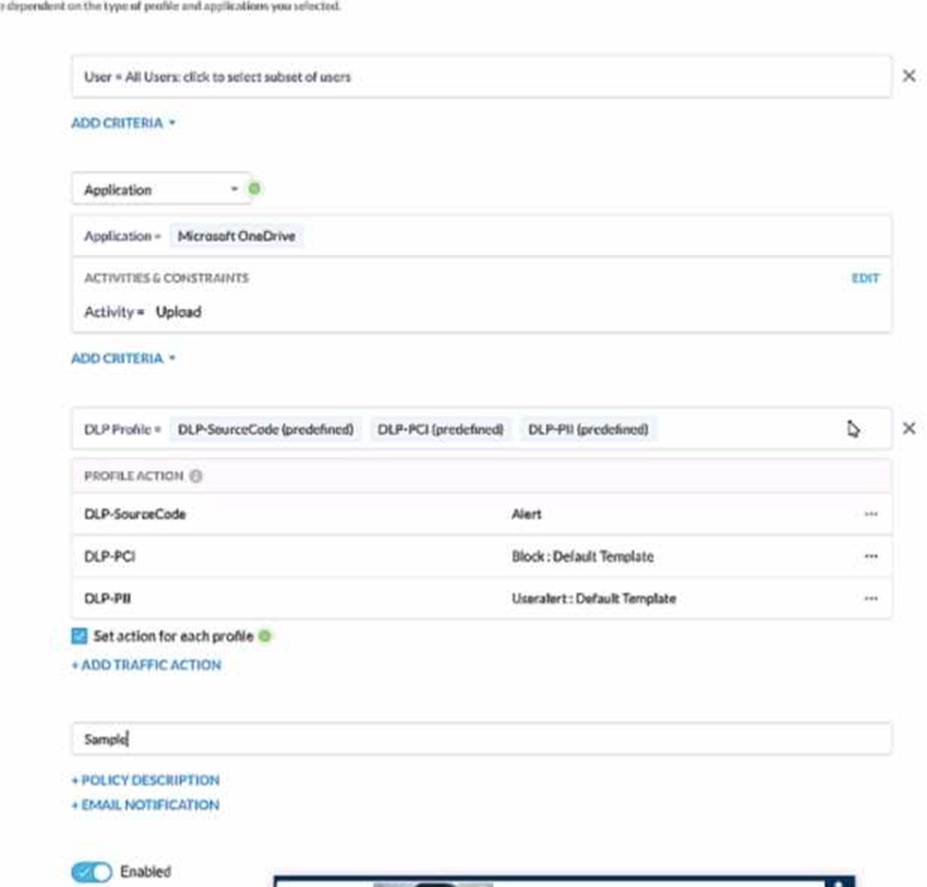
A user has attempted to upload a file to Microsoft OneDrive that contains source code with Pll and PCI data.
Referring to the exhibit, which statement Is correct?
- A . The user will be blocked and a single Incident will be generated referencing the DLP-PCI profile.
- B . The user will be blocked and a single Incident will be generated referencing all of the matching DLP profiles
- C . The user will be blocked and a separate incident will be generated for each of the matching DLP profiles.
- D . The user will be alerted and a single incident will be generated referencing the DLP-PII profile.
C
Explanation:
In the given scenario, a user is attempting to upload a file containing sensitive PII and PCI data to Microsoft OneDrive. The Netskope Security Cloud provides real-time data and threat protection when accessing cloud services, websites, and private apps from anywhere, on any device. Based on the exhibit provided, different DLP (Data Loss Prevention) profiles are triggered – DLP-SourceCode,
DLP-PCI, and DLP-PII. Each of these profiles has specific actions associated with them; for instance, an alert is generated for Source Code while blocking actions are initiated for PCI and PII data. Since multiple DLP profiles are triggered due to the sensitive nature of the content in the file being uploaded, separate incidents will be generated for each matching profile ensuring comprehensive security coverage and incident reporting.
Reference: Netskope Cloud Security
Netskope Resources
Netskope Documentation
Review the exhibit.
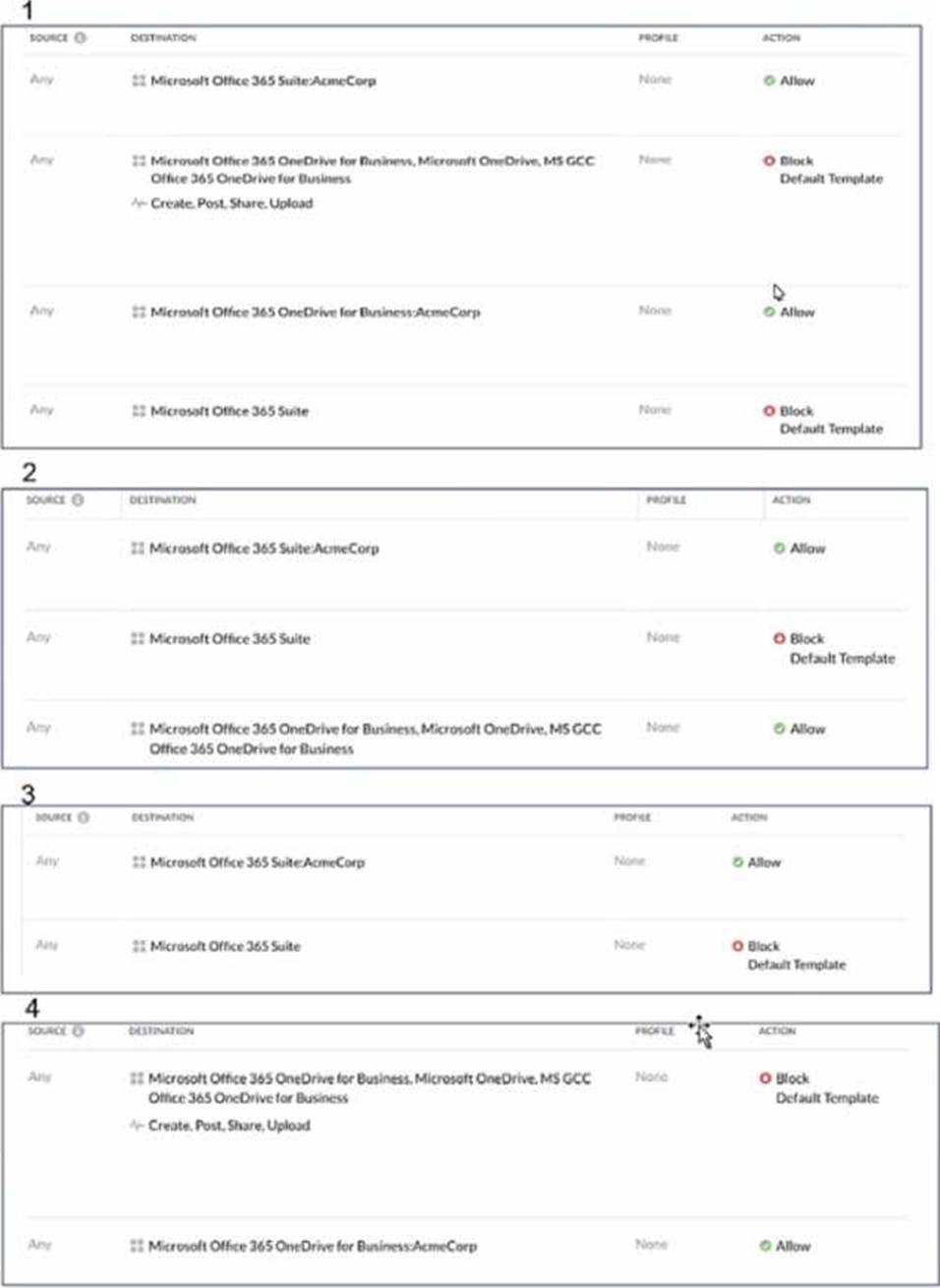
AcmeCorp has recently begun using Microsoft 365. The organization is concerned that employees will start using third-party non-AcmeCorp OneDrive instances to store company data. The CISO asks you to use Netskope to create a policy that ensures that no data is being uploaded to non-AcmeCorp instances of OneDrive.
Referring to the exhibit, which two policies would accomplish this posture? (Choose two.)
- A . 4
- B . 3
- C . 2
- D . 1
BC
Explanation:
To ensure that no data is uploaded to non-AcmeCorp instances of OneDrive, the policies that would accomplish this are:
Policy B: This policy allows traffic only for AcmeCorp’s OneDrive and blocks all other Microsoft 365 Suite traffic. It ensures that data is not uploaded to non-AcmeCorp OneDrive instances by restricting access to only the corporate instance of OneDrive.
Policy C: This policy allows traffic for AcmeCorp’s Microsoft 365 Suite but blocks all other OneDrive for Business traffic. It achieves the same outcome by permitting corporate suite usage while preventing uploads to any OneDrive for Business instances that are not part of AcmeCorp.
These policies are designed to provide granular control over the data flow, ensuring that company data remains within the corporate environment and is not transferred to external or personal storage solutions.
Reference: The policies are based on Netskope’s capabilities for real-time protection and data security, which allow organizations to enforce granular access and control policies. The information aligns with the best practices for setting up such policies as described in Netskope’s documentation and resources
You created a Real-time Protection policy that blocks all activities to non-corporate S3 buckets, but determine that the policy is too restrictive. Specifically, users are complaining that normal websites have stopped rendering properly.
How would you solve this problem?
- A . Create a Real-time Protection policy to allow the Browse activity to the Amazon S3 application.
- B . Create a Real-time Protection policy to allow the Browse activity to the Cloud Storage category
- C . Create a Real-time Protection policy to allow the Download activity to the Cloud Storage category
- D . Create a Real-time Protection policy to allow the Download activity to the Amazon S3 application
B
Explanation:
To solve the problem of normal websites not rendering properly due to a Real-time Protection policy that blocks all activities to non-corporate S3 buckets, the best solution is to create a Real-time Protection policy to allow the Browse activity to the Cloud Storage category. This approach will enable users to view content from various cloud storage services, including Amazon S3, without allowing full access to non-corporate S3 buckets. It’s a more granular and less restrictive policy that allows necessary browsing activities while still maintaining control over the upload and download activities to non-corporate buckets1.
Reference: The Netskope Knowledge Portal provides information on how to configure Real-time Protection policies, including how to set up policies that allow certain activities while blocking others1. Additionally, the Netskope Community Forum offers insights into best practices for policy configuration to avoid overly restrictive rules that can impact normal web browsing
You want to integrate with a third-party DLP engine that requires ICAP. In this scenario, which Netskope platform component must be configured?
- A . On-Premises Log Parser (OPLP)
- B . Secure Forwarder
- C . Netskope Cloud Exchange
- D . Netskope Adapter
D
Explanation:
When integrating a third-party Data Loss Prevention (DLP) engine that requires ICAP, the Netskope platform component that must be configured is the Netskope Adapter. The Netskope Adapter is designed to facilitate the integration of Netskope with various third-party tools and services, including DLP engines that use ICAP for communication. By configuring the Netskope Adapter, you can ensure that the third-party DLP engine can communicate effectively with the Netskope platform to provide comprehensive data protection.
Reference: This information is based on the integration capabilities of the Netskope platform, which includes the use of Netskope Adapters for third-party integrations as detailed in the Netskope Knowledge Portal1 and the Netskope Data Loss Prevention (DLP) documentation2
What are three valid Instance Types for supported SaaS applications when using Netskope’s API-enabled Protection? (Choose three.)
- A . Forensic
- B . API Data Protection
- C . Behavior Analytics
- D . DLP Scan
- E . Quarantine
B, D, E
Explanation:
When using Netskope’s API-enabled Protection for supported SaaS applications, the valid instance types are:
API Data Protection (B): This type is used to connect to cloud apps using APIs to find sensitive content, enforce policy controls, and quarantine malware1.
DLP Scan (D): This instance type involves scanning for data loss prevention, which is a key component of Netskope’s API Data Protection1.
Quarantine (E): This instance type allows for the isolation of potentially harmful or sensitive data until it can be reviewed or remediated1.
Behavior Analytics © and Forensic (A) are not listed as instance types for API-enabled Protection in the provided resources.
Reference: The answers are based on the information available in the Netskope Knowledge Portal and the documentation for Classic API Data Protection
You want to enable the Netskope Client to automatically determine whether it is on-premises or off-premises.
Which two options in the Netskope Ul would you use to accomplish this task? (Choose two.)
- A . the All Traffic option in the Steering Configuration section of the Ul
- B . the New Exception option in the Traffic Steering options of the Ul
- C . the Enable Dynamic Steering option in the Steering Configuration section of the Ul
- D . the On Premises Detection option under the Client Configuration section of the Ul
C, D
Explanation:
To enable the Netskope Client to automatically determine whether it is on-premises or off-premises, you can use the following options in the Netskope UI:
Enable Dynamic Steering:
This option is available in the Steering Configuration section of the UI.
By enabling dynamic steering, the Netskope Client can intelligently determine the appropriate data plane (on-premises or cloud) based on the user’s location and network conditions.
It ensures that traffic is directed to the optimal data plane for improved performance and security.
Reference: Netskope Documentation on Dynamic Steering On Premises Detection:
This option is available under the Client Configuration section of the UI.
By configuring on-premises detection, the Netskope Client can identify whether it is connected to the local network (on-premises) or accessing resources from outside (off-premises). It helps in applying relevant policies and steering traffic accordingly.
Reference: Netskope Documentation on Client Configuration
Your client is an NG-SWG customer. They are going to use the Explicit Proxy over Tunnel (EPoT) steering method. They have a specific list of domains that they do not want to steer to the Netskope Cloud.
What would accomplish this task”
- A . Define exception domains in the PAC file.
- B . Define exceptions in the Netskope steering configuration
- C . Create a real-time policy with a bypass action.
- D . Use an SSL decryption policy.
A
Explanation:
To accomplish the task of not steering specific domains to the Netskope Cloud while using the Explicit Proxy over Tunnel (EPoT) steering method, you would define exception domains in the PAC file (A). This is because the PAC file is used to specify which domains should bypass the proxy and connect directly, thus allowing for granular control over the traffic that is steered to Netskope1.
Reference: The use of PAC files for steering exceptions is a standard practice in proxy configurations and is supported by Netskope’s EPoT steering method as outlined in their documentation1.