
Netskope NSK300 Practice Exams
Last updated on Oct 22,2026- Exam Code: NSK300
- Exam Name: Netskope Certified Cloud Security Architect Exam
- Certification Provider: Netskope
- Latest update: Oct 22,2026
Your company just had a new Netskope tenant provisioned and you are asked to create a secure tenant configuration.
In this scenario, which two default settings should you change? {Choose two.)
- A . Change Safe Search to Disabled
- B . Change Untrusted Root Certificate to Block.
- C . Change the No SNI setting to Block.
- D . Change "Disallow concurrent logins by an Admin" to Enabled.
B, D
Explanation:
For a new Netskope tenant provisioned, to create a secure tenant configuration, you should consider changing the following default settings:
B. Change Untrusted Root Certificate to Block: This setting will ensure that any traffic coming from an untrusted root certificate is blocked, which is a critical security measure to prevent man-in-the-middle attacks and other types of cyber threats1.
D. Change “Disallow concurrent logins by an Admin” to Enabled: This setting will prevent multiple concurrent logins by the same admin account, which is an important security control to mitigate the risk of unauthorized access. If an admin’s credentials are compromised, this setting will help limit the potential damage by ensuring that only one session can be active at a time1.
These changes are part of the recommended security hardening guidelines for Netskope tenants to enhance the overall security posture of the tenant environment.
Reference: The recommendations for changing default settings for a secure tenant configuration are based on Netskope’s security hardening guidelines, which provide detailed instructions on how to enhance the security of Netskope products and components deployed in customer environments1.
You are implementing Netskope Cloud Exchange in your company lo include functionality provided by third-party partners.
What would be a reason for using Netskope Cloud Risk Exchange in this scenario?
- A . to ingest events and alerts from a Netskope tenant
- B . to feed SOC with detection and response services
- C . to map multiple scores to a normalized range
- D . to automate service tickets from alerts of interest
D
Explanation:
The reason for using Netskope Cloud Risk Exchange in this scenario is to automate service tickets from alerts of interest. Netskope Cloud Risk Exchange (CRE) is designed to ingest user, device, and application risk scores, creating a dashboard view of contributors to your company’s overall risk score and trend. One of the key functionalities of CRE is to trigger risk-reducing actions through business rules that are tuned to a weighted score. Automating service tickets from alerts of interest is a part of this functionality, as it allows for the automatic creation of tickets in response to specific alerts, streamlining the process of addressing potential security issues12.
Reference: The use cases for Netskope Cloud Risk Exchange, including the automation of service tickets, can be found in the official Netskope resources1. Further information on how to integrate and utilize Netskope Cloud Risk Exchange for automating service tickets can be found in the Netskope Knowledge Portal3.
You are implementing Netskope Cloud Exchange in your company lo include functionality provided by third-party partners.
What would be a reason for using Netskope Cloud Risk Exchange in this scenario?
- A . to ingest events and alerts from a Netskope tenant
- B . to feed SOC with detection and response services
- C . to map multiple scores to a normalized range
- D . to automate service tickets from alerts of interest
D
Explanation:
The reason for using Netskope Cloud Risk Exchange in this scenario is to automate service tickets from alerts of interest. Netskope Cloud Risk Exchange (CRE) is designed to ingest user, device, and application risk scores, creating a dashboard view of contributors to your company’s overall risk score and trend. One of the key functionalities of CRE is to trigger risk-reducing actions through business rules that are tuned to a weighted score. Automating service tickets from alerts of interest is a part of this functionality, as it allows for the automatic creation of tickets in response to specific alerts, streamlining the process of addressing potential security issues12.
Reference: The use cases for Netskope Cloud Risk Exchange, including the automation of service tickets, can be found in the official Netskope resources1. Further information on how to integrate and utilize Netskope Cloud Risk Exchange for automating service tickets can be found in the Netskope Knowledge Portal3.
You are implementing Netskope Cloud Exchange in your company lo include functionality provided by third-party partners.
What would be a reason for using Netskope Cloud Risk Exchange in this scenario?
- A . to ingest events and alerts from a Netskope tenant
- B . to feed SOC with detection and response services
- C . to map multiple scores to a normalized range
- D . to automate service tickets from alerts of interest
D
Explanation:
The reason for using Netskope Cloud Risk Exchange in this scenario is to automate service tickets from alerts of interest. Netskope Cloud Risk Exchange (CRE) is designed to ingest user, device, and application risk scores, creating a dashboard view of contributors to your company’s overall risk score and trend. One of the key functionalities of CRE is to trigger risk-reducing actions through business rules that are tuned to a weighted score. Automating service tickets from alerts of interest is a part of this functionality, as it allows for the automatic creation of tickets in response to specific alerts, streamlining the process of addressing potential security issues12.
Reference: The use cases for Netskope Cloud Risk Exchange, including the automation of service tickets, can be found in the official Netskope resources1. Further information on how to integrate and utilize Netskope Cloud Risk Exchange for automating service tickets can be found in the Netskope Knowledge Portal3.
You successfully configured Advanced Analytics to identify policy violation trends Upon further investigation, you notice that the activity is NULL.
Why is this happening in this scenario?
- A . The SSPM policy was not configured during setup.
- B . The REST API v1 token has expired.
- C . A policy violation was identified using API Protection.
- D . A user accessed a static Web page.
D
Explanation:
The reason for the activity being NULL in this scenario is likely because a user accessed a static Web page. In Netskope’s Advanced Analytics, when the activity is reported as NULL, it often indicates that there was no dynamic interaction or transaction to record, which is typical when a static web page is accessed1. Static web pages do not generate the kind of events or activities that are tracked by policies, hence they appear as NULL in the activity field.
Reference: This explanation is supported by the Netskope Knowledge Portal, which mentions that applications fields with null values indicate incidents generated from web traffic, such as accessing static web pages2. Further information on interpreting NULL values in Advanced Analytics reports can be found in the Netskope documentation1.
Review the exhibit.
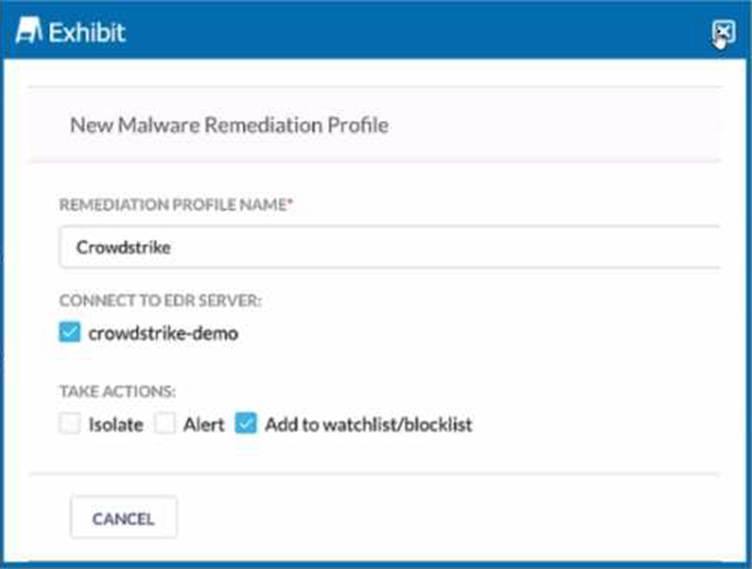
You are asked to integrate Netskope with Crowdstrike EDR. You added the Remediation profile shown in the exhibit.
Which action will this remediation profile take?
- A . The endpoint will be isolated.
- B . The malware hash will be added as an IOC in Crowdstrike.
- C . The malware will be quarantined.
- D . The malware hash will be added as an IOC in Netskope.
A
Explanation:
The remediation profile shown in the exhibit will take the action of isolating the endpoint. This is indicated by the “Isolate” option being checked under “TAKE ACTIONS” in the configuration settings. When this option is selected, the remediation profile is configured to isolate the endpoint upon detection of a threat, which is a common response to contain a potential security breach and prevent further spread of malware within the network1.
Reference: The Netskope Knowledge Portal provides detailed information on integrating CrowdStrike for EDR and the actions that can be taken by remediation profiles, including endpoint isolation1. Further details on the integration process and remediation actions can be found in the documentation provided by Netskope23.
A company needs to block access to their instance of Microsoft 365 from unmanaged devices. They have configured Reverse Proxy and have also created a policy that blocks login activity for the AD group "marketing-users" for the Reverse Proxy access method. During UAT testing, they notice that access from unmanaged devices to Microsoft 365 is not blocked for marketing users.
What is causing this issue?
- A . There is a missing group name in the SAML response.
- B . The username in the name ID field is not in the format of the e-mail address.
- C . There is an invalid certificate in the SAML response.
- D . The username in the name ID field does not have the "marketing-users" group name.
A
Explanation:
The issue is likely caused by a missing group name in the SAML response (A). When access to Microsoft 365 from unmanaged devices is not blocked as expected, despite having a policy in place, it often indicates that the SAML assertion is not correctly identifying the user as a member of the restricted group. In this case, the “marketing-users” group name should be present in the SAML response to enforce the policy that blocks login activity for this group. If the group name is missing, the policy will not apply, and users will not be blocked as intended.
Reference: This explanation is consistent with the configuration requirements for access control using SAML responses, as detailed in Netskope’s documentation on Reverse Proxy and SAML integration1.
You want to verify that Google Drive is being tunneled to Netskope by looking in the nsdebuglog file.
You are using Chrome and the Netskope Client to steer traffic.
In this scenario, what would you expect to see in the log file?
A)

B)

C)

D)

- A . Option A
- B . Option B
- C . Option C
- D . Option D
A
Explanation:
When verifying that Google Drive traffic is being tunneled to Netskope using Chrome and the Netskope Client, you would expect to see log entries indicating that the traffic is being directed through Netskope’s proxy. Specifically, Option A is correct as it shows the process “google drive” being tunneled to nsProxy. The log entry for Option A indicates that a TLS tunneling flow from a local address and process (Google Drive) is being directed to a host (play.googleapis.com) and then to Netskope’s proxy (nsProxy). This is consistent with how Netskope tunnels specified traffic for security and policy enforcement1.
Reference: The expected log entries are based on the standard operation of Netskope Client and how it steers traffic to Netskope’s cloud services, as detailed in Netskope’s documentation1.
You are building an architecture plan to roll out Netskope for on-premises devices. You determine that tunnels are the best way to achieve this task due to a lack of support for explicit proxy in some instances and IPsec is the right type of tunnel to achieve the desired security and steering.
What are three valid elements that you must consider when using IPsec tunnels in this scenario? (Choose three.)
- A . cipher support on tunnel-initiating devices
- B . bandwidth considerations
- C . the categories to be blocked
- D . the impact of threat scanning performance
- E . Netskope Client behavior when on-premises
ABD
Explanation:
When using IPsec tunnels, especially in the context of deploying Netskope for on-premises devices, several factors must be considered to ensure a secure and efficient architecture:
Cipher support on tunnel-initiating devices (A): It is crucial to ensure that the devices initiating the IPsec tunnels support the ciphers used by Netskope. This compatibility is necessary for establishing secure connections.
Bandwidth considerations (B): The bandwidth available for the IPsec tunnels will affect the data throughput and performance of the connection. Adequate bandwidth must be allocated to handle the expected traffic without causing bottlenecks.
The impact of threat scanning performance (D): The performance of threat scanning can be affected by the encryption and decryption processes in IPsec tunnels. It is important to consider how the threat scanning capabilities will perform under the additional load of encrypted traffic.
These elements are essential for the successful implementation of IPsec tunnels in a Netskope architecture plan for on-premises devices12.
Reference: The considerations for using IPsec tunnels are outlined in the Netskope Knowledge Portal and Community discussions, which provide guidance on deployment and validation of IPsec tunnels, including cipher support, bandwidth management, and maintaining threat scanning performance
A recent report states that users are using non-sanctioned Cloud Storage platforms to share data Your CISO asks you for a list of aggregated users, applications, and instance IDs to increase security posture
Which Netskope tool would be used to obtain this data?
- A . Advanced Analytics
- B . Behavior Analytics
- C . Applications in Skope IT
- D . Cloud Confidence Index (CCI)
A
Explanation:
To obtain a list of aggregated users, applications, and instance IDs, especially when dealing with non-sanctioned Cloud Storage platforms, the Advanced Analytics (A) tool within Netskope would be used. Advanced Analytics provides in-depth visibility into cloud app usage and activities. It allows security teams to create detailed reports and dashboards that can help identify risks and ensure compliance with company policies by analyzing user behavior, application access, and data movement across the organization1.
Reference: The capabilities of the Advanced Analytics tool are outlined in Netskope’s documentation and resources, which describe its use for gaining insights into cloud application usage and security posture