
Netskope NSK200 Practice Exams
Last updated on Oct 21,2026- Exam Code: NSK200
- Exam Name: Netskope Certified Cloud Security Integrator (NCCSI)
- Certification Provider: Netskope
- Latest update: Oct 21,2026
You are an administrator writing Netskope Real-time Protection policies and must determine proper policy ordering.
Which two statements are true in this scenario? (Choose two.)
- A . You must place Netskope private access malware policies in the middle.
- B . You do not need to create an "allow all" Web Access policy at the bottom.
- C . You must place DLP policies at the bottom.
- D . You must place high-risk block policies at the top.
BD
Explanation:
To determine proper policy ordering for Netskope Real-time Protection policies, you need to follow these two statements:
B. You do not need to create an “allow all” Web Access policy at the bottom.
D. You must place high-risk block policies at the top. These statements are based on the best practices for policy ordering recommended by Netskope3. An “allow all” Web Access policy at the bottom is not necessary because any traffic that does not match any policy will be allowed by default. However, you can create a “monitor all” Web Access policy at the bottom if you want to log all the traffic that is not matched by any other policy4. High-risk block policies at the top are important because they prevent any traffic that poses a serious threat or violates a critical compliance standard from reaching its destination. These policies should have higher priority than other policies that may allow or modify the traffic5. Therefore, options B and D are correct and the other options are incorrect.
Reference: Real-time Protection Policies – Netskope Knowledge Portal, Create a Real-time Protection Policy for Web Categories – Netskope Knowledge Portal, Best Practices: Real-time Protection Policies (1 of 2) – Netskope
A customer wants to use Netskope to prevent PCI data from leaving the corporate sanctioned OneDrive instance.
In this scenario. which two solutions would assist in preventing data exfiltration? (Choose two.)
- A . API Data Protection
- B . Cloud Firewall (CFW)
- C . SaaS Security Posture Management (SSPM)
- D . Real-time Protection
AD
Explanation:
To prevent PCI data from leaving the corporate sanctioned OneDrive instance, the customer can use API Data Protection and Real-time Protection. API Data Protection is a feature that allows you to discover, classify, and protect data that is already resident in your cloud services, such as OneDrive. You can create a policy that matches the PCI data based on criteria such as users, content, activity, or DLP profiles. Then, you can choose an action to prevent the PCI data from being shared or exfiltrated, such as remove external collaborators, remove public links, or quarantine3. Real-time Protection is a feature that allows you to inspect and control data in transit between your users and cloud services, such as OneDrive. You can create a policy that matches the PCI data based on criteria such as users, devices, locations, categories, or DLP profiles. Then, you can choose an action to prevent the PCI data from being uploaded or downloaded, such as block, alert, encrypt, or watermark4. Therefore, options A and D are correct and the other options are incorrect.
Reference: API Data Protection – Netskope Knowledge Portal, Real-time Protection – Netskope Knowledge Portal
Your small company of 10 people wants to deploy the Netskope client to all company users without requiring users to be imported using Active Directory, LDAP, or an IdP.
- A . Deploy the Netskope client using SCCM.
- B . Deploy the Netskope client using JAMF.
- C . Deploy the Netskope client using Microsoft GPO.
- D . Deploy the Netskope client using an email invitation.
D
Explanation:
Deploying the Netskope client using an email invitation allows smaller companies to onboard users easily without relying on integration with AD, LDAP, or an IdP. This method is efficient for smaller teams that need a quick deployment without complex setup.
A customer wants to deploy the Netskope client on all their employee laptops to protect all Web traffic when users are working from home. However, users are required to work from their local offices at least one day per week. Management requests that users returning to the office be able to transparently leverage the local security stack without any user intervention.
Which two statements are correct in this scenario? (Choose two.)
- A . You must enable On-premises Detection in the client configuration.
- B . You must allow users to unenroll In the client configuration.
- C . You must disable Dynamic Steering in the traffic steering profile.
- D . You must configure IPsec/GRE tunnels on the local network to steer traffic to Netskope.
AC
Explanation:
To allow users to transparently leverage the local security stack when they return to the office, you need to follow these two statements:
Recently your company implemented Zoom for collaboration purposes and you are attempting to inspect the traffic with Netskope. Your initial attempt reveals that you are not seeing traffic from the Zoom client that is used by all users. You must ensure that this traffic is visible to Netskope.
In this scenario, which two steps must be completed to satisfy this requirement? (Choose two.)
- A . Create a steering exception for Zoom to ensure traffic is reaching Netskope.
- B . Create a Do Not Decrypt SSL policy for the Zoom application suite.
- C . Remove the Zoom certificate-pinned application from the default steering configuration.
- D . Remove the default steering exception for the Web Conferencing Category.
CD
Explanation:
To ensure that the traffic from the Zoom client is visible to Netskope, you need to remove the Zoom certificate-pinned application from the default steering configuration and remove the default steering exception for the Web Conferencing Category. A certificate-pinned application is an application that validates the server certificates against the hardcoded ones in the application. This is a security technique used to prevent man-in-the-middle attacks and secure access to the application. By default, Netskope bypasses the traffic from certificate-pinned applications and does not decrypt or inspect it3. Zoom is one of the predefined certificate-pinned applications that Netskope supports4. To enable Netskope to inspect the traffic from Zoom, you need to remove it from the steering configuration that applies to your users5. Additionally, you need to remove the default steering exception for the Web Conferencing Category, which includes Zoom and other similar applications. A steering exception is a rule that specifies the traffic that you want to bypass Netskope and go directly to the destination6. By removing this exception, you allow Netskope to steer and analyze the traffic from web conferencing applications. Therefore, options C and D are correct and the other options are incorrect.
Reference: Certificate Pinned Applications – Netskope Knowledge Portal, Certificate Pinned App (CPA) – The Netskope Community, Steering Configuration – Netskope Knowledge Portal, Steering Exceptions – Netskope Knowledge Portal
Review the exhibit.
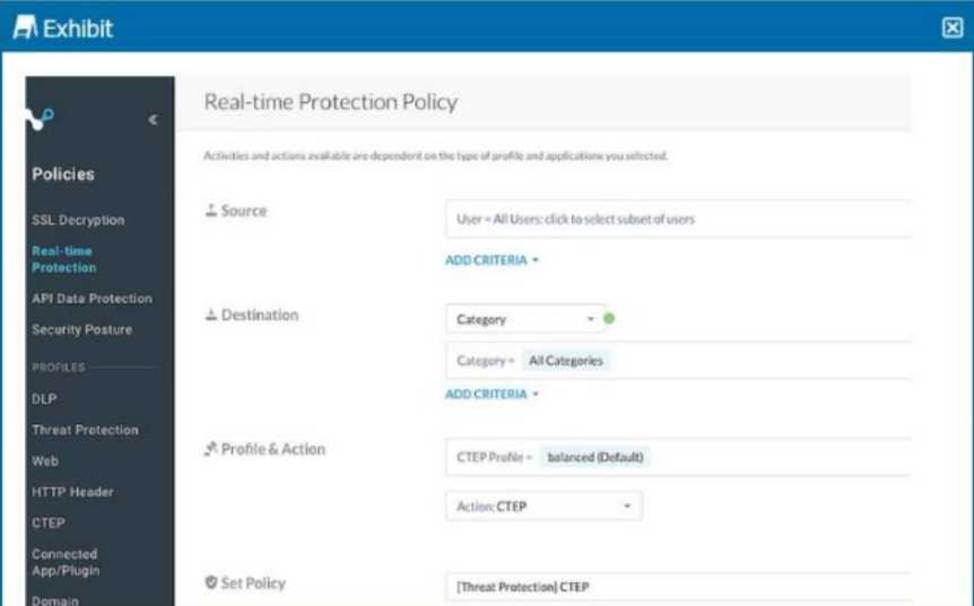
Your Real-time Protection policy contains some rules with only a browse activity. The exhibit shows a new policy rule.
Where is the correct location to place this rule?
- A . at the bottom
- B . before browse activity
- C . after browse activity
- D . at the top
D
Explanation:
The correct practice is to place high-priority rules, such as those with specific scanning actions, at the top of the Real-time Protection policy rule list. Placing the rule at the top ensures it is applied before other less restrictive rules, like those configured only for browsing activities.
You want to provide malware protection for all cloud storage applications.
In this scenario, which action would accomplish this task?
- A . Create a real-time threat protection policy with a category of Cloud Storage.
- B . Apply a data protection profile.
- C . Apply a CTEP profile.
- D . Create an API threat protection policy with a category of Cloud Storage.
A
Explanation:
Creating a real-time threat protection policy specifically targeting the "Cloud Storage" category ensures that all supported cloud storage applications are covered by malware protection. This approach allows real-time scanning and response to malware threats within cloud storage environments.
Your customer is migrating all of their applications over to Microsoft 365 and Azure. They have good practices and policies in place (or their inline traffic, but they want to continuously detect reconfigurations and enforce compliance standards.
Which two solutions would satisfy their requirements? (Choose two.)
- A . Netskope SaaS Security Posture Management
- B . Netskope Cloud Confidence Index
- C . Netskope Risk Insights
- D . Netskope Continuous Security Assessment
AD
Explanation:
To continuously detect and enforce compliance standards for their Microsoft 365 and Azure applications, the customer needs to use Netskope SaaS Security Posture Management (SSPM) and Netskope Continuous Security Assessment (CSA). Netskope SSPM allows the customer to monitor, assess, and act on security, permission, and access related issues in their SaaS environment, such as Microsoft 365. Netskope SSPM continuously checks security posture by comparing SaaS app settings with security policies and industry benchmarks (CIS, PCI-DSS, NIST, HIPAA, CSA, GDPR, AIPCA, ISO, and more). It also provides visibility and control over third-party apps that are connected to the managed apps1. Netskope CSA allows the customer to discover, audit, and remediate misconfigurations in their IaaS environment, such as Azure. Netskope CSA continuously monitors and audits cloud configurations against industry standards, CIS benchmarks, and regulatory frameworks. It also provides real-time inline protection to secure public clouds from threats and data loss2. Therefore, options A and D are correct and the other options are incorrect.
Reference: SaaS
Security Posture Management – Netskope, Public Cloud Security Solutions – Netskope
You are asked to grant access for a group of users to an application using NPA. So far, you have created and deployed the publisher and created a private application using the Netskope console.
Which two steps must also be completed to enable your users access to the application? (Choose two.)
- A . Create an inbound firewall rule to permit network traffic to reach the publisher
- B . Enable traffic steering for private applications.
- C . Create a Real-time Protection policy that allows your users to access the application.
- D . Define an application instance name in Skope IT.
BC
Explanation:
To enable your users access to the application using NPA, you need to complete these two steps:
B. Enable traffic steering for private applications and C. Create a Real-time Protection policy that allows your users to access the application. Traffic steering is the process of directing the user’s traffic to the Netskope cloud platform for inspection and policy enforcement. You need to enable traffic steering for private applications in your traffic steering profile to allow the Netskope client to tunnel the traffic to the private application through the Netskope cloud1. A Real-time Protection policy is a rule that specifies the actions and notifications that Netskope applies to the user’s traffic based on various criteria. You need to create a Real-time Protection policy that allows your users to access the private application by selecting the application name, the user group, and the allow action in the policy page2. Therefore, options B and C are correct and the other options are incorrect.
Reference: Traffic Steering Profile – Netskope Knowledge Portal, Add a Policy for Real-time Protection – Netskope Knowledge Portal
You are having issues with fetching user and group Information periodically from the domain controller and posting that information to your tenant instance in the Netskope cloud.
To begin the troubleshooting process, what would you Investigate first in this situation?
- A . On-Premises Log Parser
- B . Directory Importer
- C . DNS Connector
- D . AD Connector
B
Explanation:
The Directory Importer is a component of the Netskope Adapters that connects to the domain controller and periodically fetches user and group information to post that info to your tenant instance in the Netskope cloud1. If you are having issues with this process, the first thing you should investigate is the Directory Importer itself. You can check the status of the Directory Importer service, the configuration file, the logs, and the connectivity to the domain controller and the Netskope cloud2. Therefore, option B is correct and the other options are incorrect.
Reference: Configure Directory Importer – Netskope Knowledge Portal, Troubleshooting Directory Importer – Netskope Knowledge Portal