
Netskope NSK200 Practice Exams
Last updated on Oct 21,2026- Exam Code: NSK200
- Exam Name: Netskope Certified Cloud Security Integrator (NCCSI)
- Certification Provider: Netskope
- Latest update: Oct 21,2026
Your customer is concerned about malware in their AWS S3 buckets.
What two actions would help with this scenario? (Choose two.)
- A . Create a real-time policy to block malware uploads to their AWS instances.
- B . Enable Threat Protection (Malware Scan) for all of their AWS instances to Identify malware.
- C . Create an API protection policy to quarantine malware in their AWS S3 buckets.
- D . Create a threat profile to quarantine malware in their AWS S3 buckets.
BC
Explanation:
To help the customer with the scenario of malware in their AWS S3 buckets, two actions that would help are B. Enable Threat Protection (Malware Scan) for all of their AWS instances to identify malware and C. Create an API protection policy to quarantine malware in their AWS S3 buckets. Threat Protection (Malware Scan) is a feature that allows you to scan files in your cloud services, such as AWS S3, for malware using Netskope’s advanced threat protection engine. You can enable Threat Protection (Malware Scan) for all of your AWS instances in the Netskope tenant by going to Settings > Cloud Services > AWS > Threat Protection and selecting the Enable Malware Scan option1. This will help you identify malware in your AWS S3 buckets and generate alerts for further action. An API protection policy is a rule that specifies the actions and notifications that Netskope applies to the data that is already resident in your cloud services, such as AWS S3, based on various criteria. You can create an API protection policy to quarantine malware in your AWS S3 buckets by going to Policies > API Protection > New Policy and selecting the AWS service, the Malware Scan data identifier, and the Quarantine action in the policy page2. This will help you isolate malware in your AWS S3 buckets and prevent it from spreading or being accessed by unauthorized users. Therefore, options B and C are correct and the other options are incorrect.
Reference: Threat Protection (Malware Scan) – Netskope Knowledge Portal, Add a Policy for API Protection – Netskope Knowledge Portal
Review the exhibit.
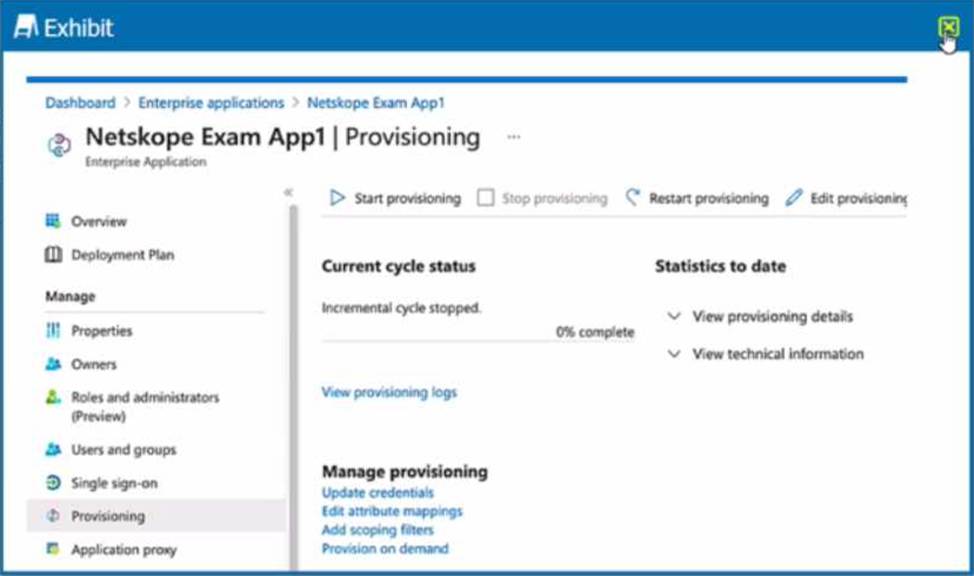
What is the purpose of the configuration page shown Ii the exhibit?
- A . to provision a Netskope client using SCCM
- B . to allow users to authenticate against the proxy
- C . to onboard Active Directory users to a Netskope tenant
- D . to enforce administrative role-based access
C
Explanation:
The configuration page shown in the exhibit is used to onboard Active Directory users to a Netskope tenant. This is done by configuring the Active Directory settings in the Netskope platform and then importing the users from Active Directory.
The configuration page allows you to specify the following parameters:
Directory Service: The type of directory service that you are using, such as Active Directory or LDAP.
Domain Name: The name of your Active Directory domain, such as example.com.
Domain Controller: The IP address or hostname of your Active Directory domain controller, such as dc1.example.com.
Username: The username of an account that has read access to your Active Directory, such as [email protected].
Password: The password of the account that has read access to your Active Directory.
Base DN: The base distinguished name of the container or organizational unit that contains the users and groups that you want to import, such as OU=Users,DC=example,DC=com.
User Filter: The LDAP filter that defines the criteria for selecting the users that you want to import, such as (objectClass=user).
Group Filter: The LDAP filter that defines the criteria for selecting the groups that you want to import, such as (objectClass=group).
After configuring these parameters, you can click on Test Connection to verify that the connection to your Active Directory is successful. Then you can click on Import Users to start importing the users and groups from your Active Directory to your Netskope tenant.
Reference: Onboarding Active Directory Users to a Netskope Tenant1
Review the exhibit.
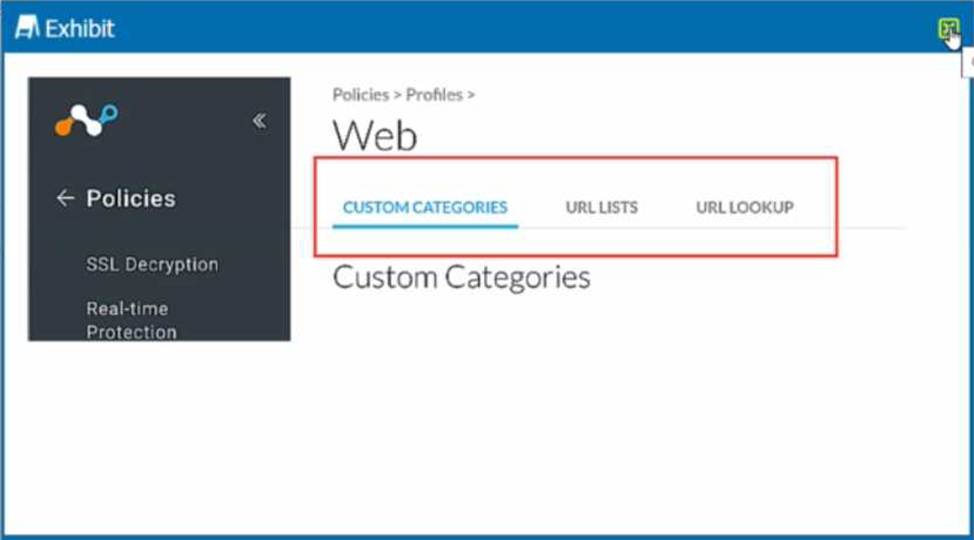
You want to create a custom URL category to apply a secure Web gateway policy combining your own list of URLs and Netskope predefined categories.
In this scenario, which task must be completed?
- A . Add the URL list to the Client configuration.
- B . Add the URL list to a Custom category.
- C . Add the URL list to a Steering configuration.
- D . Add the URL list to a Real-time Protection policy.
B
Explanation:
In order to create a custom URL category to apply a secure Web gateway policy combining your own list of URLs and Netskope predefined categories, you must add the URL list to a Custom category. This is because Netskope allows you to create custom categories that can be used in policies to block or allow access to specific URLs. You can also include or exclude predefined categories and other URL lists in your custom category. To create a custom category, you need to go to Policies > Web > Custom Categories and click New Custom Category. Then you can select the predefined categories and URL
lists that you want to include or exclude in your custom category. You also need to give your custom category a name and save it. After creating a custom category, you can apply it to a Real-time Protection policy by selecting it from the Categories dropdown. The other options are not valid tasks for creating a custom URL category. You do not need to add the URL list to the Client configuration, as this is only required for client-side steering methods. You do not need to add the URL list to a Steering configuration, as this is only required for network-side steering methods. You do not need to add the URL list to a Real-time Protection policy directly, as this will not allow you to combine it with predefined categories.
Reference: Custom Category3, Create Custom Categories
Which object would be selected when creating a Malware Detection profile?
- A . DLP profile
- B . File profile
- C . Domain profile
- D . User profile
B
Explanation:
A file profile is an object that contains a list of file hashes that can be used to create a malware detection profile. A file profile can be configured as an allowlist or a blocklist, depending on whether the files are known to be benign or malicious. A file profile can be created in the Settings > File Profile page1. A malware detection profile is a set of rules that define how Netskope handles malware incidents. A malware detection profile can be created in the Policies > Threat Protection > Malware Detection Profiles page2. To create a malware detection profile, one needs to select a file profile as an allowlist or a blocklist, along with the Netskope malware scan option. The other options are not objects that can be selected when creating a malware detection profile.
To which three event types does Netskope’s REST API v2 provide access? (Choose three.)
- A . application
- B . alert
- C . client
- D . infrastructure
- E . user
ABD
Explanation:
Netskope’s REST API v2 provides access to various event types via URI paths. The event types include application, alert, infrastructure, audit, incident, network, and page. These event types can be used to retrieve data from Netskope’s cloud security platform. The event types client and user are not supported by the REST API v2.
Reference: REST API v2 Overview, Cribl Netskope Events and Alerts Integration, REST API Events and Alerts Response Descriptions
Your company asks you to use Netskope to integrate with Endpoint Detection and Response (EDR) vendors such as CrowdStrike.
In this scenario, what is a requirement for a successful Integration and sharing of threat data?
- A . API Client ID
- B . device classification
- C . custom log parser
- D . user endpoint
A
Explanation:
To integrate Netskope with EDR vendors such as CrowdStrike and share threat data, a requirement for a successful integration is A. API Client ID. An API Client ID is a unique identifier that is used to authenticate and authorize requests to the EDR vendor’s API. You need to obtain an API Client ID from the EDR vendor and enter it in the Netskope tenant settings under Threat Protection > Integration. This will allow Netskope to communicate with the EDR vendor and exchange threat intelligence and remediation actions1. Therefore, option A is correct and the other options are incorrect.
Reference: Integrating CrowdStrike for EDR – Netskope Knowledge Portal
You are testing policies using the DLP predefined identifier "Card Numbers (Major Networks; all)." No DLP policy hits are observed.
- A . You must use Netskope API protection.
- B . Your data must have valid credit card numbers.
- C . You must normalize credit card numbers to 16-digit consecutive numbers.
- D . You must use the Netskope client to perform advanced DLP and optical character recognition.
B
Explanation:
For DLP policies to detect sensitive data like credit card numbers, the data must contain valid credit card numbers as defined by the DLP pattern. Invalid or incorrectly formatted numbers will not trigger DLP policy hits.
Your organization has three main locations with 30.000 hosts in each location. You are planning to deploy Netskope using iPsec tunnels for security.
What are two considerations to make a successful connection in this scenario? (Choose two.)
- A . browsers in use
- B . operating systems
- C . redundant POPs
- D . number of hosts
CD
Explanation:
To deploy Netskope using IPSec tunnels for security in this scenario, two considerations to make a successful connection are C. redundant POPs and D. number of hosts. Redundant POPs are Points of Presence that are geographically distributed data centers that host the Netskope cloud platform. You need to consider redundant POPs to ensure high availability and resiliency of your IPSec tunnels in case of a failure or outage in one of the POPs. You can configure multiple IPSec tunnels from your network to different POPs and use dynamic routing protocols such as BGP to load balance and failover the traffic1. Number of hosts is the number of devices or endpoints that will use the IPSec tunnels to access the cloud services. You need to consider the number of hosts to estimate the bandwidth and throughput requirements of your IPSec tunnels and choose the appropriate POPs that can handle the traffic volume. You can use the Netskope Bandwidth Calculator tool to estimate the bandwidth and throughput based on the number of hosts, locations, and cloud services2. Therefore, options C and D are correct and the other options are incorrect.
Reference: IPSec – Netskope Knowledge Portal, Netskope Bandwidth Calculator
Your learn is asked to Investigate which of the Netskope DLP policies are creating the most incidents.
In this scenario, which two statements are true? (Choose two.)
- A . The Skope IT Applications tab will list the top five DLP policies.
- B . You can see the top Ave DLP policies triggered using the Analyze feature
- C . You can create a report using Reporting or Advanced Analytics.
- D . The Skope IT Alerts tab will list the top five DLP policies.
BC
Explanation:
To investigate which of the Netskope DLP policies are creating the most incidents, the following two statements are true:
You can see the top five DLP policies triggered using the Analyze feature. The Analyze feature allows you to create custom dashboards and widgets to visualize and explore your data. You can use the DLP Policy widget to see the top five DLP policies that generated the most incidents in a given time period3.
You can create a report using Reporting or Advanced Analytics. The Reporting feature allows you to create scheduled or ad-hoc reports based on predefined templates or custom queries. You can use the DLP Incidents by Policy template to generate a report that shows the number of incidents per DLP policy4. The Advanced Analytics feature allows you to run SQL queries on your data and export the results as CSV or JSON files. You can use the DLP_INCIDENTS table to query the data by policy name and incident count5.
The other two statements are not true because:
The Skope IT Applications tab will not list the top five DLP policies. The Skope IT Applications tab shows the cloud app usage and risk summary for your organization. It does not show any information about DLP policies or incidents6.
The Skope IT Alerts tab will not list the top five DLP policies. The Skope IT Alerts tab shows the alerts generated by various policies and profiles, such as DLP, threat protection, IPS, etc. It does not show the number of incidents per policy, only the number of alerts per incident7.
You have deployed a development Web server on a public hosting service using self-signed SSL certificates. After some troubleshooting, you determined that when the Netskope client is enabled, you are unable to access the Web server over SSL. The default Netskope tenant steering configuration is in place.
In this scenario, which two settings are causing this behavior? (Choose two.)
- A . SSL pinned certificates are blocked.
- B . Untrusted root certificates are blocked.
- C . Incomplete certificate trust chains are blocked.
- D . Self-signed server certificates are blocked.
BD
Explanation:
The default Netskope tenant steering configuration blocks untrusted root certificates and self-signed server certificates. These settings are intended to prevent man-in-the-middle attacks and ensure the validity of the SSL connection. However, they also prevent the access to the development Web server that uses self-signed SSL certificates. To allow access to the Web server, the settings need to be changed or an exception needs to be added for the Web server domain.