
Netskope NSK200 Practice Exams
Last updated on Oct 21,2026- Exam Code: NSK200
- Exam Name: Netskope Certified Cloud Security Integrator (NCCSI)
- Certification Provider: Netskope
- Latest update: Oct 21,2026
You are creating an API token to allow a DevSecOps engineer to create and update a URL list using REST API v2.
In this scenario, which privilege(s) do you need to create in the API token?
- A . Provide read and write access for the "/events" endpoint.
- B . Provide read and write access for the "/urllist" endpoint.
- C . Provide only read access for the "/urllist" endpoint.
- D . Provide only write access for the "/urllist" endpoint.
B
Explanation:
To create an API token to allow a DevSecOps engineer to create and update a URL list using REST API v2, you need to provide read and write access for the “/urllist” endpoint. The “/urllist” endpoint is the API endpoint that allows you to manage URL lists in your Netskope tenant. You can use this endpoint to perform operations such as create, update, delete, or list URL lists3. To create an API token with this privilege, you need to go to Settings > Tools > REST API v2 > New Token, enter a token name and expiration time, add the “/urllist” endpoint, and select Read+Write as the privilege4. This will allow the DevSecOps engineer to use the API token in their requests to create and update URL lists. Therefore, option B is correct and the other options are incorrect.
Reference: REST API v2 Overview – Netskope Knowledge Portal, Manage URL Lists – Netskope Knowledge Portal
You are troubleshooting private application access from a user’s computer. The user is complaining that they cannot access the corporate file share; however, the private tunnel seems to be established. You open the npadebuglog.log file in a text editor and cannot find any reference to the private application.
- A . The absence of npadebuglog.log entries is not significant.
- B . File shares cannot be published using private access.
- C . The user is not added to the required real-time policy.
- D . The user needs to re-authenticate for private applications.
C
Explanation:
If there are no references to the private application in the npadebuglog.log, it is likely that the user is not added to the required real-time policy. Without proper policy assignment, the user’s traffic will not be routed correctly through the private access setup, causing access issues.
Review the exhibit.
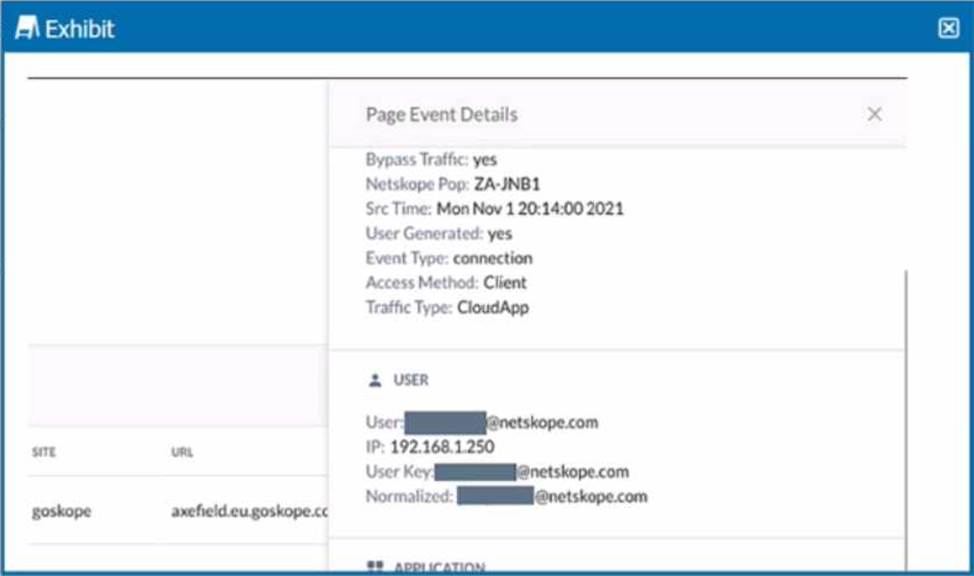
You are asked to restrict users from accessing YouTube content tagged as Sport. You created the required real-time policy; however, users can still access the content
Referring to the exhibit, what is the problem?
- A . The website is in a steering policy exception.
- B . The policy changes have not been applied.
- C . The YouTube content cannot be controlled.
- D . The traffic matched a Do Not Decrypt policy
D
Explanation:
The problem in this scenario is that the traffic matched a Do Not Decrypt policy. A Do Not Decrypt policy is a rule that specifies the traffic that you want to leave encrypted and not further analyzed by Netskope via the Real-time Protection policies1. In the exhibit, we can see that the traffic from the user to YouTube has a “Bypass Traffic” value of “yes” and a “Netskope” value of “yes”. This means that the traffic was steered to Netskope but not decrypted or inspected2. Therefore, the real-time policy that was created to restrict users from accessing YouTube content tagged as Sport did not apply, and users could still access the content. To solve this problem, you need to either remove or modify the Do Not Decrypt policy that matches the traffic to YouTube, or create an exception for the Sport category in the policy3. Therefore, option D is correct and the other options are incorrect.
Reference: Page Events – Netskope Knowledge Portal, Add a Policy for SSL Decryption – Netskope Knowledge Portal, YouTube Content Control – Netskope Knowledge Portal
Your company wants to deploy Netskope using a tunnel because you have a mixture of device operating systems. You also do not want to enable encryption because you want to maximize bandwidth.
- A . explicit proxy
- B . IPsec
- C . proxy chaining
- D . GRE
D
Explanation:
GRE tunnels are the optimal choice in this scenario. GRE is a commonly used, non-encrypted tunneling protocol that supports a variety of device operating systems, and it offers efficient bandwidth usage without encryption overhead, which aligns with the company’s requirements.
Your company has many users that are remote and travel often. You want to provide the greatest visibility into their activities, even while traveling.
Using Netskope, which deployment method would be used in this scenario?
- A . Use a Netskope client.
- B . Use an IPsec tunnel.
- C . Use a GRE tunnel.
- D . Use proxy chaining.
A
Explanation:
Deploying the Netskope client on remote and traveling users’ devices provides the highest level of visibility into their activities regardless of their location. The Netskope client can steer traffic securely to the Netskope Security Cloud, offering consistent monitoring and protection.
You are integrating Netskope tenant administration with an external identity provider. You need to implement role-based access control.
Which two statements are true about this scenario? (Choose two.)
- A . The roles you want to assign must be present in the Netskope tenant.
- B . You do not need to define the administrators locally in the Netskope tenant after It Is integrated with IdP.
- C . You need to define the administrators locally in the Netskope tenant.
- D . Once integrated with IdP. you must append the "locallogin" URL to log in using IdP
AC
Explanation:
To implement role-based access control when integrating Netskope tenant administration with an external identity provider (IdP), two statements that are true about this scenario are A. The roles you want to assign must be present in the Netskope tenant and C. You need to define the administrators locally in the Netskope tenant. Role-based access control (RBAC) is a feature that allows you to assign different levels of permissions and access to the Netskope tenant based on the user’s role. You can use RBAC to integrate Netskope tenant administration with an external IdP such as Azure AD or Okta and delegate administrative tasks to different users or groups1. To do this, you need to ensure that the roles you want to assign are present in the Netskope tenant. You can use the predefined roles such as SYSADMIN, AUDITOR, or OPERATOR, or create custom roles with specific privileges2. You also need to define the administrators locally in the Netskope tenant by creating local user accounts and assigning them roles. You can use the same email address as the IdP user account for the local user account3. Therefore, options A and C are correct and the other options are incorrect.
Reference: Role-Based Access Control – Netskope Knowledge Portal, Roles – Netskope Knowledge Portal, Integrate with Azure AD – Netskope Knowledge Portal
Your organization has a homegrown cloud application. You are required to monitor the activities that users perform on this cloud application such as logins, views, and downloaded files. Unfortunately, it seems Netskope is unable to detect these activities by default.
How would you accomplish this goal?
- A . Enable access to the application with Netskope Private Access.
- B . Ensure that the cloud application is added as a steering exception.
- C . Ensure that the application is added to the SSL decryption policy.
- D . Create a new cloud application definition using the Chrome extension.
D
Explanation:
To monitor the activities that users perform on a homegrown cloud application, you need to create a new cloud application definition using the Chrome extension. The Chrome extension is a tool that allows you to record the traffic and activities of any web-based application and create a custom app definition that can be imported into your Netskope tenant1. This way, you can enable Netskope to detect and analyze the activities of your homegrown cloud application and apply policies accordingly. Therefore, option D is correct and the other options are incorrect.
Reference: Creating a Cloud App Definition – Netskope Knowledge Portal
You want to prevent a document stored in Google Drive from being shared externally with a public link.
What would you configure in Netskope to satisfy this requirement?
- A . Threat Protection policy
- B . API Data Protection policy
- C . Real-time Protection policy
- D . Quarantine
B
Explanation:
To prevent a document stored in Google Drive from being shared externally with a public link, you need to configure an API Data Protection policy in Netskope. An API Data Protection policy allows you to discover, classify, and protect data that is already resident in your cloud services, such as Google Drive1. You can create a policy that matches the documents you want to protect based on criteria such as users, content, activity, or DLP profiles. Then, you can choose an action to prevent the documents from being shared externally, such as remove external collaborators, remove public links, or quarantine2. Therefore, option B is correct and the other options are incorrect.
Reference: API Data Protection – Netskope Knowledge Portal, Add a Policy for API Data Protection – Netskope Knowledge Portal
Review the exhibit.
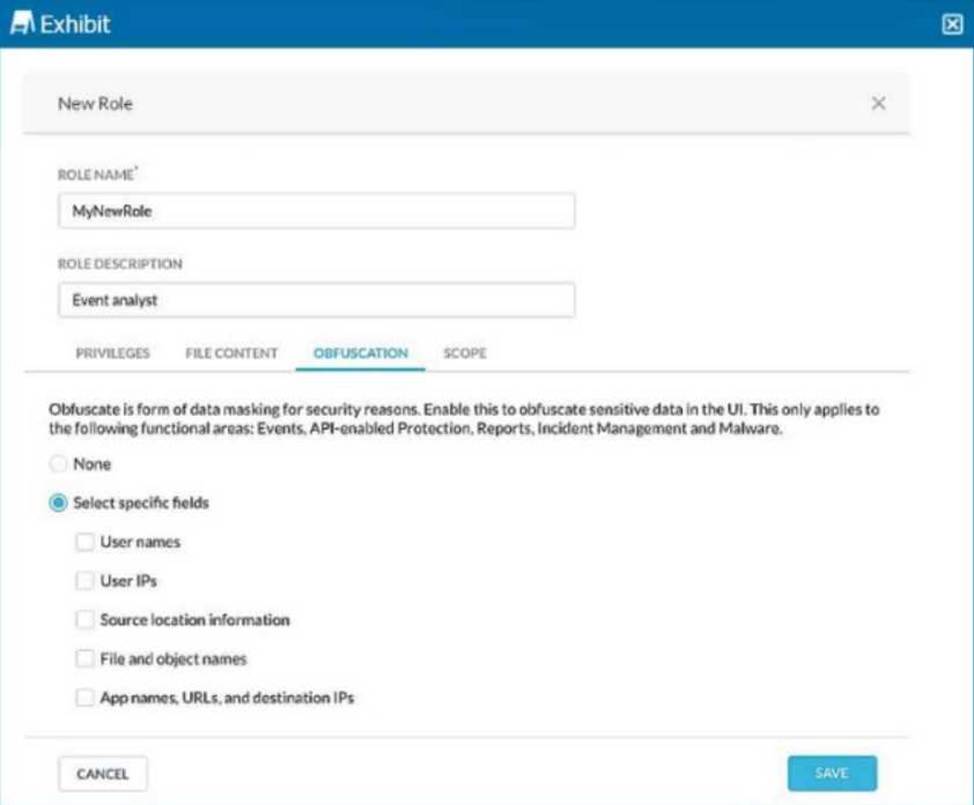
You are asked to create a new role that allows analysts to view Events and Reports while providing user privacy. You need to avoid directly exposing identities and user location information.
Which three fields must you obfuscate in this scenario? (Choose three.)
- A . User IPs
- B . User names
- C . App names, URLs, and destination IPs
- D . File and object names
- E . Source location information
ABE
Explanation:
To ensure user privacy in the Events and Reports view, obfuscate sensitive information like User IPs, User names, and Source location information. This helps protect identities and prevent location tracking of users while allowing visibility into activity details.
You are using Skope IT to analyze and correlate a security incident. You are seeing too many events generated by API policies. You want to filter for logs generated by the Netskope client only.
- A . Use the access_method filter and select Client from the dropdown menu.
- B . Use the access_method filter and select Tunnel from the dropdown menu.
- C . Use the access_method filter and select Logs from the dropdown menu.
- D . Use query mode and use access_method neq Client.
A
Explanation:
To filter for logs specifically generated by the Netskope client, select "Client" from the access_method filter dropdown menu in Skope IT. This filter allows administrators to narrow down logs by access method, making it easier to troubleshoot issues related only to the Netskope client.