
Netskope NSK200 Practice Exams
Last updated on Oct 22,2026- Exam Code: NSK200
- Exam Name: Netskope Certified Cloud Security Integrator (NCCSI)
- Certification Provider: Netskope
- Latest update: Oct 22,2026
Your company has a Symantec BlueCoat proxy on-premises and you want to deploy Netskope using proxy chaining.
Which two prerequisites need to be enabled first in this scenario? (Choose two.)
- A . Disable SSL decryption.
- B . Disable the X-Authenticated-User header.
- C . Enable SSL decryption.
- D . Enable the X-Forwarded-For HTTP header
CD
Explanation:
To deploy Netskope using proxy chaining with Symantec BlueCoat proxy on-premises, you need to enable two prerequisites first: Enable SSL decryption on your Symantec BlueCoat proxy. This is required for proxy chaining because Netskope needs to inspect the SSL traffic that is sent from your proxy to the Netskope cloud. To enable SSL decryption, you need to configure your Symantec BlueCoat proxy to trust the Netskope certificate for SSL interception. You can download the certificate from Settings > Manage > Certificates > Signing CA in the Netskope UI. Enable the X-Forwarded-For HTTP header on your Symantec BlueCoat proxy. This is required for proxy chaining because Netskope needs to identify the original source IP address of the user behind your proxy. The X-Forwarded-For header is used to pass this information from your proxy to Netskope. To enable this header, you need to configure your Symantec BlueCoat proxy to send X-Forwarded-For HTTP header for all HTTP requests. The other options are not valid prerequisites for this scenario. You do not need to disable SSL decryption on your Symantec BlueCoat proxy, as this would prevent Netskope from inspecting the SSL traffic. You do not need to disable the X-Authenticated-User header on your Symantec BlueCoat proxy, as this is an optional header that can be used to pass additional user information from your proxy to Netskope.
Reference: Proxy Chaining3, Configure Forcepoint for Proxy Chaining
With Netskope DLP, which feature would be used to detect keywords such as "Confidential" or "Access key"?
- A . Regular Expression
- B . Exact Match
- C . Fingerprint Classification
- D . Dictionary
D
Explanation:
The Dictionary feature in Netskope DLP is designed to detect specific keywords or phrases, such as "Confidential" or "Access key." By using a pre-defined list of sensitive terms, the Dictionary feature enables policy enforcement based on the presence of these keywords in data.
Your company needs to keep quarantined files that have been triggered by a DLP policy.
In this scenario, which statement Is true?
- A . The files are stofed remotely In your data center assigned In the Quarantine profile.
- B . The files are stored In the Netskope data center assigned in the Quarantine profile.
- C . The files are stored In the Cloud provider assigned In the Quarantine profile.
- D . The files are stored on the administrator console PC assigned In the Quarantine profile.
B
Explanation:
When a policy flags a file to be quarantined, that file is placed in a quarantine folder and a tombstone file is put in the original location in its place. The quarantine folder is located in the Netskope data center assigned in the Quarantine profile. The Quarantine profile is configured in Settings > Threat Protection > API-enabled Protection. The quarantined file is zipped and protected with a password to prevent users from inadvertently downloading the file. Netskope then notifies the admin specified in the profile1. Therefore, option B is correct and the other options are incorrect.
Reference: Quarantine – Netskope Knowledge Portal, Threat Protection – Netskope Knowledge Portal
Review the exhibit.
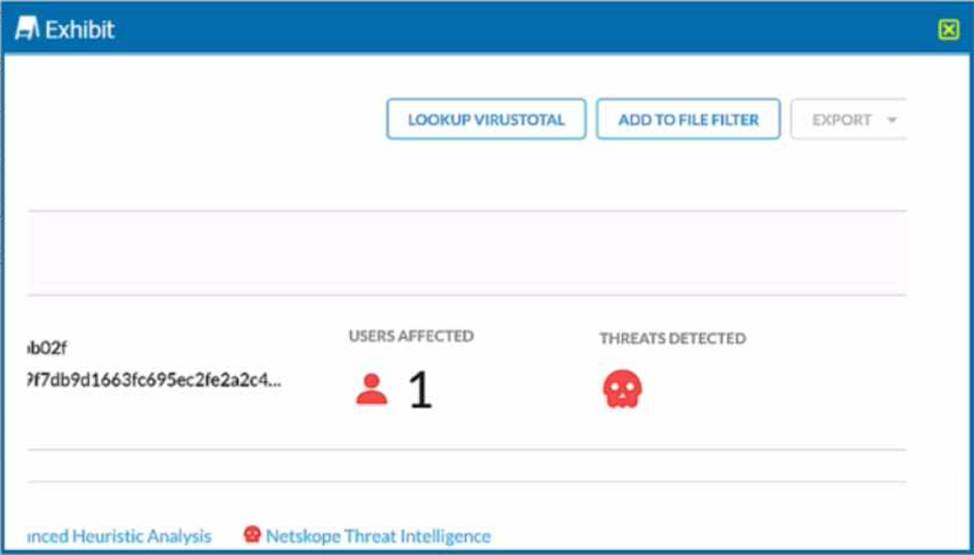
You are at the Malware Incident page. A virus was detected by the Netskope Heuristics Engine. Your security team has confirmed that the virus was a test data file You want to allow the security team to use this file
Referring to the exhibit, which two statements are correct? (Choose two.)
- A . Click the "Add To File Filter button to add the IOC to a file list.
- B . Contact the CrowdStrike administrator to have the file marked as safe.
- C . Click the ”Lookup VirusTotal" button to verify if this IOC is a false positive.
- D . Create a malware detection profile and update the file hash list with the IOC.
AC
Explanation:
To allow the security team to use the test data file that was detected as a virus by the Netskope Heuristics Engine, the following two steps are correct:
Click the “Add To File Filter” button to add the IOC to a file list. This will exclude the file from future malware scans and prevent false positive alerts. The file list can be managed in the Settings > File Filter page1.
Click the “Lookup VirusTotal” button to verify if this IOC is a false positive. This will open a new tab with the VirusTotal report for the file hash. VirusTotal is a service that analyzes files and URLs for viruses, worms, trojans, and other kinds of malicious content. The report will show how many antivirus engines detected the file as malicious and provide additional information about the file2.
https://docs.netskope.com/en/netskope-help/admin-console/incidents/
Your company is using on-premises QRadar as a SIEM solution. They are replacing it with Rapid7 in the cloud. The legacy on-premises QRadar will eventually be decommissioned. Your IT department does not want to use the same token that QRadar uses.
- A . Netskope does not support multiple REST API tokens.
- B . You must use Netskope REST API v1 to support multiple tokens to share events.
- C . You must use Netskope REST API v2 to support multiple tokens to share events.
- D . You must use an Advanced Threat Protection license to support multiple tokens to share events.
C
Explanation:
Netskope REST API v2 supports multiple tokens, allowing different applications or integrations (like QRadar and Rapid7) to have distinct tokens. This avoids token conflicts and enhances security by isolating access permissions for different SIEM systems.
You are using the Netskope DLP solution. You notice flies containing test data for credit cards are not triggering DLP events when uploaded to Dropbox. There are corresponding page events.
Which two scenarios would cause this behavior? (Choose two.)
- A . The Netskope client Is not steering Dropbox traffic.
- B . The DLP rule has the severity threshold set to a value higher than the number of occurrences.
- C . The credit card numbers in your test data are Invalid 16-dlglt numbers.
- D . There is no API protection configured for Dropbox.
BC
Explanation:
There are two possible scenarios that would cause the behavior of files containing test data for credit cards not triggering DLP events when uploaded to Dropbox. One scenario is that the DLP rule has the severity threshold set to a value higher than the number of occurrences. This means that the rule will only trigger an event if the number of matches for the sensitive data exceeds the specified threshold. For example, if the rule has a severity threshold of 10 and the file contains only 5 credit card numbers, then no event will be generated. To fix this, you can lower the severity threshold or remove it altogether. The other scenario is that the credit card numbers in your test data are invalid 16-digit numbers. This means that the numbers do not pass the Luhn algorithm check, which is a validation method used by Netskope DLP to detect valid credit card numbers. For example, if the number is 1234-5678-9012-3456, then it is not a valid credit card number and will not be detected by Netskope DLP. To fix this, you can use valid test credit card numbers that pass the Luhn algorithm check. The other options are not valid scenarios for this behavior. The Netskope client is not steering Dropbox traffic is not a valid scenario because there are corresponding page events, which means that the traffic is being steered to Netskope. There is no API protection configured for Dropbox is not a valid scenario because API protection is not required for DLP detection on file uploads, which are handled by real-time protection.
Reference: DLP Rule Settings1, Credit Card Number Detection2
Your company wants to know if there has been any unusual user activity. In the UI, you go to Skope IT -> Alerts.
Which two types of alerts would you filter to find this information? (Choose two.)
- A . Alert type = uba
- B . Alert type = anomaly
- C . Alert type = malware
- D . Alert type = policy
AB
Explanation:
To identify unusual user activity, filter alerts by "uba" (User Behavior Analytics) and "anomaly." UBA and anomaly alerts highlight deviations from typical user behavior, which are indicators of unusual or potentially risky activities.
You have deployed Netskope Secure Web Gateway (SWG). Users are accessing new URLs that need to be allowed on a daily basis. As an SWG administrator, you are spending a lot of time updating Web policies. You want to automate this process without having to log into the Netskope tenant
Which solution would accomplish this task?
- A . You can use Cloud Log Shipper.
- B . You can minimize your work by sharing URLs with Netskope support.
- C . You can use Cloud Risk Exchange.
- D . You can use REST API to update the URL list.
D
Explanation:
To automate the process of updating Web policies without having to log into the Netskope tenant, you can use REST API to update the URL list. REST API is a feature that allows you to use an auth token to make authorized calls to the Netskope API and access resources via URI paths1. You can use REST API to update a URL list with new values by providing the name of an existing URL list and a comma-separated list of URLs or IP addresses2. This can help you automate or script the management of your URL lists and keep them up-to-date. Therefore, option D is correct and the other options are incorrect.
Reference: REST API v2 Overview – Netskope Knowledge Portal, Update a URL List – Netskope Knowledge Portal
Which statement describes how Netskope’s REST API, v1 and v2, handles authentication?
- A . Both REST API v1 and v2 require the use of tokens to make calls to the API
- B . Neither REST API v1 nor v2 require the use of tokens.
- C . REST API v2 requires the use of a token to make calls to the API. while API vl does not.
- D . REST API v1 requires the use of a token to make calls to the API. while API v2 does not.
A
Explanation:
The statement that describes how Netskope’s REST API, v1 and v2, handles authentication is A. Both REST API v1 and v2 require the use of tokens to make calls to the API. A token is a unique string that identifies the user or application that is making the API request. The token must be included in the HTTP header of every API call as an authorization parameter1. The token can be generated from the Netskope UI or from the Netskope Platform API2. The token can also be revoked or refreshed as needed3. Therefore, option A is correct and the other options are incorrect.
Reference: REST API v1 Overview – Netskope Knowledge Portal, Netskope Platform API Endpoints for REST API v1 – Netskope Knowledge Portal, REST API v2 Overview – Netskope Knowledge Portal
You created the Netskope application in your IdP for user provisioning and validated that the API Integration settings are correct and functional. However, you are not able to push the user groups from the IdP into your Netskope tenant.
- A . The IdP group contains active users, as well as one or more deactivated users.
- B . The IdP does not have Create User permissions.
- C . You do not have enough users assigned to the IdP group.
- D . You failed to push the IdP users before attempting to push the IdP groups.
A
Explanation:
If user groups cannot be pushed from the IdP into Netskope, one possible cause is that the group contains both active and deactivated users. Deactivated users in a group can create conflicts during provisioning, as Netskope expects all users in the group to be active.