
Netskope NSK101 Practice Exams
Last updated on Oct 22,2026- Exam Code: NSK101
- Exam Name: Netskope Certified Cloud Security Administrator (NCCSA)
- Certification Provider: Netskope
- Latest update: Oct 22,2026
There is a DLP violation on a file in your sanctioned Google Drive instance. The file is in a deleted state. You need to locate information pertaining to this DLP violation using Netskope.
In this scenario, which statement is correct?
- A . You can find DLP violations under Forensic profiles.
- B . DLP incidents for a file are not visible when the file is deleted.
- C . You can find DLP violations under the Incidents dashboard.
- D . You must create a forensic profile so that an incident is created.
C
Explanation:
To locate information pertaining to a DLP violation on a file in your sanctioned Google Drive instance, you can use the Incidents dashboard in Netskope. The Incidents dashboard provides a comprehensive view of all the incidents that have occurred in your cloud environment, such as DLP violations, malware infections, anomalous activities, etc. You can filter the incidents by various criteria, such as app name, incident type, severity, user name, etc. You can also drill down into each incident to see more details, such as file name, file path, file owner, file size, file type, etc. The Incidents dashboard can show DLP violations for files that are in a deleted state, as long as they are still recoverable from the trash bin of the app. If the file is permanently deleted from the app, then the incident will not be visible in the dashboard.
Reference: Netskope Incidents Dashboard
Which three status indicators does the NPA Troubleshooter Tool provide when run? (Choose three)
- A . Steering configuration
- B . Client configuration timestamp
- C . Publisher connectivity
- D . Client version
- E . Reachability of the private app
ACE
Explanation:
The NPA (Netskope Private Access) Troubleshooter Tool provides the following status indicators when run:
Steering configuration: This indicates whether the traffic is being correctly steered through the Netskope infrastructure according to the defined policies.
Publisher connectivity: This status shows whether the Netskope Publisher is correctly connected and able to communicate with the Netskope cloud. It ensures that the Publisher, which acts as a gateway, is functioning correctly.
Reachability of the private app: This status verifies if the private application is reachable from the Netskope infrastructure, ensuring that users can access the necessary internal resources.
These indicators help administrators troubleshoot and ensure that the NPA setup is working correctly, providing secure and reliable access to private applications.
Reference: Netskope documentation on using the NPA Troubleshooter Tool and the status indicators it provides.
Best practices for troubleshooting NPA connectivity and performance issues.
You are required to present a view of all upload activities completed by users tunneled from the Los Angeles office to cloud storage applications.
Which two basic filters would you use on the SkopeIT Applications page to satisfy this requirement? (Choose two.)
- A . Activity
- B . Access Method
- C . Action
- D . CCL
A, B
Explanation:
To present a view of all upload activities completed by users tunneled from the Los Angeles office to cloud storage applications, the following two basic filters should be used on the SkopeIT Applications page:
Activity: This filter will allow you to specify the type of activity, in this case, "upload."
Access Method: This filter will help to specify the method of access, which is necessary to filter activities that are tunneled.
These filters combined will provide a comprehensive view of the required activities. For further details, please refer to the Netskope documentation on setting up and using filters in SkopeIT Applications.
Reference: Netskope Knowledge Portal: REST API v2 Overview.
Postman Collection: API v2.
A Netskope administrator wants to create a policy to quarantine files based on sensitive content.
In this scenario, which variable must be included in the policy to achieve this goal?
- A . Organizational Unit
- B . Cloud Confidence Index level
- C . DLP Profile
- D . Threat Protection Profile
C
Explanation:
To create a policy to quarantine files based on sensitive content in Netskope, you need to include the
DLP Profile variable.
Here’s a detailed explanation of the steps involved:
Access Netskope Admin Console: First, log in to your Netskope admin console.
Navigate to Policies: Go to the Policies section where you can create and manage different types of policies.
Create a New Policy: Click on the option to create a new policy. Select the type of policy you want to create. In this case, it will be a Data Loss Prevention (DLP) policy.
Define Policy Criteria: Define the criteria for your policy. This includes specifying the conditions under which files should be quarantined. You will need to include sensitive content detection as part of the criteria.
Include DLP Profile: The most crucial step is to include a DLP Profile in your policy. The DLP Profile will define the sensitive content that the policy will monitor for. Netskope provides various predefined DLP profiles that you can use, or you can create custom DLP profiles based on your organization’s needs.
Set Action to Quarantine: Specify the action to be taken when the policy criteria are met. In this case, you want to quarantine the files. Select the "Quarantine" action from the available options.
Save and Apply Policy: Once you have configured the policy with the DLP profile and action, save the policy and apply it to the relevant users, groups, or organizational units.
Reference: Netskope Knowledge Portal: Using DLP Profiles and Policies.
Click the Exhibit button.
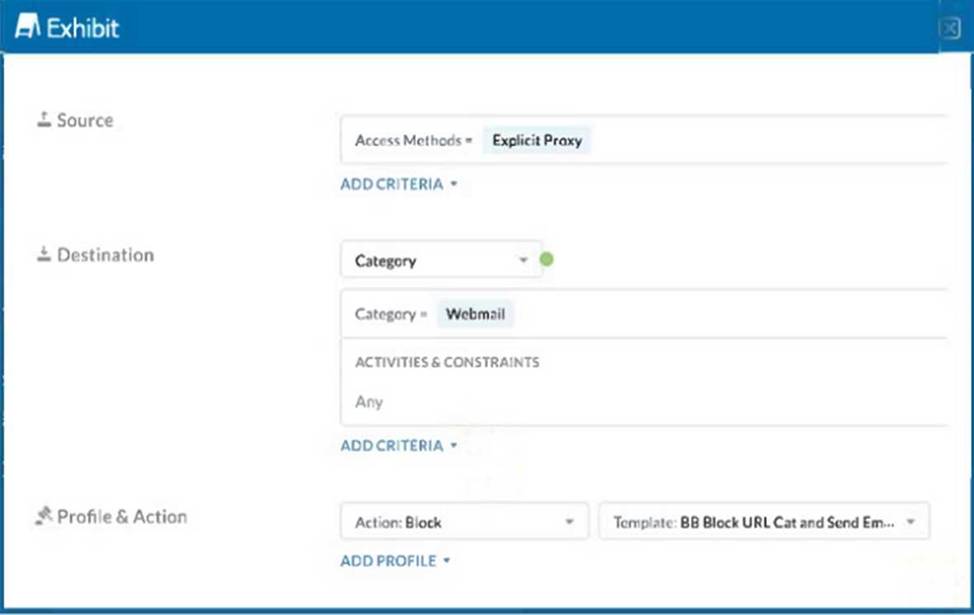
A user has the Netskope Client enabled with the correct steering configuration applied. The exhibit shows an inline policy that has a predefined webmail category blocked. However the user is still able to access Yahoo mail.
Which statement is correct in this scenario?
- A . The user is not part of the correct AD group or OU.
- B . The user is not steered using an explicit proxy.
- C . The webmail category does not include Yahoo mail when using an explicit proxy
- D . The user’s AD group must be added to the policy.
C
Explanation:
The given exhibit shows an inline policy blocking the predefined webmail category via an explicit proxy. However, the user can still access Yahoo Mail, indicating that Yahoo Mail is not included in the webmail category when using an explicit proxy.
Policy Configuration:
The policy is set to block access to the webmail category through an explicit proxy.
The action for this policy is ‘Block’.
Understanding the Webmail Category:
Netskope’s predefined categories may not always cover all services under a category, especially when it comes to specific configurations like explicit proxy.
The webmail category in the policy might not have included Yahoo Mail when using explicit proxy configurations.
Checking the Category Definitions:
It is important to verify what URLs or services are included under the "webmail" category in the Netskope administration console.
Administrators can check the category definitions and manually add Yahoo Mail if it’s not included by default.
Reference: REST API v2 Overview – Netskope Knowledge Portal
Using the REST API v2 dataexport Iterator Endpoints – Netskope Knowledge Portal Using the REST API v2 UCI Impact Endpoints – Netskope Knowledge Portal netskopesdk ・ PyPI
Netskope Rest APIv2(OAS 3.1) – Postman Collection
When designing an architecture with Netskope Private Access, which element guarantees connectivity between the Netskope cloud and the private application?
- A . Netskope Publisher
- B . API connector
- C . Third-party router with GRE/IPsec support
- D . Netskope Client
A
Explanation:
When designing an architecture with Netskope Private Access, the Netskope Publisher is the element that guarantees connectivity between the Netskope cloud and the private application. The Publisher acts as a gateway, securely connecting users to private applications hosted on-premises or in data centers.
Netskope Publisher: This component facilitates secure access to private applications by connecting the Netskope cloud with the internal network. It ensures that users can access private applications seamlessly while maintaining security and compliance.
Reference: Netskope documentation on Private Access and the role of the Publisher.
Best practices for configuring and deploying Netskope Publisher to ensure secure connectivity to private applications.
A user has performed a bulk delete activity.
In this scenario, which Netskope feature monitors potential risky users for a malicious activity that would cause data loss?
- A . Netskope’s Threat Protection inline policies
- B . Netskope’s Behavior Analytics rule-based policies
- C . Netskope’s API Data Protection policies
- D . Netskope’s Cloud Threat Exchange integration
B
Explanation:
Netskope’s Behavior Analytics rule-based policies are designed to monitor user behavior for patterns that may indicate risky or malicious activities, such as bulk deletions. These policies can identify anomalies in user behavior that deviate from the norm, flagging potential threats and taking appropriate actions to prevent data loss.
Netskope’s Behavior Analytics rule-based policies: This feature analyzes user actions and behaviors to detect anomalies and potentially malicious activities. It helps in identifying and mitigating risks associated with compromised accounts, insider threats, and other suspicious activities.
Reference: Netskope documentation on Behavior Analytics and its capabilities.
Security best practices for detecting and responding to insider threats and anomalous user behavior.
Your company started deploying the latest version of the Netskope Client and you want to track the progress and device count using Netskope.
Which two statements are correct in this scenario? (Choose two.)
- A . Use Netskope Digital Experience Management to monitor the status.
- B . Use the Devices page under Settings to view and filter the required data.
- C . Review the Group definitions under Settings to determine the number of deployed clients.
- D . Review the Steering Configuration to determine the number of deployed clients.
A, B
Explanation:
To track the progress and device count of the latest Netskope Client deployment, you can use the following methods:
Use Netskope Digital Experience Management to monitor the status:
Netskope Digital Experience Management (DEM) provides visibility into the performance and status of applications and devices. You can use this tool to monitor the deployment status and ensure that the new client version is being deployed correctly across the organization. Use the Devices page under Settings to view and filter the required data:
The Devices page in the Netskope console provides detailed information about all devices managed by Netskope. You can filter this data to view the specific deployment status of the latest Netskope Client version, helping you track the progress and identify any issues.
Reference: Netskope Knowledge Portal: Digital Experience Management
Netskope Knowledge Portal: Devices Page
What are two pillars of CASB? (Choose two.)
- A . visibility
- B . compliance
- C . cloud native
- D . SASE
A, B
Explanation:
Two pillars of CASB are visibility and compliance. CASB stands for Cloud Access Security Broker, which is a solution that provides visibility and control over cloud services and web traffic, as well as data and threat protection for cloud users and devices. Visibility is the capability to identify all cloud services in use and assess their risk factors, such as security, auditability, business continuity, etc. Compliance is the capability to ensure that cloud services and data meet the regulatory standards and policies of the organization or industry, such as GDPR, HIPAA, PCI DSS, etc.
Reference: What Is a Cloud Access Security Broker (CASB)? | MicrosoftCASB Guide: What are the 4 Pillars of CASB? – Security Service Edge
What are two characteristics of Netskope’s Private Access Solution? (Choose two.)
- A . It provides protection for private applications.
- B . It provides access to private applications.
- C . It acts as a cloud-based firewall.
- D . It requires on-premises hardware.
AB
Explanation:
Netskope’s Private Access Solution is a service that allows users to securely access private applications without exposing them to the internet or using VPNs. It provides protection for private applications by encrypting the traffic, enforcing granular policies, and preventing data exfiltration. It also provides access to private applications by creating a secure tunnel between the user’s device and the application’s server, regardless of their location or network. It does not act as a cloud-based firewall, as it does not filter or block traffic based on ports or protocols. It does not require on-premises hardware, as it is a cloud-native solution that leverages Netskope’s global network of points of presence (POPs).
Reference: [Netskope Private Access].