
Netskope NSK101 Practice Exams
Last updated on Oct 21,2026- Exam Code: NSK101
- Exam Name: Netskope Certified Cloud Security Administrator (NCCSA)
- Certification Provider: Netskope
- Latest update: Oct 21,2026
A customer wants to detect misconfigurations in their AWS cloud instances.
In this scenario, which Netskope feature would you recommend to the customer?
- A . Netskope Secure Web Gateway (SWG)
- B . Netskope Cloud Security Posture Management (CSPM)
- C . Netskope Advanced DLP and Threat Protection
- D . Netskope SaaS Security Posture Management (SSPM)
B
Explanation:
If a customer wants to detect misconfigurations in their AWS cloud instances, the Netskope feature that I would recommend to them is Netskope Cloud Security Posture Management (CSPM). Netskope CSPM is a service that provides continuous assessment and remediation of public cloud deployments for risks, threats, and compliance issues. Netskope CSPM leverages the APIs available from AWS and other cloud service providers to scan the cloud infrastructure for misconfigurations, such as insecure permissions, open ports, unencrypted data, etc. Netskope CSPM also provides security posture policies, profiles, and rules that can be customized to match the customer’s security standards and best practices. Netskope CSPM can also alert, report, or remediate the misconfigurations automatically or manually.
Reference: Netskope CSPMCloud Security Posture Management
Which statement is correct about Netskope’s Instance Awareness?
- A . It prevents users from browsing the Internet using outdated Microsoft Internet Explorer but allows them access if they use the latest version of Microsoft Edge.
- B . It identifies that a form hosted in Microsoft Forms belongs to the corporate Microsoft 365 tenant and not a tenant from a third party.
- C . It differentiates personal code from work-related code being uploaded to GitHub.
- D . It identifies if e-mails are being sent using Microsoft 365 through Outlook, Thunderbird, or the Web application in outlook.com.
B
Explanation:
Instance Awareness in Netskope provides visibility and control over instances of applications used by the organization. Specifically, it helps in differentiating between corporate and personal instances of the same application. This feature is particularly crucial in ensuring that corporate data is not uploaded to personal instances of applications and vice versa.
For example, it can identify that a form hosted in Microsoft Forms belongs to the corporate Microsoft 365 tenant, thereby preventing data from being mistakenly or maliciously sent to a third-party tenant. This ensures that only authorized instances of applications are used for corporate data, maintaining data security and compliance.
Reference: Using the REST API v2 UCI Impact Endpoints – Netskope Knowledge Portal
REST API v2 Overview – Netskope Knowledge Portal
Using the REST API v2 dataexport Iterator Endpoints – Netskope Knowledge Portal
Which two statements describe a website categorized as a domain generated algorithm (DGA)? (Choose two.)
- A . The website is used for domain registration.
- B . The domain contains malicious algorithms.
- C . The website is used to hide a command-and-control server.
- D . The domain was created by a program.
C, D
Explanation:
Two statements that describe a website categorized as a domain generated algorithm (DGA) are: The website is used to hide a command-and-control server and the domain was created by a program. A domain generated algorithm (DGA) is a technique used by cyber attackers to generate new domain names and IP addresses for malware’s command and control servers. Executed in a manner that seems random, it makes it nearly impossible for threat hunters to detect and contain the attack. A command-and-control server is a server that communicates with malware installed on infected machines and sends commands or updates to them. A program is a piece of software that performs a specific task or function. A domain generated algorithm is implemented by a program that runs on the attacker’s machine or the malware itself, and produces a large number of domain names based on some logic, such as date, time, seed, dictionary, etc.
Reference: Domain generation algorithmAmong cyber-attack techniques, what is a DGA?
Which Netskope platform component uses NewEdge Traffic Management for traffic steering?
- A . Cloud Exchange
- B . Client
- C . Data Plane On-Premises
- D . Explicit Proxy Over Tunnel
B
Explanation:
NewEdge Traffic Management:
NewEdge is Netskope’s high-performance global network designed to deliver fast and secure access to the internet and cloud applications.
NewEdge Traffic Management ensures efficient routing and traffic steering for optimal performance and security.
Client Integration:
The Netskope Client uses NewEdge Traffic Management to steer traffic securely to the Netskope cloud.
It ensures that user traffic is routed through the best possible path for performance and security.
The Client component is responsible for redirecting user traffic to the NewEdge network, applying security policies, and ensuring secure access.
Reference: For detailed information on NewEdge Traffic Management and how the Netskope Client utilizes it, refer to the Netskope documentation on traffic management and client configuration.
Referring to the exhibit.
Click the Exhibit button.
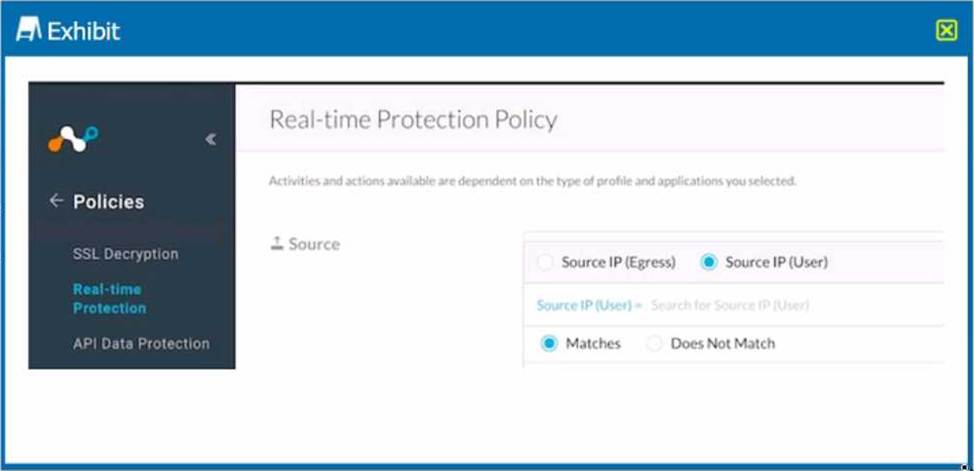
Which statement accurately describes the difference between Source IP (Egress) and Source IP (User) address?
- A . Source IP (Egress) is the IP address of the destination Web server while Source IP (User) is the IP address assigned to your network.
- B . Source IP (Egress) is the IP address assigned to the endpoint host IP address while Source IP (User) is the public IP address of your Internet edge router.
- C . You must always leave the source IP fields blank and configure the user identity as a source criteria.
- D . Source IP (Egress) is the public IP address of your Internet edge router while Source IP (User) is the address assigned to the endpoint.
D
Explanation:
The statement that accurately describes the difference between Source IP (Egress) and Source IP (User) address is: Source IP (Egress) is the public IP address of your Internet edge router while Source IP (User) is the address assigned to the endpoint. Source IP (Egress) is the IP address that is visible to external networks when you send traffic from your network to the Internet. It is usually the IP address of your Internet edge router or gateway that performs NAT (Network Address Translation). Source IP (User) is the IP address that is assigned to your endpoint device, such as a laptop or a smartphone, within your network. It is usually a private IP address that is not routable on the Internet. You can use these two criteria to filter traffic based on where it originates from within your network or outside your network.
Reference: Source Address / Source Port vs Destination Address / Destination PortHow to explain Source IP Address, Destination IP Address & Service in easy way
Your organization has recently implemented Netskope Private Access. During an investigation, your security team has asked you to provide a list of all hosts including domains and IP addresses that a user accessed through Netskope Private Access for the past seven days.
Which two locations in the Netskope Web UI would allow you to obtain and export the requested data? (Choose two.)
- A . Private Apps page in SkopeIT
- B . Users page in SkopeIT
- C . Network Events page in SkopeIT
- D . Transaction Events collection in Advanced Analytics
AC
Explanation:
To obtain and export a list of all hosts including domains and IP addresses that a user accessed through Netskope Private Access for the past seven days, you can follow these steps:
Access the Netskope Web UI: Log in to your Netskope admin console.
Navigate to SkopeIT:
Go to the SkopeIT section in the Netskope admin console.
Private Apps page in SkopeIT:
In the SkopeIT section, navigate to the "Private Apps" page.
Here, you can find detailed information about the private applications accessed by users, including the domains and IP addresses.
Use the filter options to specify the user and the time range (past seven days). Export the data as needed for your investigation. Network Events page in SkopeIT:
In the SkopeIT section, navigate to the "Network Events" page.
This page provides a comprehensive list of network events, including details about the hosts accessed through Netskope Private Access.
Again, use the filter options to specify the user and the time range.
Export the data for reporting purposes.
These two locations within the SkopeIT section of the Netskope Web UI will provide you with the necessary data to meet your security team’s requirements.
Reference: Netskope Knowledge Portal: Using SkopeIT for Network and Private Apps Analysis.
Your department is asked to report on GDPR data publicly exposed in Microsoft 365, Salesforce. and Slack-sanctioned cloud applications.
Which deployment model would you use to discover this data?
- A . reverse proxy
- B . on-premises appliance
- C . API-enabled protection
- D . inline protection
C
Explanation:
To discover GDPR data publicly exposed in Microsoft 365, Salesforce, and Slack-sanctioned cloud applications, you need to use a deployment model that allows Netskope to access and scan the data stored in these applications using out-of-band API connections. The deployment model that would match this requirement is API-enabled protection, which is a feature in the Netskope platform that allows you to connect your sanctioned cloud applications to Netskope using API connectors. This enables you to discover sensitive data, enforce near real-time policy controls, and quarantine malware in your cloud applications without affecting user experience or performance. You can use Netskope’s data loss prevention (DLP) engine to scan for GDPR data in your cloud applications and identify any public exposure or sharing settings that may violate the regulation. A reverse proxy, an on-premises appliance, or an inline protection are not deployment models that would help you discover GDPR data publicly exposed in your sanctioned cloud applications, as they are more suitable for inline modes that rely on intercepting traffic to and from these applications in real time, rather than accessing data stored in these applications using APIs.
Reference: [Netskope SaaS API-enabled Protection], [Netskope Data Loss Prevention].
Which two capabilities are part of Netskope’s Adaptive Zero Trust Data Protection? (Choose two.)
- A . contextual risk awareness
- B . continuous adaptive policies
- C . continuous enforcement of all policies
- D . contextual metadata storage
A, B
Explanation:
Adaptive Zero Trust Data Protection Overview:
Netskope’s Adaptive Zero Trust Data Protection ensures that data is protected based on continuous risk assessments and adaptive policies that respond to changing contexts and threats.
Contextual Risk Awareness:
This capability involves understanding the context around data access and usage to assess risk dynamically.
Netskope leverages various signals such as user behavior, device security posture, location, and other factors to gauge risk levels.
By continuously evaluating these factors, Netskope can enforce appropriate security measures in real-time.
Continuous Adaptive Policies:
Policies in the Netskope platform adapt continuously based on the assessed risk and changing contexts.
These policies are not static; they evolve based on ongoing risk assessments and threat intelligence. Adaptive policies ensure that security measures are always aligned with the current threat landscape and organizational requirements.
Reference: For detailed capabilities and how they are implemented, refer to the Netskope documentation on Adaptive Zero Trust Data Protection.
What are two reasons why legacy solutions, such as on-premises firewalls and proxies, fail to secure the data and data access compared to Netskope Secure Web Gateway? (Choose two.)
- A . Legacy solutions are unable to see the user who is trying to access the application.
- B . The applications where the data resides are no longer in one central location.
- C . Legacy solutions do not meet compliance standards.
- D . The users accessing this data are not in one central place.
BD
Explanation:
Legacy solutions, such as on-premises firewalls and proxies, fail to secure the data and data access compared to Netskope Secure Web Gateway because they are designed for a perimeter-based security model, where the applications and the users are both within the corporate network. However, with the rise of cloud computing and remote work, this model is no longer valid. The applications where the data resides are no longer in one central location, but distributed across multiple cloud services and regions. The users accessing this data are not in one central place, but working from anywhere, on any device. Legacy solutions cannot provide adequate visibility and control over this dynamic and complex environment, resulting in security gaps and performance issues. Netskope Secure Web Gateway, on the other hand, leverages a cloud-native architecture that provides high-performance and scalable inspection of traffic from any location and device, as well as granular policies and advanced threat and data protection for web and cloud applications.
Reference: Netskope Architecture OverviewNetskope Next Gen SWG
A company user cannot open a sports news site. You want to review the category of the website and see how the rules are applied even though this category is allowed. In this scenario, which action will accomplish this task?
- A . Use the Forensic profile
- B . Use www.netskope.com/url-lookup.
- C . Use the URL Lookup page in the dashboard.
- D . Verify with your own computer and use Advanced Debugging.
C
Explanation:
To review the category of a website and understand how the rules are applied, the following action can be taken:
Use the URL Lookup page in the dashboard: The URL Lookup page in the Netskope dashboard allows administrators to enter a URL and view its categorization. This tool provides information on how the website is classified and which policies apply to it. It helps in troubleshooting why a user might be unable to access a specific site, even if the category is generally allowed.
Reference: Netskope documentation on using the URL Lookup tool to review website categories and policy applications.
Guidelines for troubleshooting web access issues using the Netskope dashboard tools.