
Netskope NSK101 Practice Exams
Last updated on Oct 21,2026- Exam Code: NSK101
- Exam Name: Netskope Certified Cloud Security Administrator (NCCSA)
- Certification Provider: Netskope
- Latest update: Oct 21,2026
Which three security controls are offered by the Netskope Cloud platform? (Choose three.)
- A . identity lifecycle management
- B . data loss prevention for SMTP
- C . cloud security posture management
- D . endpoint anti-malware
- E . threat protection
BCE
Explanation:
Three security controls that are offered by the Netskope Cloud platform are:
C. cloud security posture management,
E. threat protection, and
B. data loss prevention for SMTP.
Cloud security posture management is a service that provides continuous assessment and remediation of public cloud deployments for risks, threats, and compliance issues. Netskope CSPM leverages the APIs available from cloud service providers such as AWS, Azure, and GCP to scan the cloud infrastructure for misconfigurations, such as insecure permissions, open ports, unencrypted data, etc. Netskope CSPM also provides security posture policies, profiles, and rules that can be customized to match the security standards and best practices of the organization or industry.
Threat protection is a capability to detect and block malware, ransomware, phishing, and other cyber threats that may compromise cloud data or users. Netskope threat protection uses advanced techniques such as machine learning, sandboxing, threat intelligence, and behavioral analysis to identify and prevent malicious activities in real time. Netskope threat protection also integrates with third-party solutions such as antivirus engines, firewalls, SIEMs, etc., to provide comprehensive defense across the cloud and web1.
Data loss prevention for SMTP is a feature that allows you to protect sensitive data that is sent or received via email. Netskope DLP for SMTP can scan email messages and attachments for predefined or custom data patterns, such as credit card numbers, social security numbers, health records, etc., and apply appropriate actions, such as block, quarantine, encrypt, notify, etc., based on the DLP policies. Netskope DLP for SMTP can also support multiple email domains and routing rules for different groups of users2.
You have applied a DLP Profile to block all Personally Identifiable Information data uploads to Microsoft 365 OneDrive. DLP Alerts are not displayed and no OneDrive-related activities are displayed in the Skope IT App Events table.
In this scenario, what are two possible reasons for this issue? (Choose two.)
- A . The Cloud Storage category is in the Steering Configuration as an exception.
- B . The destination domain is excluded from decryption in the decryption policy.
- C . A Netskope POP is not in your local country and therefore DLP policies cannot be applied.
- D . DLP policies do not apply when using IPsec as a steering option.
AB
Explanation:
If the Cloud Storage category is in the Steering Configuration as an exception, then Netskope will not steer any traffic to or from cloud storage applications, such as Microsoft 365 OneDrive, to its platform. This means that Netskope will not be able to inspect or apply any policies to this traffic, including DLP policies. Similarly, if the destination domain is excluded from decryption in the decryption policy, then Netskope will not decrypt any traffic to or from that domain, such as onedrive.com. This means that Netskope will not be able to inspect or apply any policies to this traffic, including DLP policies. The location of the Netskope POP or the use of IPsec as a steering option do not affect the application of DLP policies, as long as Netskope can steer and decrypt the relevant traffic.
Reference: Netskope Security Cloud Operation & Administration (NSCO&A) – Classroom Course, Module 3: Steering Configuration, Lesson 1: Steering Options and Lesson 2: Exceptions; Module 4: Decryption Policy, Lesson 1: Decryption Policy Overview and Lesson 2: Decryption Policy Configuration.
: https://www.bsimm.com/: https://www.iso.org/isoiec-27001-information-security.html:
https://www.dasca.org/: https://www.nist.gov/cyberframework
Which Netskope component would an administrator use to see an overview of private application usage and performance?
- A . Digital Experience Management
- B . Publishers page
- C . Incident Management
- D . Cloud Exchange
A
Explanation:
An administrator would use the Digital Experience Management (DEM) component to see an overview of private application usage and performance. DEM provides comprehensive insights into the performance and user experience of private applications, including metrics on latency, bandwidth, and application health.
Digital Experience Management (DEM): This component focuses on monitoring and optimizing the user experience for private and public applications by collecting detailed performance data and providing actionable insights.
The other options do not provide the same level of detailed performance and usage overview for private applications:
Publishers page: Typically used for managing and configuring Netskope Publishers.
Incident Management: Focuses on tracking and resolving security incidents.
Cloud Exchange: Deals with integrations and data sharing between Netskope and other security solutions.
Reference: Netskope documentation on Digital Experience Management and its capabilities.
Best practices for using DEM to monitor application performance and enhance user experience.
Exhibit
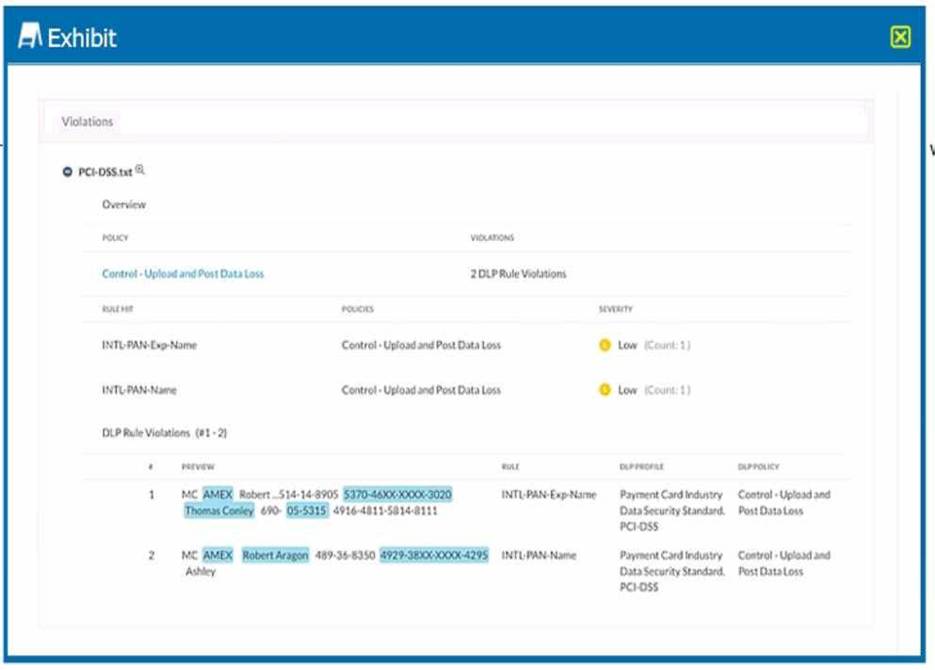
Which portion of the interface shown in the exhibit allows an administrator to set severity, assign ownership, track progress, and perform forensic analysis with excerpts of violating content?
- A . Skope IT-> Alerts
- B . Incidents -> DLP
- C . API-enabled Protection -> Inventory
- D . Reports -> New Report
B
Explanation:
The portion of the interface shown in the exhibit that allows an administrator to set severity, assign ownership, track progress, and perform forensic analysis with excerpts of violating content is Incidents -> DLP. The Incidents dashboard provides a comprehensive view of all the incidents that have occurred in your cloud environment, such as DLP violations, malware infections, anomalous activities, etc. You can filter the incidents by various criteria, such as app name, incident type, severity, user name, etc. You can also drill down into each incident to see more details, such as file name, file path, file owner, file size, file type, etc. You can also assign an owner to an incident, change its status and severity, add notes or comments, and view the excerpts of the violating content that triggered the DLP policy.
Reference: Netskope Incidents Dashboard
API-enabled Protection traffic is sent to which Netskope component?
- A . Netskope Publisher
- B . Netskope Management Plane
- C . Netskope Data Plane
- D . Netskope Reverse Proxy
C
Explanation:
API-enabled Protection traffic is sent to the Netskope Data Plane. The Netskope Data Plane is responsible for processing and inspecting data in real-time, applying security policies, and ensuring that the traffic conforms to organizational policies.
Netskope Data Plane: This component handles the inline inspection and enforcement of security policies, including API-enabled protection. It ensures that all traffic is securely processed and monitored according to the defined policies.
Reference: Netskope architecture documentation describing the roles of different components.
Detailed guides on how API-enabled protection integrates with the Netskope Data Plane for real-time traffic inspection.
Click the Exhibit button.
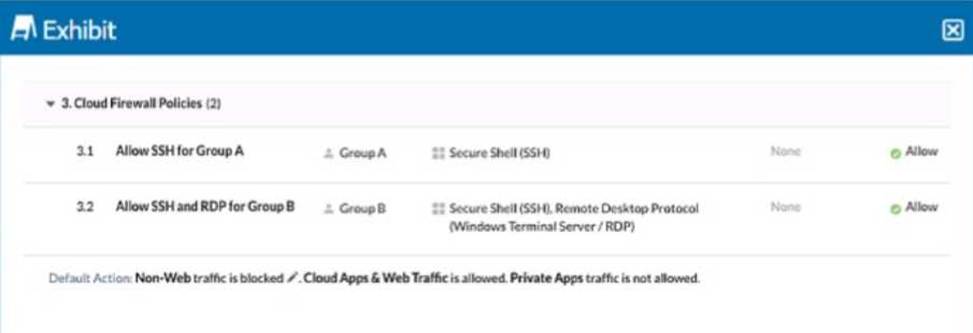
You configured a set of Cloud Firewall policies as shown in the exhibit and changed your Steering Configuration to All Traffic for Group A and Group B. Users in Group A report that they are unable to access a third-party server using TCP port 3389.
Referring to the exhibit, which action correctly describes how you would allow these connections without allowing unnecessary access?
- A . Add Group A to the Group B Allow policy.
- B . Create an Allow policy using a custom application including the destination IP and TCP port 3389.
- C . Move the Group B Allow policy above the Group A Allow policy.
- D . Change the default action to Allow.
B
Explanation:
The exhibit shows that Group A is allowed only SSH traffic, while Group B is allowed both SSH and RDP traffic. Since users in Group A need access to a third-party server using TCP port 3389 (RDP), you need to create a specific policy to allow this traffic without granting unnecessary access.
Creating an Allow policy using a custom application that includes the destination IP and TCP port 3389 will precisely target the required traffic and ensure that only the necessary connections are permitted. This method avoids broader policy changes that could introduce unnecessary access.
Reference: Netskope documentation on creating and managing Cloud Firewall policies.
Best practices for configuring application-specific policies to control network traffic effectively.
You want to prevent Man-in-the-Middle (MITM) attacks on an encrypted website or application.
In this scenario, which method would you use?
- A . Use a stronger encryption algorithm.
- B . Use certificate pinning.
- C . Use a proxy for the connection.
- D . Use a weaker encryption algorithm.
B
Explanation:
To prevent Man-in-the-Middle (MITM) attacks on an encrypted website or application, one method that you can use is certificate pinning. Certificate pinning is a technique that restricts which certificates are considered valid for a particular website or application, limiting risk. Instead of allowing any trusted certificate to be used, operators "pin" the certificate authority (CA) issuer(s), public keys or even end-entity certificates of their choice. Certificate pinning helps to prevent MITM attacks by validating the server certificates against a hardcoded list of certificates in the website or application. If an attacker tries to intercept or modify the traffic using a fraudulent or compromised certificate, it will be rejected by the website or application as invalid, even if it is signed by a trusted CA.
Reference: Certificate pinning – IBMCertificate and Public Key Pinning | OWASP Foundation
You investigate a suspected malware incident and confirm that it was a false alarm.
- A . In this scenario, how would you prevent the same file from triggering another incident?
- B . Quarantine the file. Look up the hash at the VirusTotal website.
- C . Export the packet capture to a pcap file.
- D . Add the hash to the file filter.
D
Explanation:
A file filter is a list of file hashes that you can use to exclude files from inspection by Netskope. By adding the hash of the file that triggered a false alarm to the file filter, you can prevent it from being scanned again by Netskope and avoid generating another incident. Quarantining the file, exporting the packet capture, or looking up the hash at VirusTotal are not effective ways to prevent the same file from triggering another incident, as they do not affect how Netskope handles the file.
Reference: Netskope Security Cloud Operation & Administration (NSCO&A) – Classroom Course, Module 6: Data Loss Prevention, Lesson 2: File Filters.
What are two uses for deploying a Netskope Virtual Appliance? (Choose two.)
- A . to use as a log parser to discover in-use cloud applications
- B . to use as a local reverse proxy to secure a SaaS application
- C . to use as an endpoint for Netskope Private Access (NPA)
- D . to use as a secure way to generate Exact Data Match hashes
A, C
Explanation:
Deploying a Netskope Virtual Appliance (NPA) can serve multiple purposes within an organization’s security infrastructure. Two key uses are:
To use as a log parser to discover in-use cloud applications:
The Netskope Virtual Appliance can be deployed to parse logs from various sources, including firewalls, proxies, and other network devices. By analyzing these logs, the appliance can discover and identify cloud applications that are being used within the network. This provides visibility into shadow IT and helps in managing and securing cloud application usage.
To use as an endpoint for Netskope Private Access (NPA):
The virtual appliance can act as an endpoint for Netskope Private Access, enabling secure access to private applications hosted in data centers or public clouds. It facilitates the establishment of secure, direct connections between users and the applications they need to access, without exposing the applications to the public internet.
Reference: Netskope Knowledge Portal: Deploying Virtual Appliances Netskope Private Access Overview
A company is attempting to steer traffic to Netskope using GRE tunnels. They notice that after the initial configuration, users cannot access external websites from their browsers.
What are three probable causes for this issue? (Choose three.)
- A . The pre-shared key for the GRE tunnel is incorrect.
- B . The configured GRE peer in the Netskope platform is incorrect.
- C . The corporate firewall might be blocking GRE traffic.
- D . The route map was applied to the wrong router interface.
- E . Netskope does not support GRE tunnels.
BCD
Explanation:
In this scenario, there are three probable causes for the issue of users not being able to access external websites from their browsers after attempting to steer traffic to Netskope using GRE tunnels. One cause is that the configured GRE peer in the Netskope platform is incorrect, which means that the Netskope POP that is supposed to receive the GRE traffic from the customer’s network is not matching the IP address of the customer’s router that is sending the GRE traffic. This will result in a failure to establish a GRE tunnel between the customer and Netskope. Another cause is that the corporate firewall might be blocking GRE traffic, which means that the firewall rules are not allowing the GRE protocol (IP protocol number 47) or the UDP port 4789 (for VXLAN encapsulation) to pass through. This will result in a failure to send or receive GRE packets between the customer and Netskope. A third cause is that the route map was applied to the wrong router interface, which means that the configuration that specifies which traffic should be steered to Netskope using GRE tunnels was not applied to the correct interface on the customer’s router. This will result in a failure to steer the desired traffic to Netskope. The pre-shared key for the GRE tunnel is incorrect is not a probable cause for this issue, as GRE tunnels do not use pre-shared keys for authentication or encryption. Netskope does support GRE tunnels, so this is not a cause for this issue either.
Reference: [Netskope Secure Forwarder], Netskope Security Cloud Operation & Administration (NSCO&A) – Classroom Course, Module 3: Steering Configuration, Lesson 3: Secure Forwarder.