
Netskope NSK101 Practice Exams
Last updated on Oct 21,2026- Exam Code: NSK101
- Exam Name: Netskope Certified Cloud Security Administrator (NCCSA)
- Certification Provider: Netskope
- Latest update: Oct 21,2026
Click the Exhibit button.
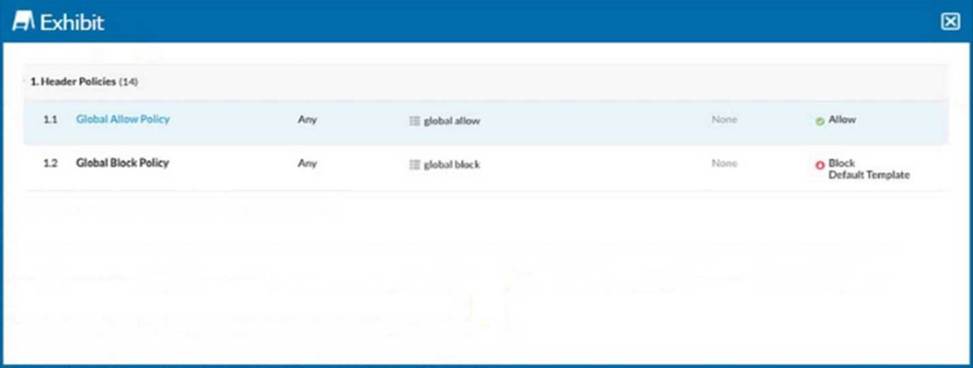
Referring to the exhibit, you have a user reporting that a blocked website is needed for legitimate business reasons. Upon review, you determine that the user has been blocked by the Global Block policy. You need to create an exception forthat domain. You create a custom URL list that includes the domain.
In this scenario, which two actions would allow this access? (Choose two.)
- A . Create a custom category with the custom URL list as an included URL list and add it to an allow policy below the triggered Global Block policy.
- B . Create a custom category with the custom URL list as an included URL list and add it to an allow policy above the triggered Global Block policy.
- C . Add the custom URL list as an excluded URL list to the category in the Global Allow policy.
- D . Add the custom URL list as an excluded URL list to the category in the Global Block policy.
B, C
Explanation:
Identify the Blocked Policy: According to the exhibit, the website is blocked by the "Global Block Policy."
Create a Custom URL List: To create an exception for the domain, you need to first create a custom URL list that includes the domain in question.
Navigate to the URL List section in the Netskope UI.
Create a new URL list and add the domain that needs to be allowed.
Option B: Create a custom category with the custom URL list as an included URL list and add it to an allow policy above the Global Block policy.
Go to the Policy section in the Netskope UI.
Create a new policy, ensuring it is an "Allow" policy.
Add the custom category to this allow policy.
Position this allow policy above the Global Block policy to ensure it takes precedence.
This ensures that the URLs in the custom list are allowed before the Global Block policy is evaluated.
Option C: Add the custom URL list as an excluded URL list to the category in the Global Block policy.
Edit the existing Global Block policy.
Add the custom URL list to the excluded URL list section of this policy.
This will exclude the URLs in the custom list from being blocked by the Global Block policy.
Reference: Refer to the Netskope Knowledge Portal for managing custom URL lists and policy configurations.
Click the Exhibit button.
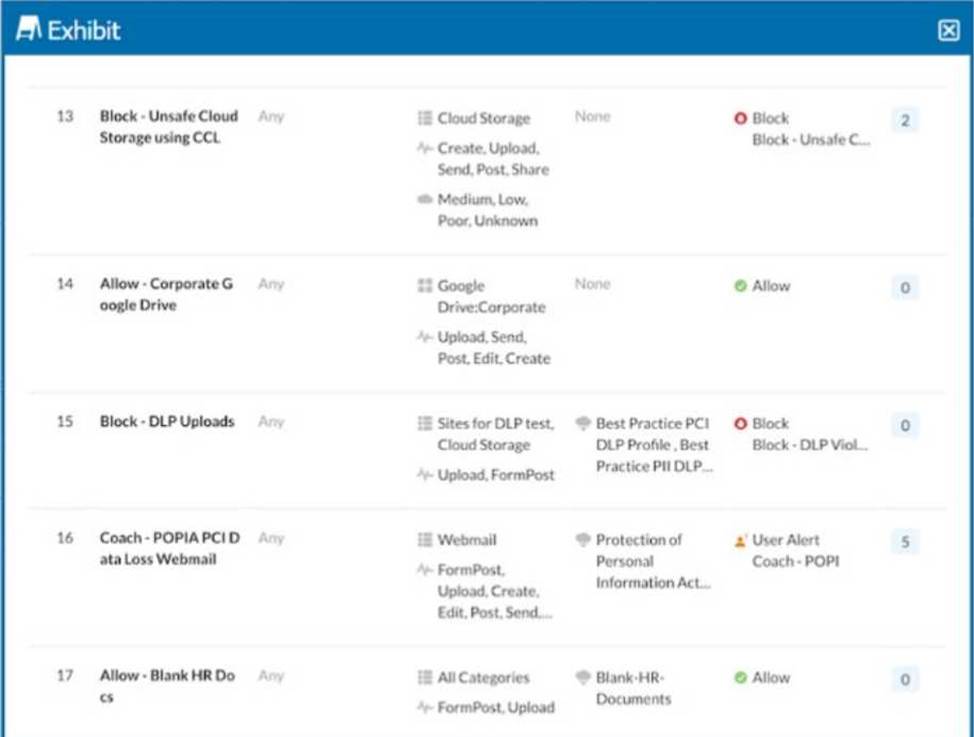
A user is uploading a file containing PCI-DSS data to the corporate Google Drive instance. You notice that the upload is not blocked by the policy shown in the exhibit.
Which statement is correct in this scenario?
- A . The policy is not applied to the correct user group.
- B . The policy is not applied to the correct URL category.
- C . The policy is not applied in the correct order.
- D . The policy is not applied to the correct application activity.
C
Explanation:
In the exhibit, a user is uploading a file containing PCI-DSS data to the corporate Google Drive
instance. Despite the policy that blocks DLP (Data Loss Prevention) uploads being active, the upload is not blocked. This indicates that the policy is not applied in the correct order.
Netskope applies policies in a top-down manner. If there are multiple policies that could apply to an action, the order in which the policies are evaluated is crucial. In this case, another policy might be allowing the upload before the DLP policy can block it. Ensuring that the DLP policy is higher in the order can resolve this issue.
Reference: Netskope policy configuration and enforcement documentation.
Details on how Netskope processes and applies policies based on their order in the policy list.
In which two scenarios would you use SD-WAN technology? (Choose two.)
- A . to differentiate between corporate and personal SaaS applications
- B . to optimize utilization and performance across multiple Internet connections
- C . to ensure a user’s corporate laptop has all of the required security compliance software in place
- D . to replace dedicated MPLS connections with multiple broadband WAN and mobile options
B, D
Explanation:
SD-WAN technology is used in the following scenarios:
To optimize utilization and performance across multiple Internet connections:
SD-WAN allows organizations to aggregate multiple Internet connections and optimize traffic flow based on application requirements and network conditions. This improves overall network performance and ensures efficient use of available bandwidth.
To replace dedicated MPLS connections with multiple broadband WAN and mobile options:
SD-WAN provides the flexibility to use a mix of broadband, LTE, and other connectivity options to replace traditional MPLS circuits. This can significantly reduce costs and improve agility in network deployment and management.
Reference: Netskope Knowledge Portal: SD-WAN Integration
Netskope Knowledge Portal: Benefits of SD-WAN
What information is displayed in an application’s Cloud Confidence Index (CCI) page? (Choose two.)
- A . top users by sessions
- B . policy violations
- C . GDPR readiness
- D . stock price
A, C
Explanation:
The Cloud Confidence Index (CCI) page in Netskope provides various metrics and information about an application.
Among these, the two relevant pieces of information displayed are:
Top users by sessions: This metric provides insights into which users are most active within the application, giving a view of user engagement and activity levels.
GDPR readiness: This metric indicates how well the application complies with GDPR regulations, providing a readiness score or status based on the app’s handling of personal data.
These metrics help administrators and security professionals to evaluate the usage and compliance status of cloud applications.
Reference: Using the REST API v2 UCI Impact Endpoints.
Netskope Knowledge Portal: Dataexport Iterator Endpoints.
When comparing data in motion with data at rest, which statement is correct?
- A . Data at rest requires API integration.
- B . Data in motion requires API integration.
- C . Data at rest cannot be scanned for malware until a user opens the file.
- D . Data in motion requires the Netskope client.
D
Explanation:
When comparing data in motion with data at rest, it is important to understand how each type of data is handled in terms of security and monitoring:
Data in motion refers to data actively moving from one location to another, such as through email, instant messaging, or any other form of communication over the internet. To secure and monitor data in motion, Netskope typically requires the deployment of the Netskope client on user devices. The client helps enforce security policies, monitor data transfers, and protect against data loss and other threats during the data’s transit.
Reference: Netskope Knowledge Portal: Data Protection
Netskope Client Overview
You are working with a large retail chain and have concerns about their customer data. You want to protect customer credit card data so that it is never exposed in transit or at rest.
In this scenario, which regulatory compliance standard should be used to govern this data?
- A . SOC 3
- B . PCI-DSS
- C . AES-256
- D . ISO 27001
B
Explanation:
PCI-DSS stands for Payment Card Industry Data Security Standard, which is a set of security requirements for organizations that handle credit card data. It aims to protect cardholder data from unauthorized access, disclosure, or theft, both in transit and at rest. PCI-DSS covers various aspects of security, such as encryption, authentication, firewall, logging, monitoring, and incident response. If you are working with a large retail chain and have concerns about their customer data, you should use PCI-DSS as the regulatory compliance standard to govern this data. SOC 3, AES-256, and ISO 27001 are not specific to credit card data protection, although they may have some relevance to general security practices.
Reference: [PCI-DSS], [SOC 3], [AES-256], [ISO 27001].
How do you provision users to your customer’s Netskope tenant? (Choose two.)
- A . Use Microsoft Intune.
- B . Use the AD Connector.
- C . Use SCIM.
- D . Use the Directory Importer.
B, D
Explanation:
To provision users to your customer’s Netskope tenant, two methods that you can use are: use the AD Connector and use SCIM. The AD Connector is a tool that allows you to synchronize users and groups from your Active Directory (AD) domain to your Netskope tenant. The AD Connector runs as a Windows service on a machine that has access to your AD domain controller. The AD Connector periodically queries your AD domain for any changes in users and groups and updates them in your Netskope tenant accordingly. The AD Connector also supports filtering users and groups based on attributes or organizational units (OUs). SCIM stands for System for Cross-domain Identity Management, which is a standard protocol for managing user identities across different applications and services. SCIM allows you to provision users and groups from your identity provider (IdP), such as Azure AD or Okta, to your Netskope tenant using APIs. SCIM also supports creating, updating, deleting, and searching users and groups in your Netskope tenant based on your IdP’s configuration.
Reference: Netskope AD ConnectorUser Provisioning with Azure AD
You are required to mitigate malicious scripts from being downloaded into your corporate devices every time a user goes to a website. Users need to access websites from a variety of categories, including new websites.
Which two actions would help you accomplish this task while allowing the user to work? (Choose two.)
- A . Allow the user to browse uncategorized domains but restrict edit activities.
- B . Block malware detected on download activity for all remaining categories.
- C . Block known bad websites and enable RBI to uncategorized domains.
- D . Allow a limited amount of domains and block everything else.
B, C
Explanation:
To mitigate malicious scripts from being downloaded into your corporate devices every time a user goes to a website, you need to use Netskope’s threat protection features to block or isolate potentially harmful web traffic. Two actions that would help you accomplish this task while allowing the user to work are: block malware detected on download activity for all remaining categories and block known bad websites and enable RBI to uncategorized domains. The first action will prevent any files that contain malware from being downloaded to your devices from any website category, except those that are explicitly allowed or excluded by your policies. The second action will prevent any websites that are classified as malicious or phishing by Netskope from being accessed by your users and enable Remote Browser Isolation (RBI) to uncategorized domains, which are domains that have not been assigned a category by Netskope. RBI is a feature that allows users to browse websites in a virtual browser hosted in the cloud, without exposing their devices to any scripts or content from the website. Allowing the user to browse uncategorized domains but restrict edit activities or allowing a limited amount of domains and block everything else are not effective actions, as they may either limit the user’s productivity or expose them to unknown risks.
Reference: [Netskope Threat Protection], [Netskope Remote Browser Isolation].
Click the Exhibit button.
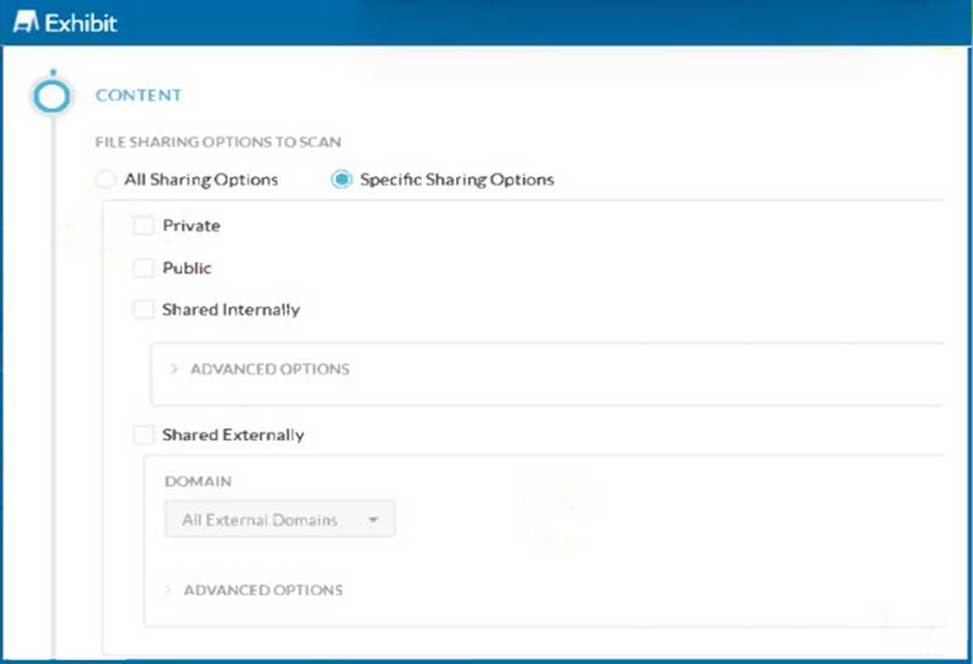
A customer has created a CASB API-enabled Protection policy to detect files containing sensitive data that are shared outside of their organization.
Referring to the exhibit, which statement is correct?
- A . The administrator needs to use Shared Externally as the only shared option.
- B . The administrator needs to use Shared Externally and Public as the shared options.
- C . The administrator must select Private as the only shared option.
- D . The administrator needs to use Public as the only shared option.
B
Explanation:
To detect files containing sensitive data that are shared outside of the organization, the administrator should select both "Shared Externally" and "Public" sharing options. These settings ensure that any files shared externally (outside the organization) or publicly are scanned for sensitive data. This comprehensive approach covers all potential scenarios where data could be exposed outside the organization.
Step-by-Step Configuration:
Select Specific Sharing Options:
Navigate to the CASB API-enabled Protection policy configuration page.
Choose the option for "Specific Sharing Options" to limit the scan to files shared under certain conditions.
Enable Shared Externally and Public:
Check both "Shared Externally" and "Public" options. This setting ensures that files shared either publicly or with external domains are included in the scan.
Configure Advanced Options:
For further granularity, configure the advanced options under each sharing type if needed (e.g., specifying particular external domains).
This configuration aligns with the best practices for CASB policies and ensures that all files potentially leaving the organization are scanned for sensitive data.
Reference: Netskope CASB Policy Configuration Documentation
You need to provide a quick view under the Skope IT Applications page showing only risky shadow IT cloud applications being used.
In this scenario, which two filter combinations would you use to accomplish this task? (Choose two.)
- A . Sanctioned = No
- B . CCL = High. Under Research
- C . User Device Type = Windows Device
- D . CCL = Medium. Low, Poor
A, D
Explanation:
To provide a quick view under the Skope IT Applications page showing only risky shadow IT cloud applications being used, you can use two filter combinations: Sanctioned = No and CCL = Medium, Low, Poor. The Sanctioned filter allows you to select whether you want to see only sanctioned or unsanctioned apps in your organization. Sanctioned apps are those that are approved and managed by your IT department, while unsanctioned apps are those that are used without authorization or oversight by your employees. Shadow IT refers to the use of unsanctioned apps that may pose security or compliance risks for your organization. The CCL filter allows you to select the Cloud Confidence Level (CCL) ratings of the apps you want to see. The CCL rating is a measure of how enterprise-ready a cloud app is based on various criteria such as security, auditability, business continuity, etc. The CCL rating ranges from Excellent to Poor, with Excellent being the most secure and compliant and Poor being the least. Risky cloud apps are those that have a low CCL rating, such as Medium, Low, or Poor. By applying these two filters, you can narrow down the list of apps to only those that are unsanctioned and have a low CCL rating, which indicates that they are risky shadow IT cloud applications being used in your organization.
Reference: SkopeIT ApplicationsNetskope Cloud Confidence Index