
Microsoft SC-401 Practice Exams
Last updated on Nov 16,2026- Exam Code: SC-401
- Exam Name: Administering Information Security in Microsoft 365
- Certification Provider: Microsoft
- Latest update: Nov 16,2026
You need to be alerted when users share sensitive documents from Microsoft OneDrive to any users outside your company.
What should you do?
- A . From the Microsoft Purview portal create an insider risk policy
- B . From the Microsoft Defender portal create a file policy
- C . From the Microsoft Defender portal, create an activity policy.
- D . From the Microsoft Purview portal, start a data investigation.
B
Explanation:
An activity policy in Microsoft Defender for Cloud Apps (Microsoft Defender portal) allows you to track and alert on specific user actions, such as sharing sensitive documents externally from OneDrive. This policy can detect file-sharing activities and send alerts when files are shared with external users, which meets the requirement.
Your company has a Microsoft 365 tenant.
The company performs annual employee assessments. The assessment results are recorded in a document named AssessmentTemplate.docx that is created by using a Microsoft Word template.
Copies of the employee assessments are sent to employees and their managers.
The assessment copies are stored in mailboxes, Microsoft SharePoint Online sites, and OneDrive folders. A copy of each assessment is also stored in a SharePoint Online folder named Assessments.
You need to create a data loss prevention (DLP) policy that prevents the employee assessments from being emailed to external users. You will use a document fingerprint to identify the assessment documents. The solution must minimize effort.
What should you include in the solution?
- A . Create a fingerprint of AssessmentTemplate.docx.
- B . Create a sensitive info type that uses Exact Data Match (EDM).
- C . Import 100 sample documents from the Assessments folder to a seed folder.
- D . Create a fingerprint of 100 sample documents in the Assessments folder.
A
Explanation:
Since all employee assessments follow a specific template (AssessmentTemplate.docx), the best way to identify these documents for Data Loss Prevention (DLP) is to create a document fingerprint of that template.
Document fingerprinting allows Microsoft 365 DLP policies to recognize documents based on their structure and format, even when content inside varies (such as different employee names and results). By creating a fingerprint of AssessmentTemplate.docx, any copy derived from that template will be automatically detected by the DLP policy and blocked from being emailed externally.
Steps to implement:
● Create a document fingerprint of AssessmentTemplate.docx using PowerShell and the Microsoft Purview compliance portal.
● Apply a DLP policy to prevent external sharing of documents matching this fingerprint.
● Test the policy by attempting to email an assessment externally.
You have a Microsoft 365 E5 subscription that uses Microsoft Purview.
You are creating an exact data match (EDM) classifier named EDM1.
For EDM1, you upload a schema file that contains the fields shown in the following table.
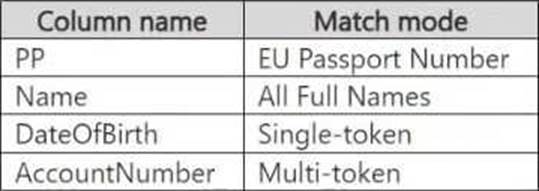
What is the maximum number of primary elements that EDM1 can have?
- A . 1
- B . 2
- C . 3
- D . 4
B
Explanation:
In Microsoft Purview Exact Data Match (EDM) classifiers, a primary element is a unique, identifying field used for data matching. EDM allows up to two primary elements per schema.
From the provided table, the Match mode indicates how data is analyzed:
● PP (EU Passport Number) → Likely a primary element because it’s unique.
● Name (All Full Names) → Typically not a primary element as names are common.
● DateOfBirth (Single-token) → Usually a secondary element, not unique.
● AccountNumber (Multi-token) → Can be a primary element, as it’s a unique identifier.
● Since EDM supports a maximum of two primary elements, the correct answer is 2.
HOTSPOT
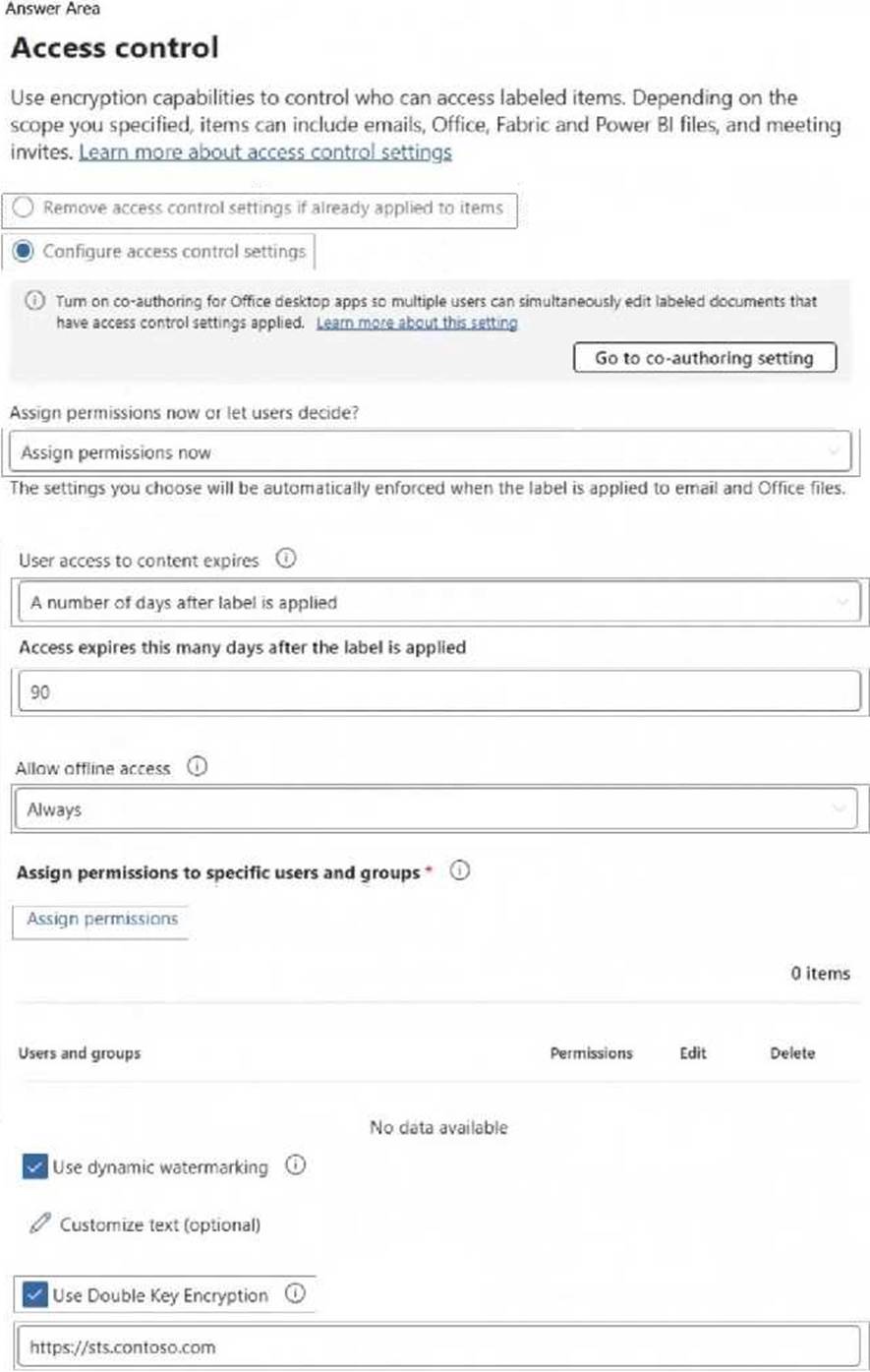
You have a Microsoft 365 E5 tenant that contains a sensitivity label named label1.
You plan to enable co-authoring for encrypted files.
You need to ensure that files that have label1 applied support co-authoring.
Which two settings should you modify? To answer, select the settings in the answer area. NOTE: Each correct selection is worth one point.
HOTSPOT
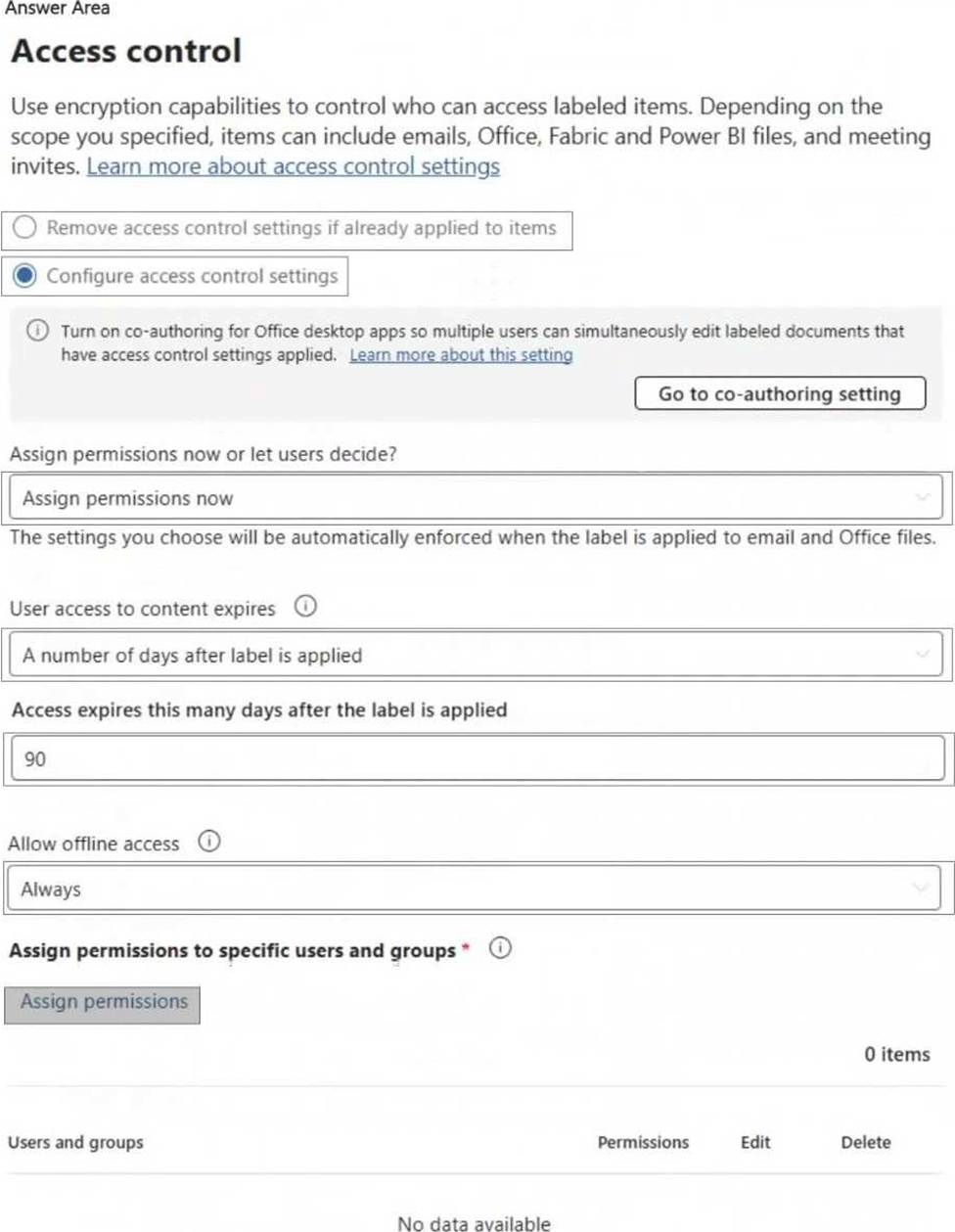
You have a Microsoft 365 E5 tenant that contains a sensitivity label named label1.
You plan to enable co-authoring for encrypted files.
You need to ensure that files that have label1 applied support co-authoring.
Which two settings should you modify? To answer, select the settings in the answer area. NOTE: Each correct selection is worth one point.
HOTSPOT
You have a Microsoft 365 E5 tenant that contains a sensitivity label named label1.
You plan to enable co-authoring for encrypted files.
You need to ensure that files that have label1 applied support co-authoring.
Which two settings should you modify? To answer, select the settings in the answer area. NOTE: Each correct selection is worth one point.
You need to meet the retention requirement for the users’ Microsoft 365 data.
What is the minimum number of retention policies required to achieve the goal?
- A . 1
- B . 2
- C . 3
- D . 4
- E . 6
B
Explanation:
The requirement states that all Microsoft 365 data for users must be retained for at least one year. In Microsoft 365, retention policies must be configured for each type of data storage.
Step 1: Identifying Where Data is Stored
From the case study, users store data in the following locations:
● SharePoint Online sites
● OneDrive accounts
● Exchange email
● Exchange public folders
● Teams chats
● Teams channel messages
Since these locations fall under two broad categories:
● Microsoft Exchange data (Emails, Public folders)
● SharePoint, OneDrive, and Teams data
Step 2: Required Retention Policies
1️. A single retention policy can cover:
● SharePoint Online
● OneDrive
● Microsoft Teams
Note: This question is part of a series of questions that present the same scenario. Each question in the series contains a unique solution that might meet the stated goals. Some question sets might have more than one correct solution, while others might not have a correct solution.
After you answer a question in this section, you will NOT be able to return to it. As a result, these questions will not appear in the review screen.
You have a Microsoft 365 tenant and 500 computers that run Windows 11. The computers are onboarded to Microsoft Purview.
You discover that a third-party application named Tailspin_scanner.exe accessed protected sensitive information on multiple computers. Tailspin_scanner.exe is installed locally on the computers.
You need to block Tailspin_scanner.exe from accessing sensitive documents without preventing the application from accessing other documents.
Solution: From Microsoft Defender for Cloud Apps, you create an app discovery policy.
Does this meet the goal?
- A . Yes
- B . No
B
Explanation:
Creating an app discovery policy in Microsoft Defender for Cloud Apps is used for detecting and monitoring cloud application usage, but it does not prevent a locally installed application (Tailspin_scanner.exe) from accessing sensitive files on Windows 11 devices.
To block Tailspin_scanner.exe from accessing sensitive documents while allowing it to access other files, the correct solution is to use Microsoft Purview Endpoint Data Loss Prevention (Endpoint DLP) and add Tailspin_scanner.exe to the Restricted Apps list.
Endpoint DLP allows you to block specific applications from accessing sensitive files while keeping general access available. Restricted Apps List in Endpoint DLP ensures that Tailspin_scanner.exe cannot open, copy, or process protected documents, but it can still function normally for non-sensitive content.
Note: This question is part of a series of questions that present the same scenario. Each question in the series contains a unique solution that might meet the stated goals. Some question sets might have more than one correct solution, while others might not have a correct solution.
After you answer a question in this section, you will NOT be able to return to it. As a result, these questions will not appear in the review screen.
You have a Microsoft 365 tenant and 500 computers that run Windows 11. The computers are onboarded to Microsoft Purview.
You discover that a third-party application named Tailspin_scanner.exe accessed protected sensitive information on multiple computers. Tailspin_scanner.exe is installed locally on the computers.
You need to block Tailspin_scanner.exe from accessing sensitive documents without preventing the application from accessing other documents.
Solution: From Microsoft Defender for Cloud Apps, you create an app discovery policy.
Does this meet the goal?
- A . Yes
- B . No
B
Explanation:
Creating an app discovery policy in Microsoft Defender for Cloud Apps is used for detecting and monitoring cloud application usage, but it does not prevent a locally installed application (Tailspin_scanner.exe) from accessing sensitive files on Windows 11 devices.
To block Tailspin_scanner.exe from accessing sensitive documents while allowing it to access other files, the correct solution is to use Microsoft Purview Endpoint Data Loss Prevention (Endpoint DLP) and add Tailspin_scanner.exe to the Restricted Apps list.
Endpoint DLP allows you to block specific applications from accessing sensitive files while keeping general access available. Restricted Apps List in Endpoint DLP ensures that Tailspin_scanner.exe cannot open, copy, or process protected documents, but it can still function normally for non-sensitive content.
Note: This question is part of a series of questions that present the same scenario. Each question in the series contains a unique solution that might meet the stated goals. Some question sets might have more than one correct solution, while others might not have a correct solution.
After you answer a question in this section, you will NOT be able to return to it. As a result, these questions will not appear in the review screen.
You have a Microsoft 365 tenant and 500 computers that run Windows 11. The computers are onboarded to Microsoft Purview.
You discover that a third-party application named Tailspin_scanner.exe accessed protected sensitive information on multiple computers. Tailspin_scanner.exe is installed locally on the computers.
You need to block Tailspin_scanner.exe from accessing sensitive documents without preventing the application from accessing other documents.
Solution: From Microsoft Defender for Cloud Apps, you create an app discovery policy.
Does this meet the goal?
- A . Yes
- B . No
B
Explanation:
Creating an app discovery policy in Microsoft Defender for Cloud Apps is used for detecting and monitoring cloud application usage, but it does not prevent a locally installed application (Tailspin_scanner.exe) from accessing sensitive files on Windows 11 devices.
To block Tailspin_scanner.exe from accessing sensitive documents while allowing it to access other files, the correct solution is to use Microsoft Purview Endpoint Data Loss Prevention (Endpoint DLP) and add Tailspin_scanner.exe to the Restricted Apps list.
Endpoint DLP allows you to block specific applications from accessing sensitive files while keeping general access available. Restricted Apps List in Endpoint DLP ensures that Tailspin_scanner.exe cannot open, copy, or process protected documents, but it can still function normally for non-sensitive content.